Showing Posts For Lahsihl.8412:
Having the same issue, trying to get ingame for a few hours now without any luck. If i get to char select it says 0 map completion with all my chars. I’m getting a never ending loading screen that perhaps says internet connection error then kicks me out and next time I’m stuck at launcher. getting Code= 7:11:3:191:101 and 42:0:9001:4418
Attachments:
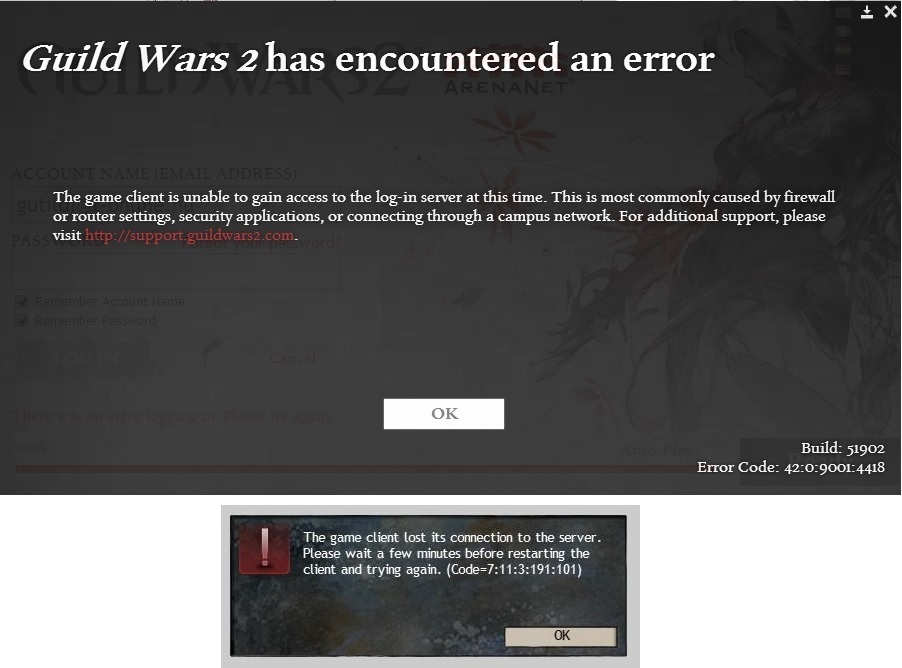
Having the same issue, trying to get ingame for a few hours now without any luck. If i get to char select it says 0 map completion with all my chars. I’m getting a never ending loading screen that perhaps says internet connection error then kicks me out and next time I’m stuck at launcher. getting Code= 7:11:3:191:101
Attachments:

The crashes just wont stop and the game is getting more and more unplayable like this. Here are my most common crashes:
Attachments:
I just noticed that the personal story has some weird thing, I already completed all personal story Season 2 too and don’t know if it happened after this patch or when but it says my last mission in personal story was the 7th Forging the pact and doesn’t show the other parts of the 7th and not even the 8th part , its the same on silvary, norn and human characters.
Attachments:

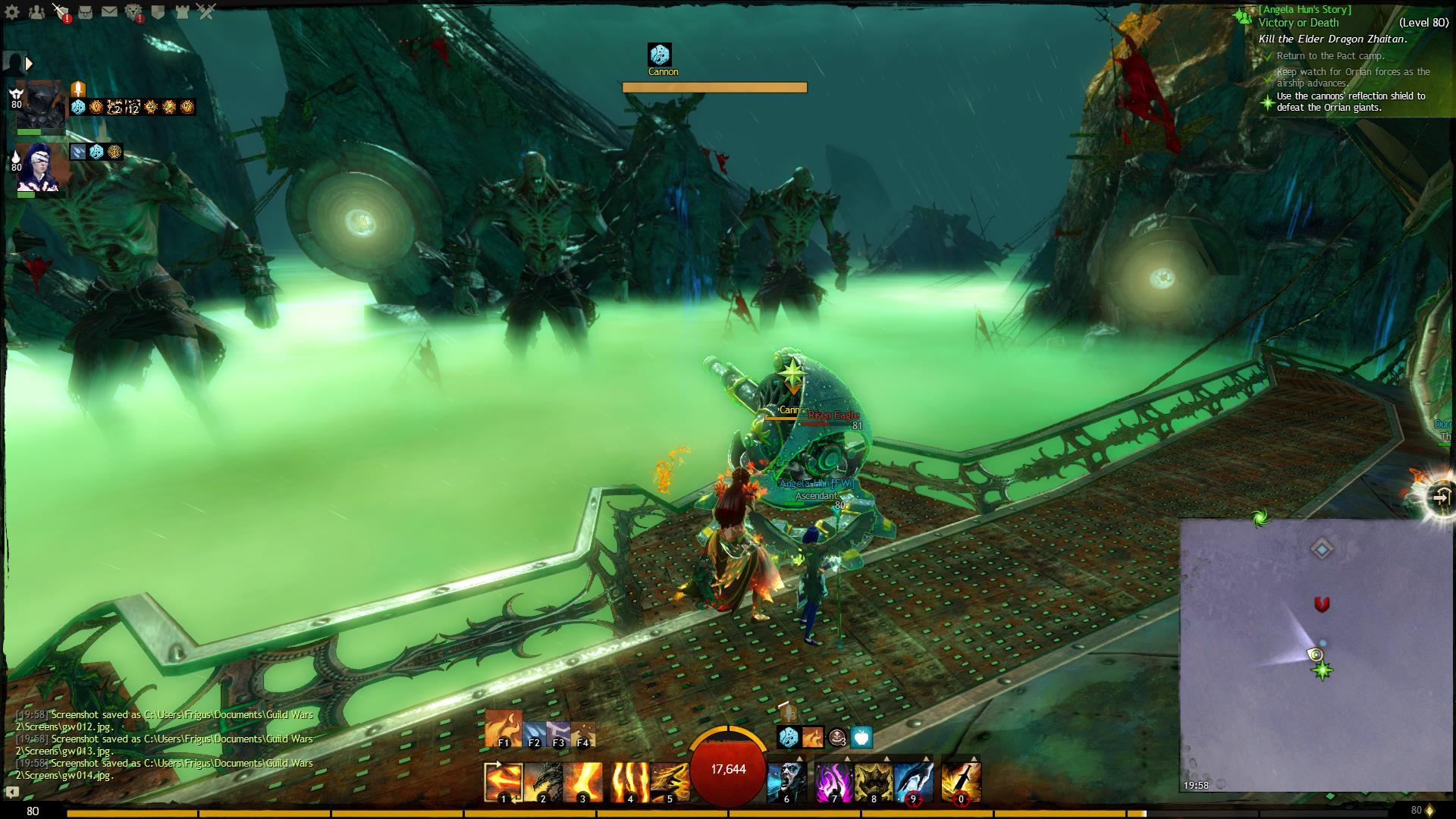
Hello, we were helping to our guildmate in Victory or Death personal story just now and as we progressed to the first airplane the turrets were unusable, attached the screenshot. Yesterday the problem haven’t existed yet.
Attachments:
My crashes started to be more fruequent in the last few days sometimes can play 1-2 hour but mostly have crash every 15-20 min so I collected some type of it. My Pc works fine memory checked and the whole pc was checked by 2 professionals and nothing is wrong in it, everything is pretty clean and no other game crashes. So here are my crashes hope you can figure out something soon.
Attachments:
Same crash happens to me since the 8th part of Living Stoy S2 came in, already sent several ticket to support but they just told it’s caused by my PC which is a bit interesting cause my friend has the exact same crashes too and he has way better pc.
My Pc was checked with 2 local professional and said my pc is in really good shape no ram problem or anything, even did win reinstall, game reinstall, clean driver reinstall … nothing helped
As I read on forums this happens for tons of configurations, varying from low end to extremely high end machines. This happens also for both radeon and geforce based machines.
This also happens at various points in the game and the crash reports indicate different types of issues from audio through multi processor machines ending in graphic issues.
So I hope Anet is goin to take a stand and look for a fix already cause most of the time the game is unplayable
just tried still the same flickering -.-
Hello, same problem here in fullscreen mode my whole monitor is flickering and can only play with -windowed option and I have Win7 64bit, good to know that win7 is still xp lool
Another bug i think that my slivary glowing all the time and not pulsing as before patch, and silvary cultural armor isn’t glowing at all as it did before too.
Attachments:

The exact same problem here too hope they will fix it cause playing in windowed mode is frustrating :S
Same here with others too
for me making myself invisible then back to visible helped in guild chat problem, i could write after it but cant play the game in fullscreen mode after patch, it starts to flicker from a black-screen to desktop back and forth
but with windowed mode it works fine :S
There is a topic on Account & Technical Support with this but thought its more like a bug thing after the recent patch with camera option changes :
the game launches fine till char select but after then at map loading my screen then starts flickering from a black-screen to my desktop back and forth for about 15 sec soon returning me to my destop with no crash report or error message.
Well for me this problem came right after todays patch with that new camera options thing , just played before it and after get to char select then Lion’s Arch or any other map loads and bumm the flickering thing
I would say its a problem always happening again after a fix. BTW just fully reinstalled the game and the first thing when i was at char select gw2 error report about corrupted files lool. So I still think that client is still the black sheep here, making some real mess.
This happens for tons of configurations, varying from low end to extremely high end machines. This happens also for both radeon and geforce based machines.
This also happens at various points in the game and the crash reports indicate different types of issues from audio through multi processor machines ending in graphic issues.
The pattern (at least it seem to be the common to all problems) is that the game is trying to invoke a native os operation (such as calling an audio effect, or trying to render a texture), which the os doesn’t support (due to different hardware manufacturer implementation or whatever), and the game ‘assumes’ the request will be performed, and tries to keep running with the called functionality which doesn’t exist at the time of the crash.
At that point, the hardware is failing, and the result is the crashes.
It has nothing to do with the machine’s configuration or drivers.
It is a matter of Anet updating the game, the client so it will still be able to run even when the operation can’t complete.
Yes I already done everything u asked several times and nothing helped even support couldn’t help with these questions and advices.
My Pc spec:
Win7 64bit
AMD Athlon II X2 3,4ghz
8gb ram
Nvidia Geforce gtx 750 2gb
Realtek® ALC887 8-Channel High Definition Audio
Well I already done that, let windows install driver, used the motherboards disc driver install, downloaded driver from motherboard website and from soundcard website nothin helped the only thing with I wont crash is the -nosound option.
Lil Puppy.5216 thy for the reply but already tryed that too. all with low fastest stable really everything and still no luck with those specifications ingame. Even done what support asked, win reinstall, driver update clean install, ram test etc nothin helped.
And i had no problem when i started to play GW2 only after Point of no Return came in and as said my PC was checked twice so couldn’t be a problem on my side.
But perhaps it helps someone to move the sliders to stable but i think most ppl who have such problems already tryed that too.
I tried underclocking too didn’t helped me but now found this
https://forum-en.gw2archive.eu/forum/support/support/Random-Crashing-Freezing-related-to-sound
I was just curious and tryed out what Ashley Segovia Technical Support tells.
Example: “C:\Games\Guild Wars 2\GW2.exe” -nosound
Testing it for some time now and since then no crash so it seems something is not right in the coding for sound cards couse my card isn’t defective (2 local specialist already looked into my pc and all in good shape) will test for a few more days then will contact support about it.
Try it out guys perhaps u are in the same shoe.
Good luck
Hello,
I have aproblem this morning(03.03.2015)
As I log into the game i get to char select and the game instantly crashes with the following report (attached).
Assertion: m_refCount
File: p:\code\arena\services\Handle/Handle.h(74)
Anyone could help what causes it?
Attachments:
Thanks for the advices abomally.2694 but already tryed several times disabling unneeded start-up programs. Yeah some crash seem ram problem but as said a specialist checked hardware and if there were any problem he would have diagnosted it ( at least I hope xD)
For malware or viruses i always do checks at weekends and my win7 has just been reinstalled ( 4 days ago) but just to make sure i will check again.
Hello,
I think you are not alone whit this problem, I have the same issue but since Point of no return came in. Support just made me do tests on my pc but found no problem i even got it to a specialist who checked every single spot in my pc and found no problem.
And if there were any issue on your pc other games would run with crashes too but they don’t. (at east on my case)
It just seems with every bug and game client fix isn’t a real fix and already don’t know what they are doin :S but hope they can make a working fix now
Attachments:
hello,
I have such problems too, contacted support and its already 2 week and noting changed just the crash report says other things not the earlier problems lool.
But to make sure its not hardware or other software problem send a ticket to support and do the tests they say.
Attachments:
Hello,
you are not alone, a lot of people have problems like that i would recomend to get a ticket to support but i wont recomend to get big hopes. I already sent them several ticket they make you a lot of test to run and even if these tests doesn’t show any problem they say its a unique problem on your pc surely and not with gw2 client or anything.
That i doubt cause i got my pc checked by a specialist who said my pc is in perfect condition (hardware, software too) and Support still said i have problem lool.
But you should at least make a try too, I wish really someone could tell already what is goin here cause its more and more unplayable now.
Attachments:
Hello,
I already contacted support once cause had a lot of crash and gone through a lot of test and found no problem on my side, with the latest client crash fix it seemed to be ok now but today evening i always got crash or freeze with the following errors:
p:\code\arena\services\IdMgr/IdMgr.h(87)
Assertion: No valid case for switch variable ‘submodel->type’
File: ..\..\..\Engine\Gr\Model\GrModel.cpp(190)
Assertion: frameId
File: ..\..\..\Engine\Frame\FrApi.cpp(1887)
any suggestion on it would be helpful
thx
well for diving jumps u will see at the right side the achi giving only when u reached 10, 20 etc number of it otherwise u can check how many u did till the jump and after u did it u get more. I mean When i jumped there i had 18 achi from it and after i did it had 19 so it counted but nothing showed it in the right side cause it wasn’t 20 what is a line in it check in achievement section the tiers.
Well I don’t think that will solve I already contacted support for the same problem and i have all driver(updated too), support made a lot of test with me and found no problem on my side so as far as i can tell the problem is still on their side.
Hello,
I have the same problem since i use 64bit system, contacted support and made a lot of test (memory, graphic card, internet connectiviti etc) none said any problem on my system and what support said at last:
“Hello,
Thanks for getting back to us.
We’re sorry to hear that we haven’t been able to help you reach a resolution for the issue you’ve been experiencing. At this point, we have gone through all the resources and suggestions at our disposal. We regret that we are unable to continue troubleshooting this issue with you. We recommend that you contact a local professional for further assistance.
You may wish to review the official Guild Wars 2 Support forum, where you will find a wealth of information and support provided by both players and ArenaNet Team members. You may find a resolution to the issue already has been posted on the forum or you could create a new forum post to request input about the problem.
You will find the Guild Wars 2 Support Forum here: https://forum-en.gw2archive.eu/forum/support/support.
Again, I am sorry that we cannot help you further, but if you have any other questions, please let us know.”
Then what that’s all? at least pls make a 64bit stable client and engine to try if the problem still on.
Hello,
just had some network error with the code 1083:5:7:1609:101 that was really strange cause i could even speak on TS3 and surf on net. Even GW2 loaded to character select but after goin to play it instantly gave this error. Made some repair and could get in again but i thought i will tell it if its some server issue or something. It happened on Silverwaste
I would like to get some assistance regarding crash and freezing problems. Sometimes i can play really long but most of the time I have crash in every 5-20 min.
Already checked forum topics and done any advice, checked memory, heating, reinstalled whole pc and game several times but still the same happens.
Most of the time the game crashes with crash report with the following line:
Memory at address " variet code " could not be read
Sometimes my game freezes but still can close it with task manager but there was some time when i had to hard reset the pc.
Specs:
windows 7 64bit
amd athlon 2 x2 3,40ghz
Nvidia geforce gtx 750 2gb
2×4gb ddr3
Attachments:
Same problem here, getting to kicked to character select in every 5-10 min