Showing Posts For Pookie.1078:
Hi Janet,
When this error occurs, does anything immediately visually change – such as the Skill Icons being greyed out. Or does everything look the same, but nothing happens when you press a button or click on a skill. Or does the skill icon pulsate, but never activate.
Before you start your next game session, start Windows Task Manager, and leave it running (Hold <Ctl><Shift>, press <Esc>).
If the error condition occurs, Hold <Alt>, press <Tab> repeatedly until Task Manager is highlight, then release both keys, to bring Task Manager to the front.
Save a Screenshot of both the Performance and Process tabs, and post them to this forum thread. (To take a Screenshot, Hold <Alt>,press <Print Screen> which copies an image of your screen to your clipboard. Now open the Paint application in Windows Accessories, click Paste, (you may wish to use the Crop tool to select just the relevant part of the screen to be saved – click Crop, drag a rectangle around the area to keep, click Crop again), then click File, Save As, and give it a name and filetype (I prefer JPEG) – by default it will save to your Picture Folder).
Hopefully, this may expose the cause of the problem.
I have attached some screenshots of my Windows 10 Task Manager, yours may look different if you have a different version of Windows, but will contain the same information.
Best wishes,
Pookie
Attachments:


Hi Licht Vester,
Try this:
Right mouse click on your Guild Wars 2 shortcut and drag it to an empty area of your desktop;
Choose <Copy here>;
You now have a second shortcut to start GW2.
Right mouse click on the new shortcut;
Choose <Rename>;
Edit the name of the shortcut to GW2 Repair (or whatever you choose);
Left click on the desktop; (to save the new name)
Right click on the new shortcut, again;
Choose <Properties>;
Edit the Target field to add the command line switches -verify -image ;
Left click on <OK>; (to save this change).
Now double left click your new GW2 Repair icon.
Hopefully you will see the Arenanet download screen twice, then an archive repair will start. If so, please be patient, as the repair can take a long time.
(see attached screenshot).
Please let me know whether or not this works for you
Best wishes,
Pookie
Attachments:

(edited by Pookie.1078)
Hi Zylo,
The most common reason to see 100% Packet Loss on an device in the middle of a trace, is that the owner of that device has configured it to not respond to ICMP Pings for their own security, in which case the 100% packet loss is NOT a problem. The fact that you see a response from the next hop after the 100% packet loss, indicates that this is the case.
However, the hops showing 18% and 24% packet loss do indicate a serious problem.
Anything above 5% packet loss will severely impact the performance of your connection (with the exception of 100% as mentioned above).
You might find it helpful to download a free tool called Pingplotter to monitor the performance of your connection on an ongoing basis.
You can see from my attached trace, what a good network connection with a sporadically busy Server would look like.
Best Regards,
Pookie
Attachments:

Hi Zhiroph,
This is a long-shot, but it only takes a few seconds – try Flushing the DNS cache .
A shortcut to get the Command prompt is <Windows Key><r> which opens the Run dialogue, type: cmd <enter> which opens the command prompt. (<Windows key> is usually located bottom left of you keyboard between <Ctrl> and <Alt> and bears the Windows logo).
At the command prompt type: ipconfig /flushdns <enter>
(See my attached screenshot).
The DNS cache is your copy of the ‘Internet Phone book’, which translates URL names such as ‘www.ncsoft.com’ into IP addresses such as ‘64.25.35.120’.
Your copy of the phone book may be holding onto an old entry which is broken or no longer the best – if for example Arenanet had added more download servers, and use a new master IP address to point your client to the least busy, but your cache is still pointing to a specific download server.
Rule 1 of the Internet – don’t blindly follow the instructions of $Random Bloke.
It is a good policy to bounce my idea of your techy friend, before you try it, if you are a Muggle . ;0)
Best wishes,
Pookie
Attachments:

Hi SnufflingPug,
When it crashes, do you get the ‘Serious Problem has occurred…’ window.
If so, click the <Show Details> button, then copy and paste the Crash Dump data into this thread (it is a good idea to also save it in notepad for your own records, until the problem is resolved).
Have you tried Repairing your game client to see if that fixes the problem ?
Hi Shoarmapappa,
Back in the ‘Good Old Days’ of Mainframe computing, it was much easier to perform end to end Network Performance Monitoring (which includes both network and server response time) in order to diagnose such problems.
Also, I could race Fred Flintstone to work on my souped-up Brontosaurus.
Attachments:
Hi Abbadon (OP),
Please would you check whether any future occurrences of this problem affect the same memory address:
Memory at address 0000016f`91de1b10 could not be read
And whether the skill, Propid, texture stuf at the bottom of the dump are the same:
Couldn’t find projectile effect for skill ‘ozBOH.8+KHW’
Content is referencing a propID that doesn’t exist propId=‘1543321963280342662’
Content is referencing a propID that doesn’t exist propId=‘1543321885970931329’
Content is referencing a propID that doesn’t exist propId=‘1543321529488645762’
Texture missing mip chain: 0×00ecaf
Texture ‘0×03539b’ dimensions too small
Loading ‘0×03539b’ texture failed
Texture missing mip chain: 0×010140
Texture missing mip chain: 0×0ebc48
Texture missing mip chain: 0×0ebc49
I am expecting the memory address to change for each dump – if it doesn’t it could be bad memory, or an invalid memory address (still too early – haven’t checked).
I am not expecting the other stuff to change – if it does it could indicate a conflict with another running program.
(The above two statements are not intended to an exhaustive list of possible causes – just the highest probability ones that came immediately to mind).
Best wishes
Pookie,
Hi Behellagh,
As you say, he is not running out of memory. But he does have a large amount of memory in use alongside GW2 running – at least some of which will be memory leaks / useless artifacts from applications that have shut down poorly. Occasionally zeroing this memory is not a bad thing to do, particularly if you rarely reboot your OS.
If you are actually memory-bound, like what I am, RAMMAP is a godsend.
—> System Memory <—
Physical: 12540MB/15810MB 79%
Paged: 15137MB/18242MB 82%
Virtual: 134215696MB/134217727MB 3%
Load: 20%
CommitTotal: 3105MB
CommitLimit: 18242MB
CommitPeak: 6894MB
SystemCache: 2472MB
—> Process Memory <—
Private: 662MB
WorkingSet: 584MB
PeakWorkingSet: 1993MB
PageFaults: 4672855
The large number of page faults also jumped out at me, but I don’t know the GW2 application well yet.
Is this normal ?
Since, the error condition that ab-ended GW2 is either an Invalid Page Fault or something quite similar.
Pondering this:
I have not got a feel for whether the skill, PropID, texture referenced at the bottom of the dump are relevant – indicating that a relevant file is missing from disk.
Or whether the running program has created a memory buffer too small for the purpose.
Or whether the memory address is shared with another running program, which has the addressed locked for writing.
Or …
I haven’t actually checked whether it is a valid location in the address space – too early in the morning for my maths brain.
Best wishes,
Pookie
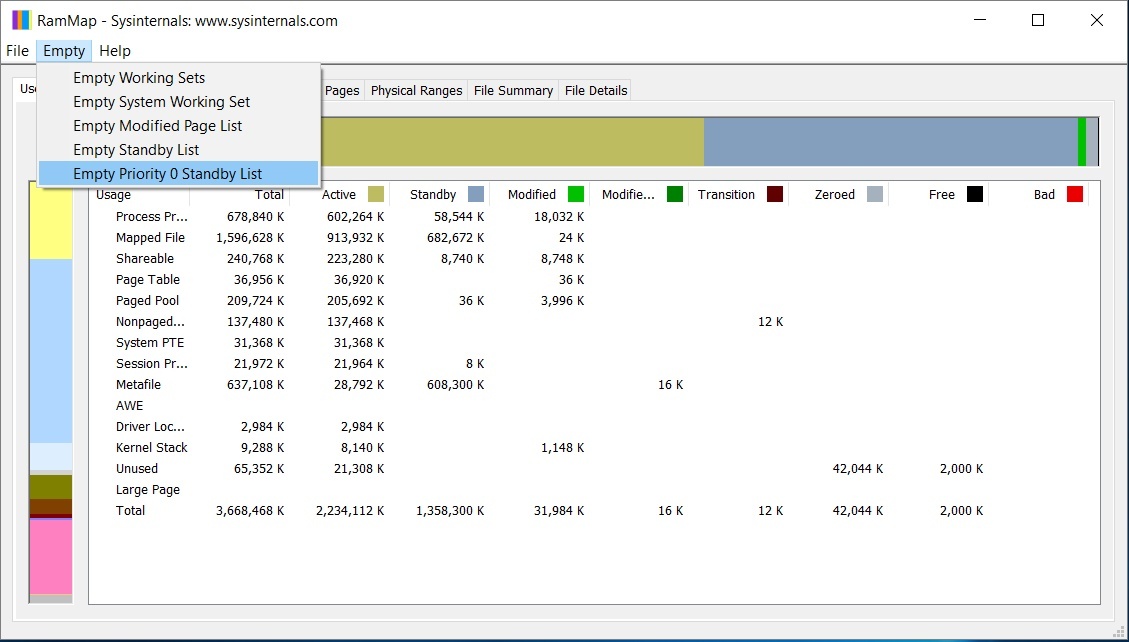
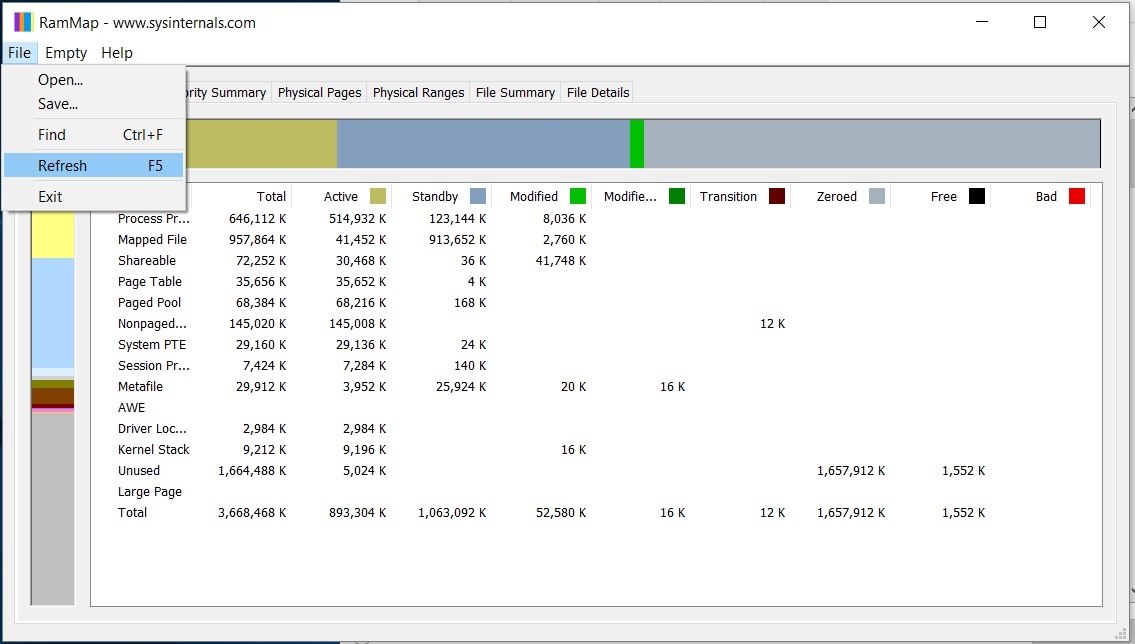
You might find it helps to run a utility called “RAMMAP”: https://technet.microsoft.com/en-us/sysinternals/rammap.aspx before starting GW2
Use all 5 of the RAMMAP <Empty> commands (recommended to start from the bottom, and work up to the top). Wait a few seconds to allow Writes to disk to complete, then <F5> to refresh, to see the happy picture!
Close the utility and then start GW2.
As you can see from the attachments, this can free up lots of memory artifacts.
I hope that this helps.
Attachments:
Hi Zhiroph,
The ‘Serious Error …’ is a catch all for many different error conditions. So you will need to raise a personal trouble ticket with Customer Support.
I suggest that you recreate this error message by trying to install again, click on the <show details> button within the message. Highlight the whole wall of detailed error text, then copy and paste it into a notepad document (so that you have a record of it). Also paste it into a reply to your post here on the forum.
But most importantly, open a trouble ticket with Customer Support, by clicking <Support> at the top of this page, then <Submit a request> at the top of the resulting page or just follow this link “Customer Support”: https://help.guildwars2.com/anonymous_requests/new .
You will quickly receive an automatic email which includes your ticket number.
You will need to be patient, as it may take a day or two for your ticket to reach the front of the queue to be addressed. If you have not received another email from Customer Support within 3 days, you may add a response including your ticket number to the sticky thread at the top of this forum to poke some action on the issue.
I am assuming you have a reasonable level of tech savvy to copy/paste etc., so please don’t hesitate to post again, if I have been unclear, or you get stuck.
Best wishes,
Pookie
Hi Chaps,
Regarding 2% packet loss – it is categorically NOT the cause of your lag problem.
First you need to take into context your average response time, which is absolutely excellent (anything below 100 ms within a continent is considered great).
Next, you need to know that the GW2 traffic relating to your play session is carried by TCP packets, which include automatic resending of lost packets and automatic re-ordering of out of sequence packets.
You can see from my attached Wireshark trace screenshot that such a retransmit can occur very quickly (~ 28 ms). However, the retransmit time will most definitely be variable, following a normal distribution or bell curve). Unfortunately, I lack sufficient data to provide an estimated mean.
The rule of thumb in Wide Area Networking would be to ignore packet loss of less than 5% for most (error correcting) protocols, such as TCP.
Casting my expert eye over your pingplots, I would say that your lag problems are most likely caused by a processing bottleneck on either the server, or the client.
You could use a (free) tool such as Paessler’s PRTG to monitor your client side system and application performance.
However, my guess would be that it is a Server side business, since so many people experience the issue, and it seems worse for many at busy times.
Attachments:

A tool that I find extremely useful is RAMMAP! .
Before you start GW2, run RAMMAP to clean up any ‘cruft’ that has built up from memory leaks etc. by using all 5 of the Empty options (it is best to do these from bottom to top).
Then use <File> <Refresh> or the <F5> shortcut, a few times until the large Green Bar at the top (denoting Modified RAM being written to disk has become small).
Now close RAMMAP, and start killing those naughty skritt !
If you haven’t shut down your PC for a while, you may well see a mighty Pink Metafile band on the left hand side. (see attached before and after pics.
The only minor problem with RAMMAP is that, whenever a new build of Windows 10 is released, the RAMAP graph stops working, until a new version is released. However, the empty function still works, which you can monitor using Task Manager.
Best wishes,
Pookie (Skritt Botherer).


