Showing Posts For kvazarsky.9468:
Can we have option to toggle on/off crosshair in action camera mode?
It would be nice to not need to hold right mouse button during world exploration, and don’t have crosshair in the middle of the screen at the same time. You know, immersion stuff.
(edited by kvazarsky.9468)
Let me remind You that pvp is not AN’s #1 priority. Money talks and looks like pve gives much more of it than pvp. You can judge it yourself by looking at the amount of content they did for pvp vs pve.
Especially in Stronghold – I can’t see anything on minimap in “normal” sized interface, and setting it to “large” or “larger” takes too much of the screen.
Also new big bars in the middle aren’t helping, especially teamed with enemy’s hp bar AND useless character’s avatar. Why can’t you set it to the right and left? (Or give us long-requested option to move UI as we please, just like in GW1). I’m playing in 1920×1200, native 24" btw.
On the bright side, Stronghold is awesome!
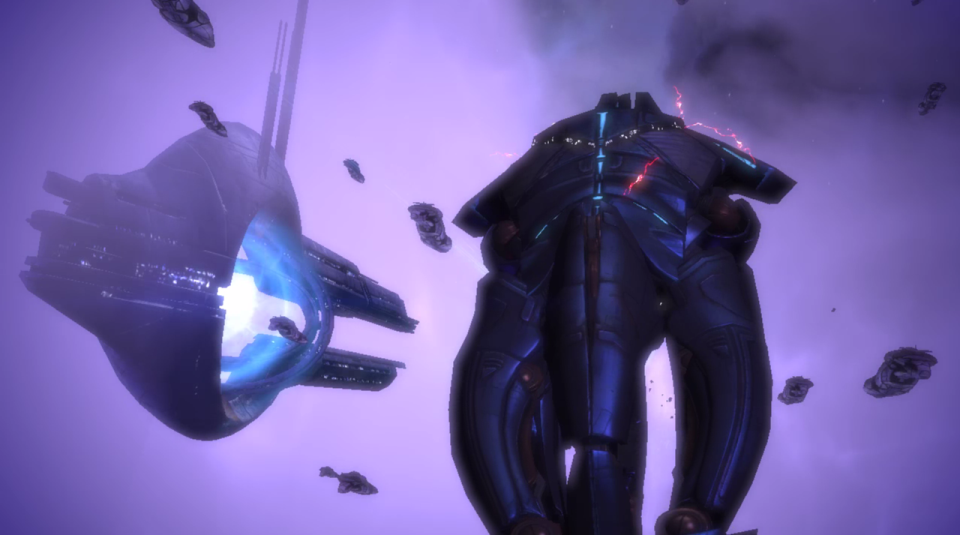
Karkaaaaas in spaaaaaace
Guild Wars – Mass Effect crossover confirmed. :P
Attachments:
(edited by kvazarsky.9468)
Second wave of invites went out. As of this point every valid North American team that signed up has been invited.
What about EU? :)
I’ve found simple toggle on click rmb script:
toggle=0
return
rbutton::
toggle:=!toggle
if toggle=1
click ,right ,down
else
click, right, up
return
http://www.autohotkey.com/board/topic/90938-right-mouse-toggle-help/
BTW. Anyone found dev’s opinion about this simple-scripting thing? Is this bannable?
Norn
Male
Elementalist
Norn cultural tier 2 light chest armor is clipping with tattoo texture (right arm).
Armor – full tier 2 with t1 gloves.
Attachments:


About greatsword – could you please do some changes to auto-attack #3 animation? It looks a bit slow imho.
Hey folks, we’ve got a newspaper.
http://orrator.com/
You’re right, it was “almost” unlocked in pve…
facepalm
Shield Stance cannot be activated in pve on Charr. Clicking skillbar, using hotkey or pinging to chat does nothing.
Works flawless in spvp.
Also tested on Norn character in pve and there’s no problem. Looks like Charr-only issue.
Can we have movable HUD, just like in GW1?
Od at least movable enemy hp bar? I’m playing in 1920×1200 with “larger” hud option and sometimes it’s hard to see dungeon boss with zoomed-out camera, because it’s hidden behind giant hp bar and even larger npc rank icon. Switching to “normal” hud gives me too small chat (even with bigger text size) and boons/conditions/defiants.
(edited by kvazarsky.9468)