I think the odd “lighting” is just extra shading added to make at least some of the normalmap detail visible in places where there’s only ambient light present.
Yeah, it’s really cheap, even some subtle, basic image-based lighting would be much nicer.
Low GPU usage in WvW PvP - High GPU Usage in PvE
in Account & Technical Support
Posted by: tota.4893
The game’s not very efficient at handling player characters; they already had to limit the max number of players displayed at once (which led to mobs meleeing empty space, attacks flying out of nowhere, etc). When the engine chokes on too many players doing things and can’t produce D3D draw calls fast enough, the GPU starts spending a good chunk of its time idling.
Turning shadows and reflections down can help a lot since both can require the engine to render things multiple times.
I’d bet the performance could be improved a lot though, there’s really nothing about the graphics that screams “this looks awesome but may kill your framerate”. Maybe they can spend some quality time profiling and optimizing the code once they get over the more critical bugs.
The mixing buffer is what the game keeps filling with audio data to pass to the sound hardware (through the OS sound interfaces).
Using a very long buffer means the game does not have to run its sound code as frequently, and the sound system is less likely to run out of audio data to play when the computer is under heavy load, but all audio will be somewhat delayed.
Using a very short buffer means the audio will have little delay, but if the game (or the system running it) is having performance issues, the audio may start having gaps or looping artifacts when the game can’t manage to run its fill-buffer-and-pass-to-sound-API code frequently enough.
The optimal setting should be the shortest buffer size that doesn’t cause extra sound glitches.
Hey, at least I bothered to link some relevant information about the capabilities of that card.
It’s true that Nvidia’s Kepler architecture hasn’t been out that long and it’s very likely to see driver improvements. However, even if some miracle would double the GT 630’s performance, it’d still be slower than mid-tier cards from generations ago. Never going to be “good system” level hardware.
If that wasn’t what you wanted to know, my apologies, but I think it’s what you needed to know.
The GT 630 is a ridiculous bottleneck in that system. It should be replaced with a GTX 660 or something if you want to play games with decent settings and 1080p or above resolutions.
See: http://www.videocardbenchmark.net/gpu.php?gpu=GeForce+GT+630
I noticed earlier that this is quite easily replicated using that spammable grenade pack from the heart task in northern Fireheart Rise. Take the pack and get spamming (just throw the nades at your feet). After about 20-30 seconds most of the skill sound effects start failing.
It’s like the game has a max number of sounds it can have playing at once, and it doesn’t clean up properly after sounds finish — or make any effort to prioritize them.
I think it’s an attempt to display at least some lighting detail on characters when they’re in the shade. Without it there’d be nothing but flat ambient light present and none of that normalmap detail would be visible.
It still looks like a 2 minute hack, I wish they’d put in some sort of image-based lighting instead.
Some have reported issues with 5.1 sound. Does it sound less wrong if you configure your sound settings as ordinary 2.0 stereo instead?
The random volume bug (and sounds not playing at all) may be separate issues. I’m getting those bugs on an ASUS Xonar card + headphones. Own attack sounds sometimes not playing or playing with completely random volume, voices randomly audible from huge distance, etc.
The attack sounds’ random failure is very easy to replicate with the heart task in Fireheart Rise that gives you a highly spammable grenade pack. Throw grenades fast enough and eventually the sound effects start failing, with only some explosions making noise.
The onboard sound chip on your mobo is just as good unless you are a professional sound engineer or something.
Some of them pick up enough digital noise to be audible if the listening environment’s quiet enough. Hearing the computer process the mouse’s movement is amusing for a few minutes, then it gets annoying.
Still, I wouldn’t buy a dedicated card until trying out the onboard sound. It’s placed better on some motherboards than others, and what you connect to it definitely makes more difference in sound quality.
I guess it could be worse, we could be back to the days of the beta weekends when the GPU wasn’t used at all. Haha. GoGo raw CPU horsepower.
I’m sure the GPU’s been used from the start; if the game was actually doing any meaningful drawing on the CPU (like some did suggest) people would not be getting 15 FPS, they’d be getting 1.5 FPS. And the CPU would certainly look very busy 
If I recall correctly, during the betas someone from ArenaNet said the engine was stalling on its occlusion queries (the part where the engine determines what actually needs to be drawn). On each frame, the engine would halt for a moment on that part and before it got back to calling Direct3D the GPU would have idled for a (relatively) long time since the previous frame. This probably got fixed in the later betas since they ran much faster.
Let’s just wait for ArenaNet to stabilize the game-as-a-service a bit first, I’m sure they’ll get around to performance tweaks later. I know I’d be itching to get the code running faster after making sure it was stable first.
It’s possible GPU manufacturers can also tweak their drivers to deal better with the game’s particular way of calling Direct3D, but I wouldn’t expect miracles from that front.
The game doesn’t seem to be architected for keeping more than 2 cores completely busy in many situations. It does spawn a lot of threads, but as in many games one of them does much more work than the others, so the engine’s running speed is largely limited by that. The other threads’ tasks are not heavy enough to completely occupy other cores, so the CPU doesn’t look very busy overall.
And when that one thread is running slowly enough on the CPU, the GPU becomes starved for instructions and ends up idling part of the time.
I think this is what’s happening in your screenshot; your FPS is similar to what others have been reporting as well.
I had this happen a lot until I turned the shadows and reflections down. Even when the framerate was quite good on average, it was varying way too much and would sometimes dip near single digits regardless of what was actually visible on the screen.
Seemed to happen more when there was heavy action going on somewhere nearby, even if I couldn’t see it.
I suspected the video card was just running out of memory with shadows maxed, but even with shadows & reflections turned down the framerate’s quite unstable — I’m getting roughly 50-60 FPS average in many areas, but even with the camera looking down at the ground the framerate still randomly dips every couple of seconds.
Hardware:
Core 2 Duo E8400 @ 3.6 GHz (yeah, old but generally fast enough with the OC)
4 GB RAM
GeForce GTX 560 Ti (306.02 beta drivers)
GW2 & Win 7 64 on a 128GB SSD
Are you sure it’s not overheating?
The game glitching and slowing down followed by a frozen screen sounds a lot like the video card exceeding its temperature limits and then crashing. Windows can (usually) restart the driver to recover from this, but it takes some time… potentially 20-30 seconds if a game was running.
Does this happen with the framerate limiter enabled?
Has anyone noticed similar issues with other classes’ skills? I’ve only been playing Elementalist so far myself.
That usually happens when the GPU’s not running some shader correctly. Are you using the latest drivers for your video card?
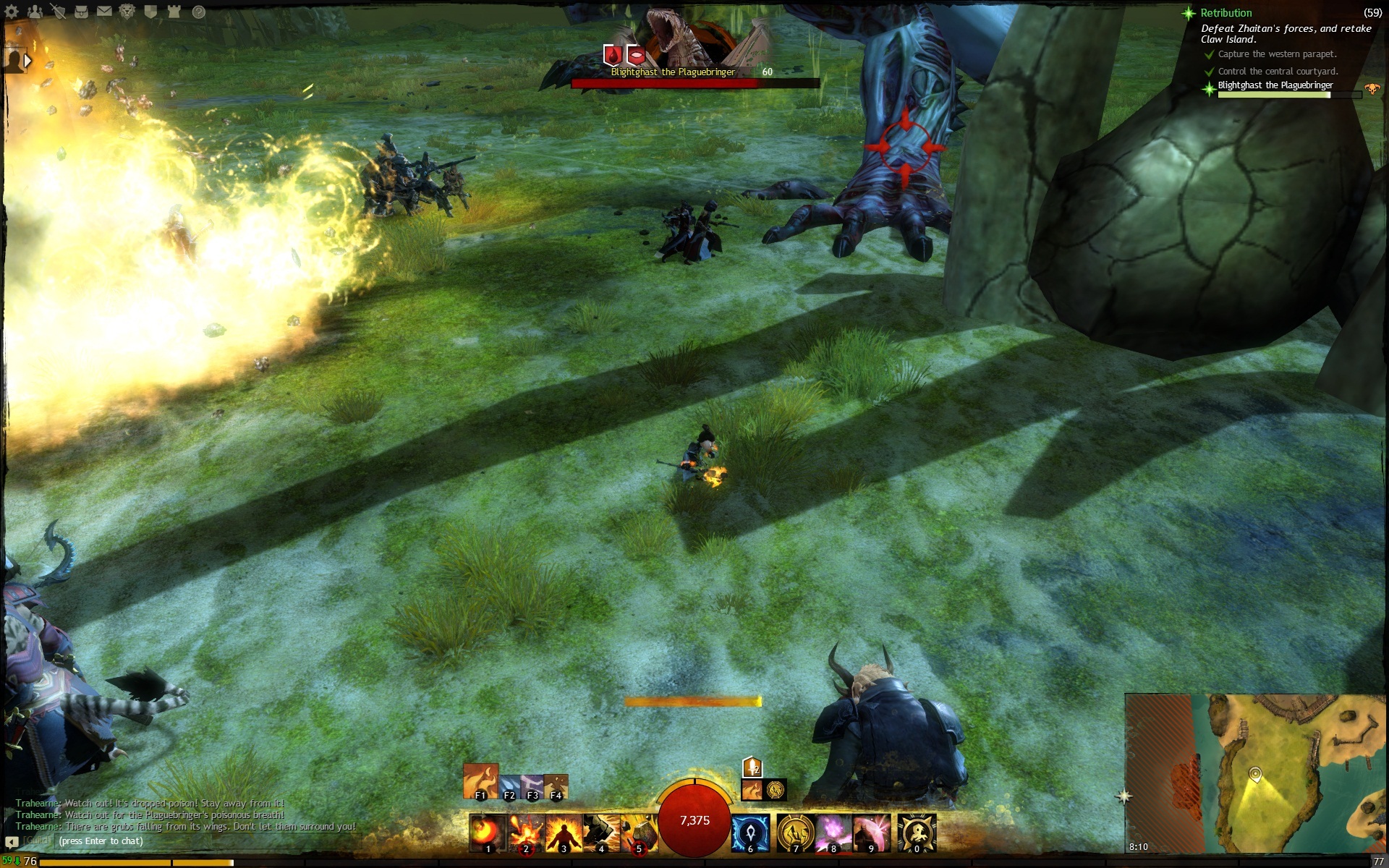
So eventually I found myself fighting a huge dragon (minor plot spoiler potential in large pic), I’m sure it’s animated and textured with great detail… and if I actually want to hit it and its minions, all I get on my screen is a foot.
While it’s a nice gesture to include a picture of the boss above its health bar so we don’t forget what the rest of its body looks like, I think this issue would be better solved with better camera controls.
Seriously, a lot of this great art’s just going to waste with players never managing to get a good view of it.
Attachments:
I hear “urge to kill rising” all thekittentime and other lines when Im solo
This is happening to me a lot, too.
Then there’s the game sometimes not playing sound effects for even my own attack skills (seems to happen more with ambient sounds around), and the loud pops of static-ish noise, but the random yelling is really immersion breaking.
While the autotargeting option does a decent job of saving keypresses on the most common interaction in the game, it doesn’t seem very polished right now:
1) Some non-hostile skills trigger autotargeting. These are clearly bugs:
- Switching Elementalist attunements autotargets. As autotargeting also triggers the autoattack and causes any pets/summons to aggro on the picked target, going Air Attunement for running speed can result in the character instead shooting at a nearby deer and entering combat.
- Glyph of Renewal autotargets an enemy on-cast, probably a major factor in its unreliability.
2) Autotargeting is not consistently triggered by similar skills.
- Arcane Wave (PBAoE) autotargets.
- Ring of Earth (PBAoE) does not autotarget.
- Frozen Burst (PBAoE) autotargets.
- Arcane Shield (defensive skill) does not autotarget.
- Magnetic Aura (defensive skill) autotargets (!)
This can cause the character to suddenly start attacking an unexpected target, potentially pulling more mobs instead of dealing with the current one, e.g. when trying to Frozen Burst mobs the player is trying to run away from, without having time to target one of them.
Potential improvements:
- Consistent behavior would be a good start.
- Stop PBAoEs and other targetless skills from autotargeting?
- Only trigger autotargeting on the “autoattack” skill? It’s easy enough to cancel into something else.
If Windows won’t let you just replace the file, right-click the icm32.dll in your system32 folder and select Properties. From the Properties dialog’s Security tab, open Advanced settings and from there, change the file’s owner from “TrustedInstaller” to your user account.
Close the dialogs and open them again, and you should now be able to edit the file’s security settings (Properties->Security tab->Edit). Just give either your account or the “(computer name)/Users” group the Full Control permission.
After this Windows shouldn’t get in the way if you try to do something to the file.
You may want to revert the permission changes after you get things working. Leaving them as-is would mean any program you run directly or indirectly can alter a system file 
Looks like you have a corrupted Windows system file. The “image” here refers to a copy (an image) of an executable module loaded into memory so the Windows application can access its code.
The file’s not a part of the game and shouldn’t be a part of any drivers either, it’s there on a stock Windows install.
Can you get a copy of the file from another similar Windows system? Might save you the reinstall. You may have to tinker with the file’s security permissions to be able to replace it.
There is no 64-bit version of the game executable, but 64-bit Windows and an x86-64 CPU can run 32-bit x86 stuff just fine.
The game might run slightly faster and be able to access more RAM if they made a 64-bit version, but then they’d have to manage two sets of middleware libraries and do QA for two versions of the game executable. I think they have better things to do for now.
This kind of camera glitch happens quite often whenever the character (or some part of it) gets too close to a surface the camera can collide with. It’s especially painful when trying to climb a object with a lot of detail — the camera randomly goes into a seizure, as if trying to get me to have one too.
I’d guess during that animation the camera movement’s origin gets too close to the ground, and the broken camera collision detection incorrectly detects the ground is between the character and the camera. Then it tries to zoom in as much as possible to deal with this.
I can’t seem to replicate the glitch with my Asura character, though. Maybe it’s got something to do with that particular animation.
I think what you’re actually looking at is the full shadow effect getting blended in at a certain distance from the camera. In some places, the static shadows (used at a higher distance) don’t seem to match the dynamic shadow effect’s results, so the shadows appear to change noticeably at a certain distance.
In this case the static shadows would have the houses (or something) casting a shadow on everything, and that doesn’t happen with the dynamic shadows, so things look brighter close to the camera.
As the shadow quality setting increases the range at which dynamic shadows are used, the odd-looking shadow transition happens at different distances depending on it.
Maybe the jigsaw effect is intended to look like it … combines with something? Like a combo field?
Many of the effects could use some work imo. Lots of flashy stuff making it hard to see what’s going on, and very little info being delivered.
There were threads about the poorly engineered camera as far back as the first beta weekend. I don’t understand why it’s been left as it is. It’s something the player interacts with constantly when playing the game.
And it feels like a chore. Always has to be tinkered with to see what you want to see, never actually feeling right. It’s making me feel sick with its bad FoV and constant bumping into things. Don’t even get me started on the ridiculous bug that makes its distance oscillate rapidly if there’s something very close at the front of character.
It’s like making a triple-A movie and hiring a random drunk as the director of photography. Doing. It. Wrong.
(edited by tota.4893)
I posted a thread about this during the betas and I must say I’m a bit disappointed to see the forum still generate page titles like this .

And now when I look at it, the forum’s HTML is not even linking to a favicon any more.
Better Framerate when using in-game SuperSampling
in Account & Technical Support
Posted by: tota.4893
Far as I know toggling various texture filtering hacks (like the trilinear optimization that’s even visible in the settings) is about the only difference between Quality and High Quality in the driver.
A few GPU generations ago those hacks generally had visible effects on image quality (the anisotropic filtering back then wasn’t very good to begin with, and the speedhacks just made it worse). Over the years they’ve made them subtle enough it’s hard to spot them without constructing some kind of rendering test case.
Had it at “quality” for a while myself, no complaints.
The client/server interaction that goes on when you activate this skill seems prone to failing in various ways. If any network/server lag is present, the skill’s implementation often fizzles, with results like:
- The character doesn’t start moving soon enough and barely manages to move at all before the skill finishes. This can reduce the skill’s effective range a lot.
- Full movement appears to happen, but the fire trail and the final explosion’s location do not reach the character’s final position.
With the fire trail being so buggy, it’s also quite hard to combo it reliably with Arcane Wave or something like that. I’d expect the server to be able to control this better, but it almost looks like it’s the client handling the movement part, effectively making this skill’s effectiveness depend on a split-second latency dice roll.
Any chance the netcode’s behavior with this skill could be improved? The skill would be great if it was more precise.
The “saving the chick at the beach” part took ages for me. Somehow she’d managed to die near the shore, almost exactly where the endless mobs appeared, so I couldn’t do much except repeatedly spend a second or two rezzing her and then dodge away from the incoming spawns.
When the last stand at the courtyard started, there was absolutely no last-stand fighting going on in the yard; all the remaining guards were standing idle on top of the wall. Even after the wall broke up they were standing there. In mid-air. The undead mostly just stood in a fairly regular grid formation (I guess in the positions the script spawned them in) in the yard.
The final escape was about the only part of the quest that worked. Quality.
Besides the initial abomination attack, the NPCs basically did nothing. Random 1+7 vs. Am Fah at the Bukdek Byway somehow felt more epic than this.