Showing Posts For Robert Walter:
[MAC] Update Notes: Guild Wars 2 Beta Client
in Account & Technical Support
Posted by: Robert Walter
Hi Bowstar,
Gem purchases through the Mac Beta client were enabled in the October 1 update. Code redemption is also supported.
[MAC] Update Notes: Guild Wars 2 Beta Client
in Account & Technical Support
Posted by: Robert Walter
Update: October 11, 2012
Bug Fixes
- Fixed a bug that prevented copy and paste functions from working in the launcher’s text fields.
- Fixed a bug that made some colored text in the Trading Post appear fragmented and difficult to read.
[MAC] Update Notes: Guild Wars 2 Beta Client
in Account & Technical Support
Posted by: Robert Walter
Update: October 1, 2012
Bug Fixes
- Fixed a bug that prevented players from entering the at sign (@) in the launcher’s log-in fields when using French Apple keyboards.
- Fixed a bug that prevented gem purchases.
Hi iseph,
It sounds like you’ve mounted the dmg file but haven’t started the installation. To do that, double-click the “2” icon and you’ll be on your way.
For the full download and installation instructions, look for the Macintosh Installation Instructions link on this page.
Hi Gintokikun,
You obviously know that Snow Leopard (10.6.X) is not supported, but there are known issues (including crashes) in running the Guild Wars 2 Mac Beta client under that version of OS X. I would recommend that you check with your Internet Service Provider to see if they have something that is compatible with 10.7 or 10.8.
I hope we’ll see you in the game soon! Good luck!
Crash during play and Keep crashing at map entering screen
in Account & Technical Support
Posted by: Robert Walter
Hi, folks,
We obviously welcome your posts in this forum if you’re experiencing technical problems, but we ask that you include your system specifications. There is very little we can do to help with out this information.
Also, please take the time to file a customer support ticket, including the system report requested in that sticky.
Hello,
To anyone who is still experiencing the “s_initialized” error, please post your system specifications in this thread. We are looking into this, and have seen a significant decrease in reports since an initial fix was pushed through. We are particularly interested in hearing from players who are still experiencing this error repeatedly.
Also, please be sure to file a customer support ticket.
No. You you will need a second account in order to play simultaneously on two computers (of any kind).
Be sure to look over the Guild Wars 2 Support pages. You’ll be able to find answers to these and many more questions there.
(edited by Robert Walter.8130)
Hi csack,
See the My Account link just under your name near the top of this page? Just click on that, then click the Download Client link on the left side of the next page, and click the Download for Mac (Beta) link on the page after that. Once you do, you’ll be downloading the dmg file that contains the Mac installer.
There’s no need to re-register as you’ll be using the same account to log in to the PC and Mac clients.
For the full download and installation instructions, look for the Macintosh Installation Instructions link on this page.
(edited by Robert Walter.8130)
Hello, folks,
I just wanted to let you all know that we have been looking into this.
Unfortunately, we’ve had no luck reproducing the issues on our own systems and are unsure of what the cause might be. Personally, the only way that I have been able to “break” the audio (albeit temporarily) is to unplug USB headphones while the game is running. Whether using these headphones or the internal speakers, however, changing the OS X output device (System Preferences > Sound pane > Output tab) and restarting the game always makes the sound perform as expected.
We will continue investigating, but we ask that anyone experiencing this lack of game audio please post their system specifications as requested in this sticky.
Edit: Thanks to everyone who has posted their systems specs. Please be sure to also submit a customer support ticket.
(edited by Robert Walter.8130)
Guild Wars runs very poorly on the new macbook pro retina
in Account & Technical Support
Posted by: Robert Walter
Dark Anima,
Have you tried performing the reset again? As Xellahmai and green plum noted, you’ll probably need to repeat this process each time you notice this behavior until the underlying issue is addressed by Apple.
Also, we’ll need more information than just your CPU. Check out this sticky for instructions on how to provide the most important system specs under Lion (10.7.X) and Mountain Lion (10.8.X):
https://forum-en.gw2archive.eu/forum/support/mac/Technical-Problems-Post-Your-System-Specs
If you’re posting in this forum about a technical issue you’re experiencing—be it a crash, slow performance, graphics glitch, etc.—the most important data you can add are the details about your systems components. Without this information, ArenaNet and your fellow players are greatly limited in the help they can provide.
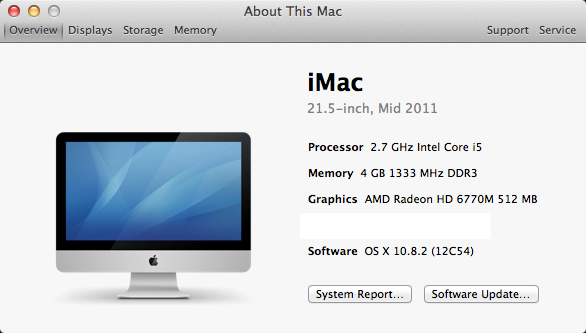
The easiest way to capture and post this information is by getting it from the About This Mac panel under Lion (10.7.X) and Mountain Lion (10.8.X):
- Click on the Apple Menu in the top-left corner of the Mac desktop.
- Select About This Mac.
- Click on More Info…
In this panel, you will find the information that will allow ArenaNet and your fellow players to help you with your problem:
- Mac model (name, size, and year)
- Processor (CPU)
- Memory (RAM)
- Graphics (GPU)
- Software (OS)
Note: Your serial number is not needed.
You may chose to either copy and paste these fields into your post, or you can follow these steps to take a screenshot which you can attach to the your post:
- Press Command+Shift+4 to get the screenshot crosshairs.
- Use your mouse to draw a box around the About This Mac window.
- Right-click the screenshot file saved to your desktop, and chose Open With > Preview.
- Use the Rectangular Selection tool to draw a box around the Serial Number field.
- Press Delete to remove your Mac’s serial number from the image.
- Press Command+S to save the edited screenshot.
- Below your forum post, click More posting & formatting options…
- Click Choose File and navigate to the screenshot file on your desktop to attach the image to your post.
(Example image below.)
Attachments:
(edited by Robert Walter.8130)
If you are experiencing unusually slow performance while running the Guild Wars 2 Mac Beta client on a MacBook Pro with Retina display, be sure that your operating system is fully updated.
If you continue to have problems, try resetting the System Management Controller (SMC). Complete instructions for doing this can be found in this Apple Support knowledge base article:
http://support.apple.com/kb/HT3964
The problem is known to recur, and the SMC reset will need to be performed each time you encounter the issue.
It should also be noted that the performance issue can appear on systems running under Windows. An SMC reset will also be needed if you encounter the problem while playing the Guild Wars 2 PC client under a Windows Boot Camp partition on a MacBook with Retina display.
(edited by Robert Walter.8130)
Guild Wars runs very poorly on the new macbook pro retina
in Account & Technical Support
Posted by: Robert Walter
Hi all,
Is there anyone with a MacBook Pro with Retina display for whom the SMC reset is not resolving performance issues? If so, please post your system specs here and we’ll look into it. Thank you!
Hi, all,
Rest assured, this is one of the many things we’re working on. Please bear with us as we figure this out and get you a permanent fix. Thanks!
Launcher wants to download 200k files everytime
in Account & Technical Support
Posted by: Robert Walter
Hey folks, I’m sorry to hear about your problems. We haven’t seen this happen on a Mac, but we’ll do our best to help you figure it out.
First off, when you’re installing the game, are you letting it install to the Applications folder of your Mac’s system HD? (That’s where it is set to install by default.)
This issue has been known to occasionally occur on PCs, and it usually has to do with account permissions, so I’m wondering if you’re signed into the same administrator account when installing and running the application. Are you? (To be honest, this really shouldn’t matter, as we’ve tested to make sure the game works regardless of which user installs and which user plays the game.)
Also, have you recently tried to verify/repair disk permissions on your Mac? If not, you may want to try this. Here’s how:
- Quit all applications (including background applications).
- At the Finder, navigate to the Utilities folder inside your Applications folder (Command+Shift+U).
- Double-click Disk Utility.
- Click on Macintosh HD (or whatever you’ve named your system drive, on which Guild Wars 2 is installed).
- Click Repair Disk Permissions (this will take a few minutes).
- Close Disk Utility and run Guild Wars 2.
I can’t be sure that this will help your situation, but it’s worth a try. We’ll post here again if we come across any other possible fixes.
(edited by Robert Walter.8130)
If you find that you are unable to use your traditional mouse’s wheel to control the camera zoom, be sure to go into the options menu (F11) and disable the “Use scrolling gestures to change direction” option. This will re-enable the mouse wheel’s input.
By default, this option is enabled, turning off mouse-wheel input. This allows players with the Apple Magic Trackpad and the Apple Magic Mouse to use gestures to control camera movement. It also prevents Magic Mouse users from accidentally zooming the camera in or out with each touch of the Magic Mouse.
Currently, there is no in-game-camera or world-map zoom functionality for the Magic Mouse (as mentioned in the known issues). Until we are able to address this, we recommend that players turn off the scrolling gestures option to adjust the zoom, and re-enable the option to lock the zoom level.
(edited by Robert Walter.8130)
Colours dull and not as vibrant as windows version
in Account & Technical Support
Posted by: Robert Walter
Hi Reece,
I was surprised to see your post. Other folks in the office here often walk by my desk and comment on how vivid and vibrant the game world appears on the my iMac and MacBooks (which obviously have built-in Apple monitors). Since I don’t know what kind of Mac you’re using, I’m not positive what you can do about this, but others have posted two good suggestions and I have one more.
First, I would try adjusting the brightness in the “Displays” panel of the System Preferences. I have the slider on my iMac cranked up all the way to the right.
As others have suggested, I would also check your color profile, which is likewise located in the “Displays” panel (though you’ll need to click on the “Color” tab). Depending on your machine, the default profile might be called “iMac” or “Color LCD.” If you use a special profile for CMYK printing or some other purpose, there’s a good chance that this might be having a negative effect on the appearance of the game.
Finally, I would try tweaking the in-game Full-Screen Gamma. I have mine set to 1.20, and as you’ve seen, it’s easy to over do this, making for a washed out appearance, so you’ll want to make small adjustments.
I hope this helps!
Hey folks,
We are looking into this (as we are the issue in which players with French-language Apple keyboards can’t enter the “@” symbol). In the meantime, if someone could upload a photo of the keyboard they’re having trouble with and post a link to it here, that would be appreciated!
(edited by Robert Walter.8130)
Just to clarify, there are two issues here. Haligator, though you quoted this issue:
Dragging the mouse while holding down the left or right mouse buttons in order to change camera or character direction causes the mouse cursor to briefly appear in the middle of the screen.
It sounds like this is what you’re experiencing:
Logging out to the Launcher—either intentionally or due to a network error—and logging directly back in to the game causes mouse movement control functionality to break.
- If this happens, please quit the application completely and log back in normally.
This describes one of the causes of the camera spinning uncontrollably. As the note mentions, if you encounter this and can’t recover control of the camera, quitting out of the game entirely and starting it back up should solve the problem.
We’re actively seeking to fix both of these issues, but we definitely appreciate your reports of these other causes of the camera spinning!
(edited by Robert Walter.8130)
Hi all,
To reiterate for the sake of Dwight and voltagecontrol, the NVIDIA 8600M GT and 9400M are both below our minimum requirements, and the performance you see with those GPUs is likely to be below below 20 FPS—regardless of your graphics settings. (And the Intel 3000 is the minimum for Intel GPUs.)
I should add for everyone else that when posting about performance or graphics issues, be sure to include the type of GPU your machine has. When it comes to hardware, CPU and GPU are the most important factors when discussing performance issues, followed by VRAM. RAM is perhaps the least important. Whether you have 4GB or 64 GB, you’re not likely to see any difference in performance. If you already have 4GB of RAM, lowering your resolution or graphics options will have a far greater impact than adding more RAM.
Another thing to consider is what other applications you may be running at the same time. I’m sure it’s obvious to most folks, but having a dozen browser tabs open in the background is not going to help your performance!
(edited by Robert Walter.8130)
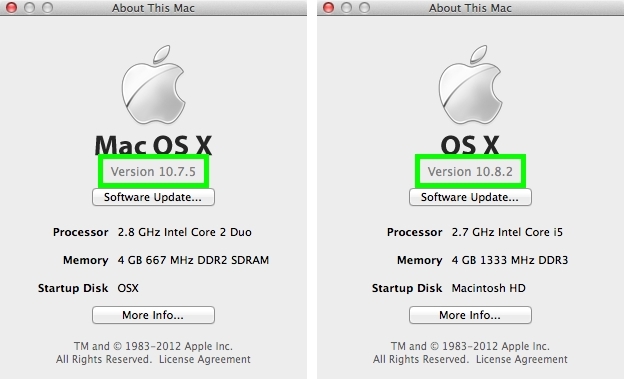
To ensure the best possible play experience with the Guild Wars 2 Mac client, you should make sure that your operating system has been updated to the latest version. Currently, this means having Lion (10.7) updated to version 10.7.5 and Mountain Lion (10.8) updated to version 10.8.2.
To check what version of Mac OS X you are running, click on the Apple menu in the menu bar and select About This Mac.
If necessary, click on Software Updates… and follow the prompts to update your OS to the latest version.
Attachments:
(edited by Robert Walter.8130)
Hi Kelkka.
You will retain all your characters, progress and gear when the Mac Beta period ends. in fact, there is no difference between accounts used on Macs and those used on Windows machines. As you’ve probably read by now in other posts, you can—and many players do—play on both types of computers.
There’s a good bit of information that our Technical Support Team can use to help address your technical issue. Here’s what to provide in the ticket you submit using “Ask a Question” on the support page:
- Your Guild Wars 2 Account Name
- A detailed description of the issue that you’re experiencing
- Any error code that you are getting
When submitting a technical support ticket for the Guild Wars 2 Mac Beta Client, be sure to include a full system report as an attachment. To get this report, please follow these steps under the Lion (10.7) and Mountain Lion (10.8) operating systems:
- Under the Apple menu, click About This Mac.
- In the small window that pops up, click More Info…
- In the next window that appears, click System Report…
- Go to the File menu, and choose Save…
This report will contain all the necessary information about your system, and will help Customer Support diagnose your issues.
If you submitted a support ticket without this info, you can log into your Support Account and attach the requested information or update via the automated message you received and include these files in your reply.
NOTE: Please do not submit multiple tickets as this may slow down response time. Please instead add any updates to the original ticket you created.
(edited by Robert Walter.8130)
Hello all,
We do not officially support Snow Leopard (10.6) simply because Apple typically only supports its two most recent major OS versions—currently, Lion (10.7) and Mountain Lion (10.8). As much as we would have liked to support Snow Leopard, it just wasn’t feasible.
Cheers,
Robert
(edited by Robert Walter.8130)
Hi Mandy and Thornton,
Sorry to hear you’re having problems. Please file a customer support ticket and submit your system’s info.
Go to [Apple menu] > About this Mac, then click “More Info…”
On the next window, click “System Report…”
Select: File > Save and then save it to your desktop.
Attach this file to your support ticket, and please include “Mac Black Screen” in the subject line.
Thanks!
well i have a gaming mouse and my scrolling wheel doesn’t seem to work at all. can’t zoom nor scroll in text. can’t figure it out, it’s quite vital in my opinion. (i’m playing on a mac of course, MBP early 2011.)
Hello, Atnon,
Uncheck this option to reactivate the scroll wheel’s zoom functionality:
Mac Beta: Use scrolling gestures to change direction.