Showing Posts For Skippygoober.3051:
Asura male – Chili Cheesin
You can also still use your media and volume function keys even with them all turned off by holding down the fn key located above the delete key (full size keyboards have this key I don’t know if “mini” or laptop keyboards have it.)
This is the key refutation to all of the people that say this tweak works:
Okay maybe Transgaming went to the troubles of creating an in-process X11 server that is linked into the wineserver or the cider process. So let’s check with Instruments: nope, none of the threads references anything X11 related.
quoted from Korval.2197.
Instruments is a developer tool that comes with Xcode. You can download Xcode for free from the App store if you have a developer account with apple.
Show us a screen shot of instruments running on your system and it showing a X11 thread running.
I’d would try these system tweaks, i really want too. i’m just pretty sure i’ll mess something up.
Mess what up? If it doesn’t work you can dump the whole Guild Wars 2 folder in the trash and the game will build a new one for you.
New update issues and graphics card help
in Account & Technical Support
Posted by: Skippygoober.3051
It usually only needs to be done once but you never know with computers and software.
That has nothing to do with whether or not changing the X11 settings has any effect on performance. I don’t have Xquartz / X11 installed. Why would changing those settings affect me at all?
Yeah but X11 XQuartz is not installed by DEFAULT on 10.8 mountain lion:
New update issues and graphics card help
in Account & Technical Support
Posted by: Skippygoober.3051
1. Open Finder
When Finder is open your menu options in the upper left hand corner of your screen are: Finder File Edit View Go Window Help
Click Go
While the Go Menu is pulled down hold down the alt option key on your keyboard.
This makes a new option called Library appear, click on Library.
Click on Application Support
Move Guild Wars 2 to Trash
Start Guild Wars 2 after moving this folder to Trash
2. You are NOT upgrading your graphics card on a macbook pro END OF STORY!
Your only option there is to buy a new mac with a better graphics card in it.
What about after the incoming nerf?
Fresh install on my iMac and haven’t crashed once ever.
I really think deleting everything including the application support folder (especially the application support folder and MANUALLY modifying the config file in the application support folder) should solve any issue other than you just having poor system tech specs.
Attachments:

bschultz turn off Mac Beta: Use scrolling gestures to change direction in Options Menu to make your mouse wheel zoom work again.
Also you’re not using one of apple’s AWEFUL mice are you?
I use a Mad Catz R.A.T. 7 Contagion mouse that has mac drivers and it works great.
Yeah no problems here at all with a late-2012 iMac with between 80-100+ fps maxxed gfx settings.
Attachments:
Mark, unfortunately it’s your computer and not the game. That computer you have was released when WoW was. GW2 was released THIS year and your system specs are god awful for attempting to run this game.
Mac OS®X 10.7.X or later
Intel® Core™ i5 or better
4 GB Ram or better
NVIDIA® GeForce® 320M, ATI Radeon™ HD 6630M, Intel HD 3000 or better
Basically the two most important items on the minimum system requirements list are total failures for you (processor and video card). Intel Core 2 Duo IS NOT Intel® Core™ i5 or better and the minimum graphics cards required weren’t even produced in 2007.
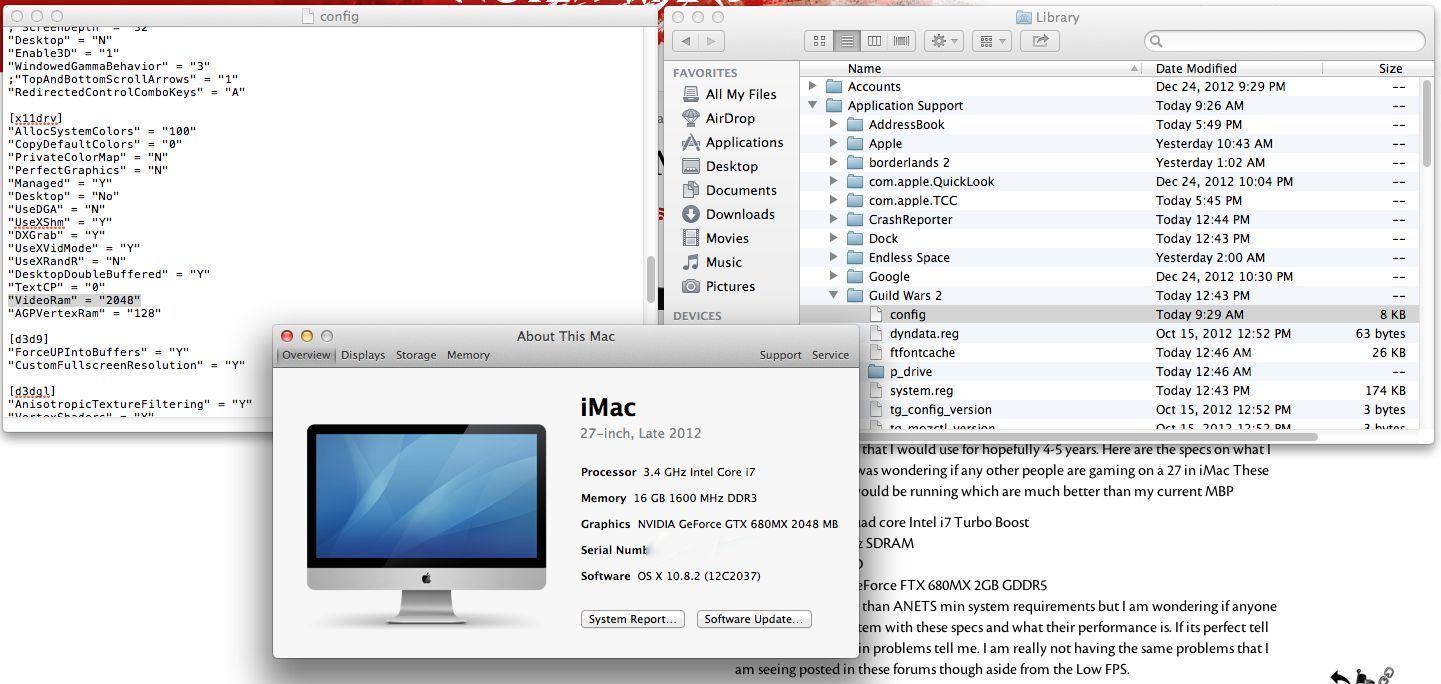
You can also modify the config.ini file to match how much video ram you graphics card actually has see attachment:
Attachments:

OSX, I crash BUT this needs to be fixed...
in Account & Technical Support
Posted by: Skippygoober.3051
I haven had no problems either but I had to manually modify my config.ini file so that the game can “see” my actual amount of video card ram see attachment:
Attachments:

Unfortunately you have to modify the config.ini file if you have more than 256 megabytes of video ram since that is the default setting see attachment.
Attachments:

I’m just happy they bothered at all. Mac users are an epic minority. But we have DEEP pockets and I think that’s what they’re after.
You still have to change the config file since it defaults to 256 mbs of video ram see attachment.
Attachments:

I think it’s because it was an online purchase (digital version) and those get flagged easier.
@FlamingFoxx.1305 you rule!!!!!!
The default is 256 and I have 2048 and the difference is pretty ridiculous.
…and the charge on my credit card is flagged as fraudulent. Is the company that made GW2 reputable?