Best regards
Tjynde
Tjynde
It’s a known problem that the CPU use a lot of power in GW2. Having a core 2 duo doesn’t make it better. Yes your CPU is bottlenecked but it wouldn’t be that bad if the game was better optimized. You just have to wait and hope for a patch to fix it. Well.. you could be lucky that some of the people here finds a temporary solution, but right now, it doesn’t seems like there are any .
.
Exactly. My opinion is that 2gb isn’t enough. It’s true that GW2 isn’t using all 2 gb but the minimum requirement for Win 7 32 bit is 1gb. Since that’s isn’t much and you’re only having 2gb i would say atleast 3gb for 32bit.
And running Win7 with 1GB is an exercise in futility. 64-bit Win7 runs significantly better with 8GB of RAM than 4GB, much less only 2GB.
Do people even run 32-bit Win7 at home? Obviously more than 4GB in that instance would be pointless.
Well. They do say that a 32 bit version can run up to 4gb, but you know that’s not entirely right. Especially not if you don’t know how to tweak it to the correct amount. 32 bit will usually use around 3.3 to 3.5, and therefore 4gb would be a waste since putting money in a new rig will be reality for him in a matter of time .
.
Get 8gb , trust me. Do not listen to the age old “4gigabite is enough and anything over it is wasted” line. “Hostile” above me here also points it out.
Ehm not if he’s using 32bit?
Though i do agree with you that an entirely new rig is the best solution. If he don’t got the money, getting 64 bit and upgrading the memory would help a bit. If he don’t got a 64 bit and only a 32 bit, 3gb is enough until he can save some money for a new rig.
It’s a very known issue guys. Like SwiftChocobo said. Reformatting is always a good thing, but in this case i don’t think it will do any difference.
If you look around the forum, there is a lot of people having FPS problems. Some of the suggestions have been working for a handfull of people. But it’s still a top priority problem. Look around a give some of the suggestions a go. If none of them is working you just have to wait for a patch to fix it (hopefully).
Exactly. My opinion is that 2gb isn’t enough. It’s true that GW2 isn’t using all 2 gb but the minimum requirement for Win 7 32 bit is 1gb. Since that’s isn’t much and you’re only having 2gb i would say atleast 3gb for 32bit.
in Account & Technical Support
Posted by: Tjynde.1604
Can you get a crash repport? That way a GW2 Supporter can help you. It sounds like a Assertion error but a repport can show what it is.
No but i think it mean that it’s not a 100% up and running yet.
So to you question: Yes
About 40mins ago on Twitter
@Guild Wars 2
For those of you that may still be experiencing login issues, please close your launcher and wait a few minutes before trying again! ^AT
You’re not the only one having the problem.
https://forum-en.gw2archive.eu/forum/support/bugs/graphic-texture-bug-character-head-and-face-bright-red
in Account & Technical Support
Posted by: Tjynde.1604
Remember to “Run as Administrator”. This mostly occur when im not running as admin.
in Account & Technical Support
Posted by: Tjynde.1604
Where do you get the “Download failed” from. The launcher or when your are downloading the installer?
oh well.. Let’s forget my idea then
Try turning off “Character Animation”
If your running 32 bit the “High res textures” should be off. But if you got the settings on “Auto” the high res textures would sometimes turn on even though it’s 32 bit (dunno if a patch have fixed it) so try and set it to low and then manually set the graphic settings you want without the Character animation on.
Try it out and post if it works.
Great that you got it working Soma. I will suggest the option for others.
- Mraz: Try turning off “Character animation” and “High res textures”. That works for some people.
No idea if it works. But it’s worth a try
- After a crash, put -image after the path, just like when you put -repair.
If it works the launcher will start and close again.
- Remove -image
Start the launcher again. If your lucky, it won’t do the repair.
I can’t promise the game will get corrupted in the end since you will be skipping the repair function. So this is on your own risk.
Very doubtfull that it is the game client that is causing your BSOD’s. Mostly they occur because of hardware issues not software issues.
So do what searias said and also do a memcheck , restore you overclocks on your cpu and gpu(s) ,check hdd’s for errors ..etc and go from there.
Well that’s what i told people in the start but BSOD also apear in driver errors ALOT. And in this case. 20-50% of the posts on the Tech Support forum, is about BSOD, Black screen crashes, freezing computer etc etc. I’ll put my money on the graphic drivers won’t cooperate with GW2 or the other way around.
“Swag” found a temporary solution to Crashes on some computers. If you downlclock your GFX 10-20%, it should prevent the crashings. No promises though!
Well the bccode like i wrote earlier, points at the graphic card. And after reading a lot about crashes, bsod, total freeze etc etc on the forum. It really points towards a problem with the graphic drivers working together with GW2. It’s the same with ATI cards.
First: Try my suggestion in this post:
https://forum-en.gw2archive.eu/forum/support/tech/GTX260-GPU-running-at-about-60/first#post16173
Second. Try uninstalling your graphic, boot in safe mode and run DriverSweeper to clean all your graphic drivers. Install the graphic driver again and give it a try.
You can get DriverSweeper from here:
http://www.guru3d.com/category/driversweeper/
I and a couple of guildmates have similar problem. We do receive the mails, but whenever we try to press the mail we received (the “button” thingy in the email) we get error message.
This has been like this for me since release, and now I have just stopped caring about getting my email validated and hope that i don’t run into an issue that requires validation.
That error you are talking about should be fixed. Have you tried validating within these last couple of days ? If not. Give it a try
ATM, Crashes is a very common problem for a lot of people. Crashes, Black screen, BSOD etc etc. is the most typical thing for GW2 right now. Did you try changing the Anti-Aliasing the GW2 team postet on the forum? :
https://forum-en.gw2archive.eu/forum/support/tech/Black-Screen-Issue-AMD-ATI/first#post3963
If you did that, try disabling “Character Animation” and “High res textures” ingame.
Sorry RoRo. I misread your post in the start about the year. Read it like you have had the problem for about a year (ofc that don’t make sense if it’s only occuring in GW2 ). Loads of people have problems with bsod, black screen crashes and hardlocks with or without the sound stuttering. I hope a patch will fix it soon. It seems like the game is making some kind of overload on even the cpu, gpu og memory which is making the crashes. Like Creature said, the graphic drivers isn’t totally optimized for the game yet (even though it should be better). Did you try the 306 i linked for you ?
It worked for me the day it got opened(meaning the day you could activate without getting the error). Though i don’t know if it’s been making problems there last 4 days.
Did you check the spam folder?
There have been loads of random crashes, and it’s for both 32 and 64 bit. I’ll say hope for a patch to fix it soon.
Catamount: Yeah for some, the GPU temperatures is a problem, and yes the GPU is heavily loaded in GW2, but not all crashes occur due to heating problems.
Try all the basics:
Updating drivers. Like pyro said, update windows aswell.
If your hardware is running very hot, dust it off and try again.
Run the game as admin
etc etc….
Is it working after you made the reset?
Look in your power options. Maybe GW2 somehow set’s the power options to be something else.
Im all out of ideas then. Sorry mate.
If i see anything related to your problem, i will update you on it.
I found some news from nvidia about transparance.
Heres a link to another thread where i mention it. Give it a try:
https://forum-en.gw2archive.eu/forum/support/tech/GTX260-GPU-running-at-about-60/first#post16173
The one that came last night i think..
Well.. I found this on the nvidia site
At this time we can also confirm that the Ambient Occlusion profile added to the game yesterday can result in certain pieces of terrain becoming transparent. If you experience this issue, simply turn off Ambient Occlusion in the Guild Wars 2 NVIDIA Control Panel profile
It’s about transparance, but could help your performance….
It’s worth a try.
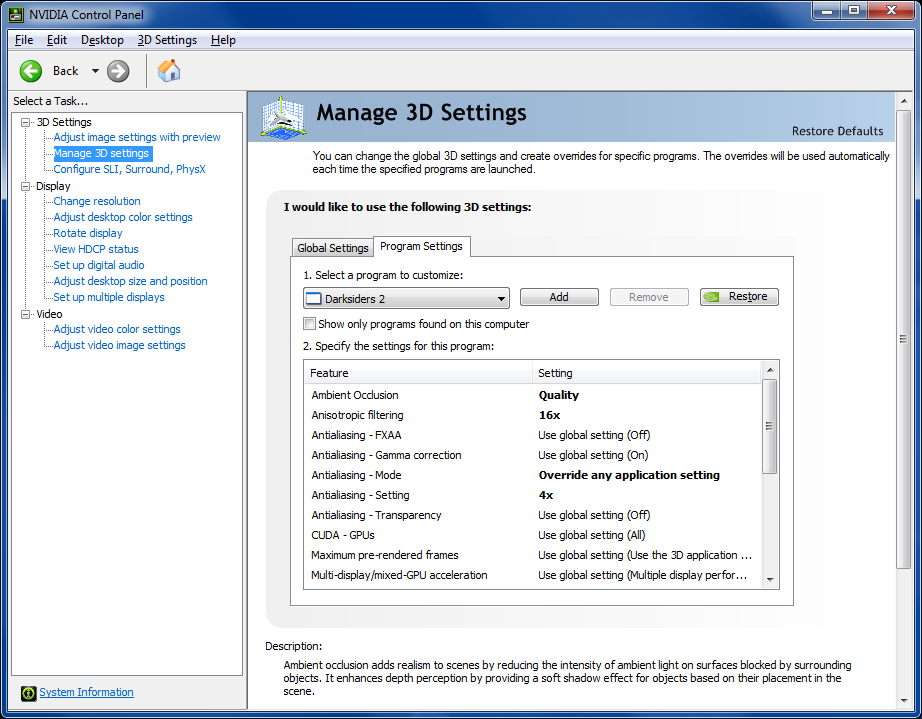
Ah okay. Sorry to hear that mate.
Did this begin after the new patch. It seems like a lot of people are having fps issues, and it’s mainly pointing towards the patch.
Hotpocket: Try downgrading to 304. Some are having luck with the 306 and some have problems, so its worth a try
- Disable firewall
- Enable UPnP
- Turn your router off. Wait 30 sec, turn it on again.
If this doesn’t work, try resetting it. (Hold the reset for 20-30 seconds).
As a last option, use the 30/30/30 reset:
http://compnetworking.about.com/b/2009/03/11/the-30-30-30-hard-reset-rule-for-routers.htm
Try downloading the GW2setup.exe, and do the following:
- Copy your Gw2.exe file to another location or name it something like "Gw2BACKUP.exe
- Change the name of GW2setup.exe to GW2.exe and place it in the Guild Wars 2 folder.
- Try to run the game with the -repair function.
Not sure if it works, but it’s worth a try.
Hi i am using a notebook to play games and as to date there are no games i encountered with the same problem as guild wars 2
CPU : Intel® Core™ i7-2860QM CPU @ 2.50GHz
GPU : GTX 580M GDDR5 2GB ( Latest Beta Driver 304.79 )
RAM : 16GB DDR3 1600MHzRunning on SSD patriot wild fire
Temperature while playing 70c – 85c
Settings were " AUTO DETECT " High and medium settings because it switch itself sometimes.
The problem is when i join a " orange " event or there are lots of people the lag spike started
I never encounter this in Battlefield 3 / World of Warcraft / CS : GO / Darksiders 2 / DOTA 2 etc
- Well if all the other games is running as they should, your SSD shouldn’t do any problems. But to be sure, is your SSD set to AHCI and not Compatibility mode. If it’s in Compatibility mode you need to reinstall your windows in AHCI to get full performance in your SSD.
- 304 is not the latest drivers. There is a 306. Try that one out:
http://www.nvidia.co.uk/object/notebook-win8-win7-winvista-64bit-306.02-beta-driver-uk.html
NOTE the link is for 64 bit, if you have 32, use this link:
http://www.nvidia.co.uk/object/notebook-win8-win7-winvista-306.02-beta-driver-uk.html
There is a new beta driver named 306. Try it out. Some get the problem you have now, and some get better performance.
http://www.nvidia.co.uk/Download/Find.aspx?lang=en-uk
Your welcome.
I will continue to look for posible fixes. If you find something. It’s very important that you post what you did! That way we can link to this thread if another person get’s the problem.
Did you update to the latest beta drivers?
http://www.nvidia.co.uk/Download/Find.aspx?lang=en-uk
in Account & Technical Support
Posted by: Tjynde.1604
No errors but freezes and i said its fixed now with windowed mode wich is super weird.
Yeah i know, but window mode isn’t the best fix. Well it’s playable, but a total fix could be awsome. Also for alle the others who has the problem.
But great you found a solution. I will definitely suggest that to others.
An possible fix so you can play in full screen, could be disabling Character Animation, since that have been making some trouble for different people.
Also try dusting off your pc! It’s a common problem. Especially since GW2 makes the CPU and GPU work a lot!
Like Ceallach said, heat issue is option number 1.
If it doesn’t work, try uninstalling your drivers, download Driver Sweeper or CCleaner and install it. Restart your pc and boot Windows in safe mode. Run one of the mentioned applications and sweep your graphic drivers. Install the latest graphic drivers and give it a try.
ATI’s Catalyst is okay for OC’ing, but MSI afterburner is also a option, if you wanna do it. Don’t think it will be better though, but it’s worth a try if you wanna take the risk.
Hmm.. a wild suggestion. Not even sure that it will work, but worth a try…
Do you have USB 3.0. If this is the case, USB3.0 get’t some of the power from the CPU (On some mobo’s). I heard about some mobos get’s it from the PCI-e too. If you try disabling usb 3.0, maybe you’ll get more power, and a chance to prevent BSOD.
I know it’s a wild guess. But i would say it’s worth a try if you got usb 3.0.
Hmm.. a wild suggestion. Not even sure that it will work, but worth a try…
Do you have USB 3.0. If this is the case, USB3.0 get’t some of the power from the CPU (On some mobo’s). I heard about some mobos get’s it from the PCI-e too. If you try disabling usb 3.0, maybe you’ll get more power, and a chance to prevent BSOD.
I know it’s a wild guess. But i would say it’s worth a try if you got usb 3.0.Overall, bsod is a common thing in GW2 at this time. In my first post i said that i haven’t heard about bsod in the launcher, but after looking through a lot of posts, and googled around. It seems like it IS a common problem. I hope a fix, workaround or whatever will be released soon, so you guys can start playing.
Best of luck!
Overclocking a laptop GFX isn’t a good idea if you aren’t using any extra cooling options (cooling pad etc..). Since it’s so compact the GFX would generate more heat than the laptop coolers can handle.
Well. I heard there’s a maintenance atm. If it continues try this:
I was stumped by this briefly as well. I had selected to remember my login and password, but you still have to hit the “log in” button…at that point, the Play button is active
Did you accept the agreements and got a mail to verify your account?
if you haven’t done that, it could be the problem.
in Account & Technical Support
Posted by: Tjynde.1604
Do you only get the freezes or have you seen errors like “Out of memory” and such?
If so, try turning off “Character animation”
Did you update the latest beta driver (12.7) for ATI?
Hmm.. Haven’t heard about a bsod in the launcher before. Do you have Nvidia 306 drivers? If so, try to downgrade them to 304.
http://www.nvidia.co.uk/Download/Find.aspx?lang=en-uk
It’s a known problem that the 600 series got problems in GW2 with the 306 drivers.
Searched a bit around for the bccode you had and found something simular to the error you have.
This could be a old graphic driver messing around. Since Guild Wars 2 is pretty sensitive with the graphic drivers, this could be a suggestion.
Uninstall your Nvidia drivers, Install Driver Sweeper or CCleaner. Boot in safe mode and clean your drivers with one of the mentioned tools. Reinstall the new graphic drivers.
Well. It’s up to you. Im just trying to help.
Let me give some examples. I crashed randomly in Diablo 3 with a bsod. It didn’t happend in any other game. The result was reseating my memory blocks.
Call of Duty 4 (Modern Warfare): People got bsod randomly without any other games, application etc gave a bsod. Result was Realtek sound drivers making conflict with CoD4. A update did the trick.
Since the memtest isn’t giving any problems, you can scratch that. Even though your sound isn’t making problems, the drivers could still make conflicts.
Again. Im just trying to suggest options.
BTW. Have you tried the new beta driver for nvidia. I know it’s been going on for a year. But try every possible thing out.
http://www.nvidia.co.uk/object/win8-win7-winvista-64bit-306.02-beta-driver-uk.html
What’s in the zip file you linked?
(edited by Tjynde.1604)
Well in some games there is a specific option for gold sellers. I think it’s named “Gold Selling” or something like that. Since it’s not there, i would agree with the others and use “scamming”.
yeah it was dust. played for 2 hours and no insane lagging occured. although the temperature rised to 70-75, all fine. should change coolers and clear more often. anyway thanks.
Great! Good hunting then
Really see no point of reseatting my ram when i’ve got passes on memtest86+. I posted the bsod code you can’t see it? Like I said I bought this computer all during the sametime I didn’t buy 1 part at a time also this issue only happens in gw2 i’ve put in over 800hrs in other games and yet to see a bsod. Also see no point of dusting off my gpu/fans/cpu heatsink when i’m getting good temps and i’ve cleaned them using my datavac anyway. Thanks for the reply but i wonder if you’ve read my post?
First of all. Memory is a typical problem regarding bsod, and since you didn’t say anything about passing in memtest before now, i made that suggestion.
Second thing. That’s only the error code you get in windows. I wanted the error you see on the bsod. And most important, if you got any memory dump.
Well since you passed on memtest, have you tried reseating any of the other hardware?
You can also take it like this: Did this start to happend after you changed any hardware or after you updated anything?
If you can’t remember, it’s not a problem. It’s more difficult to find the problem, but always possible. Since it’s been going on for about a year it wouldn’t be your graphic drivers (well if you haven’t updated your drivers in a year, it’s possible), so what about the sound drivers or the chipset?
in Account & Technical Support
Posted by: Tjynde.1604
Hmm okay. I found some solutions from different users.
The problem was that the GW2 installer is trying to install and locate files in the wrong directory. The file “Local.dat” is installed by default to “C:\Users\<User>\Documents\Guild Wars 2”, however, this causes problem because my “Documents” directory has been moved to a different directory, “X:\<User>\My Documents”. For a quick fix, I simply change my “Documents” directory back to the default location. After the install, hopefully the game functions and I can change my “Documents” directory back to my preferred “X:\” drive location.
and this
In case anyone else gets the same error I did, I was able to get back in the game by right-clicking the desktop shortcut for guild wars, selecting “run as” and then un-clicking the option “run this program with restricted access” and then running it with the administrator account.
As a last thing. Go to your registry and delete everything that has the tag: Guild Wars and ArenaNet. Maybe that’ll work for you.
Not affiliated with ArenaNet or NCSOFT. No support is provided.
All assets, page layout, visual style belong to ArenaNet and are used solely to replicate the original design and preserve the original look and feel.
Contact /u/e-scrape-artist on reddit if you encounter a bug.