[ICoa] Blackgate
you are better off buying the asus and adding in a 260 for 100 more
also newegg for that pc is cheaper:
http://www.newegg.com/Product/Product.aspx?Item=N82E16883220448
add a 100 usd r7 260 http://www.microcenter.com/product/426515/R7_260X_2GD5_OC_AMD_Radeon_R7_260X_OC_2048MB_GDDR5_PCIe_30_x16_Video_Card and you will be good to go and at the same price as amazon.
If gw2 or other mmos is the primary game you play, do not buy APU’s or FX processors as they are not designed to run for older cpu intensive software like gw2. Though the APU’s would provide more graphics power than intel, the cpu performance from a 2 module APU would restrict performance to worse than what an i3 with integrated graphics can provide.
[ICoa] Blackgate
depends on the resolution
For gw2 @ ultra (with supersample):
1080p 760 or 270x is enough
1400/1600p then you want a 770 or 280x
4k/multi monitor you want a 780ti or 290 and possibly 2 of them
Also why are you buying the 4670k if you dont intend to oc. the k versions are more for overclocking and thus slightly more expensive.
[ICoa] Blackgate
(edited by dodgycookies.4562)
The game does have color problems and texture problems as well, especially if you are on a monitor that has good color reproduction and high gamut that is properly calibrated. Also full screen directx programs override the windows color profile calibrations because of a technical limitation in a gamma function call.
use SweetFX if you dont like the default colors/textures and fine tune the look of your game:
http://www.guru3d.com/files_details/sweetfx_shader_suite_download.html
[ICoa] Blackgate
(edited by dodgycookies.4562)
In the US, you can usually file through the local small claims court. No lawyers allowed, minimal fee, quick resolution but only for claims up to 5k ish.
[ICoa] Blackgate
dominator can play at high graphical settings vs medium with the apache. The cpu is marginally better on the dominator but wont make that much of a difference.
You will not be able to turn up cpu intensive settings such as shadows, reflections character model limit/quality in wvw regardless of the computer you buy. Expect 15-30 fps in zergs depending on your settings.
[ICoa] Blackgate
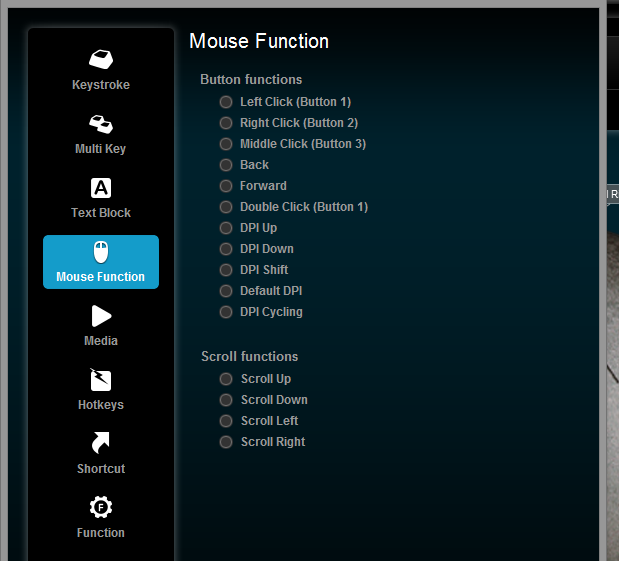
.I dont think it auto detects gw2 but works for some other games depends on if the software supports it. You can set up a button on the mouse for profile or dpi cycling or if you use a logitech keyboard as well you can set up a hot key for that.
If none of your other mouse buttons change functions and you only want a dpi change, then setting a dpi cycle button would be more convenient than cycling profiles, where you would have to actually go and create more profiles.
Attachments:
[ICoa] Blackgate
(edited by dodgycookies.4562)
The logitech gaming software is pretty good for this. just set up a different profile with a lower dpi for gw2, its pretty simple to do with the logitech software. Or set two of your buttons to dpi up/down so you can between 5 dpi settings on the fly.
edit: if you wish to use different profiles be sure to switch from the onboard profiles to the software controlled settings.
[ICoa] Blackgate
(edited by dodgycookies.4562)
well OP has a few options. Im assuming you didnt build it yourself and bought your system (which means an oem copy of windows most likely)? Can you return it for a full refund?
Or there are other options:
You can replace your cpu with a FX 8350 and get decent performance for around $200
You can switch to a intel i3 or i5 cpu + basic mobo + a new copy of windows for around $275-350.
[ICoa] Blackgate
(edited by dodgycookies.4562)
the 8350 isn’t a bad chip persay.
One can even say that the entire fx line is ahead of its time. AMD created a purely multi threaded cpu in an age of mainly single threaded software. I guess when the launched the FX line they thought that software development would catch up in a generation or two. They were right to an extent but wrong about the rate of change.
3 generations later and we are just beginning to see some truly multi threaded software, but wont come to market for ANOTHER few chip generations.
[ICoa] Blackgate
if gw2 is your primary game then you should have gotten an i5 but would have been more expensive
As for your system it will play most games decently, but not mmos as they are mainly cpu intensive and run on older software.
A FX 4000 series cpu is priced lower than and i3 not because AMD wishes to be kind to people with budgets. The performance of the chip in current software warrants its lower price.
This is why I said your system is imbalanced. You have a low end cpu that is being overworked and a top end gpu that is not being fully utilized.
[ICoa] Blackgate
A current AMD FX cpu is the wrong tool for older DX9 games, which includes many mmos. Modern titles with dx11 or mantle work well on fx series.
So for now, set animations to low, reflections off, shadows off, character model limit lowest, character model quality low, everything else you can set to the highest possible. Also if you don’t like in game sound using the -nosound command will disable all ingame sound for a bit more performance.
[ICoa] Blackgate
FPS issue when it should not happen at all.
in Account & Technical Support
Posted by: dodgycookies.4562
well anet is not gonna do anything for a while, so would you rather just tell people who have low fps to deal with it or offer an actual workable solution? Yes dx9 is old and yes it gets terrible performance because of it single thread nature, but since none of us work for anet or ncsoft, we can’t change any of that. The only options left to the player is to either change your settings(big improvement) or change your hardware(minor improvement). So of course we are going to tell other to lower their settings if they aren’t getting the fps they like.
What really killed the performance was the removal of culling. Making a player setting without clearly explaining what it did and the performance effects that it has on other settings like dynamic shadows and reflections was a mistake. And then having a bad auto detect feature that doesn’t really consider the new settings was even worse.
[ICoa] Blackgate
(edited by dodgycookies.4562)
you have a very unbalanced system, too much money spent on gpu and not enough on cpu.
[ICoa] Blackgate
FPS issue when it should not happen at all.
in Account & Technical Support
Posted by: dodgycookies.4562
umm, the 5700 was released in 2009 which makes it 5 years old. which is why we are telling him to turn his settings down. People with decent modern (sandy bridge and later) setups usually don’t have issues with the game unless they have a hardware issue or in a very large zerg
[ICoa] Blackgate
FPS issue when it should not happen at all.
in Account & Technical Support
Posted by: dodgycookies.4562
your video card is working as it should as that chip is designed to operate at 2.0×16. Considering you have a 5770 or 5750, i assume the rest of your system is just as old. Your poor fps is most likely not from any malfunctioning hardware, but rather just old hardware.
If you had better performance before, make sure you are not thermal throttling by cleaning out your heat sinks.
edit: also start your own thread rather than use someone elses., makes it easier for those trying to help.
[ICoa] Blackgate
(edited by dodgycookies.4562)
A few things to keep in mind.
lenovo’s y510p isn’t completely designed for sli. The laptop nominally has a single 755m that can be turned into a sli array via the “ultrabay expansion” (optical bay expansion tech from ibm thinkpads) which means you give up the optical drive. Also since the ultrabay addon has to be a stand alone package, the heatsinks/fans are smaller than one that would be built in, and because of the way nvidia’s gpu boost system works, performance on the second chip is slightly lacking. Due to the nature of how frampacing works in SLI, having one chip operate at a lower speed than the other can cause some micro stuttering.
Otherwise its a pretty impressive machine.
Review with benchmarks:
http://www.notebookcheck.net/Review-Update-Lenovo-IdeaPad-Y510p-GT-755M-SLI-Notebook.107108.0.html
[ICoa] Blackgate
(edited by dodgycookies.4562)
I keep hearing remove the aoe cap but I dont think you guys really have thought out the consequences of doing so
When you remove the aoe cap it just benefits the zerg more not less. I know you all think that a 5 man ground of zerker eles can dominate but consider this: a 40man zerg with 15 warriors would be able to heal 30k hp instantly just by the use of 1 shout, most hammer warriors run 2/3 shouts so you are looking at doing 60-90k hp regen just from the wars. Even assuming you poisoned them all, thats still 40-60k healing in 2 instant cast shouts, and this doesn’t even include the guards or eles.
They would have 100% protection uptime and almost unlimited condi cleanse so with all the buffs, to down that 40 man zerg you would have to hit each of them with almost 80k direct damage in less than 1 second and make sure you down them all at once, because if you don’t, they will instantly heal back to full hp.
The removal of the aoe cap would make spike damage the meta. It would encourage the instant kill classes that every mmo has discouraged because theres no real flow to combat or time to make any decisions to react. To remove the aoe cap, you would have to seriously redesign every class’s game mechanics from scratch, which we all know Anet will not do.
or as some people have suggested only remove the damage cap but keep the healing/boon cap in place…but that seems completely unfair to the support classes imo.
[ICoa] Blackgate
(edited by dodgycookies.4562)
if your temps are normal then i would say it is a power supply/power save issue.
If the power supply “hiccups” for a bit for whatever reason, then your laptop reverts to battery mode, but then it recognizes being plugged in but the software glitches and doesn’t switch power modes. Most laptops in battery operation have many power saving features enabled, one of which can be to slow down the pcie bus. So check your power options in windows and bios.
[ICoa] Blackgate
300-350 GBP is too small of a budget because at that price point you cant buy a graphics card. 350 will get you a a system with basic i3, basic mb, not enough ram, and a small slow hard drive, and no graphics card. A budget gaming system will run around 450-500 and a good one will cost 700.
[ICoa] Blackgate
(edited by dodgycookies.4562)
Damping factor refers to the amplifier, not the speakers. In other words, you don’t say speaker A has a damping factor of X, you say amplifier A has a damping factor of X – though you are basically correct.
In actually, it’s better for the damping factor to be above 50. However, headphones are much higher impedance than speakers and don’t require the amp to have as low of an impedance. We are talking headphones here.
If the OP is using speakers – they are amplified speakers (with a much higher input impedance – about 10Kohms). In the case of a standard PC sound card, damping factor is irrelevant.
Edited to add: I’m an electronics engineering technician with over 30 years of experience in the field. I just might know a little bit about electronics.
Yes you are correct.
Typical consumer headphones are 32 -70 ohms and using a damping factor of 50 sets the output impedance at around .5-1 ohm, which is pretty low but obtainable for decent usb dac/amps.
[ICoa] Blackgate
there is no need to delete the local.dat file everytime. All that does is reset the graphics settings to default.
[ICoa] Blackgate
A usb dac/amp would fix his problems and give him better performance.
Keeping output impedance low is very important. Mainly because of the damping factor in speakers.
A loudspeaker is a mechanical device. It is essentially a motor. A motor causes motion when a coil is exposed to a changing magnetic field. When a woofer cone moves, its coil is moving in a constant magnet field. That is the way generators produce electricity. So how does an amplifier handle this speaker produced electric current?
A loudspeaker can be mathematically modeled just as an amplifier can. What happens is that the net effect of speaker motion presents itself to the amplifier as a set of complex reactive impedances (inductance and capacitance). The amplifier output current passes through these impedances producing a voltage drop across them. Just as in the case of changing speaker impedance causing problems with frequency response, this new voltage must be controlled by the amplifier output impedance or it will change the behavior of the cone motion.
To keep the voltage produced by cone motion low, the current the speaker produces must pass through a very low amplifier output impedance. The lower the amplifier output impedance, the lower the speaker produced voltage is. The lower the speaker produced voltage, the less effect it has on cone motion. A good rule to follow it that amplifier output impedance must be at least ten times lower than speaker impedance for good control of cone motion. This is called damping factor. Amplifier output impedance must be less than one ohm for best performance.
[ICoa] Blackgate
(edited by dodgycookies.4562)
Mantle is both game AND hardware dependent. This is a terrible system and problem on many fronts. First of all AMD has a significantly smaller install base (source: steam hardware survey). Devs must add extra work for a smaller fraction of their (potential) install base. The expected return (in revenue) on so much work is minimal. This is why most PhysX or mantle games are in essence subsidized by nVidia or AMD respectively. AMD paid EA to put mantle in frostbite and nVidia paid WB to use PhysX in Arkham Orgins. GW2 is too small to warrant such sponsorship in hopes of extra gpu sales and not next gen (such as star citizen or star swarm) as to be sponsored as a “demonstrator”
note: Hardware dependency is not great but not terrible either. nVidias g-sync or shadowplay requires nvidia hardware, but does not require any work on implementation for the game devs This is the key point that can allow hardware specific features to flourish.
the final fact for mantle being put on the back burner for many devs is the news that Microsoft is upgrading DirectX 12 to include many of the benefits (low level abstraction) that mantle has (yay for competition!). However DX12 is not hardware limited and will work on ALL cards that support dx11.
[ICoa] Blackgate
eh i think it still needs to be a bit more limited. it should cost some gold some badges some karma and a laurel or two.
OR they could make a mystic forge recipe that requires some combination (im just going by what i get a lot of in wvw):
1: gifts of battle,
2: something bought for skill points or gold from miyani (seige upgrade?)
3: something bought from the laurel vendor (tastes of wxp?)
4: ingredient costing karma (obsidian shards?)
5: something costing gold (crafting mats/elonian wine?) should be sub 5g
6: essences of luck?
7: ascended crafting mats?Why do you feel laurels need to be added when both the other game types could spend X amount of time farming per day to get levels where you’d have us locked into at least one level per day? Not trying to be rude but genuinely Curious!
You are not locked into one level per day, you can still get many levels a day in wvw from all the karma training that goes around especially at the end of matchups. I just want to limit the number of extra levels you can instantly get.
Plus i was just going by what i have in my inventory and my current attitude towards dailies. Atm I don’t really have any real incentive to do dailies. I have all the wvw skills i want and i have all my ascended gear. I could turn them into mats for gold but atm i have a decent stash and really nothing to spend it on. So giving players like me an additional incentive to do the dailies is a good thing.
[ICoa] Blackgate
(edited by dodgycookies.4562)
eh i think it still needs to be a bit more limited. it should cost some gold some badges some karma and a laurel or two.
OR they could make a mystic forge recipe that requires some combination (im just going by what i get a lot of in wvw):
1: gifts of battle,
2: something bought for skill points or gold from miyani (seige upgrade?)
3: something bought from the laurel vendor (tastes of wxp?)
4: ingredient costing karma (obsidian shards?)
5: something costing gold (crafting mats/elonian wine?) should be sub 5g
6: essences of luck?
7: ascended crafting mats?
[ICoa] Blackgate
(edited by dodgycookies.4562)
if you are using that pci sound card for sound quality then you are doing it wrong. Internal sound cards can have terribly high output impedences (10 ohms in some cases!) and are also subject to the internal signal noise environment of your case. The only thing they typically do better than a decent onboard solution (which are usually better due to a 2 ohm impedence) is having a better amp to drive the 250 ohm + headphones/speakers. I would suggest an external dac/amp via usb which tend to have low output impedences (.5-1 ohm) and are removed from the signal noise interference in your case.
Cheaper dac/amps like the FiiO E series are mainly sub 100 USD and have great reviews. There is also plenty of options in the 100-200 range. Check reviews from headfi: http://www.head-fi.org/products/category/amp-dacs
The biggest improvement of sound quality you can do (if you haven’t done so already) is get a decent set of headphones/speakers. Don’t get gaming headsets as their audio quality is terrible compared to a similarly priced “audiophile” headphone.
[ICoa] Blackgate
(edited by dodgycookies.4562)
yeah most likely a psu issue, though many times it is not about maximum power but rather voltage regulation over the different rails. Cheaper units tend to use group voltage regulation which can cause issues in cross load situations.
Only buy well reviewed psus from reputable brands and retailers.
[ICoa] Blackgate
install the logitech drivers included in the logitech gaming software
if that doesnt fix it try doing a -repair or deleting the “local.dat” file.
[ICoa] Blackgate
sound processing eat alot of cpu power. use -nosound command in the shortcut if you dont want ingame sound.
turn OFF shadows in wvw, as the dynamic shadows start at low and eat alot of cpu power as well. Post processing also uses alot of cpu power so turn that off in wvw.
And as other people have said, set character model limit to low. Set character model quality to medium. Set reflections to none. Also for wvw turn off player npc tags so you can see the commander tag/ enemy tags more clearly.
FXAA/Animations does use some power, and you can try low/off but the effect is minimal.
Supersample really helps with the Anti Aliasing but you need a better card than a 560ti to use it at 1080p.
[ICoa] Blackgate
sounds like a failing power supply. Pretty typical of prebuilt OEM units as they tend to cheap out on the psu. Do you have another one around to plug in to see if that’s the problem? If not a cx430 will only run you around $20 and is pretty decent.
[ICoa] Blackgate
Be careful if you want to upgrade ram. That system may be 32bit which would max out ram at 3gb and also uses older ddr2 ram.
The 750ti + your old system will only allow you to have the graphical settings on high with decent fps, but the cpu intensive settings such as character model limit/character quality/shadows/reflections must be lowest/off. If you continue to play at best appearance preset with that cpu, upgrading your graphics card will do nothing.
[ICoa] Blackgate
A r9 270 (7870) or r7 265 (7850) at 180 and 150 respectively will run gw2 @ high just fine. The amd cards are finally coming down in price making them viable from the price/performance gaming aspect.
Or if you want to spend your entire budget for a higher end card for a higher rez monitor, then a 760 (230), r9 280 (300) or gtx 770 (300+).
[ICoa] Blackgate
(edited by dodgycookies.4562)
Remote gaming doesn’t quite work yet due to hardware issues and internet speeds. You can try with any remote desktop software that has a DirectX3D/OpenGL virtualizer but for the most common software it will run the onboard graphics via basic drivers rather than your discrete one.
Nvidia is the first to add the capability with Shadowplay to stream the gfx output, but currently it only works with Shield(local network only) and Twitch at the moment and not remote desktop software. Though if you are adventurous enough to try to rewrite the driver/geforce experience software you are welcome to try.
Your frame rates latency and overall performance will be terrible. As for bandwidth at 1080p you will need a minimum 500 Mbps hardware (routers/modems) and a similar speed internet connection on both ends, but those requirements decrease as most remote desktop software dont stream at those resolutions.
The hardware/software that’s required for an adequate remote pcie (such as a gaming graphics card) solution costs many times more than just buying a gaming laptop and has worst performance to boot.
As for actual solutions: you can try logmein/splashtop at lower resolution such @ 480p. Also some have had success with remoteFX via windows server 2008 and newer.
Edit: i just read locally streamed from your first post. The most elegant solution is to get a nvidia card and gamestream to a nvidia shield handheld which can then be outputted to a monitor/tv in console mode. Though you still require a bluetooth controller (maybe bluetooth mouse/keyboard) and a fast router (5ghz @ 500mbps) and the latency+game support can be an issue. Also it only streams 720p atm and get upscaled on a 1080p monitor. This is still very much in a beta stage and is subject to change. Also note the shield is selling at 250 and you will need another 50 for a bluetooth controller. This is on top of a gaming rig that must have a 650ti or better nvidia card.
[ICoa] Blackgate
(edited by dodgycookies.4562)
FPS issue when it should not happen at all.
in Account & Technical Support
Posted by: dodgycookies.4562
install latest drivers or beta drivers
check bios/windows settings for power save
make sure your card is in the top most slot closest to cpu
try reseating the gpu and clean both the socket and connections
[ICoa] Blackgate
(edited by dodgycookies.4562)
what are you size and weight requirements? and your preferred monitor resolution?
Are you are ok with bigger 17" units? or is 15" or smaller a must?
Are heavy units that weigh in at around 10lb/4 kilos ok or do you need lighter units in the 5-7lb range?
Are you ok with a 1080p resolution? Or is a high rez monitor a requirement?
Just a few starting points:
Large heavy thick 1080p unit with good specs: http://www.newegg.com/Product/Product.aspx?Item=N82E16834231631
Smaller med weight thick unit with high rez screen.:
http://www.newegg.com/Product/Product.aspx?Item=N82E16834152555
Large thin light unit with 1080p but only a 765m:
http://www.newegg.com/Product/Product.aspx?Item=N82E16834152477
I would wait for this one as MSI is releasing a thin/light 15"/17" GS 60/70 Ghost Pro with midrange 860m maxwell chips and a high res 3K screen in early april.
large thin 2×765m in sli unit @ 1080p (Sold out though):
http://www.newegg.com/Product/Product.aspx?Item=N82E16834233033
Or the new razer blade, but apparently according to this thread razer has quality/reliability issues. I’v never used razer products so i don’t have any first hand experience with that.
[ICoa] Blackgate
(edited by dodgycookies.4562)
Sounds like a pcie problem, get gpuz http://www.techpowerup.com/gpuz/ to check your bus speeds and make sure they are at x16 when you are running the game.
[ICoa] Blackgate
FPS issue when it should not happen at all.
in Account & Technical Support
Posted by: dodgycookies.4562
get gpuz http://www.techpowerup.com/gpuz/
check to see if your 7850/70 is running at pcie 3.0 @x16.
used full screen windowed mode when checking
[ICoa] Blackgate
what they should really do is make the cannon or oil upgrade operate like the skyhammer spvp laser with the controls in the lord’s room. Something that floats above the tower out of range of players but would be able to be killed by a ballista/cata/treb/omegas.
[ICoa] Blackgate
(edited by dodgycookies.4562)
It’s about form factor, find any laptop with a similar slim form factor/weight AND similar specs for a significantly lower price. You cant, any ultrabook/mac with a wqhd/retina display is already running around 1700 to 2k and usually thats with intel or a low end nvida chip, add in a 870M and the price would be very comparable. Thats why the new thin gaming laptops from gigabyte/msi are also in the same price bracket and many still lack the wqhd display.
17" doesn’t count because those laptops are huge thick and heavy. Form factor/weight is a feature many find important and are willing to pay for.
[ICoa] Blackgate
(edited by dodgycookies.4562)
OP was thinking about buy a razer blade so i would take his budget to be the msrp of 2100.
Razer blades are not really overpriced. They the same price and feature set as 15" rMBPs or a high end windows ultrabook but with a better graphics card. If anything, i would say considering the features/hardware it has and the form factor, it is an excellent value amongst its competition. Though personally i would wait for nvidia to release a high end maxwell chip first.
[ICoa] Blackgate
(edited by dodgycookies.4562)
full doesn’t mean you cant guest, it means you cant transfer to or start a new account on that server
[ICoa] Blackgate
1) if you buy a k series chip, the you should oc, otherwise you are arent fully using what you paid for.
2) Character model limit to lowest, Shadows to off, reflections to off should get you to 60 or something close. Slowly increase these settings for more eye candy but less fps. it all depends on your priorities on performance vs graphics.
3) with that card you can turn on all other options to max high/ultra including supersampling without maxing your 770 out.
4) your ram is a bit slow,but that shouldnt make too much of a difference.
5) if you really want you can use -nosound on the command line in the shortcut to disable all ingame sound which can give a few more frames (I do this because i listen to ts/music when i play and mute the sound in most games anyways)
[ICoa] Blackgate
First of all, for a 560ti you should be able to play with most settings on medium-high (don’t use the games presets because they are terrible).
Use custom settings:
Animation: Medium/High
Anti-Alias: FXAA/none
Enviornment: Medium/High
Lod Distance: Medium/High
Reflections: None/Terrain
Textures: Medium/High
Render Sampling: Native
Shadows: off
Shaders: Medium
Character Limit: Medium/Low
Character Quality: Medium
Character Limit along with dynamic shadows (medium shadows or higher) is the real cpu killer. Anything above medium limit with dynamic shadows on in a 60v60v60 zerg fight becomes a slideshow on even the most expensive cpus, thats just how it is.
As for upgrading, really depends if you play other games, the 560ti is a bit lacking in other modern titles. If you must upgrade now, then with that 250 budget i would suggest a r9 270(x)/gtx760, depending on the deals you can get for each one. With those cards you will we able to max all the graphics options @1080p in most games. In Gw2 max everything other than the previously mentioned ones, even supersampling.
Though in your situation i would hold off on upgrading, wait for a next gen maxwell/amd equivilent and just do a complete system rebuild.
[ICoa] Blackgate
(edited by dodgycookies.4562)
@TinkTinkPoof
7850 goes with i7 while need new GPu to for phenom system…. 7790 is good deal with phenom
this seems like the optimal solution for the OP, though if the 7790 is out of stock, consider the slightly faster refresh of the 7790, the r7 260x
[ICoa] Blackgate
870m is a bit slower than a gtx660/750ti so its decent for 1080p but would not be able to handle 3200×1800 with decent frame rates.
Also considering the performance per watt and heat output of the 750/ti maxwell chips, i would highly recommend waiting for a system that uses a 20nm maxwell chip which will greatly improve the heat problems most gaming laptops have and increase battery life. the 870/880m are both still kepler based while the 860m is maxwell, but is a midrange chip with midrange performance.
[ICoa] Blackgate
(edited by dodgycookies.4562)
the 7770 is sufficient for medium graphics settings@1080p (high if your monitor resolution is lower like a 900p or 720p etc), if you want to see more eye candy for1080p, use a card at the 130-180 range like r7 260x r7 265 or a gtx 750ti.
the i5 will give you decently smooth wvw experience if you use the right settings reflections: terrain+sky/none , shadows: low/none, character model limit: lowest/low with everything else on med or high depending on which graphics card you end up using and your monitor resolution.
You can turn these settings back up for solo/small group play.
lastly newegg has a pretty good 3 part guide on building a pc:
http://www.youtube.com/watch?v=lPIXAtNGGCw
http://pcpartpicker.com/parts/partlist/ is also a very usefulsite when building a pc to comparison shop and check compatibilites
[ICoa] Blackgate
(edited by dodgycookies.4562)
Really depends on the game the benchmark and whos doing the benchmark.
750 ti is a better overclocker with many of the testing sites getting close to 660/r7 265=7850 performance with stable ocs and minimal heat.
http://www.techspot.com/review/783-geforce-gtx-750-ti-vs-radeon-r7-265/page10.html
The r7 260x and its older version the 7790(which is getting hard to find these days) cannot reach that performance level when oc’ed, but the prices reflect that. With the r7 260x at about 130-150 and the 750ti at 160-180 the value factor is very similar but they are competing in different market segments. The 750(non ti) competes with the 260 and can be found for about 120-130. In the end its all about budget. (prices pulled from pcpartpicker)
650ti i think is still best performance/dollar but they are impossible to find at the old prices
[ICoa] Blackgate
(edited by dodgycookies.4562)
you essentially need a brand new everything if you wish to upgrade to the recommended i5 cpu for wvw. The only thing salvageable from that old pc is the dvd drive, the case itself and possible the hard drive
There’s a few things to understand. Motherboards are not all the same, they are built with sockets to fit specific cpu families and only those families. Yours has a AM2 socket and no chip maker makes a cpu that uses that socket anymore. You cannot stick a modern cpu from either amd or intel into that motherboard (which might not even accept any upgrades due to proprietary bios and power circuitry).
So if you wish to change your cpu, then you need to change your motherboard, which also means new ram as your current ram is going to be too slow. More importantly, changing your motherboard also means a new copy of windows, becasue the one that came with your presario is a special version locked to that motherboard and is non transferable.
As for your old 9400gt, there is no use for it as the integrated video chips that come with intel i5 are significantly faster
So depending on your budget and other factors, you are looking at something like this part list (i threw this together super quick picking the cheapest “decent” parts so they arent the best choices by any means):
CPU: Intel Core i5-4440 3.1GHz Quad-Core Processor ($174.29 @ Amazon)
Motherboard: MSI H81M-P33 Micro ATX LGA1150 Motherboard ($42.99 @ Newegg)
Memory: Crucial Ballistix Sport XT 8GB (2 × 4GB) DDR3-1600 Memory ($69.99 @ Newegg)
Storage: Toshiba Product Series:DT01ACA 500GB 3.5" 7200RPM Internal Hard Drive ($48.99 @ Amazon)
Video Card: Sapphire Radeon HD 7770 GHz Edition 1GB Video Card ($74.99 @ Newegg)
Case: NZXT Source 210 (Black) ATX Mid Tower Case ($29.99 @ Newegg)
Power Supply: Corsair Builder 430W 80+ Bronze Certified ATX Power Supply ($19.99 @ Newegg)
Operating System: Microsoft Windows 8.1 ($98.99 @ NCIX US)
Total: $560.22
I am not sure your old case can even use a micro atx sized motherboard (proprietary stuff is very common on prebuilt systems)so i added a case and a bigger faster hard drive (your old one has a pretty slow connector). The cost of doing this build is almost the same as a similar prebuilt system (such as this asus which has no discrete gpu: http://www.newegg.com/Product/Product.aspx?Item=N82E16883220447) but you get a more powerful system with higher quality parts
[ICoa] Blackgate
(edited by dodgycookies.4562)
that is the last trick up my sleeve. Other than that i see no other solutions. Best of luck.
Just rma your board
http://www.service.asus.com/#!rma-request/cope
[ICoa] Blackgate