Attachments:
(edited by Bloodlust.3672)
Please add option to reduce bloom lighting effect. Note that this effect is related to the “postprocessing” setting. Currently, bloom is too intense and makes the game look too hazy/blurry. Instead of turning it off, we should be able to make it look more subtle—like back in Guild Wars 1.
In the “Heart of the Mists” screenshot comparison below, you can see the problem. Bloom is too intense—even in dark and night environments…
Pic 1: Bloom off
Pic 2: Bloom on

(edited by Bloodlust.3672)
video game and fantasy armor is more about looks than realism
Please show more leg skin for female armor designs of all classes [light / medium / heavy]. Too many of the current armor designs don’t show any leg skin. And of the few that do, the view of the legs are covered from behind with leg dresses/capes so there’s no full 360 view around the character.
I understand that GW2 tries to be more kid and family friendly by being more prude in the armor designs compared to other fantasy MMO games. But adding some fashionably bare legs and leg skin across all classes would be reasonable.
As you can see, our current armor choices for this are very limited…
http://argos-soft.net/GW2/ArmorGallery/
(edited by Bloodlust.3672)
Please add makeover CREDITS instead of kits. These credits would allow us to unlock the additional exclusive physical features at the fullscreen character creation mode, so that they’re all in one place—instead of separating them outside of the mode into a kit. This will also simplify character creation and editing, by having all physical features in one place—for now and in the future.
Please add option to turn off leg/butt capes on armor. Make it a checkbox on our leg armor.
Far too many armor designs in this game have leg/butt capes. Instead of leg/butt capes, we like to be able to see our characters’ legs and backside from behind, especially since we see the back of our character a majority of the time during travel and combat.
This will help make more of the current armor designs actually desirable for purchase.
As you can see, our current armor choices for this are very limited…
http://argos-soft.net/GW2/ArmorGallery/
(edited by Bloodlust.3672)
i can’t believe this still isn’t added yet…
Please make screenshot messages disappear faster, such as 3 seconds. Currently, it stays on screen for too long—which gets in the way of taking new screenshots.
BUG: When composing mail ingame, we’re unable to use the mouse to select first digit of our message. We also can’t click to make the cursor move to the beginning of the message. Can this be fixed?
Please make the new makeover kits features available to all. Such as new faces, hair, colors, etc. So that when we make new characters, they also have access to the new features—without having to buy the makeover kits to access them.
Makeover kits should only be necessary to upgrade existing characters. The current implementation is a bit greedy and too inconvenient for players.
please add a character edit button at the character selection screen, that works when we consume makeover kits
Please add option to reduce bloom lighting effect. Currently, bloom is too intense and makes the game look too hazy. Instead of turning it off, I would like to be able to make it more subtle—like in Guild Wars 1.
Please add option to let us turn off the gray color effect when we die. I prefer to still be able to see in full color when we die.
Please limit our topic title length when we type. Instead of an error telling us our topic title is too long after we try to post—in which we have to edit the length multiple times until it fits.
Please add option to let us rearrange our skill bar button placement. Like how we can in Guild Wars 1, Diablo III, etc.
please fix it………………………
in Suggestions
Posted by: Bloodlust.3672
still want……………………….
please fix it………………..
still want………….
NOTE: “About face” button is custom assigned in options. It’s not one of the default mouse buttons.
Tooltips for the top-left icons [when in-game] aren’t displaying hotkeys after the name. The only ones that aren’t affected by this problem is “guild” and “world vs world”. Can this be fixed?
BTW: I customized my hotkeys for many of them. I’m not sure if it’s related.

(edited by Bloodlust.3672)
what about those players who deleted their special starter armor and can’t get it back without restarting the character?
i’m wishing for headgear with wings to the side, like the sample images
still want…………..
List of problems in character select screen…
- Character animation is broken at character select screen [tested with human characters]. It doesn’t loop/play properly. As a result, the character animation breaks/skips every several seconds.
- Unable to select characters with arrow keys.
- Unable to zoom in closer to characters.
- Unable to rotate characters with mouse drag when interface is hidden.
(edited by Bloodlust.3672)
Please add keyboard shortcut for high quality .BMP screenshots. Such as SHIFT+PRINTSCREEN. So we can easily alternate between .BMP vs .JPG—for quality vs file size.
- bug: gray object in mouth of portrait at select screen
- only happens to portrait—doesn’t happen to actual 3D character
- happens only to this human female character
- doesn’t happen to my other human female characters

it would be a lot more convenient than having to power off our speakers everytime we’re in town
this is unrelated to nkey rollover. it’s a bug with the game.
Please also put the character style kit features into character creation, instead of limiting them to the style kits. So players can compare ALL character appearance choices when creating a new character.
The style kits should only be a necessity for editing existing characters, and players should not be forced to buy them to access ALL appearance choices for new characters.
(edited by Bloodlust.3672)
it can already be turned off. i’m suggesting they make it look good when it’s turned on.
in the first guild wars, bloom and post processing looked great. but in guild wars 2, it looks abolutely horrible—as shown in the screenshots.
still a problem. even when using new nvidia driver 320.49.
Please add email notifications of forum replies. It’s a very necessary feature for forums.
When finding user content, please show by topics instead of by posts. This prevents seeing a lot of duplicate topics in results.
i’m wishing for something similar to the dressy starter leg heavy armor, but with bare legs
BTW: I also don’t like my human female voice when she says “goodbye” after talking to an NPC. She uses a norn voice when she says it.
Please make JEWELS/GEMS parts of armors dyeable. So we can better match our color schemes. Currently, it’s annoying to have unmatchable parts.
BUG: AA [antialiasing] not working in Guild Wars 2 “hero” window and “black lion trading company” style preview window.
GeForce 660 Ti [latest driver 310.90]
Windows 7 x64
Please make LION’S ARCH faster to load. It’s the most used city—it should be more optimized for lots of people. It has lots and lots of stuff, but it’s aesthetically one of the worst looking places in GW2. I suggest to reduce the amount of clutter and unnecessary graphics content there.
BTW: Yes I already play on a modern fast PC and defrag my 7200 RPM hard drive. We shouldn’t have to use an SSD hard drive to get practical loading performance in an MMO.
they should make sounds that sound better than grunting
How about add armor swaps/tabs instead of town clothing? Making wearable clothes just for town clothing seems like a massive waste of assets. Instead, make current town clothes functional in combat, and add armor set swaps/tabs to let us switch between our favorite armor combinations.
Let us choose however we want to look when we play. Afterall, this is a game.
i agree we should let all professions wear any armor. it will give players more visual choices for their characters. and will allow us to combine armors in more variety of ways.
i agree the gw2 combat system is lacking in creative potential and feels dumbed down to make it more casual friendly.
gw1 combat system had much more potential for creativity and experimentation—which gives way more variety in the way your character plays and the types of pvp opponents you encounter.
the gw2 combat system is flawed from it’s conception, so i don’t think there’s much more that can be done to fix it. they would need to redesign the gw2 combat system from scratch or go back to using the gw1 system but, in practicality, that’s not going to happen.
Please add ability to replay a completed “personal story” quest on same character.
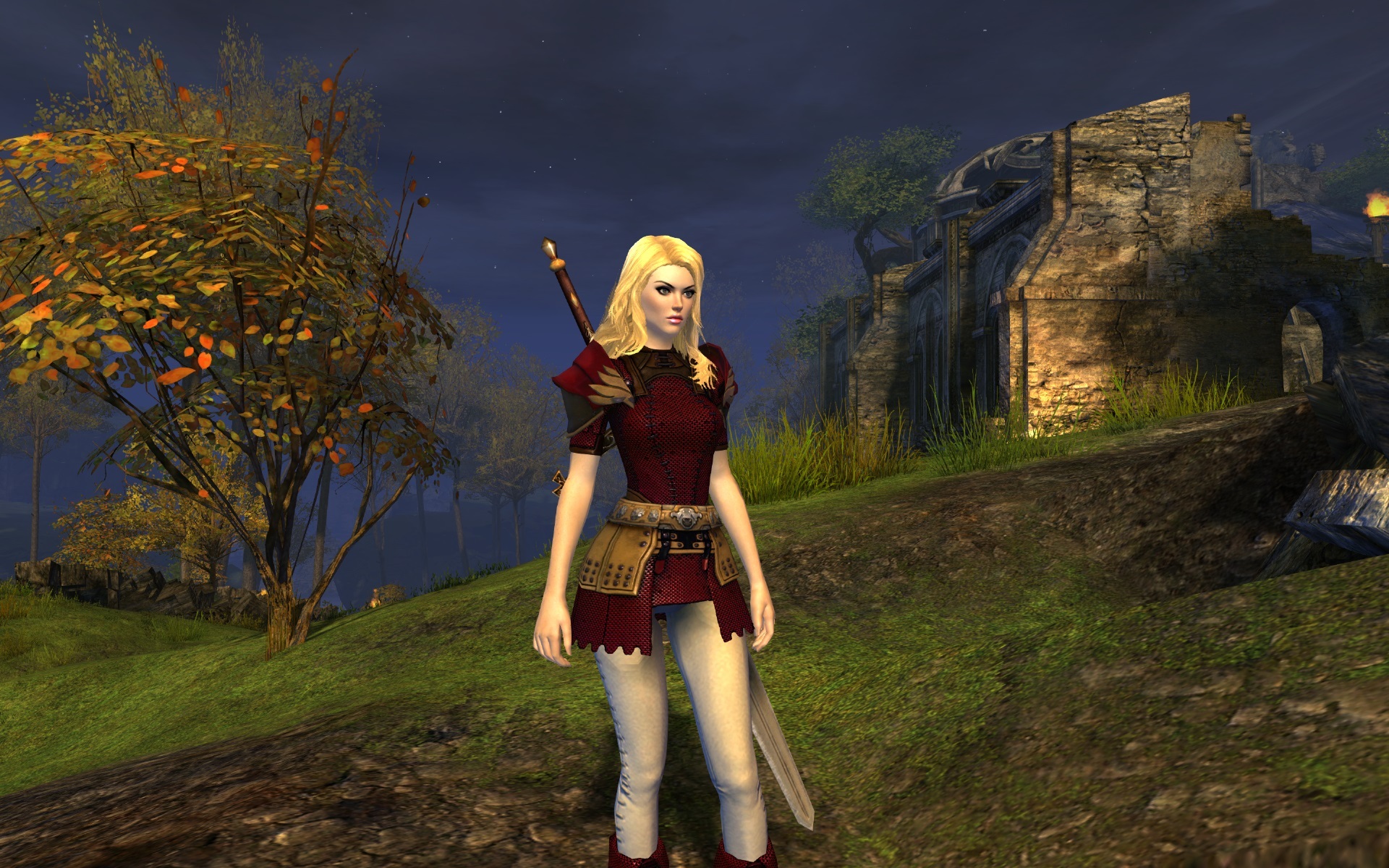
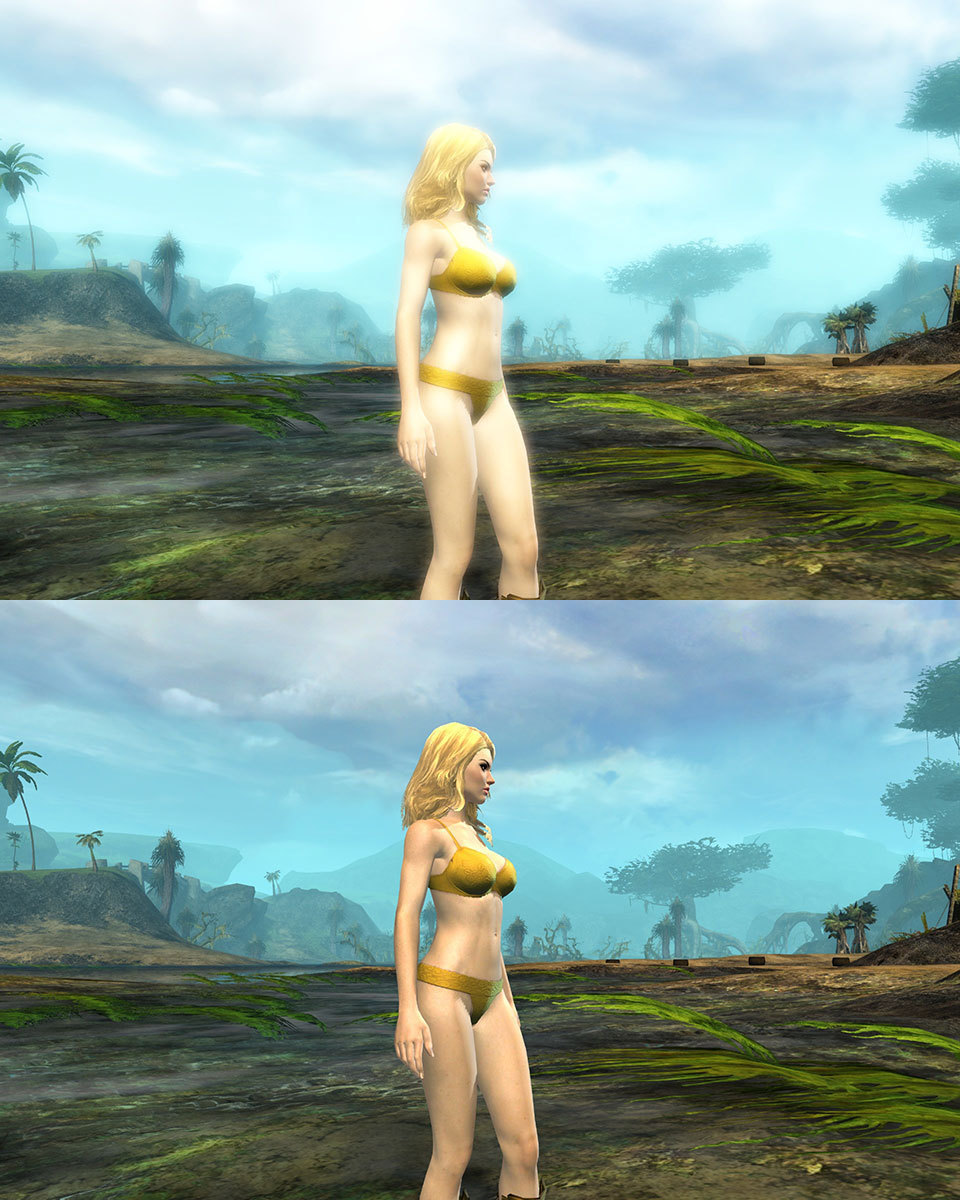
GW2 graphics and colors look great at the character select screen and during character creation. But then looks too hazy and washed out when playing in the game world. The problem is caused by excessive use of the bloom effect in post-processing. This problem is especially noticeable on light colored characters because there is more bloom effect on light colored objects.
Simply compare the way characters look when at the character select screen vs when in the game world, and it’s easy to see the huge difference.
We would like to see the GW2 graphics and colors look more clear, higher contrast, and vibrant like back in GW1.
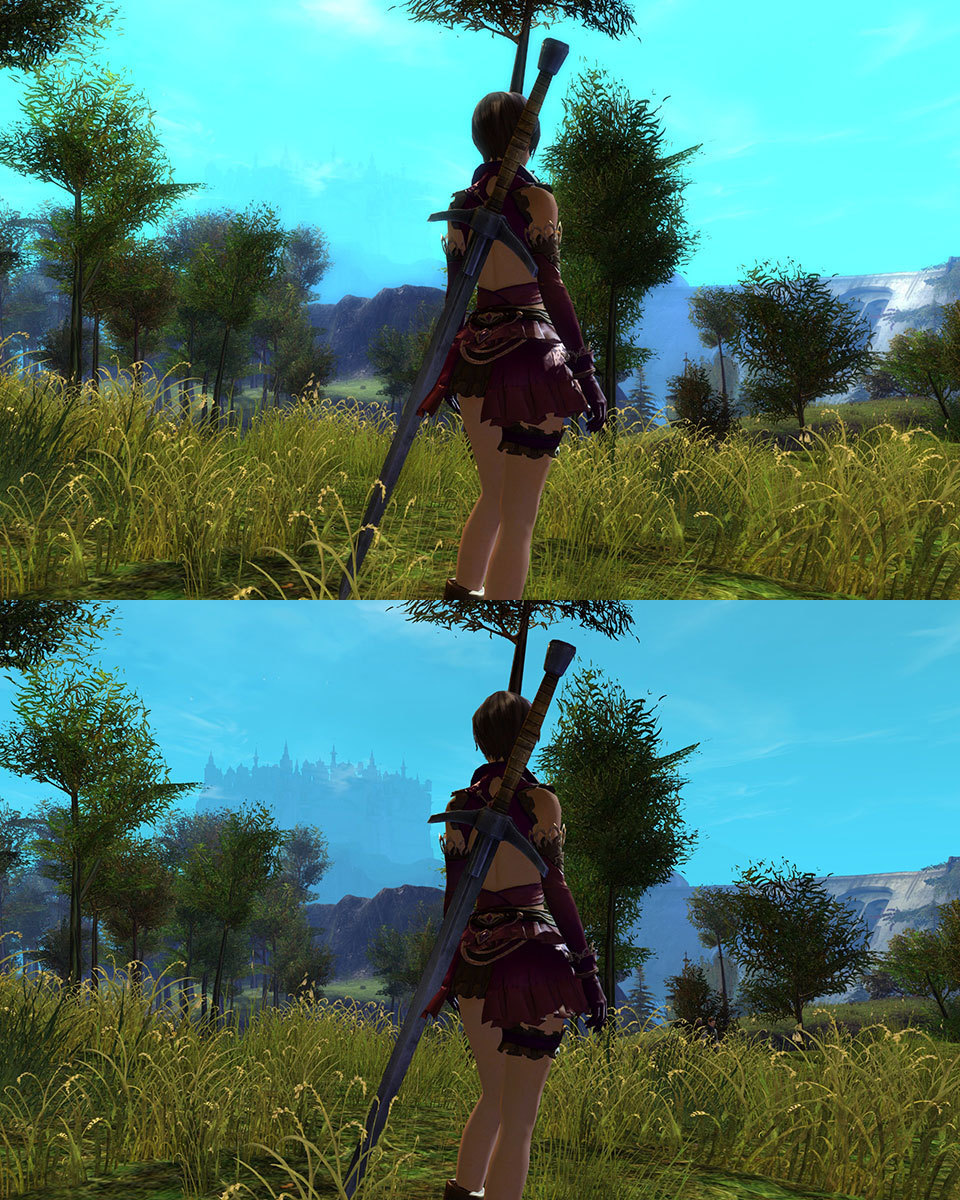
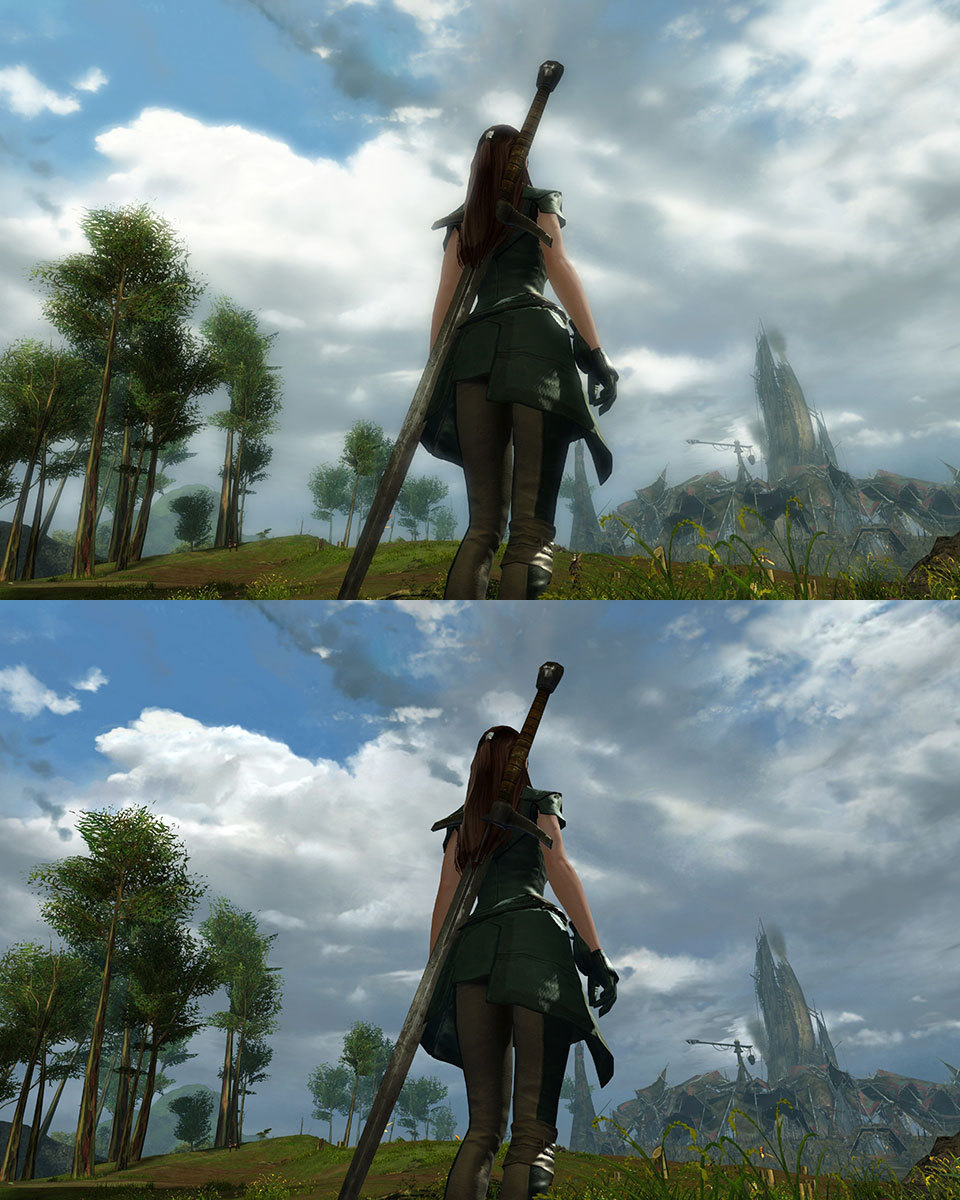
Please add option for us to adjust or turn off the BLOOM EFFECT for post-processing. The bloom effect is currently too intense and makes the game look hazy and blurry. It would be best if we can adjust or turn off bloom effect independently of other post-processing effects that are actually desirable.
NOTE: I’m already using the highest graphics settings via “best appearance” option.
NOTE: The amount of bloom effect varies depending on the lighting of the map area. Some map areas are worse than others.
Problems…
- loss of details on bright characters
- loss of distant background scenery
- makes sky color look unnatural and neon
COMPARE [post-processing on/off]…
in Suggestions
Posted by: Bloodlust.3672
point-click for movement can work for continuous terrain. for jumping spaces, we can switch to button movement.
when sliders have numbers, it also makes it easier to take notes or talk to others about what slider amount is used. or to keep settings identical across multiple systems.
in Suggestions
Posted by: Bloodlust.3672
we were able to zoom closer back in GW1
when i click “subscribe” nothing happens.
Please add an option to make top right windows buttons always show [like in Guild Wars 1]. This is more convenient for switching in and out of windows mode, and for multitasking.
I just can’t stand the corny writing/dialog in this game. And it gets especially annoying when we have to hear them over and over. I much prefer the wordless audio style like back in GW1.
Please add an option to turn off random chat audio for NPCs and our characters. So we don’t have to listen to them when we’re standing in town or in combat. Although voice sounds like mmms, hmms and combat grunts, moans, etc are OK—just please let us have option for no spoken words!
(edited by Bloodlust.3672)
Not affiliated with ArenaNet or NCSOFT. No support is provided.
All assets, page layout, visual style belong to ArenaNet and are used solely to replicate the original design and preserve the original look and feel.
Contact /u/e-scrape-artist on reddit if you encounter a bug.