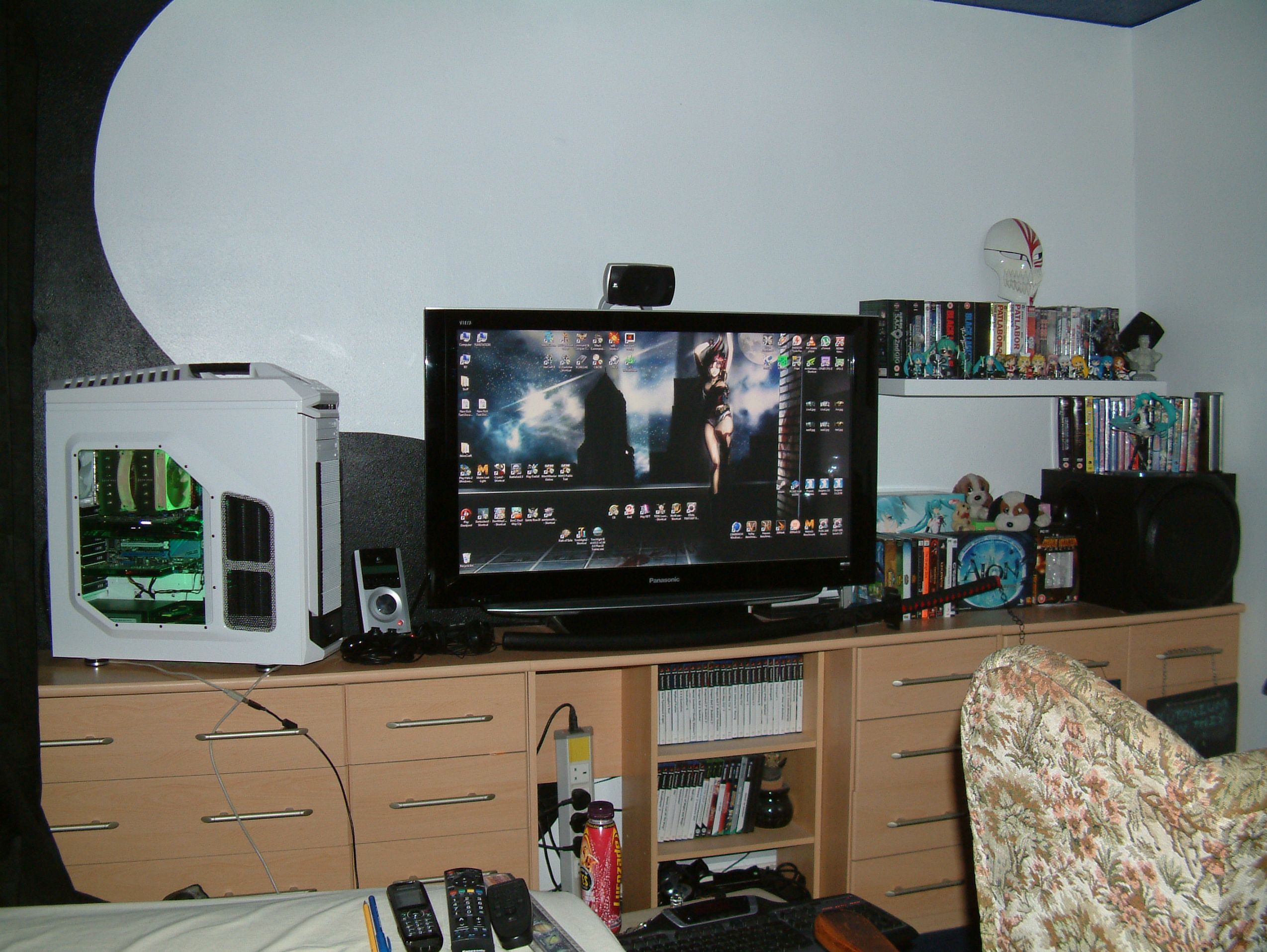
EVGA GTX 780 Classified w/ EK block | XSPC D5 Photon 270 Res/Pump | NexXxos Monsta 240 Rad
CM Storm Stryker case | Seasonic 1000W PSU | Asux Xonar D2X & Logitech Z5500 Sound system |
I will point out that u will need to get in contact with the company u buy from if ur getting a prebuilt rig. Ask them specifically what PSU is in the computer, a lot of the time pre built rigs will have a very low end cheap PSU, which is not recommended. Just stating its a 450w is not enough, u need to know the brand, the available power connectors, and the Rail design (Single or Dual, and what amperage on each rail).
If your friend is a PC gamer it would be in his best interest to build the PC himself, if he doesn’t know how he should learn. Using a computer and not knowing how one works is just asking for trouble.
£600 is very tight for a gaming rig that needs to handle High-Ultra in games, I would suggest more in the £800 range at least.
Places I suggest to buy parts within the UK:
Novatech.co.uk
Scan.co.uk
Dabs.com
Overclockers.co.uk
Aria.co.uk
Also check Amazon and Ebay as some Large stores also have a Amazon / Ebay account store that can have cheaper prices (like Scan for example).
Aria has some nice prebuilt rigs made by themselves, however the good ones start at about £1000, BUT they are not overpriced, ur paying maybe £60 over the top of the actual individual parts cost for them to build , overclock, test, and guaranty it. (last time I checked that is). For example : http://www.aria.co.uk/Systems/Gaming+Range/Award-winning+Gaming+PCs/Gladiator+Punisher+7870+LE+i5-3570K+4.30GHz+LAN+OC+Gaming+PC+?productId=55342
Ashley Segovia
The (k) on Intel CPU’s does NOT indicate it has Turbo Boost, it indicates it has a ‘fully’ unlocked multiplier to allow user Overclocking. Turbo boost is available on nearly all current Intel and AMD CPU’s and is HIGHLEY unlikely to cause the CPU be unstable.
Additionally, in most cases Turbo boost will actually DECREASE the frequency as more load is put on the CPU, not increase it. I.E 4 core CPU with 1 core fully loaded will run at say 3.5ghz, but as more cores get used Turbo Boost will LOWER the clock rate down to say 3.2ghz. Since GW2 uses more than 1 core, the CPU is likely running near or at its lowest base clock.
The FX 4170 runs at 4.3ghz , that is until 2 or more cores are in use, then it runs at 4.2.
(edited by SolarNova.1052)
Indeed, the 212Evo is a brilliant price : performance cooler, something I would recommend people use even on a stock CPU, its quieter and will run cooler, and considering you have now saved money, the small price tag on it is worth it.
Again, software like games will NOT ‘directly’ cause hardware to overheat, no matter how many patches. The game access the GPU through the API* (DirectX9 in this case) it does not ‘directly’ control the card in any way. The only way it can cause higher heat is through higher usage, in which case it is NOT the game at fault if the hardware starts overheating, that’s a hardware issue….the card itself cannot handle running at high load…which it should be able to do if it was in full working order. Ether that or you have VERY bad case airflow.
*application programming interfaces
Does the card have a single fan off-centre ? if so its likely a Nvidia default cooler, meaning its a blower style, u wont be able to see where the dust actually builds up unless u remove the plastic shroud and can se ALL the heatsink. As som1 else pointed out, it wont void the warrenty, EVGA are Very good with this, that u can do what everu like with the card so long as it is returned the way it was (minus the fault), u could even liquid nitrogen cool this thing, bench the hell out of it, ruin the GPU from overstressing and send it back and get an RMA (atleast u can with their Top cards (Classified and KingPin editions)). EVGA rock
i.e like this. (the picture u gave is a little blurry but if the Part Number is 02G-P4-2662-KR which I think I can make out, then it is indeed a blower style and the shroud would likely be concealing dust.
See this : http://www.youtube.com/watch?v=74DLrJSE3BI
If dust isn’t the issue and replacing the TIM doesn’t help….. RMA.
(edited by SolarNova.1052)
This is likely a simple hardware issue.
Since its EVGA u need not worry about warranty, they have THE BEST warranty and RMA service of all computer component manufactures.
So…
Take the card out, remove the shroud, remove the heat sink and fan, complexly disassemble the cooling system basically. Then clean it out (there may be hidden dust, special if its a blower type cooler, not so much if its EVGA’s ACX cooler).
hen remove the TIM on the GPU and clean the GPU itself, then re apply some new TIM and re-assemble and attached the cooler, making sure to remember to plug the fan control cable back into the card.
Test it out, if it still overheats, contact EVGA for RMA.
As to ‘why’ its started recently, its likely that ether its always been running hot and only recently has it degraded to the point where its hitting a hard shutdown temperature (100c), or it was running perfectly fine and cool before and has recently developed a fault. What ever the reason just remember that no game can directly cause a card to overheat, it can only do so indirectly via GPU load, and even then it still points to a hardware fault as all graphics cards are designed to keep within operating temperatures when at full load. The only software that can cause overheating is fan control and voltage control software.
(edited by SolarNova.1052)
Only LGA 2011 (X79) can do x16 x16, most else runs x8 x8 .
Once u got 3 cards most run x8 x4 x4, LGA 2011 runs x16 x8 x8
And 4 (which really inst worth it scaling wise), is x4 x4 x4 x4, LGA 2011 runs at x8 x8 x8 x8
So above 2 cards, u should really run a X79 platform otherwise PCI-E lane bandwidth becomes an issue.
Nope that wont do it ether ..better scrap it :P
in Account & Technical Support
Posted by: SolarNova.1052
Yea. .but u know ..Necro + Troll ..its better than just Troll to some :P
Robert ..tug on the line as u real in, makes it look more tempting, more likely to bite :P
The 1st one if u HAVE to choose… but tbh ,, build a desktop, ull get more bang for ur buck.
Once u get into proper WvW zergs u will see sub 30 FPS.
its totally normal. GW2 is bad thread optimisation, its main rendering thread is on 1 core/thread and will max it out, lowering all other threads performance on the CPU and thus the FPS.
http://pcpartpicker.com/p/2KlGY
This is roughly $950.
It does NOT include a monitor, I find VDU’s to be a personal choice, look at them in store, test them see which one looks ok to you. I for one could buy a monitor based on stats and reviews and find I cant stand the ghosting effect u can get on slower screens, or those that have bad viewing angles like a lot of TN panel based screens have. So I never tend to suggest a specific monitor.
It also does not include the OS, or kitten.
The CPU cooler is a AIO water cooler due to the rig being designed for portability. You don’t want a big tower heat sink bouncing around during transport possibly busting your motherboard. You other choice is to buy a mid range air cooler like the ‘Cm 212 Evo’ which wont be as good with cooling but plenty for a moderate overclock, ull just have to make sure to remove it before you think about transporting the rig.
A final note on the case. Bitfenix do 3 ITX cases all relatively the same size, so any are fine, though I do recommend the black ones as the front has better airflow as its perforated, the white models have a solid front for better ‘looks’ and thus more restricted airflow.
The 3 cases are:
Prodigy M / Phenom M / Colossus Micro
All the above builds seem solid.
For a GW2 gaming rig u definably want a 4670k or 3570k with appropriate Z series motherboard. You will also want a aftermarket cooler so u can get some kind of Overclock going as GW2 benefits from that.
GPU wise, for GW2, any low-mid level ‘gaming’ GPU will suffice. So a 7870/260x/660ti/760 something along those lines.
If u need parts outside those that are inside the case, like a monitor, keyboard mouse speakers etc ..then $1000 is a tight budget.
Its easy to build a good gaming rig for $1000 that is capable of running GW2 to pretty much the best that can be done atm, but I for one always leave out the cost of the OS, its software so check the internet.
While an SSD is something no1 ever goes back on once they have experienced using one, its not something that actually increases in-game performance, so if ur budget is tight, don’t get one right away… just deal with longer loading times and spend your money more wisely on the core components.
finally the PSU, hardware is getting more power efficient, so if ur going to stick with a single card rig for the life of the core (socket type), then a 500w will do and allow room for overclocks and if u ever want to replace the GPU u get now for a higher end one in the future.
EDIT: oh do think if ur ever going to want to take ur PC with u if u ever need to move out (like to University), if so u will want to build a Lan gaming rig based on a M-ITX or M-ATX motherboard and case so its size is portable enough for the move and uses up less space.
(edited by SolarNova.1052)
Always ignore those emails. I get them all the time from Blizzard for WoW, Diablo, StarCraft… from Anet for GW2, from other gaming devs for games like Everquest, yet most of those games i don’t play.
If u get an email like that, NEVER follow the given links, simply log onto ur account how u normal would to check its status, if its normal then you know the email is fake.
Welcome to GW2 :P
Anet’s tech support department is woefully below standard. Even this forum barely gets any attention by the Anet employees, and when they do post its inevitably a cut and paste job and or has generic trouble shooting steps that don’t help.
Before sending it back i would advise a system format to make sure its not a driver issue. If u change GPU’s without making sure all prior drivers are gone there can be left overs that cause issues with the new installation. This is why i always formate my OS after a major hardware upgrade like the GPU.
On a Sandybridge , above 4.3ghz will stll give improvments. A 2500k at 4.7ghz is roughly a 4670k at 4.5ghz.
From what iv seen of others having this issues, its usualy a software thing. Usualy drivers.
Overclock the 2500k to 4.5ghz-5ghz ( pritty easy to hit 5ghz with the 2500k) so long as u have a good cooler.
That will net you more FPS than getting a new GPU. UNLESS u specificaly see your GPU usuage max out.
Resolution doesnt make much difference in performance in regard to the CPU in GW2. I run at 3200×1800 already and have comparable FPS to those with simular CPU grunt running at 1080p or 1440p.
However for other games, yea a single 780 will struggle, specially at max settings. With that said it will still look better than 1080p even if i have to lower a few settings.
Also AA will be off or at a low level i.e 2xMSAA.
VRAM wont be an issue unless ur running modded games, even Crysis 3 doesnt break 3gb VRAM unless u run 4xMSAA (even then it only just breaks it), which u really dont need to do.
Got my loop filled and going now, im just leak testing and bleeding the microbubbles out now. I think though im going to have to remount the custom L bracket i made for the D5 Photon res/pump becouse its causing my case to hum, even though i used 5mm plastic spacers, ill use some dense foam instead. Its just gunna be a PITA to do whilst the Photon 270 full of water :P .
Update:
Everything is back together and running
after startup GPU was idling at 20c, after 30 minutes of constant Unigine Valley loops at max GPU usuage temps toped out at 46c. This is with the stock 780 Classified LN2 bios on max 1.2v overvolt with 1241mhz on the core and 7200mhz efective RAM. Going to get a custom BIOS and download the voltage tuner to get 1.3v maybe even 1.35v (max) and see if i can get somewhere around 1350mhz. Fans are oly at 850-900 RPM on the rad, and the pump is on minimum (1 of 5 speeds), so i got room to reduce temps some more if i increase the pump speed and fan speeds.
Will post pics tomorrow, though again, its nothing special to look at imo.
(edited by SolarNova.1052)
Visual artifacts like that are regularly connected to a failing grpahics cards, be wary. It might be an idea to keep some money in ur back pocket for the immediate future just incase it decides to fail entirely.
@OP: Take ur graphics out ur rig, and take it apart (dont worry its easy), replace the TIM (thermal paste) and dismantle the plastic shroud,heatsink and fan so u can clearly see the whole heatsink, you will likely find a layer of stuck dust that you will have to peal of. GPU cooler designs that suck air in and force it through the card and out the back are very prone to getting dust caught in places u cant clean out unless u take it part.
In the event there is no dust, replacing the TIM on such an old card with newer modern TIM will likely increase its ability to cool anyway so its still worth it.
Try switching to 64bit OS, though if ur only runing 3gb of RAM, that also isnt helping.
in Account & Technical Support
Posted by: SolarNova.1052
If you got the money to buy a 270x, dont. Save a litle more and swap to a Intel i5 3570k + Motherboard.
Btw, having reflections on ‘All’ is a bad life choice :P, it hammers FPS due to the underground(and thus not viewable) reflections being rendered (this happens wiwhen set to ‘Terrain & Sky’ also but as its a lower setting the performance hit isnt nearly as much). Set Reflections to ‘Terrain & Sky’.
The 760 is the faster card so i would go for that if it were my choice. However both cards are enough for GW2 to be played pritty much maxed out. GW2 is CPU bound anyway so in places like WvW and other buys events and area’s, the FPS will drop not becouse of the GPU, but becouse the GW2 engine cant fully utilize the CPU in an efficient manner.
For other games the 760 and the 270x are both good upper entry levels gaming cards so u should do well with settings and FPS figures in other games. That said it wont be able to handle fully maxed details (including AA) @ 1080p with desirable FPS (60) on some games. It may however be able to handle max or almost max settings at sub 1080p resolutions and reduced or no AA and keep reasonable FPS figures (50+).
A quick google search ‘r9 270x vs GTX 760’ will give u an idea of what to expect, check some of the vids for actual gameplay.
Check your FPS, if its super high i could be coil whine.
If none of the above, consider RMA. Contact the manufaturer directly, show them a vid or a sound recording of YOUR noise and see what they say.
(edited by SolarNova.1052)
For around £25 u can get a good aftermarket one for stock & small OC’s. I.E the Coolermaster 212 Evo. IMO for the price, even if ur not going to OC, its worth it, as the stock coolers are crap on the hot running Haswell CPU’s.
I dont do wireless, i have a ‘wired’ G15 Logitech keyboard, and a ‘wired’ MadCatz R.A.T 7 MMO mouse with G.L.I.D.E 7 pad. I would like to get a mechanical keyboard, but i just love the LCD screen on my current keyboard so i wont be getting a new one till a mechanical keyboard comes out with a LCD screen.
Due to the distance between my chair/where i sit, and where my computer is, when i have tried wireless in the past (many many years back) the signal would be crap, its likely much better nowerdays, but i have no issue what so ever with wired perfierals so i stick with them.
As for my chair, yea is nice dont get me wrong, but its very old now, it was my great grandfathers chair, its in desperate need of replacment. Anything with the same style and/or size however is rather pricey so i wont be getting one till im done with my rig, so likely in another year or so.
Im planing on buying a 4k monitor somtime around March hopefully (Asus 39" model in all likelihood) and then i need to save to add my CPU into the water loop which will require a second rad up top 240×40 size and the block.
Technicaly it is in push/pull/pull, as the rear case fan is pulling air out inline with where the cooler is.
It never got stickied becouse anything like that, that gets sticked would need Anets ratification, and they wont ratify it as it would technicaly be admitting to certain performance issues that are pointed out within said post, and go against their offical system requirments.
Aye ill post pics when im done, though it wont be anything special, iv gone with white opaque piping, and standard distilled water. The color will eventually come from some blue (top) and white (bottom) LED’s ill add inside the case, but until i get around to buying them ill be sticking with the Green LED strip i curently have which ,IMO, is to bright as it washes out the entire inside with green :P.
The res will have the stock white LED for the glow stick within it. The fittings are Monsoon Blue fittings.
The CPU area will still be dwarfed by the NH-D14 cooler and Noctua fans.
I will however have the PSU and all the wires at the bottom along with the D5 pump, thats connected to the tube res, completly covered by a pair of Cooler Master PSU covers sprayed white.
If ur interested in what my rig looked like prior to me dismantling it for this upgrade then attached is the only real shot i have of it atm. It doesnt have the PSU covers in on that pic and iv re managed the wires u can see going along the bottom of the motherboard.
Back on topic. I see no reason not to force on PCI-e 3.0 if u can do it, i personaly have just never got around to doing it as the performance increase for me wouldnt likely be much to speak about, that said, an incease is an increase none the less
As for a all in one thread, a user from back when i first started helping on this forum made a good thread for troubleshooting problems and other general advice and guidence.
https://forum-en.gw2archive.eu/forum/support/tech/FPS-GPU-CPU-Performance-issues-FAQ/first#post542540.
I dont think Kirito is very active in the tech forum anymore, so maybe who ever takes up the task could use his thread as a template or for some info to put into a new one.
(edited by SolarNova.1052)
Becouse i run a LGA 2011 rig like urself Coffee, my board is physicaly capable of running PCIe3.0 but only runs at 2.0, apparently becouse of some time constraints befor launch to get it legitably certified. Even so it can be patched and forced to 3.0.
I have never bothered to do so as most online tests have shown little to no change in FPS unless ur actualy at the limit of PCI-e 2.0 x16 bandwidth capabilities, which from what i last heared isnt an issue with single GPU setups.
I may however give it a go within the next couple of weeks, if i do ill make sure to update this post on any changes..atm though im concentrating on finishing of my GPU water loop(PC is in pieces atm, always fun/frustrating trying to install/mod things into places their not meant to go :P – typing from laptop), OC the GPU some more, and then re doing my CPU overclock (may try getting 4.7ghz (CPU is still on air) if i can keep voltage around 1.4v)
(edited by SolarNova.1052)
OP, its normal ..and what Sirsquishy said is correct.
Perfectly normal im affraid. The only way one gets higher Zerg v Zerg fps is by verclocking their CPU. Since ur running a laptop thats is usualy impossible and always unwise.
GW2 isnt a very optimised game when it comes to dealing with large numbers of people in one place. Even top end desktops have to suffer the obismaly low fps, usualy around 20.
If u want a portable desktops, build an mITX or mATX build around a intel i5 and a Asus ITX board like a P8Z77-i Deluxe, inside a case like the Bitfenix Prodigy. Obviosly with a small water cooler likethe H80 so u dont have to worry about a large CPU heatsink bouncing around inside possibly busting ur motherboard during travel.
A AMD APU system can be smaller but they are more suited to HTPC’s or very low end gaming systems (which would not run GW2 very well)
Try downsampling.
Add a custom resolution higher than ur native resolution to ur GPU control panel. Then run GW2 at said resolution.
I personaly have FXAA off in GW2, and run at 3200×1800 downsampled + Gw2’s SuperSampling, on a 1920×1080 native screen.
While i love my rig, i would never recommend to some one to buy a 3930k (~$570) or even the newer 4930k(~$580) for pure gaming unless u have the money to go crazy and want a little extra ‘future resistance’ within ur rig. The highest CPU i sugest u get is a i7 4770k(~$340), however in ‘most’ casses a i5 4670k(~$240) would be fine.
As for GPU, the 780 classified (~$600) i got is, again, waaaay overkill for GW2, u would do fine on max settings with half as much power, somthing like a 660ti/760 (~$280).
I have to downsample at 3200×1800 with supersampling on just to get into the 90% usuage range… its a monster GPU. Its more suited to a game like Crysis 3 were it easily maxes out its usuage to manage ~45fps on Max settings 4xAA and could use a second 780 for help to keep FPS at 60, rather than a game like GW2 where wihtout downsampling, i.e running at 1920×1080, it would barely break 70% usuage at the most.
*All prices based on a quick newegg search
If ur positive u could sell on the X9650 quikly and without loosing anything, then yes ok go for it, u should see an imporvment going from 2 to 4 cores, however it wont be anywhere near the improvment a new i5 or i7 would give u.
Not worth changing an Old CPU for another Old CPU.
The C2D and C2Q series are dead and buried, the ‘i’ series is current and is on its 4th itteration/generation now. You want at least a 2nd generation or newer ‘i’ series. 1st to 2nd generation was a siginificant change, however 2 to 3 to 4 hasnt been much change at all so any of those will do.
That means a Z77 (LGA 1155) motherboard with a i5 2500K/2550K or 3570k.
or Z87 (LGA 1150) motherboard with a i5 4670k.
If ur using DDR2 RAM ull need new DDR3 RAM for the new motherboard, at which point u mightswell get 8 GB(2×4), as 4GB is starting to not be enough nowerdays.
Unfortunatly ur at the point where upgrades for ur core system are not really an option anymore.
(edited by SolarNova.1052)
Under Prime95 I top out at 80c. (1.38v) (1250 RPM on fans)
Almost Idle as I type this at 35c (500 RPM on fans)
Fans silent at both speeds.
YMMV due to other factors i.e ambient temp, case airflow, silicon lottery.
EDIT: on my previous post I meant character Model ‘QUALITY’: medium ..not ‘Limit’, u can have that on High or Highest.
(edited by SolarNova.1052)
My CPU is clocked higher and I have a faster GPU, but since GW2 isn’t particularly GPU bound the only real difference is 400mhz on the CPU. You should at least try get 4.5ghz on the 3930k, the CPU itself is capable of 5ghz-5.2ghz if u have custom liquid cooling, and up to 4.6ghz, depending on the voltage required (up to 1.4v), on top end air cooling.
Change ur culling settings to Character Model Quality: Medium.
Every thing else except Reflections can be max / turned on.
With that u should not drop below 30 FPs in LA at any point, averaging 45-60 most of the time in LA. In WvW u can expect as low as 20 FPS, u may even need to to change character Model Quality to Low to keep it above 20 FPS in really massive zergs. This is going by a 4.6ghz clocked CPU, 4.2ghz u could maybe loose ~5 FPS at a guestimate.
The attached pic I took during the latest Halloween event, during such events FPS is generally lower than normal.
(edited by SolarNova.1052)
@ Sirsquishy.
Ill be honest, im new to custom loops, iv only recently learned enough to make one myself and to talk about it in general, but I could not in good conscious give advice out specific to custom loops that I can say for certain is 100% correct in all situations.
From my own research and understanding however, flow rate although it does affect performance, is not as big a factor as the performance of the Blocks and the surface area of the rads you have.
A single D5 vario pump is usually the all around suggested pump as it can handle pritty much anything u can throw at it and only needs be at setting 2/5 for a CPU +1 GPU loop.
At minimum for good OC’s I tend to find that people suggest at least 480mms of rads for a single GPU and a CPU that are at least 40mm thick (2x 240mm or 1x 360mm + 1x 120mm rads). Preferably, if u can only fit 240’s, you want at least one of them to be a 60mm or 80mm thick rad.
Fin density is also a factor, the more density the faster the fans need to be and thus more loud they are, however they perform better. The lower density rads don’t perform as well but don’t require fast fans and so things stay quiet.
That said, u can get he best of both worlds by running a 80mm thick rad in push pull with slow fan speeds, obviously performance could be better with fast fans in push pull BUT, it at least gives u the choice between Great quiet performance or Uber loud performance. However a 80mm thick rad + 50mm of fan s (25m x2) is ALOT of space to find.
Speaking of fans, Static Pressure is much more important than AirFlow rate… ur pushing/sucking air through rads, so u need higher pressure.
A few other small pointers; make sure to get piping designed for PC water cooling, all piping is not the same, a lot of genera purpose rubber/plastic piping can contain chemicals within the material itself that can leach out of the plastic and cause contamination of the water.
Also, if u have dyed water, u will have to flush the system every 6 months or so as ‘goop’ can build up in the system caused by some dyes. There is some discussion as to whether this is caused by the dye or just a biological build up due to lack of biocide/kill coil that happens to get dyed by the water. I just decided to buy opaque coloured tubing and use simple clear distilled water + biocide, my reservoir happens to have a LED hole connected to an internal frosted tube going through the centre than I can use to make the water glow the colour I want. (XSPC Photon)
GPU water blocks: make sure it has good VRM cooling as well, some cheaper/worse designed blocks sometimes neglect them.
Try not to mix metals, mixing metals will eventually lead to water contamination and corrosion due to each metal reacting to another. Stick with Copper alone or Copper + Nickel.
Erm ..cant think of anything else atm.
As I said at the start, don’t take my word as being 100% correct, im by no means experienced enough with custom loops for that yet :P
EDIT: if u don’t want to go full custom, u can buy universal GPU closed loop coolers, but they don’t cool the VRM’s and are infact hybrid units with a fan + little Heatsinks for the VRM and RAM that need permanently gluing + a universal water block for the GPU itself. They are better than air coolers but not as good as full custom ..same as AIO cpu coolers basically.
(edited by SolarNova.1052)
Go to Overclock.net
They have great OC guides.
I agree with what Squishy said
The NH-D14 is the king of air coolers and is fine for a good OC. The D14 can beat low end and mid tear AIO water coolers, if u do want to go water cooling then a H100 or higher is what u would have to look at to get better results than the D14.
I run a D14 myself and it can handle all the way up to 1.4v on the 3930k, which will usually result in 4.6 or 4.7ghz clock speeds and temps that peak at around 80c.
By the time im ready to replace that cooler to go for higher OC’s ill being skipping AIO water coolers and just buying the second half(have GPU half already) of my custom water loop, as i don’t feel that a AIO water cooler will give me any significant OC potential over a D14.
in Account & Technical Support
Posted by: SolarNova.1052
Aye, I would not get a screen bigger than say.. Asus’s 31.5" screen if ur at a desk for example. However if ur setup is similar to a front room TV experience, then its fine to go BIG
$800 for TN is to much imo.
VA, fine.
IPS even better
PLS better still
BUT… IPS and PLS are no good for gaming imo, to much blurring/ghosting. Even some VA panels can suffer from ghosting, which I cant stand, im just hoping that the VA panel Asus use on the 39" 4k screen is fast.
in Account & Technical Support
Posted by: SolarNova.1052
ooh a 120hz 1440p monitor with G-Sync ..that’s ..impressive. That would be tempting for me if it weren’t for its small size. (remembering im using a 42" atm). looking forward to Asus 39" 4k Monitor ..hopefully with G-Sync.
OP do remember that GW2 has known performance issues in busy areas, so don’t be surprised by poor performance, though you should already have experienced that.
3D vision pretty much doubles the required GPU grunt, so if ur running GW2 ok now around the 50% or less GPU usage mark, 3D vision should show no FPS reduction from that standpoint.
Its normal for i5’s.
GW2 usage
i5 4cores 4 threads = 75-100%
i7 4 core 8 threads = 40 – 90%
i7-E 6 core 12 threads = 25 – 60%
So I just built a new Computer …….. guild wars
CPU: AMD FX – 8350 (8 CPUs) , ~ 4.0 GHz
……
There’s ur problem.
GW2 is incredibly CPU bound and badly optimised, it needs high single thread performance, AMD CPU’s don’t have great single thread performance. That said even an Intel rig with its much better single thread performance wont do much better and that’s just down to GW2.
If u were building a rig just for GW2, u should have asked here for advice, we all would have advised getting an intel i5 or i7 for best results. It still wouldn’t stay pegged at 60 FPS in all situations but it would be better than an AMD cpu.
keep setting at max EXCEPT reflections. Put that to terrain and sky. Then Set culling to Highest Character limit and Medium texture.
WvW, large Dynamic Events, and LA will still have bad FPS, but PvE should be ok.
(edited by SolarNova.1052)
waves
Theres about a 200mhz performance advantage to Haswell over Sandy. So my 4.6ghz OC is roughy equal to a 4.4ghz Haswell .. Clock for Clock.
You then take into account that a i7(4770k) 4c8t has a ‘very’ slight performance advantage in GW2 vs a i5 (4670k) 4c4t and add it the same advantage to the 3930k due to 6c12t…..
All in all it would be hard to tell in game the differnece between a 4.5ghz i5 4670k and a 4.6ghz i7 3930k, with each one finding situations were they beat one another.
Throw a 4770k i7 into the mix at 4.5ghz and i would expect it to beat a 3930k at 4.6ghz in GW2 as it no longer has the core and thread limitation of the i5.
The problem arrises when u try to get a haswel to OC that high on a resonably priced cooler. A sandybridge 2500k/2550k/2600k/2700k wouldnt have any problems hitting 4.6ghz with a mid range ar cooler. A Haswell on the other hand would requir a top end air cooler at the very least to have a chance at being temperature stable at 4.5ghz.
OP. You will want around a $1000 budget for a i5 build with a good GPU, or a i7 build with a lower end GPU. So long as u set ur GFX settings up according to the grunt u have available and set Culling to High or Highest on character limit and medium or low on texture limit, u should maintain around 20-25 fps ‘minimum’ figures in zergs, though possibly lower in very extreme situations.
EDIT: One last thing to mention, unless proved otherwise, as far as i know the single thread performance charts linkd in posts above have the clock speeds shown. The 3930k apparently was at 3.2ghz whilst the 4670k was at 3.4ghz. Though those may simply be the ‘title names’ of the CPU as advertised and infact they may have been runnign at the turbo speed. In which case its 3.8ghz for the 3930k and 3.8ghz again for the 4670k.
If u look at the scores between identical processor/architecture but different clocks, like the 2600k vs 2700k, the 3570k and 3770k etc, they have 100mhz in difference and all seem to have roughly 70 points between them. So u can work out roughly what the 3930k would score at the same clock as the 4670k. Its not a perfect theory but its close enough without actually doing the test itself. Its still lower than the 4670k obviosly but not as low as the list makes out.
(edited by SolarNova.1052)
Whilst I usually agree with Avelos, and visa versa …if ur ever look into AIO water coolers for the CPU, don’t get anything lower than a H100, because anything lower, like the h60 or h80 can be matched or beaten by a air cooler for less cost and be quieter with the only drawback being size.
Yes change to 64bit.
Not affiliated with ArenaNet or NCSOFT. No support is provided.
All assets, page layout, visual style belong to ArenaNet and are used solely to replicate the original design and preserve the original look and feel.
Contact /u/e-scrape-artist on reddit if you encounter a bug.