Showing Posts For Tick Tock.9602:
1 2
I have this as well though not as frequent. Only happens on the OS X side, if I Bootcamp and play it’s rock solid.
If I got a FPS increase it would be around 5FPS but the important thing is that the game runs smoother now which allowed me to turn up a couple of settings.
I haven’t had that happen to me, better log a ticket with a GM.
How about odd values? My Intel HD Graphics 3000 has 384mb VRAM. Can it handle that value? Or is it only 128, 256, 512 etc?
Install 8GB of RAM and it will go up to 512MB.
The banner says it all. Play as you have time, be respectful and have fun! No drama. Like other games/platforms? We cover that as well. See you soon!
Attachments:

(edited by Tick Tock.9602)
That’s awesome, I learned something new!
If you go into the settings and turn off the check boxes for “Mac Beta” it will work.
22-50 FPS, low end is in Lion’s Arch and the High End is out in the world best case scenario. WvW can drop in the teens in a busy fight. The overall average appears to be 30fps. These settings are using Autodetect which are attached. Bootcamp yields the same FPS BUT with Shadows and Shaders set to HIGH and Hi-Res Character Models checked, also with Environment and Textures set to HIGH. Hope this helps in some way.
Late 2011 MacBook Pro 17"
2.4Ghz i7 Quad Core
AMD 6770M 1GB
16GB 1333Mhz RAM
750GB 5400 RPM Hard Drive
Attachments:
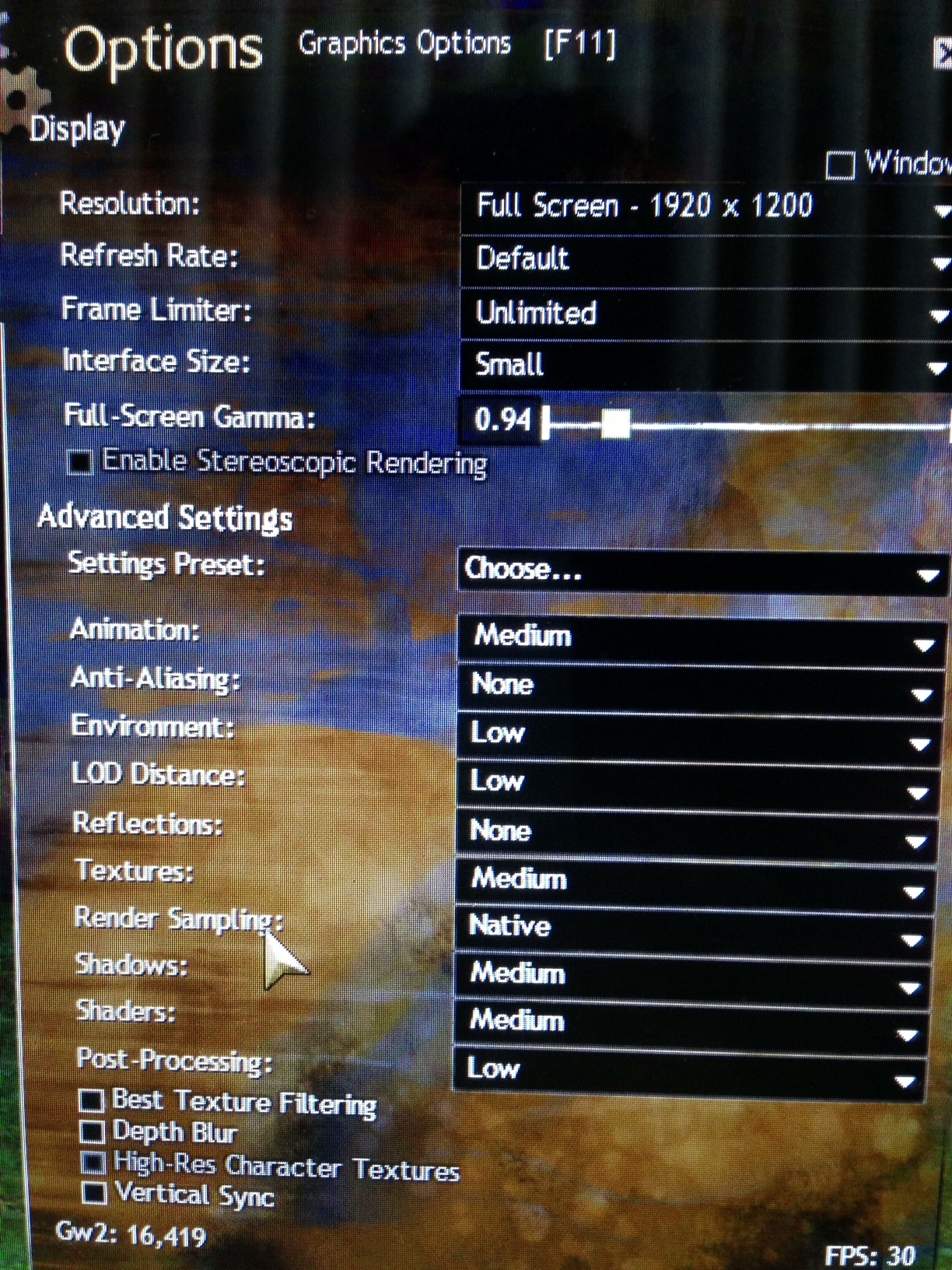
It’s important to note that moving to Mountain Lion will eventually help as 10.8.3 has updated graphics drivers in it.
Yes, compared to Lion, Mountain Lion is better, but 10.8.3 is not out yet and 10.8.1, 10.8.2 have updated graphic drivers too. (at least for NVIDIA cards)
Really, I didn’t know that. The release notes say nothing about it.
It’s important to note that moving to Mountain Lion will eventually help as 10.8.3 has updated graphics drivers in it.
Inglorious Basturds US Blackgate Recruiting! (All classes and professions)
in Guilds
Posted by: Tick Tock.9602
Great group of guys and gals! Feels like home!
1GB, Textures, etc are stored in VRAM so the more you have the better.
First, install those updates. Second, install 8GB of RAM it will bump VRAM up to 512MB.
Question: Will there ever be a native OS X version?
in Account & Technical Support
Posted by: Tick Tock.9602
I too would love a native Mac client and I REALLY hope that they build one but for the time being I’m just grateful to be able to play on OS X.
It’s exactly where the original post says on my iMac & Macbook Pro, both running 10.8.2. Remember the Library folder is hidden now.
Finder -> Go -> Hold alt/option -> Library -> Application Support -> Guild Wars 2
is where the file lives. If you don’t have one there, something’s different with your setup!
Yup just realized I was doing something wrong, I lock my privileges down a little so in my case I had to su because the files were “Hidden” lol. Carry on.
I dont have a Guild Wars 2 folder within application support. Nor could I find the directory, should I be worried about this?
I don’t have this directory either, I even looked for it in Terminal. I’m running Mountain Lion, wonder if it’s somewhere else…
I think I remember this being a known issue in the 2011 MacBook Pros… I myself experienced it under Lion but it had to be a full load. I have not experienced it in a while though.
Interesting… this is the only instance I’ve ever experienced this and I work in the MoGraph and VFX industry, so all 4 cores are constantly at work.
Just remembering something I had read, here is a link to it:
“While you can’t remove the new built-in batteries, this method of using both AC power and battery during periods of peak power demands is still applicable. This is why you may find your battery may temporarily stop charging or even drain somewhat, even though you have your AC adapter plugged in. This is working as designed and will only be used during periods of peak power demands.”
Source: http://forums.macrumors.com/showpost.php?p=9875442&postcount=23
I think it has to be a pretty extreme load, like me working in CS5 isn’t enough to do it but WoW used to display those symptoms.
I think we are all hoping this is the stepping stone for a native Mac client if the interest is high enough.
10.8.2 brings increased performance for rMBP
in Account & Technical Support
Posted by: Tick Tock.9602
I have played for about an hour tonight, I see about 5fps gained. Granted it’s still about 15-20 frames less than what I get in Bootcamp BUT it’s worth it to me to have a Mac Client. The game is playable and usually low 30fps +.
Yes getting 10.7 will help, Apple releases driver updates in . releases.
Poor Performance on Mid 2010 15" Macbook Pro
in Account & Technical Support
Posted by: Tick Tock.9602
Wow, yeah I think that’s the best you’re going to be able to do for now. Remember it’s a beta so it will get tweaked and optimized.
Guild Wars runs very poorly on the new macbook pro retina
in Account & Technical Support
Posted by: Tick Tock.9602
Update to 10.8.2, it is rumored to help a lot. I cannot confirm this myself yet as I just patched last night.
Poor Performance on Mid 2010 15" Macbook Pro
in Account & Technical Support
Posted by: Tick Tock.9602
What resolution are you running it at, even with minimum settings 1650×1050 might be a bit much. Try another native resolution (16:10) like 1440×900 or 1280×800.
I think I remember this being a known issue in the 2011 MacBook Pros… I myself experienced it under Lion but it had to be a full load. I have not experienced it in a while though.
10.8.2 brings increased performance for rMBP
in Account & Technical Support
Posted by: Tick Tock.9602
Interesting, I installed 10.8.2 last night but had not played on that version yet. I had played on my Late 2011 17" on 10.8.1 and found the frame rates acceptable, 32-37 running 1920×1200 with mostly High settings but the checkboxes turned off. I’m interested to try under the new version and see how it looks. I am very happy to have a Mac client!
Agreed, 8GB or more. I went with 16GB.
I wanna ask about the 64 -bit function, is this client running as 32 or 64?
in Account & Technical Support
Posted by: Tick Tock.9602
Curious about this as well, I have 16GB of RAM installed so it would be nice if the client would use as much as it needs.
Just adding my thanks! A native Mac Client is greatly appreciated!
1 2