Late 2012 iMac – 3.4 GHz i7 – 16 GB – GeForce GTX 680MX 2GB – OSX 10.11
Could you pls read patchnotes lol
I did and it made zero sense.. why I am asking.. the notes make assumptions and they were cryptic to casual players who dont follow every dev post, reddit AMA and stream.
Late 2012 iMac – 3.4 GHz i7 – 16 GB – GeForce GTX 680MX 2GB – OSX 10.11
Stop your wining. Change is good, even this one.
I have no problem with change, Id just like less assumptions in the patch notes when they make changes like this.. the note was wholly cryptic at best to the casual player and not easy to follow unless you have the time to follow every AMA, podcast and stream thats done (some of us don’t have that kind of time , and GW2 prides itself on being geared for the casual player.. so they dropped the ball on this) .. I eventually sorted it out by reading forum posts from other hapless souls, but it wasn’t clear at all within the scope of the game what the heck I was supposed to do .. they could have and should have done a better job making it much clearer.
Late 2012 iMac – 3.4 GHz i7 – 16 GB – GeForce GTX 680MX 2GB – OSX 10.11
So confusing .. more so for some of us who don’t fret over this sorta stuff.. thanks for the tips people have posted previously I was able to find a laurel vendor in LA who had compatible infusions for my amulet.. patch notes made a lot of assumptions and were WHOLLY UNHELPFUL for those of us who don’t craft and such and predominantly play wvw and not pve and don’t do fractals.
Late 2012 iMac – 3.4 GHz i7 – 16 GB – GeForce GTX 680MX 2GB – OSX 10.11
Where do you buy those?
Late 2012 iMac – 3.4 GHz i7 – 16 GB – GeForce GTX 680MX 2GB – OSX 10.11
Phew I saw this and thought something was seriously wrong with my Mac “beta” game client.. thanks for clarifying and fixing it.
Late 2012 iMac – 3.4 GHz i7 – 16 GB – GeForce GTX 680MX 2GB – OSX 10.11
yup same here.. crazy ping (4,000) ! .. its really bad in wvw.. people rubber banding all over the place .. massive skill lag.. etc.. was fine yesterday .. only thing impacted seems to be GW2 .. all other internet activities are fine.. even rebooted computer and all networking gear to be sure.
Late 2012 iMac – 3.4 GHz i7 – 16 GB – GeForce GTX 680MX 2GB – OSX 10.11
Hey Guys, i found a resolution to my issue – Run the 64bit client. I haven’t had issues with it for the last few hours that i played. Seems like they farked the 32bit client somehow. Guess we’ll have to wait until RNGesus is no longer praised in order to see a fix on this, but ah well, it is what it is.
Unfortunately it doesn’t work for everyone and for folks on OSX/Mac there is no 64bit client.. but thanks for sharing..
Late 2012 iMac – 3.4 GHz i7 – 16 GB – GeForce GTX 680MX 2GB – OSX 10.11
I had a crash so bad last night I couldnt even cmd-tab out of the game or do a Command-Shift-Option-Esc to terminate the front most application.. I had to actually press and hold the power button to recover my mac.
Late 2012 iMac – 3.4 GHz i7 – 16 GB – GeForce GTX 680MX 2GB – OSX 10.11
Mac client crashes so much in WvW it is functionally unplayable.. even after doing “-repair” and setting ever graphic option to low/lowest/none where applicable it still crashes up to a dozen times in a half hour (I stopped counting because I quit playing as there was just no point)
Late 2012 iMac – 3.4 GHz i7 – 16 GB – GeForce GTX 680MX 2GB – OSX 10.11
If you are on the Mac client dont even THINK about going into wvw .. crash o rama.
Late 2012 iMac – 3.4 GHz i7 – 16 GB – GeForce GTX 680MX 2GB – OSX 10.11
Ever since the HOT update the crashes have been pretty severe, but with the most recent patch 11/18 WvW has been rendered unplayable .. even after running —repair and setting every possible graphic option to low/lowest/none the crashes simply dont stop.. Not sure what if anything can be changed or set on the client side to avoid these problems but its pretty severe to the point of not actually being usable.
iMac (27-inch, Late 2012)
3.4 GHz Intel Core i7
16 GB 1600 MHz DDR3
NVIDIA GeForce GTX 680MX 2048 MB
OSX 10.11.1 (15B42)
Late 2012 iMac – 3.4 GHz i7 – 16 GB – GeForce GTX 680MX 2GB – OSX 10.11
Yup count me in as a “me too” on this issue as well..
Late 2012 iMac – 3.4 GHz i7 – 16 GB – GeForce GTX 680MX 2GB – OSX 10.11
Im getting this too and one side effect I noticed is the auto login/play no longer works.
Late 2012 iMac – 3.4 GHz i7 – 16 GB – GeForce GTX 680MX 2GB – OSX 10.11
Yep .. add me to the “its not working/broke again” club.
Late 2012 iMac – 3.4 GHz i7 – 16 GB – GeForce GTX 680MX 2GB – OSX 10.11
One thing I noticed and I will have to play with it more is the TP getting stuck or broken after a while (and apparently if you try to use it in a heavily populated area) bug seems to have gone away .. well for me at least .. every time I try to use the TP now it actually works.. no more spinning gold ring of death .. which required me to log out to desktop then back in to get it working .. so this i am really happy about .. more so now we are in WvW seasons and waiting an hour for a queue only to get that dammed TP bug was a huge pain in the behind.. as I really didnt relish the idea of having to drop out and loose my precious spot in a wvw zone just to fix the TP and have to requeue for another hour to get back in. .. so thank you aNet for fixing that .. it was a huge pain.
Late 2012 iMac – 3.4 GHz i7 – 16 GB – GeForce GTX 680MX 2GB – OSX 10.11
Worked .. thank you .. (but I had to restart the game twice)
Late 2012 iMac – 3.4 GHz i7 – 16 GB – GeForce GTX 680MX 2GB – OSX 10.11
I think a lot of these issues could be resolved (or even better prevented ahead of time) if one (or more) Anet developers were required by management to play using OSX / anet Mac client as their default and forbidden to play under Windows.
Late 2012 iMac – 3.4 GHz i7 – 16 GB – GeForce GTX 680MX 2GB – OSX 10.11
Add me to the “me too” list of having TP not working .. please fix ASAP
Thanks.!
Late 2012 iMac – 3.4 GHz i7 – 16 GB – GeForce GTX 680MX 2GB – OSX 10.11
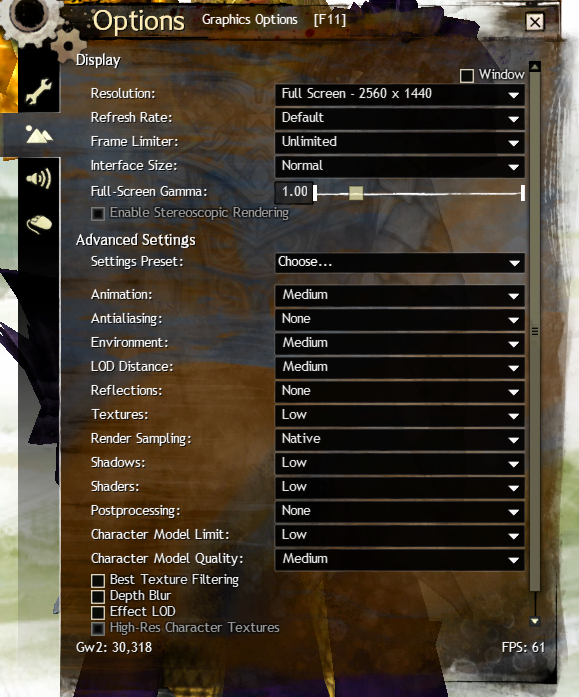
If you are getting lockedrsptbits or dtbits try setting your graphics as follows and see if you get the error .. I suspect the “bug” is in the graphics rendering engine used by GW2 .. dialing back some of the graphics will help prevent crashes.
I have been using these settings for several weeks now and no crashes.. while its disappointing that we can not use the “auto detect” settings this makes life less aggravating.
(please only use the Advanced section in the shot below , the resolution setting you will want to keep at whatever is correct for your mac)
Attachments:

Late 2012 iMac – 3.4 GHz i7 – 16 GB – GeForce GTX 680MX 2GB – OSX 10.11
Reduce your current graphic settings..
Late 2012 iMac – 3.4 GHz i7 – 16 GB – GeForce GTX 680MX 2GB – OSX 10.11
For the record since I have set these graphic settings I have not had a problem in WvW .. where (for me) the issue crops up the most.. the only downside is of course I had to shut off almost all the eye candy.
Late 2012 iMac – 3.4 GHz i7 – 16 GB – GeForce GTX 680MX 2GB – OSX 10.11
lockedRect.pBits is an old issue thats been going on for some time .. the only way I have found to keep it from happening (and this is VERY ANNOYING DURING WVW seasons with 6 HOUR borderland queues mind you, getting in after waiting an hour or more only to crash to desktop and have to requeue is a massive pain in the kitten ) is to set your graphics settings much lower than whats is suggested by auto detect.
I have a thread here about the lockedRect.pBits issue
https://forum-en.gw2archive.eu/forum/support/mac/lockedRect-pBits-CTD-error-back/first#post3737364
Late 2012 iMac – 3.4 GHz i7 – 16 GB – GeForce GTX 680MX 2GB – OSX 10.11
Wait till the flipping “seasons” start up again and you have queues to get back into the zone where your friends/guildmates are .. thats really going to be awful.
Would be nice if aNet afforded us a “grace period” where if you crashed to desktop .. say if you log back in within 5 mins you can skip a queue if there is one.
Late 2012 iMac – 3.4 GHz i7 – 16 GB – GeForce GTX 680MX 2GB – OSX 10.11
The crash issue is getting really played out.
in Account & Technical Support
Posted by: Feydiir.2609
The same happens in WvW .. it would be nice if you have a grace period to get back into a zone thats “full” with a wait queue if you crash to desktop .. it can be very frustrating to wait to get into a zone for 20 or 30 mins only to crash to desktop in 5 mins after that .. just to have to wait again another 30 mins to rejoin your friends/guildmates.
the only suggestion I can make is check my other post re the FPS issue/LockRepBits threads and see the screenshot of the graphics settings I am using.. dropping down many of them seems to mitigate the frequent crashing.. if you are crashing out to desktop you probably have them set too high.
Late 2012 iMac – 3.4 GHz i7 – 16 GB – GeForce GTX 680MX 2GB – OSX 10.11
For what its worth the mac game client for Warhammer Online was “beta” from launch until they shut down the game(they also used the same CIDER wrapped windows exe like GW2 does).. just because it says “beta” one should not read into it beyond that..
Late 2012 iMac – 3.4 GHz i7 – 16 GB – GeForce GTX 680MX 2GB – OSX 10.11
After some degree of testing. these settings (on my mac) seem to make the lockedRect.pBits stop .. granted you loose all the nice eyecandy but the client is less prone to crash.
(obviously there are still some very ugly warts to be fixed by aNET)
Attachments:
Late 2012 iMac – 3.4 GHz i7 – 16 GB – GeForce GTX 680MX 2GB – OSX 10.11
“lockedRect.pBits” drop your graphics settings .. see my screenshot in the post above .. if you are getting that error your settings are too high for anything other than simple pve with no other player in the area and perhaps one small npc
Late 2012 iMac – 3.4 GHz i7 – 16 GB – GeForce GTX 680MX 2GB – OSX 10.11
try reducing graphics to best performance and see if you keep crashing.
If that fixes the crashing, you can increase one setting at a time to your liking.
I think it’s the environment graphics option that makes macs crash.
I’ve been systematically trying each graphics settings one at a time and I dont think its just limited to environment .. more so in wvw .. character limit seems to play a lot in if its going to crash or not.. i think its highly subjective as to where in the game you are .. pve/wvw and how “busy” that spot is at any given moment and if you are in the middle of that “Busy”.
Late 2012 iMac – 3.4 GHz i7 – 16 GB – GeForce GTX 680MX 2GB – OSX 10.11
Let us know which settings seems to minimize the crashing. Thanks.
depending on how zergy wvw is .. you may have to set your graphic settings to “best performance” then up the “render sampling” to native and perhaps the character model limit .. (see my screenshot for what settings I am using now in wvw)
here is what I am using now and it seems to be holding up in the most zergy vicious 3 way zerg fights.. if you are not involved with massive zerg on zerg on zerg battles and just say small man or havoc then you can probably use “auto detect” and be ok with no CTD/lockedRect.pBits error .. but if you have nearly all the players in the borderland all fighting in close proximity it will probably crash to desktop with the lockedRect.pBits
(note I don’t really “do” PVE or the livingworld stuff so I can’t speak to how any of those settings impacts those zones )
Attachments:

Late 2012 iMac – 3.4 GHz i7 – 16 GB – GeForce GTX 680MX 2GB – OSX 10.11
In case any Anet devs are looking at this thread here is the error message in question you get with the crash to desktop.
Attachments:

Late 2012 iMac – 3.4 GHz i7 – 16 GB – GeForce GTX 680MX 2GB – OSX 10.11
Just a note I would throw out that I have noticed since the last patch the lockedRect.pBits crash to desktop error is cropping up again in WvW .. but as I mentioned in the FPS post it now seems to take a much more massive zergy fighting to trigger it..
just wanted to see if anyone else noticed it.. the frames per second is great in wvw now and I can live with the lockedRect.pBits crash to desktop if the performance is this good now.
Late 2012 iMac – 3.4 GHz i7 – 16 GB – GeForce GTX 680MX 2GB – OSX 10.11
So a week or so later things are still very playable however our old friend the “lockedRect.pBits” error in WvW has come back .. sorta mildly annoying.. but it seems now it takes a much more massive zerg on zerg on zerg fight with very aggressive fighting going on to trigger it.. I will try altering the shaders/lighting/AA settings one by one to see if it helps make it go away like the past.
Late 2012 iMac – 3.4 GHz i7 – 16 GB – GeForce GTX 680MX 2GB – OSX 10.11
On my iMac the FPS issue is now fixed .. was in the WvW zones and getting 30+ fps with some decent sized zergs around and eyecandy set to the auto-detect defaults..
Late 2012 iMac – 3.4 GHz i7 – 16 GB – GeForce GTX 680MX 2GB – OSX 10.11
Actually for me on my iMac it seems fixed now.. perhaps better than before the Feb 4th patch as now I can have all the eyecandy set by auto-detect enabled and get 30+ fps in the wvw battlegrounds, EB and the new mists zone..
Late 2012 iMac – 3.4 GHz i7 – 16 GB – GeForce GTX 680MX 2GB – OSX 10.11
Well i did some WvW last night in some of the battlegrounds and in EB as well as the new Mists zones with full eye candy (auto detect defaults) and was getting 30+ fps in those areas with some pretty beefy fights .. so I am happy .. it seems better on the mac now than before as I often had to disable things like AA and post processing as well as turn down the shader settings etc..
Late 2012 iMac – 3.4 GHz i7 – 16 GB – GeForce GTX 680MX 2GB – OSX 10.11
I took a quick stroll in wvw in EB and zerg surfed with all the eye-candy fully on and was getting 20 or 30fps which is excellent.. but I need to really test it out in ernest .
Late 2012 iMac – 3.4 GHz i7 – 16 GB – GeForce GTX 680MX 2GB – OSX 10.11
I’m so on the verge of quitting it isn’t funny. And I was a heavy gem store supporter too.
Well I’ve quit but not by my choice.. I cant play the game even if I wanted to because its so bad i’ve been more or less forced into a quit until its fixed.
Late 2012 iMac – 3.4 GHz i7 – 16 GB – GeForce GTX 680MX 2GB – OSX 10.11
Anyone know if todays patch includes a fix to the FPS problem ?
Late 2012 iMac – 3.4 GHz i7 – 16 GB – GeForce GTX 680MX 2GB – OSX 10.11
Anyone know if todays patch includes a fix to the FPS problem ?
Late 2012 iMac – 3.4 GHz i7 – 16 GB – GeForce GTX 680MX 2GB – OSX 10.11
I get the feeling that the macs they test it on are top of the line Mac Pro’s that are connected directly to their servers or something – and thus result in no issues whatsoever being observable.
I have a top of the line iMac with customized features and it still didn’t run beyond 3FPS after that Feb 4th patch.. I think they just dont do any sort of real-world testing aside from booting it and maybe porting to lions arch .. I highly doubt that any of the devs actually makes the mac client their day to day long session playing client.
Late 2012 iMac – 3.4 GHz i7 – 16 GB – GeForce GTX 680MX 2GB – OSX 10.11
Same here. I am running Windows 7 with Intel Core i7 2700k with GeForce GTX 670 and 16gb of ram. Run around 30 fps (all medium settings or below), and will drop to 12fps or lower in WvW or big events or towns in GW2.
Mac version currently has a unique issue KK, you are just having expectations popped in WvW, which sucks for everyone. Most people “fix” it by adjusting the Character Model Quality settings as well as reflections and shadows when playing WvW. Frame rate tends to grind to a halt as the number of other players, not NPCs, increases.
So leave the Mac players with this thread, you already have your one thread.
At the moment i have all my settings at the lowest they can go or disabled if applicable on my Mac and I would absolutely kill to have 12FPS in WvW right now (its not anywhere near what I used to have but at 12FPS i could actually play Gw2 again). Be fortunate that you have such great FPS in WvW ..
Late 2012 iMac – 3.4 GHz i7 – 16 GB – GeForce GTX 680MX 2GB – OSX 10.11
you can tell the difference if you hit F11 (or fn+F11) to bring up the settings window .. look at the bottom left corner to get your graphics FPS .. if its 30+ and you are having problems then its LAG (network) .. if you are seeing under 10FPS its the “FPS bug” .. there is a lot of confusion with LAG and FPS .. they are not the same thing and are unrelated.. (though you can in theory have both since they are different issues)..
Late 2012 iMac – 3.4 GHz i7 – 16 GB – GeForce GTX 680MX 2GB – OSX 10.11
Yeah Yifang it’s possible you aren’t experiencing the same issues everyone else is.
1-5fps is EXTREMELY noticeable.
- and it is definitely an issue that is isolated to OSX. I play in bootcamp and the game runs smooth as butter, Anet recently did performance optimisation which has helped a bit. If you know people having issues in Windows then those issues are being caused by something else completely.
Before there was an “official” mac client.. there was some experimentation to use an existing game wrapper and “port” unofficially to Macs.. one of the problems the unofficial port had was if multi threading was enabled with the CIDER/Wine wrapper performance tanked (much like its is now) with certain models of video cards .. the launch client originally had a -dx9single command line switch that fixed this but it has since been removed and deprecated and is no longer a valid command switch unfortunately.
Late 2012 iMac – 3.4 GHz i7 – 16 GB – GeForce GTX 680MX 2GB – OSX 10.11
Well I still don’t agree it’s just a Mac issue in that there are Windows users also with problems even on high end tech. However I may be inclined to believe it’s hurt mac users more as a whole, I’ve been quite lucky it seems. While the fps readings are lower than usual I can’t say it’s impacted my experience too bad if anything the game’s running smoother in LA, WvW, well anywhere minus that horrid Scarlet Marionette event so the client is far from broken for me. I’ve had the game run better than many windows users and that swtor game even (which is a windows only game, using bootcamp ofc) in the past on a macbook pro 8.1 that is a fraction the power of the custom computers people tend to be using these days.
Is anyone still using OS X 10.7, Lion? If not perhaps Lion is less affected with this recent debacle? Oh regarding frames, I have a theory perhaps the client’s readings may be wrong, they’re certainly erratic at times too (Not that I have super perception that I can see all dozens of frames each second) but if my game truly was running at 10 or less fps it would look very choppy yet it doesn’t. I tried lowering my graphics on another game (Star Conflict) which also has a mac beta, every mac user I heard in that game says it runs great on OS X. Anyway, my fps there is 20 or less usually, with lower graphics it more than doubled however the game didn’t look right at all it played too fast! So my conclusion is to not focus too much on the fps readings, unless of course it’s very clunky when trying to play. Well off to face the marionette the last time or two, perhaps by some miracle it will run smooth ironically at the 11th hour…
Hope tomorrow’s update fixes the problems many of us are experiencing! All the best my fellow mac users!
(About fps,ping and lag, back then changing my graphics settings had a very visible effect on my fps so I could assume then the client was working well as was the servers. Recently as one person said low or high yields little difference at all lately so makes me think the problem is either the server’s problem or the client rather than my system) Lower settings would still help naturally just isn’t the fix it once was, models take ages to load for many players regardless of OS though it seems to have improved recently so it hasn’t been all doom and gloom. We’ll see soon!
My game looks VERY CHOPPY .. think power point slide show. WvW is impacted much more severely than PvE .. and I am pretty much only a WvW person.
No the problem is most certainly with the graphics engine GW2 uses and how it interacts with the CIDER/Wine DirectX→OpenGL translation layer.. (my guess is is probably specific to shaders )
Late 2012 iMac – 3.4 GHz i7 – 16 GB – GeForce GTX 680MX 2GB – OSX 10.11
(edited by Feydiir.2609)
Hopefully a fix will come with the patch tomorrow fingers crossed
Hate having to start up bootcamp for GW2 when my work stuff are on OS XHow are the rest of y’all coping?
I’ve stopped playing as its pointless since 3fps slideshows give me really bad migraines.
Late 2012 iMac – 3.4 GHz i7 – 16 GB – GeForce GTX 680MX 2GB – OSX 10.11
Anet Any status updates on this issue?
Late 2012 iMac – 3.4 GHz i7 – 16 GB – GeForce GTX 680MX 2GB – OSX 10.11
Any status updates on this issue?
Late 2012 iMac – 3.4 GHz i7 – 16 GB – GeForce GTX 680MX 2GB – OSX 10.11
Can’t say I’m having the same issues. I was able to tweak some of the tg settings in config and that helped. I am getting much better fps now in WvW. I am on a MBPro with the GT650M 512MB. I still get drops when there are a lot of players and complex terrain, or in a city with complex terrain, and I can’t play the new WvW map at all. Those issues are because my computer is limited though, and not really ANet’s fault.
I have mine with everything at the very lowest setting (or disabled if applicable) and my iMac is a late 2012 with NVIDIA GeForce GTX 680MX 2048 MB , 3.4 GHz Intel Core i7 and 16 GB 1600 MHz DDR3 ram and an SSD-HDD Fusion drive. .. WvW is a slide show .. 2 or 3 FPS .. its migraine inducing.. I just stopped playing till the issue is fixed..
(even dropping the screen rez to the lowest possible value helps none)
Attachments:

Late 2012 iMac – 3.4 GHz i7 – 16 GB – GeForce GTX 680MX 2GB – OSX 10.11
(edited by Feydiir.2609)
I just wish people would stop confusing LAG with FPS .. the FPS issue is an internal one with how graphics are being rendered to the screen its an internal graphics engine issue and has nothing to do with networks, DNS or anything related to your connection to the internet.
Late 2012 iMac – 3.4 GHz i7 – 16 GB – GeForce GTX 680MX 2GB – OSX 10.11