Stormïe ~ Tarnished Coast | My little monster <3 – http://valid.canardpc.com/6nbdeq
Lazy people who just want to deck out at start. What is the point of the game then?
The same as all those games that have no gear at all. To play because you enjoy playing it.
Having goals can motivate playing more, and be enjoyable themselves, but those goals do not have to involve making your character stronger. And as myself and others have said, it’s not even really getting stronger, because everyone else gets stronger too. Having 10% more HP/damage doesn’t matter when your opponent has 10% more HP/damage too.
Many of us love making special trait build to see if they can withstand powerful foes and theorycrafting. That’s the fun.
Able to hold off a group a zerg with a customize build + gears set and level. Mhm… fun fun.
Stormïe ~ Tarnished Coast | My little monster <3 – http://valid.canardpc.com/6nbdeq
Lazy people who just want to deck out at start. What is the point of the game then?
Stormïe ~ Tarnished Coast | My little monster <3 – http://valid.canardpc.com/6nbdeq
de-brony some of the legendaries while you are at it, especially Quip :P
de-what?
Brony is term for those cartoon unicorn horses if you ever seen those meme. He simply said remove those unicorn horses.
Stormïe ~ Tarnished Coast | My little monster <3 – http://valid.canardpc.com/6nbdeq
Good luck on console in WvWvW Zergs. That thing might end up fried.
Stormïe ~ Tarnished Coast | My little monster <3 – http://valid.canardpc.com/6nbdeq
Broken fonts using the Interface Size options
in Account & Technical Support
Posted by: DJRiful.3749
GDI++ requires calibration. One programed by a japanese guy but I forgot the link. His one works pretty well.
Found another one. https://code.google.com/p/gdipp/
Stormïe ~ Tarnished Coast | My little monster <3 – http://valid.canardpc.com/6nbdeq
(edited by DJRiful.3749)
This will happen if you don’t have a fast access hard drives. If you have SSD, loading elements would be much quicker.
Stormïe ~ Tarnished Coast | My little monster <3 – http://valid.canardpc.com/6nbdeq
Broken fonts using the Interface Size options
in Account & Technical Support
Posted by: DJRiful.3749
The trading post interface is a web integrated interface. They use a third party engine for that (ingame browser with limited capability). Due to the strict limited capability it lack of font smoothing.
To fix this please look up OS X font render for Windows GDI+
http://lifehacker.com/5190607/gdi%252B%252B-adds-os-x-font-rendering-to-windows
There are many others sorry I don’t have the links anymore.
Stormïe ~ Tarnished Coast | My little monster <3 – http://valid.canardpc.com/6nbdeq
Stormïe ~ Tarnished Coast | My little monster <3 – http://valid.canardpc.com/6nbdeq
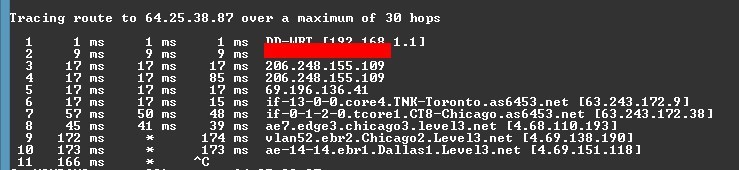
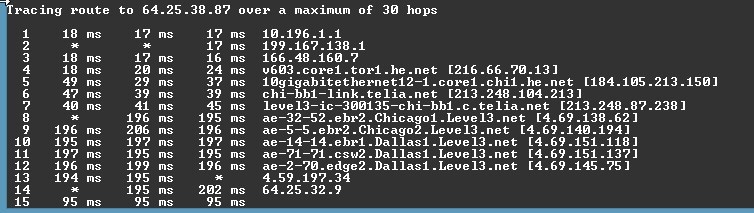
Guys this is the Level3 server issue.
To help testing. Type /ip ingame chat.
do tracert in your CMD.
tracert xx.xx.xx.xx
READ full test: http://www.dslreports.com/forum/r28594736-Cable-Latency-from-Level3.
I am now force to use VPN to Midwest datacenter. The East Datacenter is just horrid at the moment, 2nd time this month.
Attachments:
Stormïe ~ Tarnished Coast | My little monster <3 – http://valid.canardpc.com/6nbdeq
(edited by DJRiful.3749)
Everyone is in danger! Hostile zones everywhere! Yeah, bugged.
Stormïe ~ Tarnished Coast | My little monster <3 – http://valid.canardpc.com/6nbdeq
Take note the population in GW2 in most area has grown a bit larger today than launch day. The more characters on in the area the more stress on anyone systems.
I get low 15FPS at some point…
Stormïe ~ Tarnished Coast | My little monster <3 – http://valid.canardpc.com/6nbdeq
I will need to know your PC spec.
Stormïe ~ Tarnished Coast | My little monster <3 – http://valid.canardpc.com/6nbdeq
Graphic Option -> Character Model Quality to High?
I can’t seem to set Model Quality to high? It goes Lowest – Low – Medium.
Model Limit goes to highest.
Oh that’s interesting, I guess the option panel scale what you have in your computer. :/
Stormïe ~ Tarnished Coast | My little monster <3 – http://valid.canardpc.com/6nbdeq
Are they usable against mobs or just simply another Tonic combat with other players?
Stormïe ~ Tarnished Coast | My little monster <3 – http://valid.canardpc.com/6nbdeq
Mind a screenshot?
Stormïe ~ Tarnished Coast | My little monster <3 – http://valid.canardpc.com/6nbdeq
Graphic Option → Character Model Quality to High?
Stormïe ~ Tarnished Coast | My little monster <3 – http://valid.canardpc.com/6nbdeq
Have you guys try to clear Local.dat file? It will reset your Graphic setting to default.
Stormïe ~ Tarnished Coast | My little monster <3 – http://valid.canardpc.com/6nbdeq
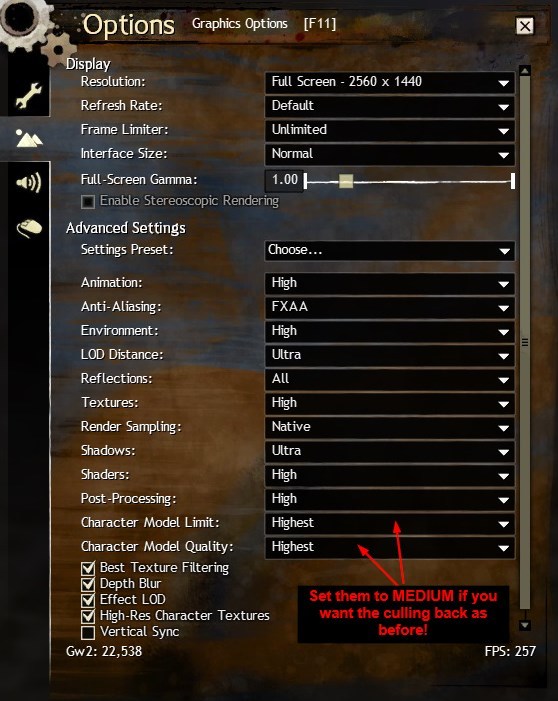
Guys… have you all look into your setting before you do complain about Culling gone yes it will decrease your performances but it’s not gone.
Culling system is always there, BUT now it allows you to control it on CLIENT side instead of SERVER side…
This. The patch notes said “server side culling”. Didn’t say anything about client-side culling though, and according to some people, the WvW culling settings in the options also affect PvE culling.
If anything, this is better. Why artificially limit players with a server restriction, instead of letting them control the level of detail theirself? If I want to see everyone at any time and get 10 FPS, let me :p
You got it the other way around. Before it was server side, now it is client side. Look at the screenie, those option were there for WvW only before this week patch.
What Anet did was implement the same option from WvW to PVE world now. They also corrected the option typo by removing “WvW”.
If you play around those 2 settings, it’s the same way how previous culling works. Since many people see drop of performances because those setting at at default “High”. The server side culling was at “Medium”. Server side culling did not have “Quality” option before these 2 options exist month ago for WvW only.
Stormïe ~ Tarnished Coast | My little monster <3 – http://valid.canardpc.com/6nbdeq
Sounds like monitor issue, does the white line moves to different places? Check your cable… (VGA is old)…
Stormïe ~ Tarnished Coast | My little monster <3 – http://valid.canardpc.com/6nbdeq
Pixelpumpkin, usually this is a starting symptom of hardware failure. My previous GPU GTX680 issue, have a look.
http://www.overclock.net/t/1363965/graphic-square-dots-glitch-corruptions/0_20
Follow up thread: http://www.evga.com/forums/tm.aspx?m=1868800
RMA the card at the end.
Stormïe ~ Tarnished Coast | My little monster <3 – http://valid.canardpc.com/6nbdeq
Guys… have you all look into your setting before you do complain about Culling gone yes it will decrease your performances but it’s not gone.
Culling system is always there, BUT now it allows you to control it on CLIENT side instead of SERVER side…
Attachments:
Stormïe ~ Tarnished Coast | My little monster <3 – http://valid.canardpc.com/6nbdeq
Exactly! What is the point anymore? This is bad, I don’t think I ever able to do any events until the least population hours. I’m on High pop servers this is hard to get into non-overflow.
Stormïe ~ Tarnished Coast | My little monster <3 – http://valid.canardpc.com/6nbdeq
It’s still there… WvW Character Limit, WvW Character Quality under Graphic Options.
Stormïe ~ Tarnished Coast | My little monster <3 – http://valid.canardpc.com/6nbdeq
I end up turning on and play on VPN. No lags now. – somethings is up with the datacenter on the East coast.
Stormïe ~ Tarnished Coast | My little monster <3 – http://valid.canardpc.com/6nbdeq
I find it deeply disturbing that Anet posts most of their responses about their game in social media sites and the like and NOT on their own official forum. Am I missing something here?
I’m the same boat. I don’t use Twitter and Facebook. If they want to avoid flooding the forums, they should announce it here.
Stormïe ~ Tarnished Coast | My little monster <3 – http://valid.canardpc.com/6nbdeq
My other thoughts, the servers are being updated for tomorrow. So it uses the CPU load which lag of everything else…
2cents.
Stormïe ~ Tarnished Coast | My little monster <3 – http://valid.canardpc.com/6nbdeq
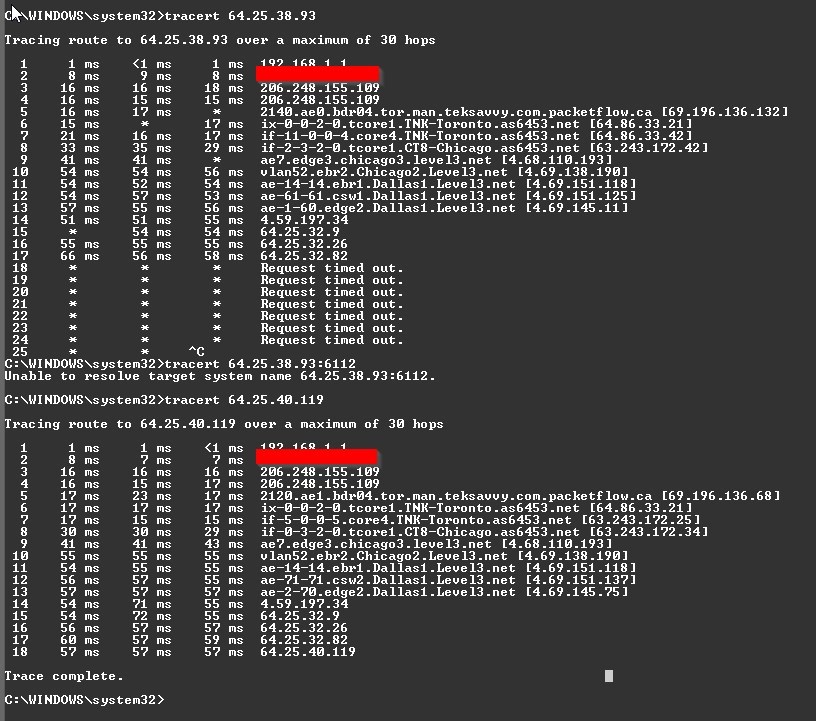
Some tests but I know it is not accurate.
Attachments:

Stormïe ~ Tarnished Coast | My little monster <3 – http://valid.canardpc.com/6nbdeq
Chat is fine, instant but skills and abilities are lagging behind 1.5 to 2 seconds which makes everything hard to play tonight.
Checked my network, nothing wrong. 16ms latency full speed. Your move Anet.
Stormïe ~ Tarnished Coast | My little monster <3 – http://valid.canardpc.com/6nbdeq
Whatever you do, don’t get the 13.8b drivers. They’re performance killers in GW2. Stick with 13.4.
My buddy is on the beta, I don’t see any issues.
Perhaps there are other things causes it to conflict.
Stormïe ~ Tarnished Coast | My little monster <3 – http://valid.canardpc.com/6nbdeq
Looks normal to me.
Stormïe ~ Tarnished Coast | My little monster <3 – http://valid.canardpc.com/6nbdeq
Where are you updating drivers from? The original manufacturer website like Dell, HP etc.? (This only applies if bought an OEM product).
Then don’t update from those website, they are lazy at keeping drivers up to dated.
http://support.amd.com/us/kbarticles/Pages/AMDCatalyst13-8WINBetaDriver.aspx
→ AMD Catalyst™ 13.8 Beta for Windows®
It’s a start, I don’t know what is your real issue yet.
Stormïe ~ Tarnished Coast | My little monster <3 – http://valid.canardpc.com/6nbdeq
Hello again! Thanks for the replies. I downloaded CPU-Z and hope ya’ll can help with the information collected.
What I did find odd, was that my processor (i5 2500 3.30GHz) fluctuates a lot when I ran GW2. (Or at least I thought it was a lot.)
Upon opening gw2 it ran at ~3300 MHz, I let it sit in the character screen and it dropped to ~2200MHz. After entering the game I was in the Mists where it ran fairly smoothly but dropped down the ~1800MHz. Then I went into WvW. Visual lag was terrible apparent when activating pretty skills (symbols for guardians.) and the speed would drop to ~800MHz. I was also running around loading the environment if that matters.
Bus Speed is 99.7X MHz. Which I think is good?
Also, Ricky brought up the power issue, so I don’t know if it’s helpful, but the Core Voltage is at .912 V.
Would EVGA work with Radeon cards? I have a Radeon HD 6850.
If you did knock over your PC lately, most likely the cooler on the CPU got misaligned. You need to resit the heatsink.
Why? Your CPU throttle down when it is not being cool properly and overheat protection. Which is why it keeps on lowering your clock speed for lower heat output.
Stormïe ~ Tarnished Coast | My little monster <3 – http://valid.canardpc.com/6nbdeq
Yes, GW2 files can be play from USB if you prefer it this way.
The folder is:
C:\Program Files (x86)\Guild Wars 2
Just move that files to any other drives or USB if you have like 64GB USB.
You can launch the game from the USB.
Worry about installation missing out things? It’s just all shortcuts you’re going to be missing. Your start menu is all shortcuts if you didn’t know that.
Stormïe ~ Tarnished Coast | My little monster <3 – http://valid.canardpc.com/6nbdeq
The game engine is poor at start ever since I load GW2 into my system. LA low 40 FPS… WvW down 25 FPS lowest.
A system pushing at 4.7 to 4.8Ghz 6 cores 3930k (12 virtual cores) $600 CPU and GTX TITAN to run this poorly.
p.s. no i didn’t build this system for GW2 but to run other high end games at 1440p without issues. Going back to old MMO like World of Warcraft, that game dump out 300FPS in DX9 and DX11 mode at max.
Engine is known to be very poor since Beta Week launch.
I had a feeling the game isn’t fully utilizing the GPU VRAM leads to constant loading from HDD to CPU which drags down the FPS.
Culling engine is terrible. GW2 base on Umbra Culling http://www.umbrasoftware.com/en/
I believe it is poorly use or something.
Stormïe ~ Tarnished Coast | My little monster <3 – http://valid.canardpc.com/6nbdeq
(edited by DJRiful.3749)
Because all the spell effects are actually a texture box like a PNG with transparency. So if you apply overlay effect over that transparency, the box will shows up.
This is most likely the reason the game is playable on low end system. DX9 no real heavy particle effects which requires way more processing powers.
Stormïe ~ Tarnished Coast | My little monster <3 – http://valid.canardpc.com/6nbdeq
3DTV? That’s old school…
Welcome to Oculus Rift… http://www.oculusvr.com/
Stormïe ~ Tarnished Coast | My little monster <3 – http://valid.canardpc.com/6nbdeq
Smells like faulty HDD or corrupted sector. Disk check.
Stormïe ~ Tarnished Coast | My little monster <3 – http://valid.canardpc.com/6nbdeq
1. Hit your windows key.
2. Type CMD
3. Hit Enter
4. Type
tracert 64.25.40.118
or
tracert 64.25.38.111
Copy from line 3 till the end and let us know your latency.
Usually Line 1 is your router or modem, Line 2 is your ISP. Line 3 beyond is the datacenter (traffic control – friendly word). The last line is the destination point GW2 server.
Stormïe ~ Tarnished Coast | My little monster <3 – http://valid.canardpc.com/6nbdeq
Um… you better off going for Intel 3570k lines and up Z77 board. It will costs you a few pounds but really the performance vs that X4 is night and day for GW2 specifically CPU bound game. Then you can grab a GTX 660Ti or something.
I had X4 CPU, 3570k, 3770k and 9800GT, HD6970, GTX680 etc etc.
Stormïe ~ Tarnished Coast | My little monster <3 – http://valid.canardpc.com/6nbdeq
(edited by DJRiful.3749)
I find this unfair, I was close getting 5 gambits achievement then patch buff him… now i gave up.
Stormïe ~ Tarnished Coast | My little monster <3 – http://valid.canardpc.com/6nbdeq
Other skill I have no lags but Withdraw has a 0.7 sec delay when i try to use it as heal and dodge, most of the time in Gauntlet fight I end up dead because of the instant cast delay for 0.7… that is just annoying.
Stormïe ~ Tarnished Coast | My little monster <3 – http://valid.canardpc.com/6nbdeq
There is nothing to address, this is the nature of Windowed and Fullscreen mode works. Those games are able to change is because they are changing the brightness natively in game overlay effect instead of using hardware/directx.
Stormïe ~ Tarnished Coast | My little monster <3 – http://valid.canardpc.com/6nbdeq
It’s just a sticker, doesn’t mean anything.
2.3GHz Intel Core i3-2350M
Intel HD Graphics 3000
You will run the game at lowest setting.
Stormïe ~ Tarnished Coast | My little monster <3 – http://valid.canardpc.com/6nbdeq
Bursting tooltip is bugged, correct should be +6% Critical Damage.
Stormïe ~ Tarnished Coast | My little monster <3 – http://valid.canardpc.com/6nbdeq
hehe I love the cute Bitfenix Prodigy chassis, I have one here at home currently being built along with CM 690 II Advanced and Corsair 600T mini supercomputer.
:p
Stormïe ~ Tarnished Coast | My little monster <3 – http://valid.canardpc.com/6nbdeq
64bit is the way to go, never look back.
Stormïe ~ Tarnished Coast | My little monster <3 – http://valid.canardpc.com/6nbdeq
Got stuck in LA loading for nearly 30sec on SSD
Stormïe ~ Tarnished Coast | My little monster <3 – http://valid.canardpc.com/6nbdeq
Did you check your graphics settings? The patch set all my graphics to high, which makes it take longer to load. One of the settings has a huge impact. Texture detail maybe.
This has nothing to do with computer. Its the game or the server.
Stormïe ~ Tarnished Coast | My little monster <3 – http://valid.canardpc.com/6nbdeq
Actually the long loading bug is back… takes forever!
Stormïe ~ Tarnished Coast | My little monster <3 – http://valid.canardpc.com/6nbdeq