Wow! That really is odd. Is your system overclocked in any way?
I looked around and there seems to be an issue specific with windows 10 & Nvidia cards. Is there any fix/workaround the problem?
At times, yeap.
They intentionally limit the outgoing bandwidth at times. There have been numerous patches that they do not. I wish they just made it kittenK *()@ clear when. It would LESSEN so MUCH DISMAY for their customers.
It would be so easy to do too.
Why won’t ANET communicate connectivity errors they are obviously aware of?
A short message, but clear, on the updater would solve so much dismay.
Another example would be to just simply explain how they allocate bandwidth. I’m currently downloading the patch at a small fraction above dial up speeds.
(edited by Maze.3825)
I have not suffered lag from any of the recent patches. I hope this information helps the OP
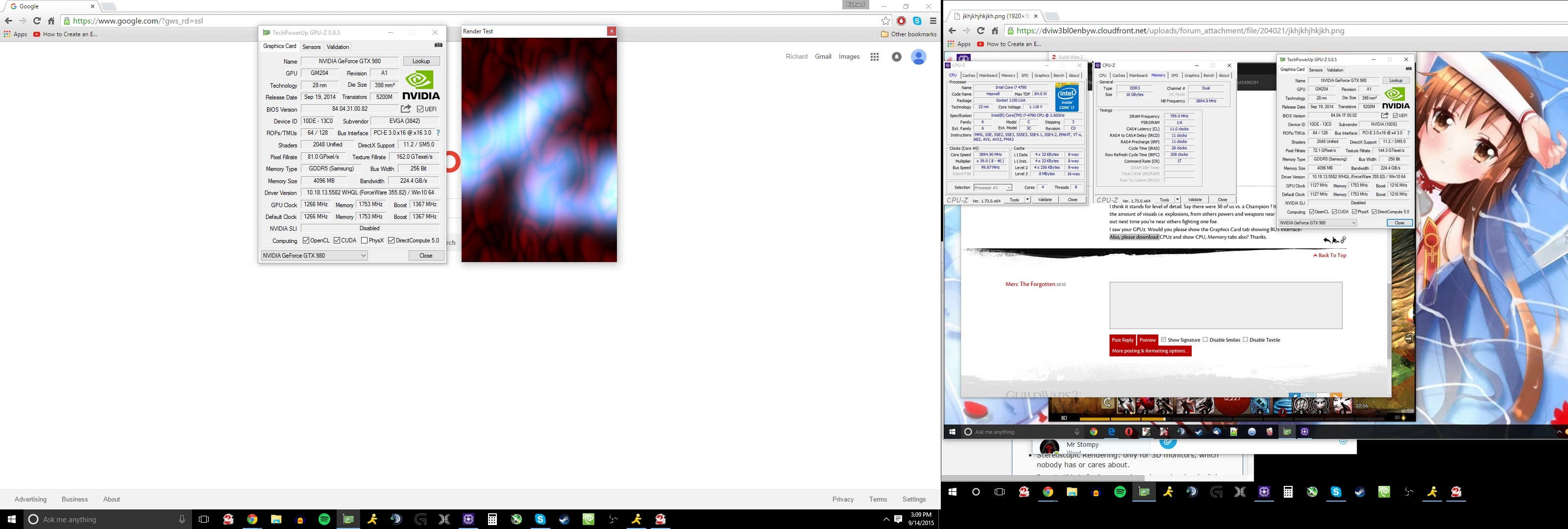
See how mine reads PCI-E 3.0×16 @ x16? We want yours to say the same thing if you have just one video card too.
Attachments:
(edited by Maze.3825)
There you go.
My paint skills included
Your Video card is x4 instead of x16. This is the reason why.
Just consult your motherboard manual and figure out how to alter this. It’s either a bios setting or literally in the wrong slot.
Effect Lod :
I think it stands for level of detail. Say there were 30 of us vs. a Champion ? It would limit the amount of visuals i.e. explosions, from others powers and weapons near you. Try it out next time you’re near others fighting one foe.
I saw your GPUz. Would you please show the Graphics Card tab showing BUS interface? Also, please download CPUz and show CPU, Memory tabs also? Thanks.
I tried to duplicate your screenshot but couldn’t. Here is the best that I could get. I too have same video card, but lesser cpu.
Attachments:

What drivers are you using and OS?
Download latest and do a clean install.
I don’t think you can make such blanketed statements with GW2. Especially in open world combat + all maximum settings you will dip below 30fps with any setup.
Again, I’m saying in certain scenarios even 3 SLI Titan X will dip in GW2!
I really am disappointed and wish this was not the kittening case!
I’m attaching my specs, these are basically the max I can run at all times and stay around 30+ unless fighting something i.e. The Maw, Queen Karka etc
Some of the CAMERA BETA settings can really affect fps too.
On the main page the only one that is not checked is the Effect Lod box.
Hope this helps some.
Attachments:


(edited by Maze.3825)
I see said the Blind Man! Ty
If this is true that is really not too customer friendly. I would imagine it’d be easy to accommodate such ‘secondary purchases’ pfft
They clearly stated from day one that there will be no upgrade to ultimate and it’s obvious why. Deluxe to Ultimate is simply 1/2 price gems. They do not want to set as a precedence offering just gems at a heavy real currency discount. UK gets a bigger break, £42.50 of gems for only £20.
Also the in game upgrade from base to deluxe is $30€/£25.50 in gems and not the $25/30€/£25 pre-purchase difference.
The three plans still exist. It’s not a foreign aspect to have customers to purchase one thing and desire to upgrade at a later date. Since the three still persist, I still think it’d be easy to accommodate a customer to upgrade rather than re initiate a completely new purchase.
Perhaps one day they will incorporate the ‘Ultimate fluff items’ into the game to acquire them otherwise.
(edited by Maze.3825)
If this is true that is really not too customer friendly. I would imagine it’d be easy to accommodate such ‘secondary purchases’ pfft
me ither recoded whole event no reward Not worth trying agin with 3 fps and 400 ping on a $3000 computer
If you were actually getting 3 fps, that’s on your end, not Anet’s fault. I’m playing on a 2011 Macbook Pro and my fps didn’t drop below 20.
lol as if 20 fps is ever an aimed goal to achieve?
I’ve had this issue in other MMOs too.
Restarting client seemed to fix this for me also. No clue why it occurred to begin with/ maybe I was alt-tabbing out too often??
I would think it’s normal, depending on ambient and how long you game. Intel specifies max is 105c. http://ark.intel.com/products/64899/Intel-Core-i7-3610QM-Processor-6M-Cache-up-to-3_30-GHz if it tops out and stays near 85c I’d not worry at all.
Maybe get yourself a cooling pad or even re apply thermal paste to the cpu itself.
Yeah. Optimizing would perhaps be upgrading in this case.
Do keep in mind that large scale fights in GW2 cause general/fairly low fps for anyone with maximum settings.
https://www.youtube.com/watch?v=9aFcEdESqG8
I’ve yet to see a video that shows otherwise. I personally have i7 3770k + gtx 980 and sufffer similar fps at HD resolution vs. the above 4k in large open world combat.
Inside your BIOS there should be a setting for this. You can manually change it to perhaps ‘auto, pcie 2.0, and pcie 3.0’
I must be very fortunate to not have this latency issue at all.
It seems like it’s obvious that the GW2 engine is not accommodating or powerful enough to utilize hardware in certain open world maps.
It angers me that the latest and greatest zone; i.e. map Lions Arch can’t utilize hardware to a certain degree.
PLease forgive my ignorance and novice state. What am I suppose to think?
HD resolution, default drivers, max in game settings
GTX 980
i7 3770k
Attachments:


Since Windows 10 installation it does feel speedier in booting up. (subjective)
Windows 10 and 8.1 also seem practically identical for me within GW2 performance.
i7 3770k 4.2Ghz w/ Gtx 980
There is no way any said video card will max this game out in any serious outside world combat. That being said, I do believe that that the Nvidia 960 + a decent quad core WOULD with all maximum settings inside a dungeon/ game instance! I really think that Open World Combat starting at HD resolution + max settings. would suffer greatly with any setup in this game. 15-20fps is to me not a doable/playable option for maximum settings.
(edited by Maze.3825)
I <3 the aluminum can reference. Ty & gl with your issue.
Running Windows 10 here and Guild Wars 2 is compatible
Attachments:
In your particular case with your screenshot provided I’d presume it’s a driver issue.. That low of fps with nothing going on at that time in the game is astonishingly low.
Keep in mind that the game really sucks kitten with max settings in certain scenarios; i.e. World Events and Heavily Populated areas LA etc
I too have pretty low frames with maximum in game settings with ivy bridge + gtx 980
Especially near The Mystic Forge.
If I turn and look out near the forge I get around 27-35fps. Gosh that sucks!
1920×1080
Attachments:
(edited by Maze.3825)
Have you tried w/ default settings on your i5 processor yet? I would return all to stock first, including the GPU and ram then attempt to play for a while.
I’ve found GW2 to BSOD if my volts for my cpu weren’t up to snuff.
I’mma Airplane I’mma Airplane! Bzzzzzzzzzzzzzzz!! Vrooooooooom!!!!!!
Hello Everyone,
Our attempt here is to not as much recruit people as it is to get to know ‘potential friends’ and guildies; prior to clicking the infamous ‘accept’ button, that we’re all so accustomed to.
We are attempting to create a free flowing philosophy of inclusiveness rather than specific & mandatory aspects. We feel that if we have the right blend of people that the guild itself [Children of The Candy] [CORN| will maintain itself; to the highest ideal that is possible. Gamer’s can’t be held back!
[CORN] will always be democratic in its basic forms and evolution. We are relatively young at this point but have some serious veterans among us.
We invite you to join us! We are looking mainly for adult like, mature, socially inclined, fun, nice, honest, hilarious types of all ages. Basically if you’re not filled with hate and self-centeredness you’re in!
We relish the opportunity to unite with you in [CORN]
Maze.3825 in game or Escher Moon.7536
(edited by Maze.3825)
it is very possible to have nearly 27k or 20k+ on the guardian class.
on the surface I would guess perhaps you have Character Model Limit above setting low and/or supersampling on?
also, i don’t think during say like the maw with large numbers present we will ever get large frame rates with maxed settings from Anet.
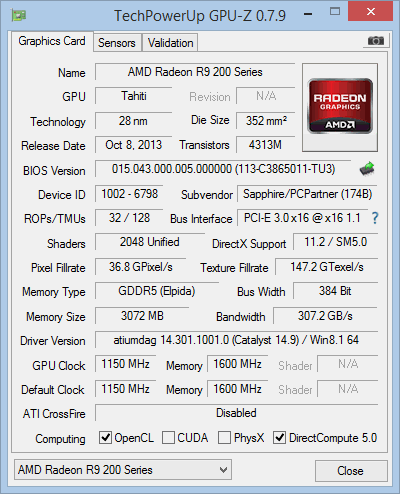
I too have had a huge debacle surrounding exact artifacts & the r9 280x Sapphire Toxic 3GB edition. It is a huge widespread issue & unacceptable one. It personally took me 2 RMAs from their division in Walnut, CA to remedy this.
I finally have had a working card for approximately 4 months. However, one of the fan blades rubs on the frame. By turning up the fan speed I’ve been able to lessen the sound of the blades rubbing.
Dealing with the RMA was very generic and irritating, but proved ultimately worthy.
Attachments:
Have you tried putting all monitors to native mode and matched this in game with Vsync off ?
I’m not certain but I think it may have something do to with Hertz rates
Current Mode: 1920 × 1080 (32 bit) (120Hz)
Monitor Name: Generic PnP Monitor
Monitor Model: S27A950D
Monitor Id: SAM079D
Native Mode: 1920 × 1080(p) (60.000Hz)
Would you mind providing us a DXDIAG report from your Windows 8.1 Pro system?
I’m having issues with my crystal ball.
Please provide more information.
I suspect creating ones own data center might not be applicable seeing how it’s approximately 1billion dollars. Some claim that entering into a cooperative networked-cloud might really be a feasible method too for major ddos protection. I wonder if it’s still too pricey for Anet.
I want you to know that I have no performance degradation as a result of Dry Top.
Thank you.
Maybe some graphics setting is different this time? My gawd, have you tried to adjust any in game setting? You can change them, or maybe trying ‘auto detect’ is better for you?
Anet, are you out there?
Words can’t easily express how MMO fans often become embedded into their various worlds.
Here is one phenomenal example of just that!
I can’t imagine the time, the effort, nor the precision this demands. I salute it nonetheless. Brilliant!
Hope you enjoy as much as my small group of GW2 fans have.
http://s153.photobucket.com/user/Ting_22/story/102631
Game runs fine ty Anet. Looks great too.
OP,
What resolution? If it’s 1024×768 you’ll be fine on highest only with that card.
To answer your question specifically is not really easy since not all ‘medium settings’ equal eachother. I’m sure you could play with basically low settings at hd resolution 1080p
this video is not exact or specific in any way but offers some evidence based upon subjective viewings only ( does offer fps and claims to have 750ti )
https://www.youtube.com/watch?v=Bk8yeZsHkqU
(edited by Maze.3825)
Yep. It’s agonizing at times. My remedies are any of the following: (which stinks)
1. Die and rez
2. WP – so fun to do while in battle!
3. Relog ur toon
3a. Any of the above and wait desperately for them to fix or (acknowledge) it even.
Also
When the Universe is especially affectionate there is a similar bug we get too
’Can’t attack at all bug’ Fix it please ?
(edited by Maze.3825)
I dislike even more when I attempt to sell items with right clicking them and although it brings up the tp it just kinda hangs on the wrong screen!~! So we have to exit and restart the process.
It’s just one of those small things that make you go “REALLY!!?”