Showing Posts For Blackwood.9072:
1 2
If at all possible, could you find a way to have something other than 1440×900 or 2880×1800 as available resolutions on MBP? The latter is too slow and the former is too small for PvP as there is too much stuff in the way.
PvP was more tricky, intense, challenging. That is good. Need icons for elites to better plan roles in 60 seconds (had to ask, slow responses). Extra visuals clutter & disorient, somewhat of a headache. Did HP bar show barrier %? I don’t recall it, should be there if missing.
The keyboard froze, I was able to tab out, but when I tabbed back it began to freeze, then crash. The crash reporter appeared, then the game froze and the crash reporter crashed…
Where are the crash logs?
All I have is from the console logs:
8/19/17 16:10:10.347 GuildWars223948: TSMProcessRawKeyCode failed (-192)
8/19/17 16:10:10.349 GuildWars223948: (
0 CoreFoundation 0×00007fff8d718452 exceptionPreprocess + 178
1 libobjc.A.dylib 0×00007fff85c11f7e objcexception_throw + 48
2 CoreFoundation 0×00007fff8d77f49d +[NSException raise:format:] + 205
3 AppKit 0×00007fff993d0294 _convertEventRefToString + 274
4 AppKit 0×00007fff993d0c11 -[NSEvent characters] + 1020
5 Gw64 0×000000010dd49116 EntryPoint + 33101062
6 Gw64 0×000000010dd47edb EntryPoint + 33096395
7 Gw64 0×000000010dccd0a1 EntryPoint + 32593041
8 AppKit 0×00007fff993ba16a -[NSApplication sendEvent:] + 4382
9 Gw64 0×000000010dace4f2 EntryPoint + 30501090
10 AppKit 0×00007fff99220df2 -[NSApplication run] + 796
11 Gw64 0×000000010dacef68 EntryPoint + 30503768
12 Gw64 0×000000010c0ce442 EntryPoint + 3237938
13 GuildWars2 0×000000010bb48148 main + 584
14 libdyld.dylib 0×00007fff94f145ad start + 1
15 ??? 0×0000000000000001 0×0 + 1
)
Edit: This has not happened before today’s latest update on Saturday afternoon (I see nothing in the patch notes). This is not the patch posted here: https://forum-en.gw2archive.eu/forum/info/updates/Game-Update-Notes-August-8-2017-3/first#post6706329, but the one that came right after.
(edited by Blackwood.9072)
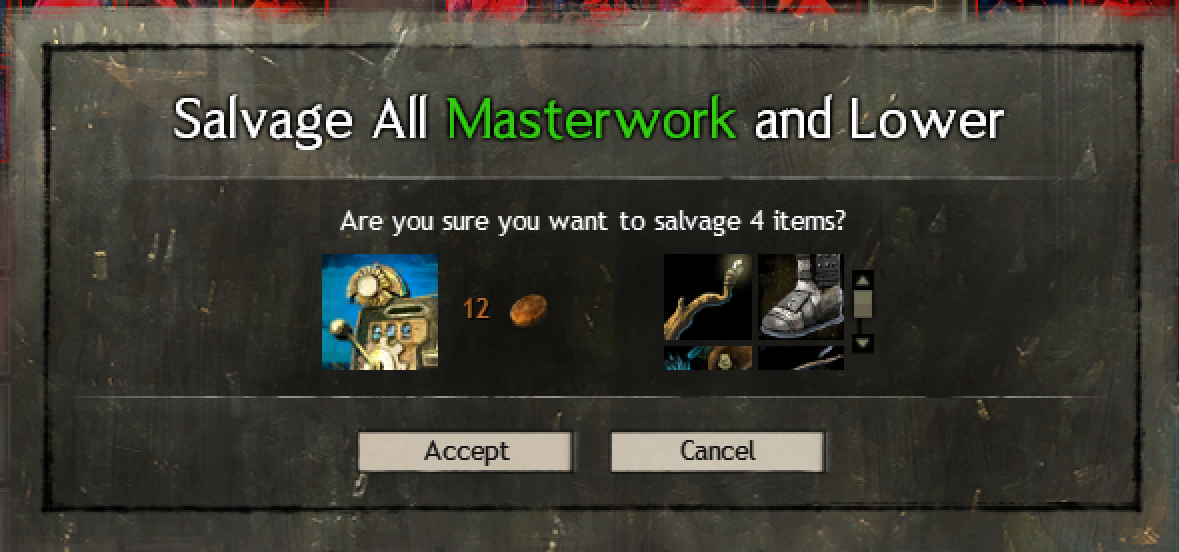
As per screenshot, when you have 4 items to render it is a 2×2 grid rather than 4 in a row. No idea if this Mac-64 related or a new bug for everyone as I never saw this issue on Mac-32.
Similar problems occur at other numbers when doing a salvage all:
- 1 item = No item rendered
- 2 items = SOMETIMES there is a vertical column of items w/ scrollbar (2nd item is only partially shown) instead of in a row
Attachments:
Some flickering:
Note the character is standing in the same place and camera has not been removed. The flickering occurred as the capture point updated, but once it was fully captured it no longer flickered / jumped.
Attachments:


I’m really disliking the 64-bit client for PvP. For the most part it runs well, but when the player count at mid increases the game repeatedly stutters even with low settings.
Crash on quit, error log attached.
Attachments:
During character creation my entire computer becomes sluggish if I tab out and try to use another app or even Finder. However, as soon as character completion is done all other apps speeds back up to normal when GW2 is in the background.
I’ve done this for several characters and it seems to be consistent in behavior once you get to step 4 (design the look of the PC).
If I attempt to report a bug it always says “Error taking screenshot”.
For some reason having ambient occlusion enabled is causing my character, all NPC / enemies, and lots of plants in the Brisban Wildlands to have these glowing yellow auras. Turning it off removed the aura, but is that what it is supposed to do?
I just installed the 64 bit client, the graphics option in game are only showing me 3 options, instead of the options i had in the 32 bit client, is this a bug or intended? my preferred resolution is not an option listed and it is greatly impacting whether or not i enjoy the new client
Apparently we’re stuck to whole number multipliers for resolution with the 64-bit.
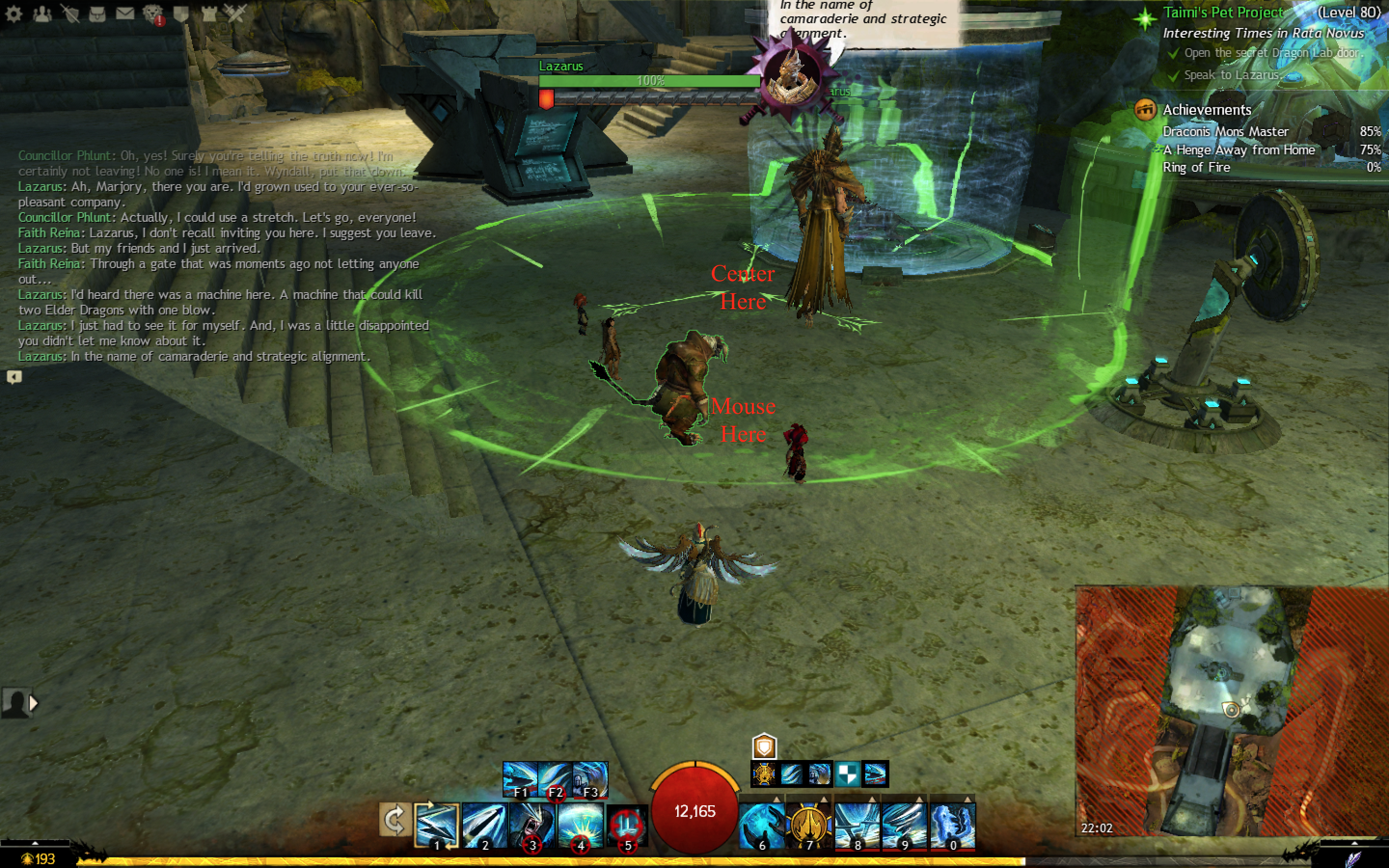
I can’t really take a screenshot in-game via the bug report system for this (due to mouse cursor moving), but when playing LS3 Chp. 5 if you use skills that have aiming guides (AoE circles, lines, etc) they are off-center from the cursor or sometimes not rendering depending on the camera angle. I also had the same problem w/ the final episode and aiming the dragon energy at the hounds.
Basically, where I am aiming w/ my cursor does NOT match up w/ where the game places the target. Observe in the screenshot where the AoE circle is. My mouse (which was not captured in the screenshot?) vs. the center. Also, guidelines for aiming that are supposed to pivot off the PC are pivoting off another point (slightly around / above center of screen instead of the PC).
Second and possibly related, not all Enemy AoE circles are being drawn or are only partially drawn depending on the camera angle.
Attachments:
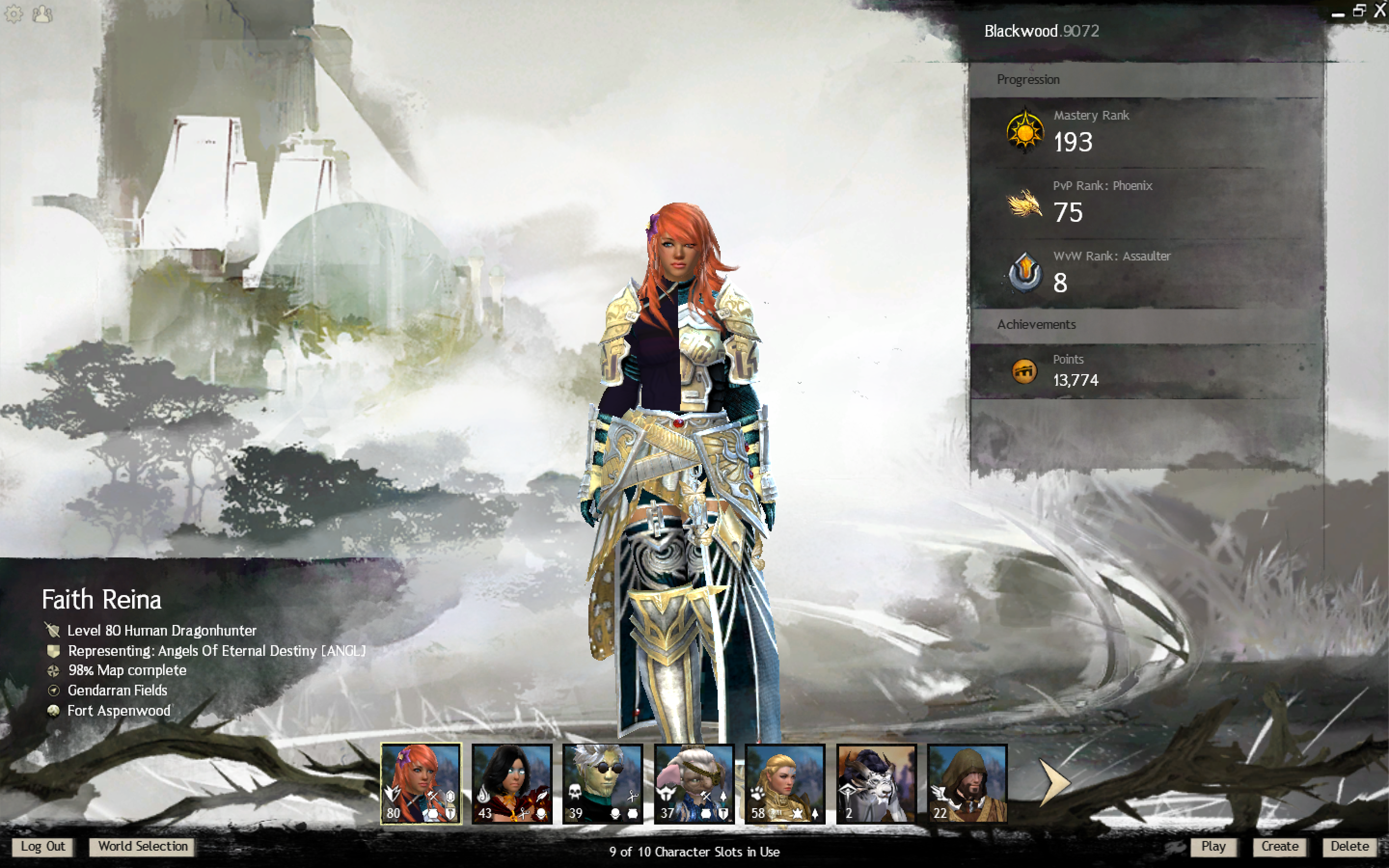
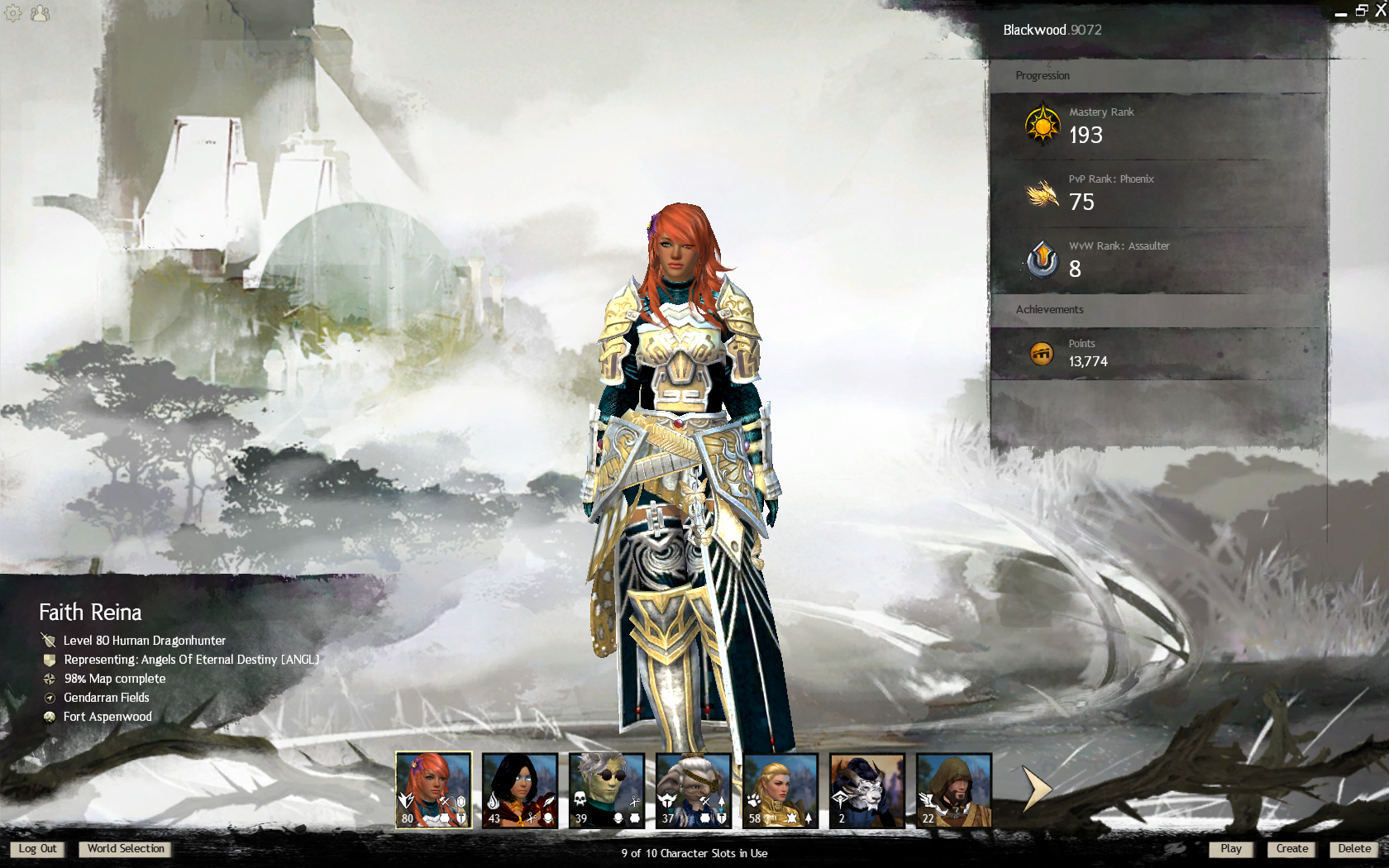
Is this a problem (see coloring in screenshot, left side of chest) with the beta Mac client or a graphics setting?
Compared to 32-bit client (2nd image).
Ah, I managed to determine that setting Shaders to High or Low causes this issue, but Medium is without issue.
If my FPS does not really improve in the 64-bit with the same graphic settings as the 32-bit version on a MBP 2015, is that expected? Is the current version 64-bit client mainly meant to fix crashes associated with the 32-bit version?
The thing is… my 32-bit has the screen resolution set to 1680×1050, but the 64-bit is 1440×900. I would expect the 64-bit to be doing better at a lower resolution (game stutters at 2880×1800) with all other things being equal.
I also experience a moment of stutter / pause when I rotate the camera. It’s less than a second, but there is a slight freeze when I move it (which I why I’m using it now and not during the previous PvP season)
Graphics
- Intel Iris Pro 1536 MB
- AMD Radeon R9 M370X 2048 MB
Is this a problem (see coloring in screenshot, left side of chest) with the beta Mac client or a graphics setting?
Compared to 32-bit client (2nd image).
Attachments:
There are 3 daily tourneys, but the timing is awful. Take a look at world bosses though and you’ll see that are roughly 6 chances per day vs. the tourney’s 3. I’m certain to get at least 1 chance at a daily boss when not at work or sleep but with tourney’s? Fie!
Even worse when it’s only open when you can’t even get online. For those on the NA west coast: 11:30 AM, 4:15 PM, and 1:15 AM. If you work 8-5 you’re screwed unless you are willing to stay up until 1:15 AM.
Looks like in the latest patch the League Vendor in the Heart of the Mists now requires shards of glory for some items. Okay…. only what used to be 1 League Ticket exchanged for 10 normal Shards of Glory is now 1 League Ticket and 500 normla Shards of Glory for 10 normal Shards of Glory back.
Not 10 ascended shards of glory, just normal ones. So I spend 500 and get 10 of what I just spent back?
Attachments:

If I block a player will the system ensure I don’t get paired up with that player in an future matches? Or does it just block their whispers?
Is this the full list of balance changes coming with the patch or is there more waiting for us?
Piercing Light: This trait no longer causes traps to daze enemies and will instead inflict the Slow condition on enemies for 1.5 seconds on the initial ‘trigger’ of a trap.
Also, since it doesn’t mention PvP only, is it safe to assume this change will hit PvE too?
Yes. Per OP “Note that all changes listed are global changes except for those that are designated as “PvP only.””
Hm, defiance bar impact though. This means 75 defiance bar damage per trap (1.5s of slow). This is down from 100 damage per (0.25s of daze).
As for the slight daze effect I found it very useful when dealing with large # mobs, but I’ve yet to play with lots of slow. Not sure how it would affect things for ranged enemy units. For example, the Mordrem Thrasher. It would spin and move to me, but hit a trap and it would stop moving. Will it now keep moving as normal speed, but attack slower? How exactly does slow affect enemy mobs?
(edited by Blackwood.9072)
Whenever I’ve been experiencing stuttering, lag, or in general I just see myself perform an action and then the game pauses only to execute 2-5 seconds later I’ve punched in /ip. It’s always 64.25.38.238 that is giving me grief. When I am on maps and PvP matches with no trouble /ip is never 64.25.38.238.
To make the touch bar display the function keys whenever you play GW2 (no idea how ESC will work) follow these instructions: https://support.apple.com/en-us/HT207240
Making these achievements permanent is is really lame. They should be a reward for beta testing your maps.
Also the requirements for these achievements (25 wins being the hardest part) is really low for a permanent achievement. If it is permanent all requirements should be at least 10 times higher.
250 wins? Oh heck no. Not everyone who plays these maps is a hardcore PvPer and getting 250 represents a major grind.
Not mention some of the others. You’d want people to get 1500 kills? The Slayer achievement asks for 2000. A single map would then be 75% of that.
If they did alter the requirements then double would be more reasonable, but TBH I’d prefer the current setup. If all maps eventually have a set of achievements then it might not easy to get the map I’m currently working on since it would be RNG to be 1 of 4 choices when I have more than 4 maps in rotation.
- shimmering crystal
- tenebrous crystal
- blade shards
I agree with you. It is easier for me to follow a conversation while fighting in WvW or PvP if the chat panel is one the top right. However, anytime I want to command a squad I have to swap the panels since the new menu makes it impossible to properly manage my squad from the bottom-left of the screen. That blasted cutoff is very annoying.
- - Provide a means of previewing armor/dye changes alongside hair/PC changes, i.e., merge the wardrobe preview, dye preview, and physical appearance preview.
Why? Some body types/builds clip armor but if I can preview different armors I can see what doesn’t work w/o wasting transmutation charges; it becomes easier to coordinate makeup/hair/accessory color with armor coloration; I can see what hairstyles will or will not clip with various chest armors.
Not for the same achievement but similar, yes. Daily Bloodstone Ghostly Justiciar Killer did not trigger the first time I defeated him even though I got This Time, Stay Dead (which comes from defeating the Ghostly Justicar) and a bouncy chest. The second time I fought I got the daily achievement.
I’m playing and suddenly GW2 goes black, my computer becomes non-responsive, and then it shuts itself down. When I login and check the console logs I see that I had 3000 of this message during that period it was blacked out: GPU Access disallowed due to VM protection attribute.
The computer is running Mac OS 10.11.5. Specs are MBP11,5, 16GB RAM, 2GB AMD Radeon R9 M370X and a 1.5 GB Intel Iris Pro.
Any way to prevent this from happening? I’ve tried turning down my GW2 options.
So, I’ve run Weyandt’s Revenge in Lion’s Arch several times before and for some reason the first maze is now dark. This is the one you go to after you fall down and navigate by going through the illusory walls.
As shown in the screenshot light sources are not casting light. I’ve changed nothing from before, so was this introduced in the last patch? I can’t see and can’t navigate.
ANet has always been indifferent to sorting.
- Some lists are alpha order.
- Some lists are alpha order, by weight class.
- Some lists are weight order (light->medium->heavy) and then alpha order within that.
- Some lists appear to be sorted by item ID (which, for some reason, is in arbitrary order, not alpha by display name within the set).
I stopped keeping specific track of which were bugged sometime during the GW2 BETAs in 2012.

Oh, I am not talking about sorting differences between different windows, I’m talking about it changing within the same UI.
For example:
1. It starts out sorted by alphabetical.
2. I close the UI. I talk to the vendor to get some crafting items.
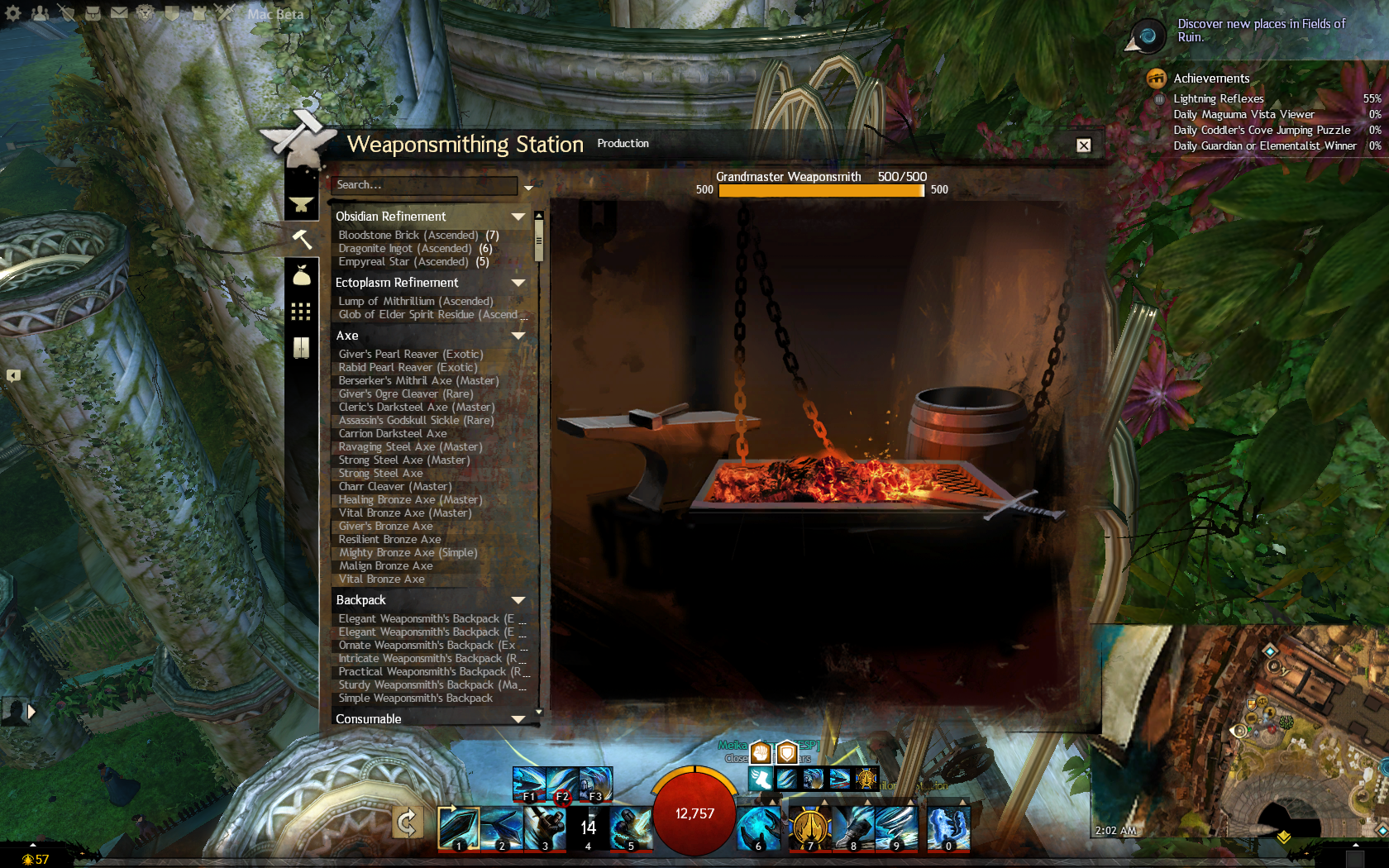
3. I reopen the UI. It is now sorted by Ecto and Obsidian refinement and then the remaining is alphabetical.
4. I close, reopen. Same as #3.
5. I close, reopen. Same as #1.
WTF?
So, normally the crafting UI is organized so that recipe categories are sorted alphabetically. Sometimes, this is not the case and the circumstances of how it sorts are unknown. Is this an expected behavior (and I’m not getting how it determines when to switch) or a bug?
I don’t have a screenshot for every combo, but sometimes the Ecto Refinement and/or Obsidian Refinement and/or Consumable and/or Inscription categories are the ones that tend to jump to the top of the list.
Attachments:
That is seriously puzzling. I’ve been playing these past days with no trouble. Patches download just fine; I did as described above.
ANet GM says yes. It’s just a quick rename though. oldgw2.exe -> gw2.exe and done.
Edit: FYI, the latest build seems to have fixed the problem, so this workaround is no longer needed.
I should mention: per GMGus this fix is only a short-term solution. Unless you revert back to the gw2.exe file future patches won’t work. https://www.reddit.com/r/Guildwars2/comments/4fiind/mac_stalling_client_download/d296dx1
(edited by Blackwood.9072)
Edit: It’s fixed. Hotfix was released and it’s working just fine.
SOLUTION:
Go to your GW2 application. Right-click and choose “Show Package Contents”
Navigate Contents -> Resources -> transgaming -> c_drive -> GW2
Rename gw2.exe to oldgw2.exe
Rename gw2.tmp to gw2.exe.
Launch GW2.
The launcher will start and will begin the download. I’m downloading now.
Edit: per GMGus this fix is only a short-term solution. Unless you revert back to the gw2.exe file future patches won’t work. https://www.reddit.com/r/Guildwars2/comments/4fiind/mac_stalling_client_download/d296dx1
(edited by Blackwood.9072)
Could you have hit the weekly cap on those maps?
I don’t believe it is a cap. My understanding is that the cap is 8000 points and I’ve only done 10-14 events. Tried a few more events and I got the rewards (small scales), but the UI hasn’t changed.
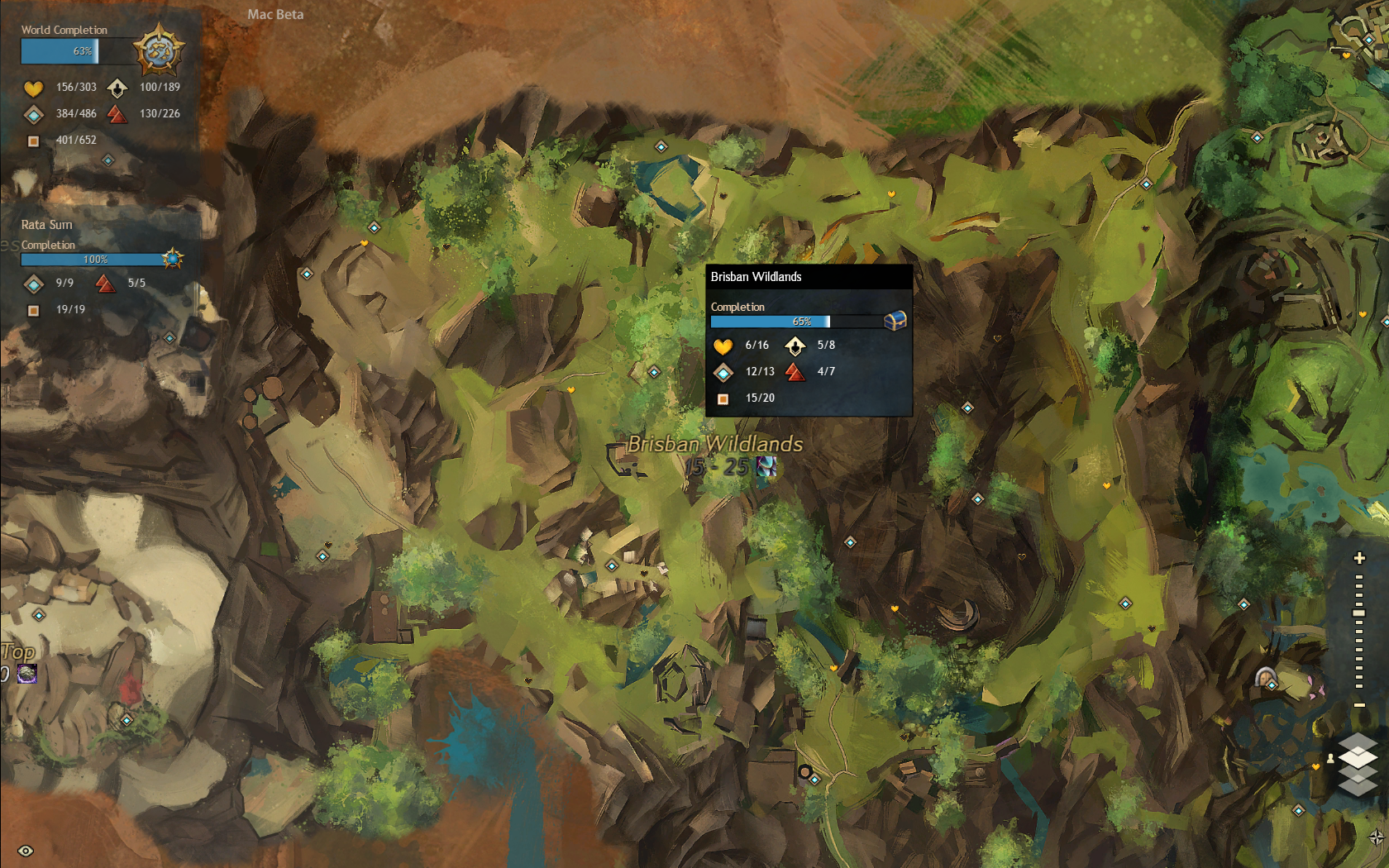
So, I’ve 3 zones (Brisban, Dry Top, Silverwastes) which do not show the map rewards when hovering the mouse over the title of the zone. All other zones show the current and other potential map bonus rewards. Is this a bug or is game supposed not supposed to show the map bonus rewards if something (if so, what?) happens?
Attachments:
Nope, I’m running 10.10.5
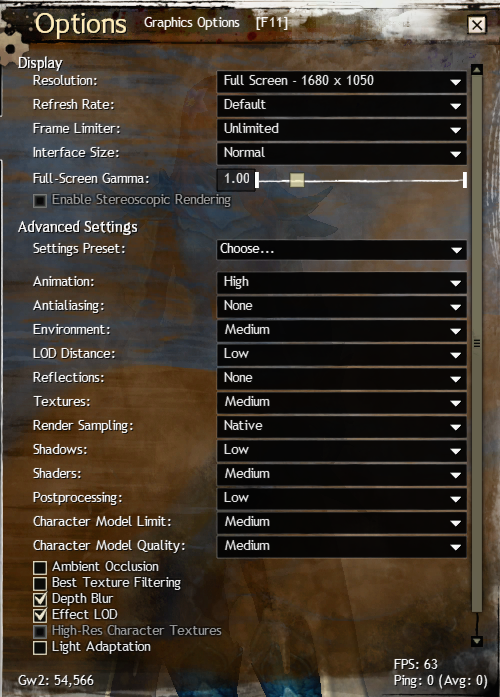
You can see this in the attached image, but High-Res Character Textures is CHECKED and is also greyed out. This was set by the system when I selected the Settings Preset and now I can’t remove it. I’m a Mac, and for Mac/32-bit this is supposed to be unchecked by default and greyed-out.
Not that I’m complaining mind you, but I’ve no idea if this is what is causing my crashes or not and whether the high-res textures are loading or not (I can’t see a difference from before). This occurred with the latest patch (November 19, 2015).
Attachments:

Can we please get a working Mac Client [Merged]
in Account & Technical Support
Posted by: Blackwood.9072
No guarantees, but…
1. Run /Applications/Utilities/Activity Monitor
2. Kill any Guild Wars 2 processes
3. Go to ~/Library/Application Support (if you don’t know this it is your user folder’s Library)
4. Rename the Guild Wars 2 folder to Guild Wars 2 OLD
5. Relaunch
Let us know if that did the trick.
Would you post your mac’s specs, the game’s graphics settings, and your experience with crashes while using crossover? I’d like to be able to compare to my machine before I consider purchasing.
It is “fixed” for me as well on my MBP. The UI is very slow to load, but you can scroll and (I think) select.
Here is a sample of the process (Mac) when the game crashed.
Attachments:
This may or may not be relevant, but I’ve tried lowering the resolution and it seems to work. Not always and it may simply be perception rather than fact, but it feels more stable.
There’s a dialogue box that pops up when you crash to send the details to ArenaNet. Some crashes don’t generate this but most do.
Well, this may be a mac thing Lauren, but I’ve yet to have a single crash where this happened. Do you know what types of crashes do not launch the crash reports?
Regarding my ticket on this UI issue:
- - I confirmed with GW2 Support that I did have permission to donate to the treasury.
- - My response is, “The next time that you’re in the game and you find a bug, you can do us a favor by submitting an in-game bug report. This will send detailed information about your character and your position directly to our Quality Assurance Team and will help us kitten the issue as promptly as possible.” I removed the rest of the response on how to do this.
- - I also did a follow-up w/ an in-game bug submission.
The ticket remains open, and I guess the ball is in the QA’s space. Don’t know how well that’ll work, but if I get further news I’ll post it here.
Hello, checking in with everyone. I have a few updates to share. There will be more later but I wanted to hit these first:
-snip-
OOM crashes
- Please continue to send your crash reports via the in game crash reporter with details about what you were doing and your system specs.
- The in game reporter is the best way to report crashes as they go directly to the programming team.
Lauren, where exactly is the in-game crash reporter? When I experience crashes my screen freezes for a moment and then goes to my desktop. I’ve never seen an in-game crash reporter. I do see a support link on the menu when I press escape and I can submit a bug, but there is not category to submit crashes. Am I looking in the wrong spot to provide a crash report?
Try dropping your settings as low as they can go. If that’s fairly stable, choose a setting and slowly increase it. Once the maximum is reached (and you feel it’s stable) make a note of it. Drop that back to the lowest and start again with a different setting.
Once all these settings have been exhausted, start with combinations.
Basically, I’m suggesting playing with the settings until:
- You are fairly stable.
- You feel reasonably satisfied with the appearance.
Hopefully you will find a happy spot that isn’t a potato. We’re continuing to push toward fixes that should help solve some of these issues. Memory fragmentation is a complicated issue.
I did that back when I first started playing GW2 earlier this year (March 5, 2015) which lead to these current settings. However, the problem is that with HoT these setting don’t work as well.
Now, I will do as you suggest and start from the lowest settings, but if the issue still exists then what should we do?
shaden, what are you current in-game settings? I’m referring to things like character limit, and such. This sounds like an out of memory error, which is rather common with Cider due to it emulating 32-bit Windows. Also, how long do you play (and where) when these occur?
I figure it might help if various users provided their settings as well.
Also, the hardware for these settings is:
- 16GB RAM
- 2.8 Ghz i7
- AMD Radeon R9 M370X – 2048MB VRAM
In your opinion Jon, if the attached settings are no good for the given hardware then what is recommended? Using the auto-detect feature just raises the settings.
Attachments:
1 2