Aside from the generally abysmal lags when there’s 2 blobs fighting or three-way stonemist battle, i’ve been experiencing random small lags at short intervals.
Like i’m just strolling with my medium sized zerg, i swap weapons, but it takes that little bit longer to swap, and then things are back to normal, then a few seconds to a minute later it lags that little bit again, then back to normal, and it keeps going on like that, in EB and BLs.
Has anyone been experiencing this?
When Escape from Lion’s Arch was released, everything was great, the game was responsive even in the biggest of zergs, whether they be in PVE or WvW (except when it’s a 3 server battle in SM).
But shortly after that i started getting slightly more delayed response times (ping fluctuates between 84~155), and after Battle for Lion’s Arch release it’s just been constantly spiking from 90ms to 200+, or just flat out stay at 250~350 in LA and sometimes other areas.
I’ve tried everything in my power to fix this, but i’ve reached a dead end, and all that’s left is to ask, is this a common issue since the latest LS releases or is it a problem on my end??
Server: Piken Square
Country: Egypt
ISP: TE Data
Hardware:
CPU: i7 3rd generation 2.6ghz up to 3.7
GFX: Nvidia GTX 675m 2gb
RAM: 16gb DDR5
OS: Windows 7 64-bit
Concerned about Captain's airship passes.
in Battle for Lion’s Arch - Aftermath
Posted by: RapidSausage.4620
okay then, i just hope they’re not so far apart that i have to WP to transport between npcs.
Concerned about Captain's airship passes.
in Battle for Lion’s Arch - Aftermath
Posted by: RapidSausage.4620
I was reading the patch notes and getting quite excited, then i read this “A two-week Captain’s Airship Pass can now be purchased in the Services category for 150 gems. // Permanent Captain’s Airship Pass in the Services category for 1000 gems”
From my understanding, they’re offering LA’s utilities for real money, and this makes me very concerned.
Can someone shed some light on this?
yes it was possible to conjure minions out of thin air in GW1, but it needed certain conditions, and it was only 1 type of minion, not like GW2 where ALL minions are summoned unconditionally this way.
also i’m not comparing GW1 and GW2 necromancers per se, i’m just saying that GW2 necromancers are farther away from the definition of a necromancer than the GW1 necro was.
Lifesteal is not as good, minions are created out of thin air, and conditions replaced what used to be profession unique hexes which makes you feel like you’re doing nothing special, so the necromancer feels less of a necromancer now than the necromancer felt like back then.
Everything that made the necromancer a necromancer, has been transformed into a generic caster with green particles.
I know it’s a little late to be writing that sort of thing, but i have to.
The necromancer doesn’t feel like a necromancer, he doesn’t really deal with the dead like he used to in GW1.
Think about it, the minions don’t need corpses anymore, they just pop out of thin air, that’s conjuring.
Life siphon, Life steal, that’s a vampire right there.
Conditions, Curses, might as well call him The Witch.
Spectral utilities??, that’s the Ritualist’s domain.
Where’s the necromancy?
LOL.. if Anet gave out free kites to everyone who spent gems since the launch of gw2 and not within the last month guess how many? a LOT.. Anet would be making imo huge financial losses than gaining something.. besides they aim to promote the kites hence the limit. i also did not get a kite due to spending gems in july not june but thats my tough luck and i dealt with it. Deal with it^^
there are 3 types of kites, they only gave away 1 type
I’ve spent a significant amount of money on gems in this game, i’ve pre-ordered it, and it was a digital deluxe.
Now ANet made these nice kites and put them in the gem store, normally that’d be ok, if they didn’t give them away to people who made gem purchases within the last month….what about those who didn’t, what about those who spent lots of money on the game NOT within the last month?, don’t they deserve something?
I’m saddened by this
I only play WvW (for PVE it’s meta events only).
I wanted to create a Hammer Warrior at first, since he has area control while still keeping damage, and he has lots of weapon choices.
Then i was told that the Guardian hammer is much more annoying to the enemy, plus guardian survivability is incredible, and he has more utility.
I already have a Mesmer, Engineer, and a Ranger, so i’m not too keen on having casters or range, i want a melee class that can be effective in zergs, has good survivability, build diversity, and good damage without being a kamikaze.
I’m making my first heavy class, but i’m undecided which one to pick.
So if you have the time, please give me the goods and bads from your perspective on both classes, as it will help me pick one.
the effectiveness of SD is questionable to me in wvw.
sometimes i just wish we’d get a couple more choices for weaponry.
SD?
////15chars
Since most engineer builds pretty much force the use of a kit to be good, and the main weapons just end up being something to put a sigil on, why not allow the engineer to have a kit INSTEAD of an alternate weapon set, while keeping 3 utility slots free.
for example, i can switch between a rifle and a bomb kit, and still have space for 3 elixirs
sorry to burst your bubble, but for PVE engineer isn’t a very good choice.
However, if you really want to play engineer then go with the Bomb kit, until you can get grandmaster traits, then you get the grenade kit and trait it with the master grenadier grandmaster trait in the explosives line.
any engineers in here?
hey everyone.
I mainly play WvW in medium to large groups, and therefore adopted a grenade/elixir build with 30/0/0/30/10 build.
i really want to be using my main weapons, but due to lack of major AOE such as grenades i don’t use them often.
So i was wondering if there is a P/S or Rifle builds that focus on taking down a small number of targets efficiently rather than moderately damaging many targets with grenades.
anyone?
/15char
My server is basically dead in PVE (open world), no one seems to play at low or high level zones anymore, everyone’s busy with FOTM and Cof, and i’m really not into playing these for farming cuz i hate grinding.
I love the open world, it’s beautiful and diverse, and the dynamic events would be much more fun if there were more than 2 people doing it.
so pure and simple, are there any EU servers with lively open world PVE??
So i just reached lvl 80 with my engineer today, and i’ve been saving up enough money and badges of honor to gear myself up.
But now that there’s a new patch around the corner, i don’t want to risk buying anything that’ll get changed/nerfed later in the patch.
So i was wondering, is there any sort of like….preliminary patch notes?, or a bit more specific of a description other than “changes to traits and skills”?
opened about 400 dragon coffers so far.
Zhaitaffy everytime, 4 holo minis, foods and fireworks, ZERO tickets.
i guess ANet really wants us to buy those rich coffers.
having this as well, no idea what’s going on, first i start the client and it says “Downloading 0 (0KB/S)”, both zeroes keep jumping to 1 and back again, then i get “connection error, retrying”
Yes, you have to do PvE. Unless you can find a zerg karma train WvW leveling is extremely slow. And even if you do, it’s still very slow. PvE with hearts, story, and DEs, I found leveling to be at least 3 times faster than WvW. And that is independent of profession.
If you decide to just bite the bullet and PvE, take grenades and bombs to make those heart and DEs go faster. Build explosives and I suggest you do power/condition damage hybrid stats.
any specific guide in regards to the grenade and explosive builds?
So i’ve made an engineer today, and leveled him to 17 via maxing Chef, but since i’m out of funds i resorted to WvW (the only mode i play pretty much) to gain levels, but it’s painfully slow, so i have to do PVE.
I don’t like PVE that much, i find it repetitive, and i don’t like that very much.
So, any tips on how to level an Engineer as fast as possible? (10~15 levels per day)
the question is, which class do you suggest i play???
I have 2 lvl 80 character, my main, which is a level 80 Norn Mesmer, pimped to the brim in exotics, and a lvl 80 ranger which i bought cleric gear for and 100% regret it, plus pet mechanics feel very dodgy.
So, since i’m coming back to GW2 now, i want to build up a new character, which will be either a Necromancer, a Thief, or an Engineer.
I need help deciding based on my experiences with their counterparts from GW1.
I loved playing a blood necro in GW1, lifestealing and hex builds especially, and i loved playing assassin with a burst kill build.
as for the engineer, i just love his kit in terms of originality.
I’ll mainly be playing WvW, hardly any pvp.
Normally i wouldn’t mind a grind, heck, i don’t mind legendaries being a grind, because they require materials and effort from all aspects of gameplay (apart from PvP).
What i do mind is the extreme PvE/Dungeon centric progression system.
I am not a big fan of dungeons, i do everything i can to stay away from them, i don’t like grinding them, but all the good looking weapons and faster leveling methods almost force the player to do dungeons.
It would be nice to see WvW only unique skins, not the invader weapons currently available, these are not very good, i’m talking genuine stuff, and no laurels, simply weapon/armor skins exclusive to WvW, that require Badges, and perhaps another WvW only resource, like World Exp.
It’s nice to see threads like this and it is nice you took the time to show your appreciation. I hope you enjoy your time in GW2.
It’s great because i meant every word.
Hello everyone.
I’m a veteran GW1 player, and one of the earliest players (prepurchased digital deluxe) to play GW2.
I recently came out of a really bad confrontation with the Admins of another game, provided by another major game publisher/developer, that resulted in my PC (through Hardware ID) getting permanently banned from playing their game, even though i was in the right.
This made me really appreciate the effort Arena Net puts into their games, and the love they have for their players.
What i want to say is, thank you Arena Net for bringing such joy to my gaming experience through your games (GW1 and GW2), and i commend you for doing things the way they should be done without slacking off or implementing half-bummed measures.
Sure you can get a bit slow on some stuff, but i always know it’s because you’re trying to get it right.
I also would like to thank the community, one of the best i’ve had the pleasure to be part of, for being so awesome.
I’ll be coming back to GW2 again now, after quite some time off due to college work, and i’m looking forward to many more years of enjoyment with all of you guys, Devs and players alike
Have a great day everyone, and god bless you.
Thank you for the reply nitro, very well structured and to the point.
If it’s alright to ask for a bit more insight from you, i ran AlienAutopsy tests, the one attached is the gaming test, it tests HDD, CPU, GPU, and RAM.
I skipped the tests that use full screen 3d graphics, since i only seem to crash when running fullscreen 3d applications, and sometimes videos.
I have run individual tests on the CPU, RAM, Monitor, and other hardware to rule out any hardware other than the GPU.
If you can take a look at the results and give me your opinion i would be grateful.
Regadless of what the problem might be, i have already contacted Dell “representatives” here in Egypt, and i’ll be taking my laptop to be repaired on monday, how long it will take i have no idea, but i do know where laptops that require repairs go (i know where the plant is).
p.s: wouldn’t hurt for others to take a look and give opinions as well
p.s2: Prior to the problem became at such severity, i had tested the temperatures for my GPU and CPU, both of which peaked at about 72 degrees Celsius (heavy gaming), and i don’t know if this is normal for laptopsIf you are going to run diagnostic tests it makes sense to fully test all aspects of your hardware. I did not know about the current TDR errors as I have not played GW2 for the last 6 weeks. I would say that if the Alien Autopsy diagnostic tool gives you a pass on all aspects of its diagnostic tests and similar diagnostic tests have the same results, then I would test other 3D games and/or 3D stress test to uncover any hidden hardware defects. By hidden I mean a fault that may not show itself all the time but only when certain conditions are reached such as:
certain amount of power/wattage usage
certain temperature range
certain components become active in different power statesIf none of these tests cause the same problem that you experience with Guild Wars and do not show any other symptoms then I would assume the problem was oriented around Guild Wars.
In either case it may be worth having DELL inspecting the laptop due to it being 2/3rd’s of the way through its warranty, the last thing you want is an expensive laptop with hardware problems and being outside of the warranty period. It would also be a wise to back up all important data to a externally hard drive or pen drive whilst your computer is still running and before you hand it over to DELL (very important!).
If you require the same laptop for work or education then its also important to know the turn-around time for an inspection/repair from your manufacturer (in the UK its typically 2-4 weeks that may be different for Egypt).
good luck
i’m pretty much done with tests at the moment, i’ll be handing the laptop to Dell on monday.
i have backed up my important stuff already, since i had to reset my laptop to factory defaults anyway in an attempt to fix the problem earlier.
and WOW, 2-4 weeks, that’s….that’s a lot of time, it’s gonna be a challenging time for me to do my college work.
It sounds like you are getting a STOP Error after a TDR. TDR or Timeout Detection and Recovery error are a way for the GPU to reboot in the event of a hang, freeze or other issue. A STOP error is a BSOD that normally is caused by hardware failure or when the OS interaction with hardware fails AKA, driver or bad/corrupted software issues.
It appears that your system is unable to recover giving you a BSOD. There have been reports of TDR problems with the latest NVidia 314.07 driver. If you are using 314.07 then ripping and installing a different driver may alleviate the issue. If you are on old drivers installing a new on may help also.
Many people that are on 314.07 and experiencing TDRs are now using 310.90 to clear up the issue. Unfortunately there are so many things that can cause this so it can be very difficult to troubleshoot.
Here is an article linked by Ashley Segovia on TDR.
yea, i’ve read that article several times.
I’ll try the 310.90 drivers and see how it works, i doubt i’ll have much success with it though.
The version i’m looking at says the memory clock is 750 mhz, but notebook check says the 675m has a memory speed of 1500 mhz, is there a difference between memory speed and clock?
Hi RapidSausage,
Memory used in todays computers are DDR (Double Data Rate) based technology, meaning if you had for example a clock speed of 750MHz you effectively get a data rate of 1500MHz.
I would also have to agree with the majority of this post that the problem is most likely related to a graphics card malfunction, wether this be caused by overheating, lack of cooling, improper use, overclocked hardware or even manufacturing defects.
If the laptop is within warranty it would be best to contact the manufacturer (in this case DELL), it is their responsibility to honour the warranty not the retailers, and DELL operate globally and will most likely have an approved services and repairs center based in Egypt.
Although the laptop has two big fans built in, gaming laptops are notorious for having many problems related to graphics cards and overheating, and it is no surprise there when you try to shove high performance hardware into the small form factor case.
What most people do not think about, when monitoring their computers temperatures is that although a CPU or GPU may be able to withstand certain limits and stress levels, their surrounding components cannot, and its usually these components that develop a fault or break well before the CPU or GPU reaches its thermal limits.
So even though a GPU may be able to withstand 100+ degrees celsius, many other components surrounding the graphics processor may not and as the hotter your processors like the CPU and GPU get the hotter the surrounding components get.
I hope this helped
Nitro.
Thank you for the reply nitro, very well structured and to the point.
If it’s alright to ask for a bit more insight from you, i ran AlienAutopsy tests, the one attached is the gaming test, it tests HDD, CPU, GPU, and RAM.
I skipped the tests that use full screen 3d graphics, since i only seem to crash when running fullscreen 3d applications, and sometimes videos.
I have run individual tests on the CPU, RAM, Monitor, and other hardware to rule out any hardware other than the GPU.
If you can take a look at the results and give me your opinion i would be grateful.
Regadless of what the problem might be, i have already contacted Dell “representatives” here in Egypt, and i’ll be taking my laptop to be repaired on monday, how long it will take i have no idea, but i do know where laptops that require repairs go (i know where the plant is).
p.s: wouldn’t hurt for others to take a look and give opinions as well
p.s2: Prior to the problem became at such severity, i had tested the temperatures for my GPU and CPU, both of which peaked at about 72 degrees Celsius (heavy gaming), and i don’t know if this is normal for laptops
Attachments:
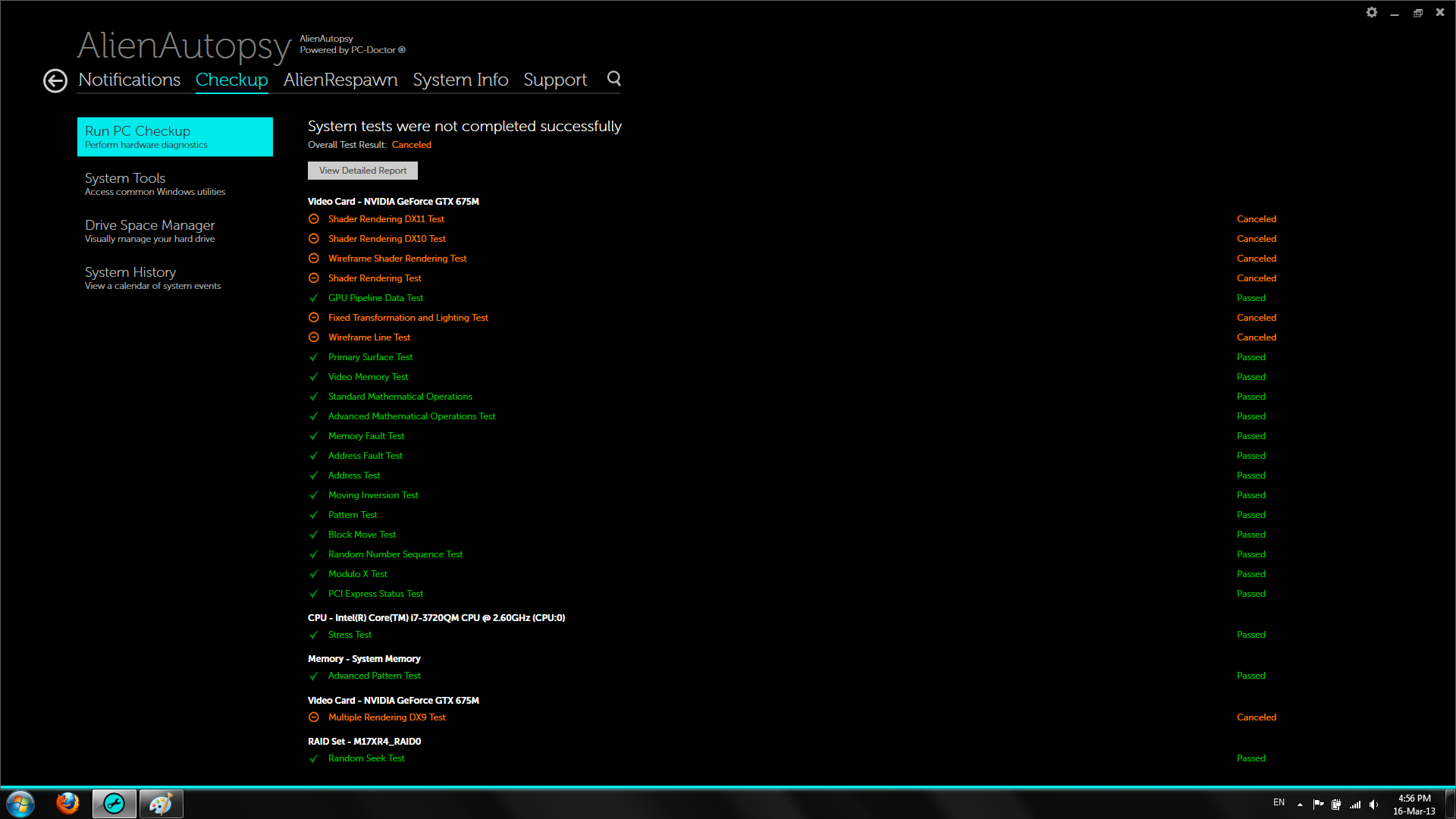
(edited by RapidSausage.4620)
i downloaded the BIOS i need but it’s in .rom format, how do i use it? (without opening the laptop)
Yes this is defective hardware or insufficient cooling which can happen if you use your laptop in a manner that prevents proper airflow.
Get a cooling system that sucks air from the laptop rather than blowing air into it.
this thing has 2 big fans, one for the processor and one for the GPU.
the temps are normal (same as they ever were) but it still exhibits the problem.
I’m thinking about flashing the BIOS, same BIOS version and everything, but i’m not sure if this is the same version i have or not.
The version i’m looking at says the memory clock is 750 mhz, but notebook check says the 675m has a memory speed of 1500 mhz, is there a difference between memory speed and clock?
anymore input into the issue?
i can’t add much to what has been said.
if you even want to meet the minimum requirements set for GW2, you’ll have to spend more than that.
not to mention that these min requirements are pretty much too low if you plan to play WvW or a moderately crowded area.
Well if its the same company then region matters little in most cases. The money goes to the company as a whole so …
But if u cant get anything as good or better in ur area then fair enough ..go with a repair.
i just hope this is a minor issue, it seems my gtx 675m has suffered damage/dislodged and i’m guessing it costs quite a hefty sum of money to replace if not within warranty.
i also hope it doesn’t take long to fix, i need my laptop for my graduation project, it’s the only computer i have.
(edited by RapidSausage.4620)
Cant u get a refund form the retailer then ?
i doubt it, we do have CompuMe in egypt, but i bought the laptop from a branch in Dubai (Dubai is in another country), i doubt this will work.
But even if it’s possible, there are currently no laptops better than what i have now, so i’d prefer if they fixed the issue.
(edited by RapidSausage.4620)
Then in all honesty if ur worried about that, get a refund and buy from another brand.
Asus
MSI
Sager
RazerThey all seem to be other popular performance laptops u can get in the US.
http://www.xoticpc.com/index.html
i’m not in the US, i’m in Egypt, and i can’t refund since i didn’t buy it from dell directly, i bought it from CompuMe in Dubai.
Your graphics “card” is failing; have the laptop replaced since it’s under warranty. It’s a common problem on many Dells and Alienware. This is why BGA mounted chips are a terrible engineering design (in my opinion).
they’d probably only replace the gpu.
but my concern is if this happens again outside warranty it’d be a monetary problem.
i ran a CPU stress test with the same program as well.
i ran it 64bit for 5 minute on large packet load, max temperature was 90 celsius but it only reached that number near the end of the test, and only 2 cores reached that temperature, the other 2 cores ran under 82 celsius at all times.
hmm, only thing i could suggest is try DX11, DX0 is quite old now, also lower the resolution to something silly like 600×420 or something then slowly go up see what happens during the tests, might do nothing but might be a work around until the manufacturers have sorted it out.
up side is you have warranty so they have to fix it, silver lining!
OCCT doesn’t have DX11, plus GW2 runs on DX9 anyway.
i ran the test at 640×480 and 1 shader, and i still crashed immediately, there wasn’t even any animation, the model was frozen all the time.
could i have dislodged a heatsink somehow?, how do i know if i did?!
Run diagnostics on the computer (restart the computer by holding FN and Power button simultaneously) let the diagnostics complete.
just ran diagnostics (and thorough test as well), everything came out clean.
i also disabled windows update, and after all this i did the gpu stress test with OCCT
on lowest resolution, dx9, 1 shader…basically the lowest of everything i could find.
i crashed 10 second into the test.
aah ok, the best thing to do then would be to let the guys isolate the problem as they will know a lot more about that particular model than i could find around however i have found that a few people have had this problem and the general ’’solver’’ was to turn off windows automatic updates and roll back the driver software.
previous driver software : http://www.geforce.co.uk/drivers/results/55205
i have guessed your on windows 8
if not heres the win 7 : http://www.geforce.co.uk/drivers/results/55205
and if your unsure this will automatically select a driver if you are just select legacy drivers to find a previous version (try to avoid BETAs) http://www.geforce.co.uk/drivers
do the below to run a diag check (sorry if you all ready know this! haha) but this should show up any conflicts / discrepancies within the system
Hardware Diagnostics Check:
Run diagnostics on the computer (restart the computer by holding FN and Power button simultaneously) let the diagnostics complete.
p.s.s. check the airvents, make sure there not full of dust, i doubt they are but that will add to whatever problem you have.
before i comment on what you said, i’ve run OCCT (GPU tab), i changed idle times to 0 minutes, and test duration to 1 minute, DX10, Full screen, 1920×1080, shader 7, max FPS 120.
the first time i ran the test with these settings it worked for 80 seconds, the second and last time it didn’t last 10 seconds.
to reply to you comment, i’m running the stock nvidia drivers that came with the laptop (296.39), i have not disabled windows update, and i have not done a diagnostics check, i will do both now.
as for the air vents, i regularly clean them, almost everyday just removing dust form the outside manually, and every month or so i vacuum the vents (i know i shouldn’t be doing this with the vacuum, but i can’t get any compressed air where i am).
sure, i am at work at the mo so ill post the info as soon as i can, ill look at the model of your laptop too on the net before i start telling you what to unscrew and what not
i’d prefer not to void my warranty, i’m taking it to be repaired at the dell guys on monday.
i just need to identify where the problem lies and how to take countermeasure to prevent it from happening in the future.
also my laptop is not exactly and R4 or an R3, it’s sort of a mix, so what you find on the net might not be the same as what i have.
really appreciate the help btw.
As its still got a warranty i would send it back personally i know its not the ideal situation but that’s what i would do.
i would still check the fan, don’t write any problem off until you have properly checked.
if you have a spare GPU i would replace it and see what happens, if this invalidates your warranty i wouldnt even try.
p.s. take a screenshot and post the diagnostics, we’ll be more than happy to read it for you.
if that’s possible, can you guide me on how to do the test for the parts that need testing?
The Fan on the GPU might be failing, does the sound do any skipping or anything or is it an instant restart?
used to be a 5 second wait then restart, now it just stays black and i have to manually restart.
what i will say is the temp might say its fine, but seriously check the fan any ’’load’’ put on might make it stress, a good way to check in your computer while its running put your small finger in the GPU fan, if it stops its too weak and on the way out if it hurts a little (wont take your finger off) then its not the GPU fan.
The fans are performing as they always did, nothing falling short.
http://www.ocbase.com/ is a good site to test the GPU and system, dont rely on windows diag.
tried this software but it’s very confusing for me to read.
and this is a laptop? i know its a silly question but are you sure its on a hard, level ventilated surface? as this defiantly sounds like a cooling problem, at the very least a hardware problem.
It’s on a flat marble desk.
have you got any warranty/insurance on it?
Still within its 1 year warranty.
(edited by RapidSausage.4620)
Do you monitor the cpu/gpu temp ?
That night in LA, might have lifted a heatsink on your GPU… therefore you continue to have problems.
Just a tought…Edit: Anyways, Bsod is allmost allways hardware related.
please check notes aat the end of my post, i updated it.
Sounds like a cooling problem.
Laptops in general are not very good at displacing heat.
And Guildwars 2 in a pvp setting will generate alot of heat on any hardware.
i think 2 friggin huge fans should do the trick, and they did, i’ve had this thing for 8 months and i’ve played GW2 everyday.
i forgot to mention i checked the termperatures.
in WvW, both my processor and gpu are at 69~71 celcius.
I’m not asking for assistance, i’m merely giving a heads up.
My current setup:
-Alienware m17x R4
-I7 3720QM 2.6ghz
-16gb Ram
-Nvidia GTX 675m
Last thursday, TNTD and Hobs were getting a warband together for WvW reset, we had 30+ people at one WvW gate in LA, and it seems a couple of other guilds had the same thing planned, and they had about the same numbers at another WvW gate.
That’s when things got messy for me.
to give a bit of tl;dr, the issue is, a few minutes in any intensive graphics situation (wvw battles, being in LA, or a match in world of tanks) my screen would go black, and the computer restarts, after it loads again it gives me an error telling me i got a BSOD most likely causes by a VIDEO_TDR_ERROR triggered by this file nvlddmkm.sys
A few minutes into the gathering, my computer crashed, i had no idea what the problem was at the time so i just restarted, but it happened again within 3 minutes, so i thought to myself it could be just team speak that’s causing this.
It’s been a week now, and during that week i’ve crashed at least 15 times, i tried everything that can be done (Disk error checks, disk and registry cleanup, malware and anti virus scans, defragmented, tried stock and latest drivers, and the drivers i had prior to the problem), heck, to eliminate any software possibilities i repaired my pc to factory condition, but i still get this problem, and to make it even more confusing, my pc doesn’t restart after getting the black screen now.
From what i understood from other people, LA by default requires high processing power, and coupled with WvW grade player gathering last thursday, i think it popped something in my graphics card.
i’m not sure where to go from here, i’m most likely going to RMA this alienware since it’s still within warranty, or try to fix it at least, but it doesn’t really matter if the cause will still exist.
if you have any comment on this please do give it.
notes: forgot to mention a couple of stuff, i’ve checked my temperatures during WvW play (nothing intense, just regular small group fighting) and both my CPU and GPU temps were going around 69~71 celcius, also i’ve had a couple of times where my laptop beeped 6 short beeps when it went black screen, according to this thread http://tinyurl.com/bdpblrr 6 beeps mean video card failure, but i’m being suspicious about this one since it only happened twice from the 15 times i got the black screen, and most games launch no prob and run for a few minutes no prob.
(edited by RapidSausage.4620)