Laptop: M6600 – 2720QM, AMD HD6970M, 32GB 1600CL9 RAM, Arc100 480GB SSD
here. reason i didnt provide anything is due to the fact i’m well aware of how long this issue has been in the game. and this thread served more as a heads up than anything else.
XX\XXX\XXXXXX>tracert 206.127.146.36
Traceren van de route naar 206-127-146-36.plaync.com [206.127.146.36]
via maximaal 30 hops:1 * * * Time-out bij opdracht.
2 8 ms 1 ms 1 ms 192.168.178.1
3 7 ms 7 ms 7 ms 10.223.220.1
4 7 ms 7 ms 8 ms tb-rc0001-cr101-irb-201.core.as9143.net [213.51.
150.129]
5 9 ms 10 ms 10 ms asd-tr0042-cr101-ae5-0.core.as9143.net [213.51.1
58.18]
6 9 ms 9 ms 10 ms xe-8-1-0.edge3.Amsterdam1.Level3.net [212.72.33.
213]
7 16 ms 15 ms 16 ms ae-51-51.csw1.Amsterdam1.Level3.net [4.69.139.15
3]
8 16 ms 19 ms 19 ms ae-58-113.ebr1.Amsterdam1.Level3.net [4.69.153.1
93]
9 17 ms 15 ms 15 ms ae-47-47.ebr2.Dusseldorf1.Level3.net [4.69.143.2
06]
10 17 ms 17 ms 18 ms ae-22-22.ebr1.Dusseldorf1.Level3.net [4.69.143.1
85]
11 16 ms 17 ms 19 ms ae-47-47.ebr3.Frankfurt1.Level3.net [4.69.143.17
4]
12 16 ms 15 ms 17 ms ae-93-93.csw4.Frankfurt1.Level3.net [4.69.163.14
]
13 16 ms 16 ms 15 ms ae-4-90.edge6.Frankfurt1.Level3.net [4.69.154.20
2]
14 17 ms 17 ms 17 ms 195.16.161.58
15 16 ms 15 ms 17 ms 206-127-157-86.plaync.com [206.127.157.86]
16 21 ms 17 ms 18 ms 206-127-157-102.plaync.com [206.127.157.102]
17 * * * Time-out bij opdracht.
18 * * * Time-out bij opdracht.
19 * ^C
Your having TX issues with Level3. From LA to you, the Latency is 150MS-250MS. So while your Trace to plaync.com is low 21ms~, from the US to you its 150ms-250MS.
You should contact your ISP and have them open a Transport ticket with level3, explain that traffic from the US to you (going in your direction) has high latency.
13 150 ms 150 ms 150 ms vlan80.csw3.losangeles1.level3.net [4.69.144.190
]
14 149 ms 149 ms 149 ms ae-82-82.ebr2.losangeles1.level3.net [4.69.137.2
5]
15 150 ms 151 ms 151 ms ae-3-3.ebr3.dallas1.level3.net [4.69.132.78]
16 * * * Request timed out.
17 148 ms 148 ms 148 ms ae-101-101.ebr1.atlanta2.level3.net [4.69.202.65
]
18 150 ms 152 ms 150 ms ae-6-6.ebr1.washington12.level3.net [4.69.148.10
6]
19 150 ms 150 ms 150 ms ae-1-100.ebr2.washington12.level3.net [4.69.143.
214]
20 153 ms 152 ms 152 ms ae-58-58.ebr1.newyork1.level3.net [4.69.201.69]
21 150 ms 151 ms 151 ms ae-43-43.ebr2.london1.level3.net [4.69.137.73]
22 153 ms 153 ms 156 ms ae-48-48.ebr2.amsterdam1.level3.net [4.69.143.81
]
23 156 ms 156 ms 156 ms ae-58-223.csw2.amsterdam1.level3.net [4.69.153.2
10]
24 150 ms 150 ms 149 ms ae-2-52.edge3.amsterdam1.level3.net [4.69.139.16
9]
25 161 ms 156 ms 158 ms ziggo.edge3.amsterdam1.level3.net [212.72.33.214
]
26 153 ms 152 ms 156 ms tb-rc0001-cr101-irb-201.core.as9143.net [213.51.
150.129]
Laptop: M6600 – 2720QM, AMD HD6970M, 32GB 1600CL9 RAM, Arc100 480GB SSD
performance gain is performance gain. there is no point in benching naked.
those numbers aren’t any kind of placebo, they are real.
instead of learning all those iometer bools, and variables I’ll let the developer show you.
http://www.romexsoftware.com/en-us/fancy-cache/demo-benchmark-iometer-1-defer-write.html
You dont understand the Tech. RamDISKs are Cache. Used mainly for Reads. Benching with Cache Enabled skews the numbers and shows NO REAL performance of what you are benching
If the bench only uses the Cache you are not even touching your HDD/SSD in the test, as it never leaves the RAM.
And the Topic here is GW2 on kitten, not GW2 On a RAM DISK.
*Edit, lol they Kittened SSD.
Laptop: M6600 – 2720QM, AMD HD6970M, 32GB 1600CL9 RAM, Arc100 480GB SSD
can’t log in, Extreme latency, pretty much unplayable, anyone else..?
it’s definitly not on my end too.You say that, but fail to provide any usable and valid information.
Firs thing to do is log into GW2 and issue /ip. Then in windows Command Prompt issue
tracert x.×.×.x <- that would be the IP address from /IP
then post the output here.
That is the ONLY way to being to troubleshoot Lag/connectivity issues.
oh man please, this issue has been going since release…
occasionaly some huge lagg just appears.. server wide.
If you do not want to provide the BASIC information NEEDED to even look at the issue for you, then please just go away.
Laptop: M6600 – 2720QM, AMD HD6970M, 32GB 1600CL9 RAM, Arc100 480GB SSD
and with the program primo cache your SSD IS as fast as a ram disk.
Lol, yeah right!
If you seriously think so, then good for you. You do know what primocache is now, don’t you? Also, benching your ssd with primocache active and thinking “this is my ssd performance!”, well whatever makes you happy I guess.
See, with primocache running, you aren’t benching the ssd, but what primocache has cached in ram.
that would make sense why his ‘SSD Bench’ was running at 1GB/s.
NeedCofee – RAMDisks are nice and all, but useless when doing benchmarks. If I had known you had a RAMDisk I would have told you to disable the driver before running ANY benchmarks ;-) – Even I use a RAMDisk, 8GB carved out of my 32G. Its very nice to have for reads. But throws stats for raw disk/ssd testing out the window!
Laptop: M6600 – 2720QM, AMD HD6970M, 32GB 1600CL9 RAM, Arc100 480GB SSD
Side question:
When I was forwarding my ports, the guide on portforward said that I need static IP. My connection type is PPPoE and I was assigned no static IP at the beginning, so I assume I have dynamic IP.That isn’t what it means by a static IP. It doesn’t matter whether the IP your ISP gives you (ie your ‘internet IP’) is static or dynamic. Port forwarding is done within your own network (by your router), and you set it so that traffic on port X goes to say 192.168.1.100 (ie your gaming computer’s internal IP in your own network). If the next time you turn on your gaming computer your router gives it the internal IP address of 192.168.1.101 then your port forwarding won’t work.
Essentially you have to set your computer to use a fixed IP address in your computer’s Network Settings (in the Control Panel if you’re on Windows) rather than asking the router to give it one.
However, if his Router supports UPnP (almost all newer ones do) Port Forwarding is not necessary.
OP – I still believe the issue is COS/QoS related. However, if you want to test the port forwarding correctly you need to setup your PC to use a static IP. Best thing to do is issue the command ‘ipconfig /all’ then goto your TCP/IP settings and copy that output as your static IP configuration.
Then go into your router and forward the ports used for GW2 back to the IP address you just set in TCP/IP.
Laptop: M6600 – 2720QM, AMD HD6970M, 32GB 1600CL9 RAM, Arc100 480GB SSD
can’t log in, Extreme latency, pretty much unplayable, anyone else..?
it’s definitly not on my end too.
You say that, but fail to provide any usable and valid information.
Firs thing to do is log into GW2 and issue /ip. Then in windows Command Prompt issue
tracert x.×.×.x <- that would be the IP address from /IP
then post the output here.
That is the ONLY way to being to troubleshoot Lag/connectivity issues.
Laptop: M6600 – 2720QM, AMD HD6970M, 32GB 1600CL9 RAM, Arc100 480GB SSD
If Skype and other real-time applications are working correctly, then your ISP needs to set COS/QoS for GW2 to work properly. It really sounds like they put ‘other traffic’ on a low priority that gets dropped when a threshold is approached (anything not defined via the ISP would be ‘other’), and that might just be the issue here.
I would call the ISP and ask them to fix connectivity for GW2 and make sure that its not being dumped due to CoS/QoS policies. they may require a PCap of you playing GW2 so they can setup the policy across the Wireless Link properly for you. But they can walk you through that.
As for this ‘Line monitor’ there is no such thing. Unless you have SNMP access into BOTH ends of your Wireless connection (which you do NOT), you cannot ‘monitor’ the wireless signal for signal to noise ratio and radio strength. And that is what you would need for this ‘line monitor’.
The best you can hope to do, is bring this to your ISP. Explain what is going on, and have them help you fix it. If COD doesnt have issues, then GW2 shouldnt either.
Laptop: M6600 – 2720QM, AMD HD6970M, 32GB 1600CL9 RAM, Arc100 480GB SSD
just because it doesn’t make sense to you doesn’t mean its not possible.
theses are my actual benches, i can do the same on my cheap mushkin SSD’s.
I have mentioned on this forum 20 times how to do it, but no one listens to me.
~futrureman
Its quite simple, you do not understand. Your Benches are synthetic and wrong.
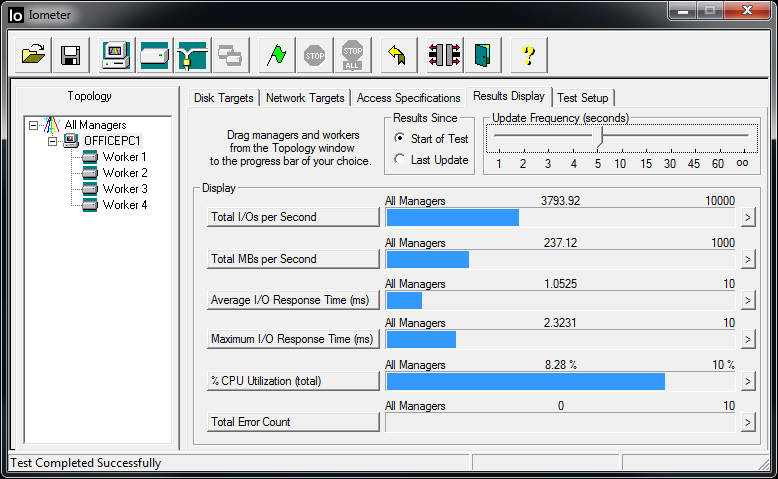
Again, grab IOMeter, and run 4 workers with 45000 mapped sectors. Change the Block size between 64K and 4M for your SEQ-Read and SEQ-Write tests, then again for RND-Read, RND-Write. And you’ll get your REAL Throughput.
Refer to my screenshots for proper testing data (those are my actual numbers from last night)
Laptop: M6600 – 2720QM, AMD HD6970M, 32GB 1600CL9 RAM, Arc100 480GB SSD
so i can use the one from the 80’s? sweet, that should be accurate.
can you explain in your best storage architect voice why crystal disk isn’t good enough?
With that tone, no. even responding to this is a waste of my time now.
tone? like you or all the other negative nancies don’t have a tone?
Ohhhh but i poke fun at you antique software I all of a sudden a tone.you people aren’t easy be friendly around.
Well until i learn how to use this overly complicated nonsense, my 5gb per second on crystal disk will have to suffice.
To be fair, your knocking software that is used by extremely high level Engineers to measure and gauge very expensive Storage hardware…cause its OLD.
Your 5Gbps would be about 619MB/s. Only the VERY expensive Intel SSDs are capable of that xfer rate. And even then, only when they are running a RAID setup.
Attached are some Screenshots between my SSD and my 3TB Spindles(Raid1)
As you can see, the Spindles take a huge hit on SEQ Writes, but are comparable to SSDs on Reads.
Laptop: M6600 – 2720QM, AMD HD6970M, 32GB 1600CL9 RAM, Arc100 480GB SSD
so i can use the one from the 80’s? sweet, that should be accurate.
can you explain in your best storage architect voice why crystal disk isn’t good enough?
With that tone, no. even responding to this is a waste of my time now.
Laptop: M6600 – 2720QM, AMD HD6970M, 32GB 1600CL9 RAM, Arc100 480GB SSD
the year of the version doesn’t matter. its the same tool used to measure IOPS on 250k+ USD Sans (yes, I am also a storage Architect).
Laptop: M6600 – 2720QM, AMD HD6970M, 32GB 1600CL9 RAM, Arc100 480GB SSD
HT only causes performance issues for heavily SINGLE threaded applications. As HT is a ‘virtual Thread’ Pined to a physical Core. If that single thread is using 80%+ of a single core, and HT is enabled, you are reducing the over all system performance as your OS will be throwing threads into HT. Whether or not the Physical Cores are overloaded.
For applications that are properly multi-threaded, HT will increase performance as each physical Core will handle 2 Threads. Instead of additional threads waiting for resources to become available.
GW2 is a great example of a poorly coded Single Threaded application. Since the main rendering thread is single, and it tends to use 80%+ of its physical Resource, HT will not overly help for it. And in some cases (1080p, Full on Details, Super-Sampling…ect) HT will hurt performance.
But, HT aside as there is also the FX modules that need to be considered for this discussion, you should leave the additional threads enabled. Instead of disabling them, use Process Lasso/Affinity settings to control what applications ‘peg’ to when it comes to physical resources.
Over all, your OS will benefit over the additional threads then ANYTHING else.
Laptop: M6600 – 2720QM, AMD HD6970M, 32GB 1600CL9 RAM, Arc100 480GB SSD
Thank you for your reply and help.
I was afraid this might be the root of the problem. Well, I am still bound by contract to this ISP so it’s a no-go at the moment, but if everything bodes well, our area is getting fiber-optics later this year. That should solve the problem, no?
All ISP contracts have an underlining SLA agreement. If they cannot uphold the SLA then the contract can be voided. I suggest reading your Agreement thoroughly.
Have you called into your ISP to complain about the latency issues? Since it happens at certain times of day, its going to be interference. They can work on that. But Wireless over long distances sucks for real time applications (GW2, VoIP…ect)
Laptop: M6600 – 2720QM, AMD HD6970M, 32GB 1600CL9 RAM, Arc100 480GB SSD
MY SETUP:
My area doesn’t have a lot options for internet services, so my ISP has a tower (transmitter?) set up approximately 500 meters away from my house. My modem is a wireless receiver. The signal is green and maxed out, as I said, I don’t have problems with other games or browsing. The connection type is PPPoE, and I’m behind a Dlink router. The connection speed is 2Mbps. I tried connecting my PC to the internet at my friend’s house. They have an EMX connection which uses PPPoE as well, and it runs smoothly there.
There is no fixing that. Wireless based ISP’s all have this issue. And all it takes is them setting Priority for something OTHER then gaming traffic to ruin it for everyone else.
You literally have no hope to getting this resolved with out buying a DSL ISP based connection (DSL SHOULD be available in your area, even at 256Kb up and 1Mb down)
Laptop: M6600 – 2720QM, AMD HD6970M, 32GB 1600CL9 RAM, Arc100 480GB SSD
didja want to see my crystal Mark benches?
Crystal mark is synthetic. Io-meter is not. So no.
Laptop: M6600 – 2720QM, AMD HD6970M, 32GB 1600CL9 RAM, Arc100 480GB SSD
+1, Z87 Chipset, i5-4670K :-) – I paid $420 for my Combo, but you can get it for about 350~ with stock Cooling.
Laptop: M6600 – 2720QM, AMD HD6970M, 32GB 1600CL9 RAM, Arc100 480GB SSD
wvw cripples even the fastest processors. But you should be getting better than 1 to 3 fps.
use game booster to unpark those cores and you should see a noticeable difference.
unparking will help a Ton, But I also think it sounds like your GPU is locked at 1×. Install and run CPU-Z while GW2 is running, or just after it was ran, and check the mainboard tab to make sure the PCI-E shows 16x for the Link speeds.
Laptop: M6600 – 2720QM, AMD HD6970M, 32GB 1600CL9 RAM, Arc100 480GB SSD
Unless you test your SSD/HDD with IOMeter you do not know what performance metrics you are getting.
While SSDs will out peform HDDs 3:1 MOST OF THE TIME, there are instances where they are 1:1.
Load up IOMeter and run 4 Workers (1 per CPU, Ignore HT, if you have an 8 core CPU then run 8 workers). On each worker Build a test profile.
You will edit the test profile 8 times, once for each test.
64K 100% Read – Random
64K 100% Write – Random
4M 100% Read – Random
4M 100% Write – Random
64K 100% Read – Sequential
64K 100% Write – Sequential
4M 100% Read – Sequential
4M 100% Write – Sequential
On Top end SSDs you will see that while Random Reads/Writes will push the SSD to its max, Seq Reads/Writes bottom out at 4MB Block Sizes. My OCZ Vertex4 will push 350MB/s on 64K and 4M randoms, but Bottoms at 125MB on Sequential. My WD Black Spindles Will Bottom out at 35MB/s on Random Reads/Writes, but outperforms my SSDs on Sequential at 165MB/s
Then you have the 2 different types of SSDs to consider, SLC and MLCs.
MLCs are TERRIBLE, and found in 99% of the cheapest hdd sales. They provide some serious read ability, but have HORRIBLE writes. And they burn out the fastest, so make sure TRIM is enabled for MLCs. SLCs are the best and most expensive SSDs on the market. They are found in the 179+ Range.
And in this write up, im not even going over IOPS (operations per second) against the SSD/Disk, mainly because it does not play for this game. The max IO this game seems to push is about 80, and thats when you load into LA on a busy night. Most HHDs will push 75IOPS, max (some can push 85 if they are high quality and limit their platter density). So I am talking purely Read/Writes here.
And while your SataII,III,6 connections can push 3Gbps, 6Gbps…ect, You are limited at the Drive’s ability. To get your true SataII+ port speeds, you would need to stack 2-3 Drives per port and setup Raid0. So in reality, the difference between SataII+ is minimal in these cases.
Laptop: M6600 – 2720QM, AMD HD6970M, 32GB 1600CL9 RAM, Arc100 480GB SSD
Wow, that hatred of reds, the most sought after Cherry keys available, especially for gamers.
Sucks I was late, was going to recommend you take a look over at Tiger Imports for the Ducky Shine 3 boards. They come at a premium price, but sit at the top of the hill for quality alongside Filco, Maxx, Cherry, Topre, etc. as well as offer any lighting or switch combo you could want.
If you bottom out on a mechanical keyboard, it’s because you don’t know how to properly type, but if you really feel the need to mash down each key press, simply purchase a set of o-rings that dampen the keys over the switches.
Using Rubber based Keyboards for 20+ years kinda tends to lead to bottoming out on Mechanical on the switch. Most of my keyboards are under sensitive, and require mashing (so I have a natural hard key stroke). The keyboard I use at work right now is one of those Dell Quiet Keys. Works fine. But If i press to lightly the key press never registers.
Ill give myself a week to adjust to it, again. And then we’ll see if its an issue (probably wont be, as I’m going to get the same setup at work most likely).
My Keyboard at home just sucks, and a few of the rubber stoppers became cut due to burs in the plastic at the bottom of the keys. Cheap keyboards do that.
But, I have not had a proper keyboard since early 90’s. Last great keyboard I had was my old AT IBM ‘Typewriter’. Noisy as anything could be, but was perfect until I just couldn’t use it anymore. Everything else has been sub-par since.
And when it comes to mice/keyboards I’m usually cheap, just got tired of always wearing them out.
I have high hopes for the one I bought, I shall give it feedback after a few weeks of using it.
Laptop: M6600 – 2720QM, AMD HD6970M, 32GB 1600CL9 RAM, Arc100 480GB SSD
I would advise you double check to make sure that your processor driver is properly installed and that your video card is actually running at full PCI-E x16 speeds.
To check your video sub-system check into GPU-Z.
To check your processor driver; load up a CPU monitor that will provide you with a load chart for each core then launch an application that will load up all of the cores and keep them loaded. After about then minutes load up Guild Wars 2, you should see one or two cores close to 100% while the rest are running at somewhere between 10-30% (depending on your system). If that is not what you are seeing, your processor driver is not properly installed. Uninstall it, then install the oldest and try again working your way up to the “latest and greatest” or you are satisfied with the performance of the processor.
Processor driver? Really?
Laptop: M6600 – 2720QM, AMD HD6970M, 32GB 1600CL9 RAM, Arc100 480GB SSD
I normally play/work in a dark area at home Its easier to have a blue glow then a glaring White/Yellow Lamp on at 4AM. So that’s what I am also considering when I purchase this.
So you need to look at the keyboard then? Investing some time into learning to touch type (purely in the server of not looking at the keyboard while you’re typing, not necessarily that homerow bullcrap) would be wise.
I use the ambient light for other things. I dont look at the keys when I type. just cause im on the PC doesnt mean I dont need to look at papers or other physical objects.
But each to their own.
Laptop: M6600 – 2720QM, AMD HD6970M, 32GB 1600CL9 RAM, Arc100 480GB SSD
My spec is gtx 660 ti,amd fx 6100 and 8 gb ram,getting 10 fps max with lowest settings in wvw,getting 9-10 fps at spawn,something is wrong but i really dont know what everything is updated and i just checked drivers
that FX6100 will hold you back with WvW Zergs. AMD is weak when compared to Intel for this game. Reason? Single threading.
Aside from that, you should be at 45-60FPS where players are at or below the count of 12. I would download GPU-Z, CPU-Z, and Coretemp. Make sure your GPU is linked at PCI-E 16X while GW2 is running, if not that would be one Major cause of your issue.
The other is to make sure your GPU Core isnt locked at 300mhz or 450Mhz (Cstat0 – Max power saving on the PCI-E Slot), GPU-Z will tell you this on the sensor tab.
And Coretemp is to verify your CPU is clocked right, and not over heating (getting throttled).
But even after all that, if you were able to find the issue and resolve it, dont expect much in the way of Performance in WvW Zergs (60vs60vs60), as it will tank your system down to 8-12FPS.
Laptop: M6600 – 2720QM, AMD HD6970M, 32GB 1600CL9 RAM, Arc100 480GB SSD
Just remember that if you’re paying for backlights, you’re really dropping money on something that’s essentially useless. They’re cool and all (if you’re into that sort of thing), but they don’t really add function.
Also, I’ve heard some bad things about Corsair’s backlights not lasting particularly long, something about how they actually build the KBs, although that’s going to be fixed this year (if it hasn’t been already?). Might be expensive tho.
I normally play/work in a dark area at home Its easier to have a blue glow then a glaring White/Yellow Lamp on at 4AM. So that’s what I am also considering when I purchase this.
The Macros, different configuration saves, and LED key by key brightness control is why I was mainly considering the Corsair over the CM or other brands. Which is why i started this convo off on the MX Switch types rather then manufacturer.
BUT, I just pulled the Plug on a Corsair K70 with Cherry MX Blues, on newegg.
I went to bestbuy over lunch with some work buddies, nothing like being the CTO and dragging your Helpdesk with you to pick out a @#$%$ keyboard cause you so indecisive, to test the feedback on the MX blue vs the Browns. The Blues are louder then browns, but Seems to be that way largely when you bottom out the key, I Read you can put O Rings in there to help with that clunk sound when you do bottom out. Which I will Look into if I cant stop myself from smacking the keys.
I have used Corsairs Keyboards and Mice for a long time. Their builds are solid, with quality of life in mind (that M90 Mouse is the best mouse I have ever owned). So while the LED’s on the KB’s might have issues, I have no doubt that an RMA wouldn’t be hard to get.
Hopefully the keyboard gets here before Friday, so that I may annoying my wife with ‘Clicky Clank’ sounds over the weekend, house has Wood Floors so when I drop a screw driver you can hear it across the entire house, What fun this will be :-)
Laptop: M6600 – 2720QM, AMD HD6970M, 32GB 1600CL9 RAM, Arc100 480GB SSD
I figure for the first couple weeks Ill be bottoming out, and since I use voice activation on TS3, its going to be interesting. But, it shouldn’t be that big of an issue after a while.
But I am split between Browns (for the Bump Feel) vs the Blues (no Bump) as AFAIK that is the main difference. They seem to use the same pressure to articulate the key press, just that with browns you can predict when you’d bottom out, where with the blues you need to pay more attention.
Looks like the CM TK’s are going for about 80-99 Bucks, while the Corsairs are 129~.
Difference is the Onboard Storage for the Corsair for their ‘programmable Modes’ like they do with the gaming mice (really nice feature BTW!!). I kind of want the ability to save keyboard modes (FPS, MMO, work, Macro) that would change the Lit Keys on the keyboards (and brightness levels). Other then Corsair I don’t see any other manufacturer doing that.
And I’m having a hard time finding a MX Brown keyboard with a blue BackLight. Seems CM, Corsair, and logitech match the MX Color Code to their Back Light, which is why I am leaning more towards the MX Blues right now.
Laptop: M6600 – 2720QM, AMD HD6970M, 32GB 1600CL9 RAM, Arc100 480GB SSD
Hello,
Recently (after new patch?) I’m having some huge performance problems in GW2. I have no more than 14-15 FPS in less crowded zones, and about 10 FPS in more crowded zones, like Lion’s Arch. I’ve set minimal details, no shadows, antyalising etc but with no results. Could this be due to the problems with the game itself or rather with my computer?
I have CPU intel Pentium i3 2,9ghz, GPU ATI Radeon hd 5750, 4GB RAM DDR3, HDD Segate SATA 500gb, OS Windows 7 64-bit, all drivers up to date.
On my system monitor i can see that the memory usage is about 3,5GB when game client is running. CPU usage is about 40%. Is it possible that I simply need more RAM?
what are your ingame settings, download and run CPU-Z and look at the mainboard tab, verify that the PCI-E Link speed is 16x while the game is running. Download CoreTemp and make sure your CPU is not over heating, do the same with GPU-Z and make sure your GPU isnt over heating as well.
Laptop: M6600 – 2720QM, AMD HD6970M, 32GB 1600CL9 RAM, Arc100 480GB SSD
I am going to buy a new keyboard, I am tired of the ones I am using (keys are lazy, and fumble ALOT…they are also 5 years old!)
SO I was thinking about jumping back into a mechanical keyboard with Cherry Switches (I had one in the 90’s, other then the Clacking sound, it was perfect for gaming!…But AT form factor died along time ago
)
Anyway, I am Split between Cherry MX Blue and Brown Keys (I dont want Red due to their over sensitivity. I want to be able to ‘write a paper’ with out having to relearn to type all over again!)
So I am looking for suggestions on the Switch Types more then the actual keyboard. I am going to get a Corsair Vengeance Keyboard when I do get one (To Match my Corsair Vengeance M95 Mouse), however.
So any gamers out there, that also do ‘office work’ that have a solid recommendation between the different switches? Suggestions are welcome :-)
Laptop: M6600 – 2720QM, AMD HD6970M, 32GB 1600CL9 RAM, Arc100 480GB SSD
Hello!
So I recently bought a new Microsoft Surface Pro 2 – its awesome, if you were wondering. Unfortunately, I decided to save $100 by buying the 64gb version – and after the necessities, I only have 30gb free hd space sigh
I can still download the game, but I won’t have much room for anything else – so I was wondering if anyone knows about playing the game through a microSD? I did some internet searches but couldn’t come up with a clear answer, only to get a Class 10 or UHS… I don’t really understand though ^^; and don’t want to waste the money if it doesn’t work.
Any help?
MicroSD’s cap at about 30MB/s on Class10. But thats not the issue, MicroSD was not meant for the kind of reads that GW2 would put on it. They will heat up and wont last very long if you played this kinda game off them.
Does that tablet support USB 3.0? That would be a way better solution then the MicroSD.
Laptop: M6600 – 2720QM, AMD HD6970M, 32GB 1600CL9 RAM, Arc100 480GB SSD
OP: Have you verified all your hardware? Such as PCI-E speed Link, CStates, Clock/Temps,…ect?
I run a HD7790…well look at my sig for my specs, and While in LA Ill get 30-35~ FPS on high settings, everywhere else I get 100+. Zergs still drop between 20-25 though, Bottom at 15….But you should be getting similar performance.
Laptop: M6600 – 2720QM, AMD HD6970M, 32GB 1600CL9 RAM, Arc100 480GB SSD
Unfortunately I have a 32 Windows so I can only support up to 4gb. I need to get ahold of a 64 one to support the 8GB Im going to get. I will look to go with intel thanks for the advice. Now to go on newegg and find the most cost effective parts
Your Windows 7 or 8 key can be used on the 64Bit Install. Just make sure you get the right Version (OEM, Retail, Systembuilder) to match up your key.
and while the 32bit version of windows ‘may’ only see a total of 4GB (that includes system resources and Video RAM) you can enable /pae in the boot params to have windows access more physical memory. But your User space can never exceed 3.25GB of ram.
And that same rule applies to all 32bit applications (Such as Guildwars2) on a 64Bit OS. While your User space can sit at 8GB+, each application ran can only ever spawn across 3.25GB of ram if they are 32bit Apps. With Win32bit, if you know your applications foot print, you can allign that one giant 32bit app with your User space by limiting the external applications that are running. Such as IE, Firefox, Outlook, AV applications…ect.
But, in fact, Guildwars2 wont use more then 3GB of ram at any time(this has nothing to do with its 32bit foot print). And in a lot of cases when the process reaches 3GB of ram, it will crash because it has HORRIBLE paging to reduce its memory usage when it needs to flush/cache out that used memory. Because of that, I try and keep the process at or below 2.8GB of ram (using Char Limit and Char Quality settings in game to control that, actually).
So in reality, while upgrading to a 64bit OS is a huge over all improvement. It wont do a thing for GW2, unless your user space is already exceeding about 3GB of used ram while GW2 is running.
Laptop: M6600 – 2720QM, AMD HD6970M, 32GB 1600CL9 RAM, Arc100 480GB SSD
Hey all,
I’m experiencing the exact same issue as in this old thread, but I figured necroing that would be bad form:
https://forum-en.gw2archive.eu/forum/support/tech/Graphic-problems-with-a-new-PC-AMD-GPU
The main difference, is that my card is an R9 270X, which, as far as I can tell, has less in common with the old 7xxx chips, but I figure the architecture has to be similar.
The symptoms are exactly the same. Textures seem to stretch off into infinity or fill a plane like wall. It’s extremely random and hard to predict/reproduce. It can happen immediately, or after a few hours.
If I minimize/restore the game, the artifacts go away, but they tend to return very quickly once it’s happened once.
It doesn’t show up in stress tests or other games I’ve tried. Temperatures are in the mid-60s on both CPU and GPU. I’m using the latest driver, 13.12. I have a Core i5-4440 processor, 8GB 1333MHz RAM, Sapphire Dual-X R9 270X. Card is factory OC’d but aside from that everything is stock frequencies and voltages.
Has anyone else who has had this issue managed to confirm that it’s a software issue, and resolve it somehow?
Thanks
I have seen that happen with weaker then needed power supplies. Whats your Power supply rated at? 450W, 500W, 600W….ect?
Laptop: M6600 – 2720QM, AMD HD6970M, 32GB 1600CL9 RAM, Arc100 480GB SSD
Right so thats why I was wondering if I needed a new motherboard for DDR3 ram. Looks like thats the case. I have a good CPU and good GPU and cant run anything but low. I want to experience high graphics playable in this game! So switch to intel you say? I wasted $100 on Phenom II but if AMD really wont help me out I can do that. $1k is too much to spend but I will be able to get 8gb DDR3, Intell Mobo, and Intel CPU.
I went from a FX8350 to an I3-2120, and my FPS on that FX peaked at 60FPS while no other players were around.
on the i3, 55-60FPS is what I get with players on the screen. No Players around and I peak at 80-98FPS.
All I did was change the MB and CPU. Still using an R7-260X and my DDR3-1600MHZ ram on that system (Wifes system, btw).
On my system, I went from a Phenom II x4 965 to a i5-4670K. My max on the Phenom was 45-65, on the i5 Ill hit 145FPS on some areas the game now.
and those stats are with everything on High/Ultra with Native Sampling, and Low Character Limit, Medium Character Quality. The upgrades were, and are, totally worth it.
The lows on both Intels are about the same, however. 15-20FPS. Though the i3 will drop to 8FPS when 80~ players are in a concentrated area and there are a lot of effects around (such as the World Boss train fighting Maw). But that could be helped if my wife would lower SOME of her ingame settings :-)
Laptop: M6600 – 2720QM, AMD HD6970M, 32GB 1600CL9 RAM, Arc100 480GB SSD
I still disbelieve a GPU is the problem here. You say it only happens with high population areas which tells me it’s RAM. The only thing I see happening with a GPU thati s not defective is once it exceeds it’s load, things just become slower with the more that’s put onto it’s plate. More RAM is something to consider.
I have to agree. While Memory Latency does play in. So does Mem Bandwidth.
1600mhz is lightyears faster then 667 DDR2. Then if you add in the differences between CL4, CL7, CL9 and/or CL10 you can see that not only is the DDR3 alot faster then DDR2, it can handle more throughput between the CPU and everything else.
I would say, upgrade your system. I would not upgrade to AMD unless GW2 was not your only game you go to. As even with the best AMD system, it cannot touch Intel for the ‘low end’ performance (My Fx8350 got beaten by a i3-2120 for ‘low end’ FPS).
I would build around the 1155 Socket, aim for either a i5 if you got the cash, or get a cheap i3-2000 series (3.2Ghz or higher) used from Ebay (I got mine for 65bucks shipped). Get a high grade MB that supports the higher frequency DDR3 (1866+), and maybe buy in on kitten (128G are going for 99bucks now adays).
Or if you got 1k to spend on this, go for the bang for your buck and build into a i5-4670K on a z87 board. Get the fastest DDR3 memory you can and get a decent GPU (I still rec a HD7790/R7-260X, but a 7850/7870 would be better if you got the 250~ to spend).
Basically, I would not waste time or a dime on fixing that AMD system. I would also not build into AMD if you are trying to build better for Guildwars2.
Laptop: M6600 – 2720QM, AMD HD6970M, 32GB 1600CL9 RAM, Arc100 480GB SSD
I figured, considering that internal heating is not necessarily good for the parts inside. It’s quite warm so I’ll probably be better off lowering my settings for now until I can land a good external cooling system. And keeping my desk and such clean in the meantime – perhaps I’ll see about raising my laptop off the desk surface just a bit so the vents can breathe better, if only temporarily.
Know of any good cooling pads I should check into?
Are you overclocking your laptop at all?
If not, then something is just wrong with it.
Your TIM dried up between the CPU and heatsink, or your Heatpipe isnt working anymore. Or your FAN’s vents are plugged with dust balls.
Its going to be something along those lines, but its serious enough to get it looked at. Or spend a couple hours tearing into it yourself.
80c at full load for a stock clocked laptop is a bit much. It shouldn’t be more then 65c.
Laptop: M6600 – 2720QM, AMD HD6970M, 32GB 1600CL9 RAM, Arc100 480GB SSD
Oh no. I wasn’t anywhere near LA. I left Black Citadel and went out into Diessa Plateau. Highest peak is roughly 95% with an increase to my game settings. I’ll see about going to the Boar Spawn and testing it out though and I’ll watch for any changes.
Core Temp now is about 81, or was. It’s leveled out at 80.
EDIT: Okay, so I ran a test through Boar and it only got up to 98% GPU Load. If it peaked at 100% it was very brief while I was messing around with my camera to test the FPS. Sliced in half from roughly 60 FPS to between 30-36, with the lower end facing the actual boar.
Um, Coretemp is showing your CPU at 80C?
that is probably why, you are going above the thermal protection on the laptop. Make sure the laptop is dust free, blow out the vents and such. Maybe get a cooling pad for it…ect.
Under load your CPU (unless overclocked) should be between 55c-65c. 80c is ALOT for normal configurations on Laptops.
Laptop: M6600 – 2720QM, AMD HD6970M, 32GB 1600CL9 RAM, Arc100 480GB SSD
Okay, so far I have GPU-Z up with GW2 running. Here are my stats for it now:
GPU Core Clock: 594.8MHz
GPU Memory Clock: 750.0MHz
GPU Shader Clock: 1195.0MHz
GPU Temp: 70.0 C
Fan Speed: 100%
Memory Used: 619MB
GPU Load: 82~84%
Memory Controller Load: 29%
Video Engine Load: 0%
VDDC: 0.8500 VAnd here’s when I increase my settings:
GPU Temp: 78.0 C
Memory Used: 562MB
GPU Load: 91%
Memory Controller Load: 33%Everything else is the same, and that’s not on max settings btw.
EDIT: Also, my current GPU driver is listed in my original post.
This tells me your CPU is holding you back more then anything. You should be able to push that GPU to 100%. If not, then your CPU is causing the GPU to wait. Please tell me you are not taking these stats while in LA. Go someplace else if you are, like the Hilltop where Boar Spawns in Queensdale. It has a good wide range of things to test against. Such as low population, high population, high population while in combat, Looking over long distances(trees vs the Lakes). Looking away from the player zerg/mesh to test performance…ect. It’s not the same as testing in WvW, but you should be able to get 60+ FPS with your specs there on High/Ultra settings. The fact your not tells me something else is going on.
Also, what does CPU-Z and CoreTemp tell you?
Laptop: M6600 – 2720QM, AMD HD6970M, 32GB 1600CL9 RAM, Arc100 480GB SSD
AMD + GW2 - My Experience and Video upgrade Q
in Account & Technical Support
Posted by: ikereid.4637
Hello everyone. To start off I have been seeing many posts involving players with FPS issues. Most of these players are running AMD builds, like myself.
My Build:
FX 6300 @ 4GHz (Turbo) cooled by an Antec Khuler H20
ASRock 970 Extreme 3 Motherboard
8 GB AMD Radeon DDR3 1600
Sapphire 6870 1GB
Ultra X3 600w
Antec DF 85 Full TowerI post up front so others can compare. I have about the same issue as everyone else in the FPS department, though my sometimes come out a little higher.
AMD sadly lacks strong support in single thread design. GW2 requires a decently strong single thread design to run high FPS. I’ve found that some settings and build factors fall into play. The five most noticeable setting factors I’ve found are: Shadows, AF, Reflections, PC Count, PC quality. Lowering these does give a small boost overall. I run High on most settings, Medium on Shadows, AF on (app control on my GPU), Reflections on, PC Count Medium to High, PC Quality High.
Results:
Lions Arch (no festival) 15-30 FPS
Lions Arch (festival) 10 – 20 FPS
Wandering around (no zerg) upwards of 50-60 FPS
Wandering around (with zerg) 10 – 30 FPS depending on zerg sizeMy CPU has turbo enabled tapping it up to 3.8~4 GHz with no issues. I am going to attempt to push it as far as 4.5 GHz as I have liquid cooling. It also helps I have 4x 120mm fans intake, 1x 120mm out and 2x 140mm out. My case and system stays cold. My CPU at 4GHz, load, never tops 30C.
So with all of this I have looked at possibly upgrading my video to the r9 270x, my only concern is that it will impact my performance, not only in GW2, but games like EQ2 as well. Any thoughts?
GW2 aside, a R9-270X will be overkill for that system. The CPU wont be able to keep up with the GPU.
But concerning GW2 only, you won’t see much of a performance increase from a HD6870 to a R9-270X cause your CPU is the limiting factor, for the reasons you posted.
Also, I would not recommend upgrading to a $350+ graphics card, when your CPU is in the Mid range Class. If you had the FX8350, then I would not hesitate. But that FX6300 will hold you back.
Also, explore disabling Core Parking. Its not as effective on AMD as Intel (mainly because of HT), but on the FX it helps some. Also make sure you have the Win7 patch for the FX Core handling. That will also increase your performance too.
Laptop: M6600 – 2720QM, AMD HD6970M, 32GB 1600CL9 RAM, Arc100 480GB SSD
Disable Core parking, this made the most impact out of all the other things I did to get more performance out of my system.
http://bitsum.com/about_cpu_core_parking.php
And in your game settings make sure the following are set;
Sampling – Native
Character Limit – Low
Character Quality -Medium
While your system will probably be fine with higher settings, to work around the FPS issue you are currently having, I recommend change those 3 Settings. The rest should be fine on High/Ultra.
Download and run GPU-Z, CPU-Z, and Coretemp to monitor your HW performance/temps.
GPU-Z has a sensor tab that will tell you your core clock (Changes with power states), and your Temps and utilization. It also shows fan speed % (RPM doesnt work for me, so i suspect it wont work for you?).
CPU-Z is used to verify your CPU Clock and vCore. As well as the PCI-E speed setting under Mainboard tab (should show 16x in BOTH colums)
CoreTemp – Shows the CPU’s temps per core, as well as per core utilization and speed.
Start by taking sample stats from the above programs and report what you find here.
Also include your driver versions that you have installed.
Laptop: M6600 – 2720QM, AMD HD6970M, 32GB 1600CL9 RAM, Arc100 480GB SSD
I see, well changing my rig now would be stupid since its only been like 2 weeks. Maybe in the future sometime.
With the new motherboard and CPU and basically wud be a waste of my previous OEM windows. Maybe I’ll just make do with this for guild wars 2 and if they don’t decide to support multi core performance in like 7-8 weeks, I’ll then look into the 4670 k and z87
Thanks for the replies all, really helped me understand the problem2 weeks? See if you can return your CPU/MB for a ‘restocking fee’ and then buy an i5-4670K. Usually a restocking fee is about 10%-15% of your total order cost (before taxes).
that is what I would do if i were in your shoes.
thats the things, theres the restocking fee and then i have buy a separate windows OS OEM. It would basically mean me throwing $120 out the door, just used for 2 weeks ankitten ot really prepared to let it go that easily.
Anyways, its just gw2 so im ok with it, the other games are working fine.
I guess it just comes down to what im willing to do for gw2, lolwhy would you need to throw 120 out the door? Your restocking fee shouldn’t be more then 30-40bucks total?
as for the OEM thing, you got an OEM install with what hardware purchase?
You can buy ‘OEM’ software from a retailer (Newegg for example) and have it teamed with your or other hardware.
But, those are actually Retail keys not OEM keys, labeled as ‘system builder’ keys. They are just sold as OEM per MS’s EULA with the retailer. But you can only buy ‘system builder’ kits with Certain Hardware.
A true OEM key can only be obtained from a manufacturer.
not quite understanding this, so i bought the windows 7 OEM from newegg and installed it on my computer.
when i return my motherboard and cpu, wont I need a new copy of windows 7 OEM?? for that new motherboardWhen you bought the OEM from Newegg, was it bundled with your MB? OR did you pick it out separately as a different line item on the PO?
sadly, yes…
bought them from different distibutorsCan you find the Link for it on Newegg and Post it here. It might really be a system builder edition (Depending on the motherboard) and not OEM.
http://www.newegg.ca/Product/Product.aspx?Item=N82E16832116986
thats the link, on the cover, it does have an “OEM system builder license” attached to it
You do not need to worry about that software. Its system builder. But before you do your returns you must deactivate that install so the key is not tied to that MB anymore. That is the difference between System-builder OEM, and Manufacturer OEM keys. You can deactivate and move the key, where with your Dell/HP’s you cannot.
Here’s how you do that;
Press Windows key + X
Click Comman Prompt (Admin)
At the command prompt, type: slmgr.vbs -upk
Hit Enter, this will uninstall the product key from the computer and set it back to trial mode, you are now free to use it on another computer.
Then setup for the Newegg RMA and get your returns done.
Laptop: M6600 – 2720QM, AMD HD6970M, 32GB 1600CL9 RAM, Arc100 480GB SSD
What is your country of origin? And what are your system specs, and OS versions?
What Antivirus Software(s) are you running?
Laptop: M6600 – 2720QM, AMD HD6970M, 32GB 1600CL9 RAM, Arc100 480GB SSD
I see, well changing my rig now would be stupid since its only been like 2 weeks. Maybe in the future sometime.
With the new motherboard and CPU and basically wud be a waste of my previous OEM windows. Maybe I’ll just make do with this for guild wars 2 and if they don’t decide to support multi core performance in like 7-8 weeks, I’ll then look into the 4670 k and z87
Thanks for the replies all, really helped me understand the problem2 weeks? See if you can return your CPU/MB for a ‘restocking fee’ and then buy an i5-4670K. Usually a restocking fee is about 10%-15% of your total order cost (before taxes).
that is what I would do if i were in your shoes.
thats the things, theres the restocking fee and then i have buy a separate windows OS OEM. It would basically mean me throwing $120 out the door, just used for 2 weeks ankitten ot really prepared to let it go that easily.
Anyways, its just gw2 so im ok with it, the other games are working fine.
I guess it just comes down to what im willing to do for gw2, lolwhy would you need to throw 120 out the door? Your restocking fee shouldn’t be more then 30-40bucks total?
as for the OEM thing, you got an OEM install with what hardware purchase?
You can buy ‘OEM’ software from a retailer (Newegg for example) and have it teamed with your or other hardware.
But, those are actually Retail keys not OEM keys, labeled as ‘system builder’ keys. They are just sold as OEM per MS’s EULA with the retailer. But you can only buy ‘system builder’ kits with Certain Hardware.
A true OEM key can only be obtained from a manufacturer.
not quite understanding this, so i bought the windows 7 OEM from newegg and installed it on my computer.
when i return my motherboard and cpu, wont I need a new copy of windows 7 OEM?? for that new motherboardWhen you bought the OEM from Newegg, was it bundled with your MB? OR did you pick it out separately as a different line item on the PO?
sadly, yes…
bought them from different distibutors
Can you find the Link for it on Newegg and Post it here. It might really be a system builder edition (Depending on the motherboard) and not OEM.
Laptop: M6600 – 2720QM, AMD HD6970M, 32GB 1600CL9 RAM, Arc100 480GB SSD
I see, well changing my rig now would be stupid since its only been like 2 weeks. Maybe in the future sometime.
With the new motherboard and CPU and basically wud be a waste of my previous OEM windows. Maybe I’ll just make do with this for guild wars 2 and if they don’t decide to support multi core performance in like 7-8 weeks, I’ll then look into the 4670 k and z87
Thanks for the replies all, really helped me understand the problem2 weeks? See if you can return your CPU/MB for a ‘restocking fee’ and then buy an i5-4670K. Usually a restocking fee is about 10%-15% of your total order cost (before taxes).
that is what I would do if i were in your shoes.
thats the things, theres the restocking fee and then i have buy a separate windows OS OEM. It would basically mean me throwing $120 out the door, just used for 2 weeks ankitten ot really prepared to let it go that easily.
Anyways, its just gw2 so im ok with it, the other games are working fine.
I guess it just comes down to what im willing to do for gw2, lolwhy would you need to throw 120 out the door? Your restocking fee shouldn’t be more then 30-40bucks total?
as for the OEM thing, you got an OEM install with what hardware purchase?
You can buy ‘OEM’ software from a retailer (Newegg for example) and have it teamed with your or other hardware.
But, those are actually Retail keys not OEM keys, labeled as ‘system builder’ keys. They are just sold as OEM per MS’s EULA with the retailer. But you can only buy ‘system builder’ kits with Certain Hardware.
A true OEM key can only be obtained from a manufacturer.
not quite understanding this, so i bought the windows 7 OEM from newegg and installed it on my computer.
when i return my motherboard and cpu, wont I need a new copy of windows 7 OEM?? for that new motherboard
When you bought the OEM from Newegg, was it bundled with your MB? OR did you pick it out separately as a different line item on the PO?
Laptop: M6600 – 2720QM, AMD HD6970M, 32GB 1600CL9 RAM, Arc100 480GB SSD
massive slowdown due to dropped packets today
in Account & Technical Support
Posted by: ikereid.4637
this is from the gw2 diagnostic run
It doesnt matter what app did the diags. Ping is not a good tool to use.
I wish Anet knew better :-)
Laptop: M6600 – 2720QM, AMD HD6970M, 32GB 1600CL9 RAM, Arc100 480GB SSD
I see, well changing my rig now would be stupid since its only been like 2 weeks. Maybe in the future sometime.
With the new motherboard and CPU and basically wud be a waste of my previous OEM windows. Maybe I’ll just make do with this for guild wars 2 and if they don’t decide to support multi core performance in like 7-8 weeks, I’ll then look into the 4670 k and z87
Thanks for the replies all, really helped me understand the problem2 weeks? See if you can return your CPU/MB for a ‘restocking fee’ and then buy an i5-4670K. Usually a restocking fee is about 10%-15% of your total order cost (before taxes).
that is what I would do if i were in your shoes.
thats the things, theres the restocking fee and then i have buy a separate windows OS OEM. It would basically mean me throwing $120 out the door, just used for 2 weeks ankitten ot really prepared to let it go that easily.
Anyways, its just gw2 so im ok with it, the other games are working fine.
I guess it just comes down to what im willing to do for gw2, lol
why would you need to throw 120 out the door? Your restocking fee shouldn’t be more then 30-40bucks total?
as for the OEM thing, you got an OEM install with what hardware purchase?
You can buy ‘OEM’ software from a retailer (Newegg for example) and have it teamed with your or other hardware.
But, those are actually Retail keys not OEM keys, labeled as ‘system builder’ keys. They are just sold as OEM per MS’s EULA with the retailer. But you can only buy ‘system builder’ kits with Certain Hardware.
A true OEM key can only be obtained from a manufacturer.
Laptop: M6600 – 2720QM, AMD HD6970M, 32GB 1600CL9 RAM, Arc100 480GB SSD
massive slowdown due to dropped packets today
in Account & Technical Support
Posted by: ikereid.4637
You cannot gauge packetloss with Ping tests. All network equipment is coded to treat ICMP as a LOW level response. So when a system detects pings from a single source, its going to discard them to prevent the routing engine from getting overwhelmed.
its also how they prevent 80% of the DoS and ADDoS attacks against those nodes.
Your tests are invalid and you need to run wireshark while you experience packet loss and run the packetloss detection script against the Pcap when you are finished.
Laptop: M6600 – 2720QM, AMD HD6970M, 32GB 1600CL9 RAM, Arc100 480GB SSD
Hey all,
I bought GW2 this morning, and it initially BSOD’d on install. I reinstalled the AMD drivers, and it worked fine. Managed to install GW2, but now whenever I load up the Launcher it goes back to the BSOD (atikmpag.sys). Sometimes it’s as soon as I load the launcher, sometimes it’s when I hit play, but I’ve never got further than that.
Tried a load of things, such as a clean uninstall of Drivers (for both the integrated and separate graphics card) then reinstall, removing AVG, and anything else Google told me to.
Anyone know how to fix this?
Check your HDD for failing sectors, and check your ram with Memtest86+.
When you have a driver BSOD your system,over and over, its generally hardware related.
And you should run TDSSKiller to make sure you dont have a rootkit.
Laptop: M6600 – 2720QM, AMD HD6970M, 32GB 1600CL9 RAM, Arc100 480GB SSD
Your OEM key is tied to your Vendor’s Motherboard. Once you change the Motherboard You lose access to that OEM key. (Again hard coded in the BIOS/EFI’s SLIC).
I’ve always wondered about this. If that’s truly the case, why did my OS carry over from my HP laptop to my desktop without issues? Other people have had the same luck, too.
Once windows OEM is activated, it stays that way. So if you know how, you can do an OEM install and move it to another system. And it will work.
But if you try and do a fresh install, you wont be able to activate the OEM because the validation is done against the key that is locked away in the BIOS/EFI’s SLIC code.
I have tested this over the years, from HP to Dell, from Dell to HP, from either to a custom Retail rig, and One thing that I did forget to mention…Windows will deactivate itself from time to time, to force re-activation. If you need to activate and your doing an OEM install against a Non-OEM Bios, it will fail.
And because of that crap, in the end, I just dropped OEM software.
Now, instead, I have a VLK that I use :-)
Laptop: M6600 – 2720QM, AMD HD6970M, 32GB 1600CL9 RAM, Arc100 480GB SSD
yeah well its not so straigth forward thing to get the new windows activation code, you will need to “talk” with robot for like 30mins to get the process done or atleast that was the case when i did it last time about 2y ago and the fun doesnt end to that, every single driver disc you have for that PC will say its not PC from that manufactor and therefore not working, then you waste 5hours to find drivers for that old PC which is removed from manufactors homesite. Yeah some could say its easier to buy new copy of windows.
If you have an OEM install, you CANNOT get an activation code for that directly from MS. As they do not have the generation key to activate your OEM. Only your OEM does (HP/Dell/IBM/Gateway/Acer/MSI/…ect_).
The method you describe is ONLY for retail versions of Windows, NOT OEM.
Again, YOU CANNOT contact MS on ANY OEM based software (MSSQL, Exchange, Windows….ect) They not only won’t support it, they cannot generate keys for it.
basically they dont generate anything, u give the OEM key code to them adn they confirm its actually legit one(which u have in sticker), and they handle you “OEM free” code which can be used normally on any pc, but as i said i did this last time 2y ago, they may have changed their policies about these things, but its still free to try get new key before buing one.
Sorry, but your 100% wrong.
Microsoft does not generate OEM codes at all. They cannot even verify OEM codes to the end user. What they can do is accept an OEM code that validates against the Vendor specific OEM generation Key (that is not the same as your OEM install key, btw) for Updates and validation on windows.
But their activation system does not work with OEM keys.
Your OEM key is tied to your Vendor’s Motherboard. Once you change the Motherboard You lose access to that OEM key. (Again hard coded in the BIOS/EFI’s SLIC)
No one will generate you a new OEM key that you can assign to a new motherboard.
(Regeneration of your Install key ONLY works for Retail versions of windows, As Microsoft actually can generate retail install keys)
End of discussion.
Laptop: M6600 – 2720QM, AMD HD6970M, 32GB 1600CL9 RAM, Arc100 480GB SSD
yeah well its not so straigth forward thing to get the new windows activation code, you will need to “talk” with robot for like 30mins to get the process done or atleast that was the case when i did it last time about 2y ago and the fun doesnt end to that, every single driver disc you have for that PC will say its not PC from that manufactor and therefore not working, then you waste 5hours to find drivers for that old PC which is removed from manufactors homesite. Yeah some could say its easier to buy new copy of windows.
If you have an OEM install, you CANNOT get an activation code for that directly from MS. As they do not have the generation key to activate your OEM. Only your OEM does (HP/Dell/IBM/Gateway/Acer/MSI/…ect_).
The method you describe is ONLY for retail versions of Windows, NOT OEM.
Again, YOU CANNOT contact MS on ANY OEM based software (MSSQL, Exchange, Windows….ect) They not only won’t support it, they cannot generate keys for it.
Laptop: M6600 – 2720QM, AMD HD6970M, 32GB 1600CL9 RAM, Arc100 480GB SSD
Also keep in mind that if you have an OEM version of Windows it is tied to your current motherboard, which means new motherboard -> new Windows.
Actually by calling Microsoft support you will get New key, there will be instructions after u type OEM key and it says u cant register it with that key.
http://www.microsoft.com/oem/en/licensing/sblicensing/pages/licensing_faq.aspx#fbid=PjvRiSnv4ll
“A. Generally, an end user can upgrade or replace all of the hardware components on a computer—except the motherboard—and still retain the license for the original Microsoft OEM operating system software. If the motherboard is upgraded or replaced for reasons other than a defect, then a new computer has been created. Microsoft OEM operating system software cannot be transferred to the new computer, and the license of new operating system software is required. If the motherboard is replaced because it is defective, you do not need to acquire a new operating system license for the PC as long as the replacement motherboard is the same make/model or the same manufacturer’s replacement/equivalent, as defined by the manufacturer’s warranty.”
I have heard of similar things tho, but I wonder why Microsoft is breaking their own rules by it.
It’s because OEM’s are tied back to a Vendor specific activation core key (its the key that generates the End users OEM Licenses). Then those OEM generation unlock Keys are stored in the BIOS of your HP/Dell/IBM Motherboard’s SLIC code.
Even if you wanted to use a HP or Dell OEM key on a none HP/DELL Motherboard, you couldn’t with out hacking the BIOS and Windows Install. As the OEM will fail if it cannot detect the proper SLIC unlock code (New as of EFI support).
So its not just that MS won’t support OEM movement, its that the hardware prevents it in most cases now.
Laptop: M6600 – 2720QM, AMD HD6970M, 32GB 1600CL9 RAM, Arc100 480GB SSD
