Laptop: M6600 – 2720QM, AMD HD6970M, 32GB 1600CL9 RAM, Arc100 480GB SSD
yes there is lag right now. I had it last night and verified that it is on Anet’s servers side this time around (no Network lag whatsoever, but there was rubberbanding and text was slow to show up). All the Hops up to NCSoft’s servers are Clean, less then 50MS TTL’s.
I am thinking that with the new event being on a 2 hour spawn cycle, on every server, whatever script they are using to keep that in sync is causing the current issue.
In the patch notes they said all items that summon pets are on a 30mins cool down timer. I’m willing to bet things like that (so, Tonics, Minis, Hunter’s swaping pets,…ect) might be putting undo stress on the system as a whole. Then adding in the new timed cycle content.
best thing to do here is wait it out. Ill give them till the weekend to fix it internally. Before making a detailed post and placing the phone call into their support system.
Laptop: M6600 – 2720QM, AMD HD6970M, 32GB 1600CL9 RAM, Arc100 480GB SSD
PCi-E 2.0 to 3.0, As you have seen, is about a 10% gain.
Now, that being said, That 10% Gain affects Low end side of the FPS as well. While GW2 is heavily CPU bound, you will get 2-3 MORE FPS with PCI-E3.0 then 2.0 at absolute Lows as well (Where it really makes a difference IMHO). So that Low 8 becomes 11~.
If your GPU and PCI-E Slots Supports 3.0, there is no reason NOT to enable it. It’s a free 10% Gain.
If your GPU is of High quality (anything that can push 80-100FPS right now) and is PCi-E 2.0, there is no reason to upgrade. You would have to consider the MB and the GPU for a 10% gain over your current, Maybe More depending on Options. But you will be looking at Hundreds to upgrade for that 10%.
Laptop: M6600 – 2720QM, AMD HD6970M, 32GB 1600CL9 RAM, Arc100 480GB SSD
If you do the math, to get 60FPS in a Fully Queued Map Zerg, you would need a CPU clocked at 12Ghz. And I doubt that then, you would get 60FPS.
Laptop: M6600 – 2720QM, AMD HD6970M, 32GB 1600CL9 RAM, Arc100 480GB SSD
If your GPU is hitting 80c’s under full load, your TIM or the Heatpipe needs to be replaced.
The Thermal Paste (TIM) Wears out and dries up over time (2.5years in my experience) and should be replaced about that often. As well as physically removing the dust ball build up in your Heatpipe Fins.
Now, its rare but happens, a heatpipe’s closed welding will burst. Making the pipe ineffective. And that must be replaced when that happens. Heatpipes are all sealed with a liquid inside. And that Liquid goes from Solid(moves heat away from the CPU/GPU) to Gas/Vapor (reforms As solid to drop the temp) and this process is happening ALOT. And if the Temps in the Heatpipe go above a threshold, the End can burst releasing that Gas. I see this happen when a GPU/CPU sit at 80-90c for a long (Days) period of time.
If you dedust your Laptop, replace the TIM (IC-Diamond7 is the best for laptops IMHO) and the heat issue persists. then order a new heatsink from ebay or your Manufacturer.
But even when I OC my laptop, and the CPU sits at 78-83c’s while playing GW2, my GPU doesnt go above 72c’s. and that’s full load at 60fps~ in MOST areas.
Uuuuh okay… I don’t really dare to put any stuff into my laptop, so I guess I’ll have to give it to some repair service. Uuuuh that sucks… but your explanation makes sense, the laptop is 3 years old and none of the parts have been replaced until now.
I would never trust someone else with my laptop. I have seen and heard to many horror stories about ‘techs’ working at ‘shops’ (BestBuy mostly) doing more harm then good to laptops.
If you send your laptop back to its manufacturer, they will do it for you. But they wont use high quality TIM (IC-Diamond7 is the bet non-conductive TIM there currently is). And would be a waste of 200-300 bucks. And this is not a one time process. You have to do this every 2-3 years.
Best do it yourself, seriously.
Invest in a static Mat and static wrist strap, get NON Magnetic Tools and carefully go to town. You can download a dis-assembly manual from your manufacturer for the laptop to use as a guide. Entire process shouldn’t take more then 2 hours the first time going at it.
Laptop: M6600 – 2720QM, AMD HD6970M, 32GB 1600CL9 RAM, Arc100 480GB SSD
Hello guys, i recently got a new laptop which i planned to use for playing gw2.
So lets go straight to the point.
I have Nvidia Geforce GTX 765m, i7-4700MQ, 8GB ram.
During WvWvW, i set my graphics to best performance then set my character model and quality to medium.
When im alone with no one (at spawn), i get 70-100fps, but when im moving around with the zerg i get around 25-40 fps, when theres zerg fights i normally get 15-20 fps.
So i want to know what is affecting my fps? how can i improve it? thanks in advance for helping me find out how to improve my fps, i appreciate it a lot.
If u guys need more details about my laptop, feel free to ask me for more information. thanks again for helping me
Hate to say it, this is perfectly normal for this game.
15-25FPS is the best you can expect to have while playing around a ‘zerg’ of other players.
Laptop: M6600 – 2720QM, AMD HD6970M, 32GB 1600CL9 RAM, Arc100 480GB SSD
Best bet for GW2’s kitty engine is just higher resolution, unfortunately.
AND Supersampling.
You can force AA via your GPU’s control panel and override application settings (it helps alot, actually). But depending on your Res and what sampling your using in game. FXAA might be your only option.
Laptop: M6600 – 2720QM, AMD HD6970M, 32GB 1600CL9 RAM, Arc100 480GB SSD
I would not put any money into a dead/aged socket. Even at 60 bucks. To upgrade to a newer (1155/1150) socket you are going to spend 250-300, if not more. But the over all performance gains will be very clear and apparent.
Core2, while it was a good chip for its age, is end of life. IMHO EoL equipment shouldn’t be upgraded to, unless there are no other options.
Now that being said, my Rig (specs in Sig) the lowest FPS i get is 15 (that’s in a fully queued map), while the highest is 129 (in dungs, open world content with 12 or less players on the screen). Your mileage will vary but the cost is worth it IMHO to jump Sockets.
Laptop: M6600 – 2720QM, AMD HD6970M, 32GB 1600CL9 RAM, Arc100 480GB SSD
Stay away from the FM2+ Socket for gaming. If your building AMD, you want the AM3+ socket, and a high end FX series CPU (FX8350). Team that with a HD7790 or R7-260x (Both run between $99-$139, and spec about the same)
Otherwise, please build Intel. As games like GW2 will be a disappointment on AMD.
Laptop: M6600 – 2720QM, AMD HD6970M, 32GB 1600CL9 RAM, Arc100 480GB SSD
If your GPU is hitting 80c’s under full load, your TIM or the Heatpipe needs to be replaced.
The Thermal Paste (TIM) Wears out and dries up over time (2.5years in my experience) and should be replaced about that often. As well as physically removing the dust ball build up in your Heatpipe Fins.
Now, its rare but happens, a heatpipe’s closed welding will burst. Making the pipe ineffective. And that must be replaced when that happens. Heatpipes are all sealed with a liquid inside. And that Liquid goes from Solid(moves heat away from the CPU/GPU) to Gas/Vapor (reforms As solid to drop the temp) and this process is happening ALOT. And if the Temps in the Heatpipe go above a threshold, the End can burst releasing that Gas. I see this happen when a GPU/CPU sit at 80-90c for a long (Days) period of time.
If you dedust your Laptop, replace the TIM (IC-Diamond7 is the best for laptops IMHO) and the heat issue persists. then order a new heatsink from ebay or your Manufacturer.
But even when I OC my laptop, and the CPU sits at 78-83c’s while playing GW2, my GPU doesnt go above 72c’s. and that’s full load at 60fps~ in MOST areas.
Laptop: M6600 – 2720QM, AMD HD6970M, 32GB 1600CL9 RAM, Arc100 480GB SSD
GW2 uses up to 6 cores on its own. You can use afinity to force it to spawn across 8+. However, the rendering thread – the main issue here- uses 1 core/1 thread.
AMD’s CPUs are weak in single threaded applications
Intel’s CPUs are strong in single threaded Applications
That is why its the way it is.
If the Rendering engine was split into 2 threads, we would see a 50-60% performance increase over what we have today. And AMD would stand a chance against Intel’s i-Series CPUs for this game/Application.
Laptop: M6600 – 2720QM, AMD HD6970M, 32GB 1600CL9 RAM, Arc100 480GB SSD
Computer Specs
CPU: Intel Core i7 4820K @ 3.70GHz
RAM: 32.0GB DDR3 @ 800MHz
MOTHERBOARD: ASUSTeK COMPUTER INC. P9X79 LE
GRAPHICS: 3072MB ATI AMD Radeon HD 7970
HARD DRIVE: 1863GB TOSHIBA DT01ACA200 ATA Device (SATA)
WIN 7Im trying to run the game on max settings and when im running around i get 30 fps what could be the problem? On the same computer i run skyrim and bf4 on max settings and get 60 fps no problem. I could drop the settings and play that way but i spent $1700 on this computer i feel like it should run the game the way it was supposed to be run
Kinda sounds like your GPU is locked at PCI-E 1x (power saving mode) and wont unlock to the proper 16×. You can verify this with CPU-Z’s Mainboard tab.
Really should use GPU-Z for link width verification since it got rendering test and value actually update unlike in cpu-z
the Rendering test does not always ‘fix’ the sleep state on the PCI-E slot. And I have seen it miss read the Slots Link speed, btw.
I use CPU-Z cause it has never been wrong in any of my cases. And from there you can reinstall your drivers, disable PCI-E Sleep stats, set your power profile to High, or reseat the card to fix the 1x issues.
If the rendering test worked, so would running any Full screen DX game. Since the tests are the same. But that is not always the case with GPu-Z.
if its never wrong like u say, why dont you tell proper way to check it with cpu-z then?
cpu-z WILL ALWAYS show 1x link width when you start it while GPU was idle and windows not setted up to “high performance” mode from power options.so in normal cases theres user who can turn computer on and install game, they have power option on balanced since its default, and whats the deal now(?), cpu-z will show 1x link width.
if you want to use cpu-z for checking that u need to do this ->
1. open gpu-z, start rendering test(leave it running backround)
2. start cpu-z, now check link width.also aslong as we dont have fixed time benchmark on gw2 you cant tell if something boosted performance period.(there will NEVER be exact same circumstances so u cant tell if it really helped)
oh and btw cpu-z shows im running on 1x link width, but my graphics card out performs gtx titan on 3dmark(firestrike) by 11%, tell me hows that possible if cpu-z is not lying to me? pretty sure you figured it allready its not possible if i was actually on 1x speed.
step off the soap box. Seriously.
The issue with the 1x linking is related to power saving of the GPU. While a render test should pop it up to 16x, if the driver, Windows, or the Cards BIOS is locked in the pState its going to get locked at 1×. Happens alot actually.
And in some cases, MB’s dont drop the PCI-E link down to 16x, they drop the Port Version down to 1.1 from 2.0 or even 3.0 to enable the power saving state.
Even on my laptop, if I open CPU-Z right now it will show 16x for the PCI-E link speed. And that has my current max power saving settings across all the systems I have access to.
And you dont need a ‘fixed time’ test of GW2 to test performance differences. the performance difference from a card locked at 1x vs 16x is extremely Visually Clear(and Painful).
I dont give a kitten if your GPU out performances XYZ card, thats beyond the scope of this forum post.
And for the way you come off, I am now officially done talking to you.
Laptop: M6600 – 2720QM, AMD HD6970M, 32GB 1600CL9 RAM, Arc100 480GB SSD
Tried graphics and resolution to minimum and the performance is exactly the same. Not better and not worse, though I doubt it can be any worse than this.
I got CPU-Z and it says link width is x1 and maximum supporter is x16
Thats the root cause of your issue, just as I thought.
You can try pulling the card out and dusting the Slot and the Pins on the card, then reseating it.
You can try setting your power profile to High
You can uninstall the GPU drivers, boot into safe mode and run a driver cleaner program, then reinstall the drivers in normal mode
You can go into the BIOS settings and disable the PCI-E power saving feature for whatever PCI-E Slot your GPU is in.My power profile has already been on High.
Is disabling PCI-E power saving feature safe?
What driver cleaner program should I run?yes, its just a setting that tells windows to apply link power states or not.
It may break sleep on win7, it does for some. It didnt for me though.I did that and everything is still the same.
If your PCI-E is still 1x then you need to reseat the GPU.
Yup it is, I will try doing that. I hope I won’t break it.
Do I just take it off then put it back on again?
Pull the card. Dust the connections, plug it back in.
Laptop: M6600 – 2720QM, AMD HD6970M, 32GB 1600CL9 RAM, Arc100 480GB SSD
But who has an external drive formatted with FAT32? Mine which I bought 3+ years ago (and it was a clearance item so it’s older than that) came preformatted with NTFS.
Some drives still come Fat32. Esp Flash drives (my 64GB USB3.0 came as Fat32). its so it can be used on Linux or Windows (Linux cannot safely write to GPT and NTFS).
And windows cannot read/write to any Linux File systems with out 3rd party software
Laptop: M6600 – 2720QM, AMD HD6970M, 32GB 1600CL9 RAM, Arc100 480GB SSD
Tried graphics and resolution to minimum and the performance is exactly the same. Not better and not worse, though I doubt it can be any worse than this.
I got CPU-Z and it says link width is x1 and maximum supporter is x16
Thats the root cause of your issue, just as I thought.
You can try pulling the card out and dusting the Slot and the Pins on the card, then reseating it.
You can try setting your power profile to High
You can uninstall the GPU drivers, boot into safe mode and run a driver cleaner program, then reinstall the drivers in normal mode
You can go into the BIOS settings and disable the PCI-E power saving feature for whatever PCI-E Slot your GPU is in.My power profile has already been on High.
Is disabling PCI-E power saving feature safe?
What driver cleaner program should I run?yes, its just a setting that tells windows to apply link power states or not.
It may break sleep on win7, it does for some. It didnt for me though.I did that and everything is still the same.
If your PCI-E is still 1x then you need to reseat the GPU.
Laptop: M6600 – 2720QM, AMD HD6970M, 32GB 1600CL9 RAM, Arc100 480GB SSD
Tried graphics and resolution to minimum and the performance is exactly the same. Not better and not worse, though I doubt it can be any worse than this.
I got CPU-Z and it says link width is x1 and maximum supporter is x16
Thats the root cause of your issue, just as I thought.
You can try pulling the card out and dusting the Slot and the Pins on the card, then reseating it.
You can try setting your power profile to High
You can uninstall the GPU drivers, boot into safe mode and run a driver cleaner program, then reinstall the drivers in normal mode
You can go into the BIOS settings and disable the PCI-E power saving feature for whatever PCI-E Slot your GPU is in.My power profile has already been on High.
Is disabling PCI-E power saving feature safe?
What driver cleaner program should I run?
yes, its just a setting that tells windows to apply link power states or not.
It may break sleep on win7, it does for some. It didnt for me though.
Laptop: M6600 – 2720QM, AMD HD6970M, 32GB 1600CL9 RAM, Arc100 480GB SSD
Also, is it normal that graphics card problem affects sound? And all my single player games work just fine, GW2 is the only one that has this problem.
This depends on the software in question. Anything that uses a good portion of the GPU, when the GPU is acting up, can affect sounds.
Only way to find out is for you to fix the 1x issue.
Laptop: M6600 – 2720QM, AMD HD6970M, 32GB 1600CL9 RAM, Arc100 480GB SSD
Tried graphics and resolution to minimum and the performance is exactly the same. Not better and not worse, though I doubt it can be any worse than this.
I got CPU-Z and it says link width is x1 and maximum supporter is x16
Thats the root cause of your issue, just as I thought.
You can try pulling the card out and dusting the Slot and the Pins on the card, then reseating it.
You can try setting your power profile to High
You can uninstall the GPU drivers, boot into safe mode and run a driver cleaner program, then reinstall the drivers in normal mode
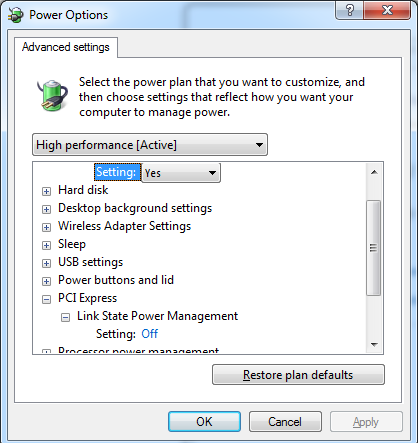
You can go into the BIOS settings and disable the PCI-E power saving feature for whatever PCI-E Slot your GPU is in.
Attaching a screenshot of the power settings in windows.
Laptop: M6600 – 2720QM, AMD HD6970M, 32GB 1600CL9 RAM, Arc100 480GB SSD
Tried graphics and resolution to minimum and the performance is exactly the same. Not better and not worse, though I doubt it can be any worse than this.
I got CPU-Z and it says link width is x1 and maximum supporter is x16
Thats the root cause of your issue, just as I thought.
You can try pulling the card out and dusting the Slot and the Pins on the card, then reseating it.
You can try setting your power profile to High
You can uninstall the GPU drivers, boot into safe mode and run a driver cleaner program, then reinstall the drivers in normal mode
You can go into the BIOS settings and disable the PCI-E power saving feature for whatever PCI-E Slot your GPU is in.
Laptop: M6600 – 2720QM, AMD HD6970M, 32GB 1600CL9 RAM, Arc100 480GB SSD
Sure you can do it, you just can’t play the game with the dat file split up. I used 7zip to carve the dat file up into CD sized parts for a USB drive that was still formated as FAT32 (4GB limit per file).
Your external hard drive can’t handle a 16-18GB file size? Curious.
Its a file system limitation. Fat32 has a 2GB file limit, Fat16 (IIRC) was 1GB. NTFS and GPT have the largest supported File footprint for Windows based File systems.
Laptop: M6600 – 2720QM, AMD HD6970M, 32GB 1600CL9 RAM, Arc100 480GB SSD
Also please note that this issue only happens with GW2, which is completely unplayable. It happens with YouTube when watching videos, sound keeps stuttering quite a bit. And it happens on Windows startup, one big stutter. Everything else works just fine. I am hopeless, tried everything.
As mentioned, verify your PCI-E link speeds using GPU-Z And CPU-Z(Mainboard Tab).
if it is 16x, then using the sensor tab on GPU-Z, while running GW2 or any other rendered application, what does your Core Clock display?
I recently ran into an issue where my core clock locked at 300mhz. Turned out to be a dying PSU. A work around, until my new PSU arrived, was to download MSI Afterburner, and set the Power Slider to +4. This would unlock the Core Clock 300Mhz lock and it would work normally.
After installing my new PSU the problem went away entirely.
Also, download and install HDTUNE (Google for it) and look at the SMART tab. If there are any Red or Yellow Lines. Replace your HDD. If your power on time is more then 20,000 Hours (each Unit is an hour), Replace the HDD.
Under the Benchmark Test, you should be able to read from the HDD at 55MBs-135MBs (Worst-best, and Best-best) before considering replacing it as well.
Laptop: M6600 – 2720QM, AMD HD6970M, 32GB 1600CL9 RAM, Arc100 480GB SSD
Computer Specs
CPU: Intel Core i7 4820K @ 3.70GHz
RAM: 32.0GB DDR3 @ 800MHz
MOTHERBOARD: ASUSTeK COMPUTER INC. P9X79 LE
GRAPHICS: 3072MB ATI AMD Radeon HD 7970
HARD DRIVE: 1863GB TOSHIBA DT01ACA200 ATA Device (SATA)
WIN 7Im trying to run the game on max settings and when im running around i get 30 fps what could be the problem? On the same computer i run skyrim and bf4 on max settings and get 60 fps no problem. I could drop the settings and play that way but i spent $1700 on this computer i feel like it should run the game the way it was supposed to be run
Kinda sounds like your GPU is locked at PCI-E 1x (power saving mode) and wont unlock to the proper 16×. You can verify this with CPU-Z’s Mainboard tab.
Really should use GPU-Z for link width verification since it got rendering test and value actually update unlike in cpu-z
the Rendering test does not always ‘fix’ the sleep state on the PCI-E slot. And I have seen it miss read the Slots Link speed, btw.
I use CPU-Z cause it has never been wrong in any of my cases. And from there you can reinstall your drivers, disable PCI-E Sleep stats, set your power profile to High, or reseat the card to fix the 1x issues.
If the rendering test worked, so would running any Full screen DX game. Since the tests are the same. But that is not always the case with GPu-Z.
Laptop: M6600 – 2720QM, AMD HD6970M, 32GB 1600CL9 RAM, Arc100 480GB SSD
That and your using 66% of your system memory when the crash happens, Yet GW2 was only using 1.8GB (about 12%).
You should scan for infections – Malwarebytes, Avast!, Spybot, TDSSKiller…ect.
If it occurs again after that, it could be a simple memory issue. Download and run Memtest86+ for 24-48hours.
Laptop: M6600 – 2720QM, AMD HD6970M, 32GB 1600CL9 RAM, Arc100 480GB SSD
Hello,
(sorry about title mistake, it is .dat)
GW2 saves everything under one massive .dat
Is there a way to make it into multiple smaller files?I wanted to save GW2 on my external hard drive, but there is no way I can allocate that much memory into one file on it, so I need to break it up.
Is there any way to do that?Thanks,
BobtheLawyer
No, the DAT file is a Flat style database that the game uses. You cannot/must not split it up. As when you recombine it, it will have issues.
What you need to do is change your External Drive from Fat16/Fat32 to NTFS or GPT (Depending if your HDD is larger or smaller then 2TB). You do this by formatting it (easiest way with out much technical knowledge).
Laptop: M6600 – 2720QM, AMD HD6970M, 32GB 1600CL9 RAM, Arc100 480GB SSD
Computer Specs
CPU: Intel Core i7 4820K @ 3.70GHz
RAM: 32.0GB DDR3 @ 800MHz
MOTHERBOARD: ASUSTeK COMPUTER INC. P9X79 LE
GRAPHICS: 3072MB ATI AMD Radeon HD 7970
HARD DRIVE: 1863GB TOSHIBA DT01ACA200 ATA Device (SATA)
WIN 7Im trying to run the game on max settings and when im running around i get 30 fps what could be the problem? On the same computer i run skyrim and bf4 on max settings and get 60 fps no problem. I could drop the settings and play that way but i spent $1700 on this computer i feel like it should run the game the way it was supposed to be run
Kinda sounds like your GPU is locked at PCI-E 1x (power saving mode) and wont unlock to the proper 16×. You can verify this with CPU-Z’s Mainboard tab.
Laptop: M6600 – 2720QM, AMD HD6970M, 32GB 1600CL9 RAM, Arc100 480GB SSD
Thanks for your feedback guys. Not exactly what I was looking for but still kinda helps
I know that if I get 4670K and OC it it will run pretty much all the content in GW2 but it is quite pricey and also I’m not really a big fan of over clocking. I know that the boost is huge, my two friends both have i5-3xxxK, one OCed it to 4.5GHz and second has it on stock settings and the difference is quite big.
What I wanted to know is that if maybe FX-6300 or 8320 can run WvWvW on High (not Ultra High) with 15-25FPS during larger zerg vs zerg (I’m on Piken Square). Right now with my already mentioned PC it is obviously quite impossible at lowest of lowest settings with 5 FPS
I also mentioned that I have my eyes on R9 270 card, you guys stated that even R7-260x is enough for GW2 but even though I play MMOs most of the time (2013 was 100% MMO for me), I do hop into BF3/4 from time to time with my friends and who knows what will come later. I think 260x won’t be enough in the longer run since I usually upgrade my PC every 4 years.
I’m trying to get my new setup for under 600€. Case, PSU, RAM and VGA are 360€. If I buy 260x which I really really don’t want it would be 320€. With 260x I can easily get i5-4670K with some 70-80€ MBoard but I’d rather have better VGA and some lower FPS here and there
I’ve played GW2 on low for last 15 months so I think that if I can get Ultra in dungeons and medium/high in WvWvW I’d be OK with that.
Unless you get a top rated CPU that R9 270 isn’t going to be any better for GW2 then a HD7790/R7-260X, or a Nvidia GTX 650.
For example, My Wife’s system has a FX8350 (Not OC’d due to PSU restrictions). Upgraded her from a HD5770 to a R9-270 and her FPS went from 25-28 to 30-35 in LA on Max Settings. In WvWvW she will drop down to 7FPS, STILL. Because the FX8350 SUCKS for this game. Where as I will only drop down to 15FPS. And Ill tell ya, HUGE HUGE HUGE difference between a Low 7FPS and a Low 15FPS. Also Affects Skill Lag too (i have none, she gets 1-2seconds).
So yea, an i5/i7-K (OC to 4.5-4.6) is the ONLY way to go if you are building for this game. teamed with a Cheaper GPU like what I run, or something in the same class. Because even with the top end CPUs, its not enough to power the games demands.
HD7790 – 119
R7-260X – 129 (Newegg Special)
Edit GTX 650 is NOT as good as the ATI Cards above. Nothing in Nvidia’s Line is as good for the price Currently!
http://www.hwcompare.com/15494/geforce-gtx-650-vs-radeon-r7-260x/
http://www.hwcompare.com/14290/geforce-gtx-650-vs-radeon-hd-7790/
http://www.hwcompare.com/15489/radeon-hd-7790-vs-radeon-r7-260x/
Anything better is going to cost 20-40++bucks more, and anything less isn’t a bargain.
Put the Cash into the CPU and Motherboard. Skimp on the rest (Except PSU, since you ARE going to overclock to get the performance you are after).
That is all.
Laptop: M6600 – 2720QM, AMD HD6970M, 32GB 1600CL9 RAM, Arc100 480GB SSD
A human’s Eyes cannot detect Frame Rate above 32FPS. (Science Research says 24, But my own research…I Say 32FPS).
If your eyes bother you below 60FPS, you need to investigate your Monitor. There is probably a refresh rate issue going on that causes the Light to Flicker to your eyes, causing Headaches and eye pain/Discomfort.
I know this is strange for the internet but: I formulated my hypothesis and tested it myself before I spoke. I can see the difference between 50 and 60 fps on monitors that display at 60Hz and were confirmed by a friend’s semi-high speed camera. 30Hz is like a slideshow and will give me a headache eventually. On the other hand, my BF can’t see the difference between 30 and 40 and I know most people can’t, so I can’t really push the “I DON’T GET 60 FPS AND IT’S TERRIBLE, GET ALL THE KING’S MEN TO FIX IT” point too hard because I’m not that selfish.
By the way, I found that CL 7 makes the game more stable in terms of audio over CL 9.
If you have an old school Monitor (Tube), Set the Res to 1280×800@60hz. Bring up a Grey-White Screen. And Have anyone look at it from the side of their eye (Peripherals). 90% of the people I have tested can see Flicking at 60HZ. Now if you set it to 72Hz, seems people that are near sighted are the only ones that can still see the flickering. Then at 80-120hz anyone I tested could not see the flickering.
The same can be done on LCD’s, But remember LCDs are not the same as Tubes (They dont project Light outwards, its from the side of the panel). Some LCDs that have bad inverters or bad LED power lanes will have a flicker that is similar to Tube Monitors at 60hz. Again can only be seen to the side (Very few can actually see it straight on…even with the Tubes. But almost every could see it from looking out of the corner of their eye).
So, I doubt its a FPS issue, as much as its a HZ/Lighting issue.
Laptop: M6600 – 2720QM, AMD HD6970M, 32GB 1600CL9 RAM, Arc100 480GB SSD
Look at my Sig, that is a good config to get the best performance out of this game.
its not that i5/i7 rules the world, its that GW2 was built around a single threaded process. And AMD does not do well with single thread performance when compared to Intel. This is a Anet/NCsoft/GW2 specific related issue, since their Code is Flawed.
Even with the best Intel CPU’s ppl are not getting more then 25FPS in a full on 80vs80vs80 zerg. Its just not possible to get better performance at this time.
I would buy a K series i5/i7. team that with either a HD7790, GTX650, or R7-260×. Whichever you can get cheaper. As those cards are the BEST bang for the buck when talking specifically GW2.
Then Overclock the CPU to 4.6Ghz, your GPU to 1200Core, 1600/1800 Memory, then Profit in GW2’s Absolute Best Performance.
For the CPU, AMD loses when it comes to GW2. Plain and simple.
Laptop: M6600 – 2720QM, AMD HD6970M, 32GB 1600CL9 RAM, Arc100 480GB SSD
Like I said in another thread. I have a GTX 580. Modest. I have everything on maxed at 1920×1080 AND forced 4x SSAA and 2x SGAA Alpha and it’s not maxed. On the other hand, my i5-3570 @ 4.5Ghz is maxed. Which is funny because it’s the best gaming CPU available. Even still, the primary thread of the game maxes out it’s associated core, even though that core is operating at 4.5ghz and I only got 50-60 FPS in LA because of it. It’d be fantastic if the game was either more processing efficient or could use hyper-threading so the i7’s would actually have a purpose.
I know 60 fps sounds like a good number, but that’s the minimum before it starts to bother my eyes, and it’s even lower in a huge crowd.
A human’s Eyes cannot detect Frame Rate above 32FPS. (Science Research says 24, But my own research…I Say 32FPS).
If your eyes bother you below 60FPS, you need to investigate your Monitor. There is probably a refresh rate issue going on that causes the Light to Flicker to your eyes, causing Headaches and eye pain/Discomfort.
Laptop: M6600 – 2720QM, AMD HD6970M, 32GB 1600CL9 RAM, Arc100 480GB SSD
I can’t speak against or for process lasso, But I use the unpark util. And that bit is great (15-20 FPS gain, Seriously).
But, Running a process in real-time can be damaging to your system if you have other ‘real-time’ processes running. Such as A/V. If the AV cannot scan into the ‘forced’ process that is now running Real-Time, it will actually cause a performance Hindrance.
Same goes for Windows based services that need to activate.
Now, High Priority there is NOTHING wrong with putting any process there (Since 90% of the processes are Normal anyway). But I would never recommend Real-Time.
Laptop: M6600 – 2720QM, AMD HD6970M, 32GB 1600CL9 RAM, Arc100 480GB SSD
Hi Tech Support,
Recently got the game (digital copy), proceeded to change graphics settings around to my taste, changed Htz setting not realising it would prevent me from playing GW2.
I followed the topic similar to this (delete the local.dat file) but there are no files in my GW2 folder, apart from Program Files (x86) which is the 17GB file.
Please help, I don’t know how else to get around this.
local.dat is located here
C:\Users\%username%\AppData\Roaming\Guild Wars 2 <— Copy/Paste into your Windows Explorer URL Entry section.
then delete the Local.dat, then restart the game.
Laptop: M6600 – 2720QM, AMD HD6970M, 32GB 1600CL9 RAM, Arc100 480GB SSD
With out qouting, No we cannot trust them to not say anything.
Intel wants to be 3-4 gens ahead of AMD for performance. They will do anything necessary to get that done, Including Jumping into a new Platform and forcing everyone to rebuild.
Laptop: M6600 – 2720QM, AMD HD6970M, 32GB 1600CL9 RAM, Arc100 480GB SSD
AAAANNNNNDDDD still nothing. Time for a necro to let this utterly infuriating issue come to light again. I have a high end AMD CPU and just recently got a 780. The game still runs like a flipbook a disturbingly large percent of the time.
You need to run Intel to get good performance in this game.
This issue has been beaten to death. And Anything above a GTX650/HD7790 is going to waste, due to that CPU bound issue.
After you buy into Intel, tweak your systems hardware settings to be 100% efficient. You will get 38-40FPS in LA on a busy night, 110-135FPS in the open world with a few players in sight, 45-55FPS in combat with 6+ other players, and 15-25FPS in 80+ player zergs (WvW, World Boss Train..ect).
And thats with all settings on Ultra, with Char Limit to Low and Char Quality to Medium.
The issue sits at Anet’s Feet. And unless they redesign the game engine from the ground up, this is how the game is going to be for the rest of its life.
Laptop: M6600 – 2720QM, AMD HD6970M, 32GB 1600CL9 RAM, Arc100 480GB SSD
It’s going to depend, if he really wants more power now, 3570K is not a bad choice. a year old CPU (that wasn’t newly released to begin with) won’t probably lose so much of it’s value and it could be resold when it’s time to upgrade to whatever is available at the time
I will say this much. 2nd and 3rd Gen i5’s, that can be unlocked, hold potential to last another 2-3 years before they are outclassed by even AMD.
Given the current price market of the 2k,3k, and 4k CPUs. As long as they are priced with in reason (5-8% between Generation) then buy the current best.
I paid 210 for my i5-4670k. It was an upgrade from a PhenomII 830. The upgrade was so far ahead of that older CPU the cost was (and IMHO still) worth it. Even if the Z87 only holds a final upgrade to an i7-K and not the Gen5/Gen6 CPUs.
What I hope (I really really really hope, btw) is that new Z9* Chipsets include the instructions to work with the 4th Gen CPUs. I am not sure what part of the CPU is being put back into the chipset (PROBABLY MEMORY CONTROLLER!!). But if the Chipset can be programmed to disable the internal component that is known to be on the Haswell CPU’s, I see no logical reason why the Z97 chipset cannot/will not work with the Haswell CPUs.
So while currently (waiting for more public released info from intel), Haswell is a single upgrade with no roadmap for a 5th Gen, that doesnt’t mean you won’t be able to take your Haswell and put it in the next gen Chipset to cut down on the 5th and 6th gen CPU upgrades.
Until Intel says otherwise, anyway :-)
Laptop: M6600 – 2720QM, AMD HD6970M, 32GB 1600CL9 RAM, Arc100 480GB SSD
I think Anet is going in the right direction with the harder world bosses, Just failing at the delivery of them.
Scaling issue. You should NOT NEED 80+ players to take down a world boss. NONE of the other world bosses are like that. So why start now? A group of 6-20 should be able to hunt and take down the new harder world bosses. Using the same mechanics that are used by the 80+ players.
Loot: I think the rewards should scale how the boss scales. With every 10 players in the area beating on XYZ boss, the Boss gets % harder. And every % harder he gets, adds MF (or something) to his internal loot table. With the maps maxing at 100~ Players, that could be a max of 10% MF internally to that boss. (This could be applied to any encounter, really.)
And at a full Map there should be a guaranteed 1-3 BiS (Currently Ascended) Item drops to that Map(Not per Player). Which is given out like a raffel/Lottery, RNG. That way if you do Teq2.0 or Wurm2.0 for 4 months you have a 100% chance to get a BiS item if you devote enough time to it.
Currently there is NO incentive to continue doing XYZ world boss encounter because you can just craft what you want, like Ascended. (again, same kind of time limits that I would like to see imposed, above) – Face it everyone, Loot and shiny objects are why 90% of the player base even does content!
Time: Then the other issue is the Time limit. I think all World Boss types need to share the same Time Limit, and I would like to see that Time Limit scale DOWN depending on how many players are present. AND add achievements for beating XYZ boss in under ABC time.
Boring: Static encounters get boring after, 15times you run them (My Personal APX). There needs to be more dynamic added to the boss’s (EVERYTHING really) fight scripts. Another posted said it and gave a couple GREAT ideas. Have the Boss move around the map, destory objects, Eat players/NPCs, throw players around the zone…you know, anything that would be more interesting them standing in a 600 range and doing your 1-2 jobs until the target is dead.
IMHO, the current encounters are all trivial and boring. Even MORE boring then when I used to raid in WoW (25man Heroics). It only takes 3 hours to wipe out every world boss in the game, and thats with 135~ Players fighting for entry into your home server map(s). And these Boss Trains dont even consider doing Teq2.0 anymore. I expect the same will happen with the new boss thats being added with this patch.
Laptop: M6600 – 2720QM, AMD HD6970M, 32GB 1600CL9 RAM, Arc100 480GB SSD
If you have the money, sure, 4670k >3570k, but it’s not that much better. If you’re on a budget, I’d suggest 3570k as it’s only 5-10% slower. Upgrade both to Broadwell or the one after that when they’re out.
Not just that, but the Haswell socket 1150 is a one time upgrade. The Z87 Chipset will NOT support the 5th gen of Intel i-series CPUs(I confirmed this via Intel Directly yesterday). Its going to still be on the 1150 Socket, but on the Z9* Chipset, which will NOT support 4Th gen CPUs (what the rumor mill is saying currently, and its still in discussion internally at Intel).
They are moving some control element from the CPU back into the Chipset to reduce their nm Manufacturing Process (To reduce Die Size again).
So While the Haswell is faster then Ivy, Knowing that the Z87 Socket 1150 is a dead end now, I wouldn’t recommend buying into it at the full price. If you cannot get the Haswell setup for less then 8% above Ivy I would just stick with Ivy.
If at all possible, Wait for the Z9* 1150 Motherboards and CPUs to come out, as that’s probably going to run up through 7th Gen CPUs (unless they change the CPU’s Internal Architecture again).
Laptop: M6600 – 2720QM, AMD HD6970M, 32GB 1600CL9 RAM, Arc100 480GB SSD
Thanks ive only used it for less taxing applications and kinda taught myself how to do it so I never really had to think too in depth about it haha
Just remember, PPTP is not secure in the least. And most schools break into the GRE tunnel to make sure their network is not at risk for things like TOR and other ‘things’.
Laptop: M6600 – 2720QM, AMD HD6970M, 32GB 1600CL9 RAM, Arc100 480GB SSD
Hi there,
While I was waiting for one of my classes to start, I thought I’d log into GW2 for a second to do my daily, but when I tried to log in (the screen where you can see your account name and password) by pressing the “LOG IN” button, the client just seemed to be stuck on loading. The weird thing is that the client was still running (the loading circle was still moving) and it never loaded.So obviously i figured it was the college internet that was the problem (like a firewall), so I wanted to test this out by seeing if I could play another online game (Final fantasy XIV) and it loaded correctly and I was able to play the game.
Is there anyone out there that could give me some advice or explanation as to why I cant log on to GW2? Any help would be great! Thanks!
You need to grant the Public IP you are connecting from access to your account. Check your GW2 associated Email address for that auth request.
Laptop: M6600 – 2720QM, AMD HD6970M, 32GB 1600CL9 RAM, Arc100 480GB SSD
an i5-4670k (or the equalvent for your Motherboard) would do wonders over that i3.
and i7-K would be better then the i5 (But not worth the cost IMHO).
I get 35-40FPS in LA with my system on high/Ultra/Supersample (Low/Medium on the Character settings).
Laptop: M6600 – 2720QM, AMD HD6970M, 32GB 1600CL9 RAM, Arc100 480GB SSD
Well I’m having this issue and I don’t have the pcie link issue (is at 16x) and this started roughly around 8 days ago out of nowhere. At first I thought it was a hardware problem, but after much checking, it’s running at the regular values and numbers as before.
Places where the game was smooth before, is suddenly getting an FPS dip. Especially when the camera view is pointed towards the horizont, it feels like it has the entire map loaded for me. I really don’t know what is causing it or how to fix it right now. But I’m positive it’s game related.
You are going to want to verify your HW stats while playing the game.
Run GW2 in Windowed-Full screen
Run GPU-Z (Sensor tab)
Run CoreTemp (Verify CPU, Per Core, Multiplier and utilization%)
Run CPU-Z (To verify the voltage of your CPU)
and when GW2 is running open the options menu and watch the FPS
youll have to window swap quite a bit.
The idea is to get your CPU to hit 70-80% utilization and have your GPU to peg between 97% and 99%. In LA, this is not possible unless you are on a really high end CPU (i7-Extreme) Due to the kitten Snow Glob in the middle of the fountain right now. But you can do this almost anywhere else in the world.
But if you cannot get your CPU to get that high, verify that its clocked correctly and its not throttling due to high Temps. If the CPU looks OK then you need to verify your GPU’s Temps. As its going to be one of those pieces.
Laptop: M6600 – 2720QM, AMD HD6970M, 32GB 1600CL9 RAM, Arc100 480GB SSD
Not sure about you guys, but i’ve been having constant disconnects since last nights “server crash” i’ve called my ISP as well as used my 4g LTE phone to check my internet access, youtube streams fine, ping stays well below 50 when pinging a texan(which is where Anet’s server’s are located) server, so I believe its something on Anets side. please look into this.
i’ve pinged Houston, and dallas, assuming maybe there was an issue with a major ISP provider over there, but this is just me guessing, not exactly somebody who fully understands the intrawebs and it’s mysterious ways.
When you start to lag, ingame type \ip in your chat box.
Do a traceroute to that ip address output. You will visually see what hops are affecting your lag.
If it was anet’s side, everyone would be having issues. And I currently am not having any Lag issues.
It very well could be an ISP that Anet Links to, or a BGP routing issue between you and their ISP. It could be a oversubscribing issues as well.
But pointing to anet for this is not going to get it fixed. data has to be gathered, then a proper ticket needs to be opened with the right affected source (USUALLY AT&T)
Laptop: M6600 – 2720QM, AMD HD6970M, 32GB 1600CL9 RAM, Arc100 480GB SSD
Download cpuz and check pcie link is 16x
Also get GPU and set it to log GPU useage its should be ,60-70+ if no problems
CPU-Z http://puu.sh/6kWtT.png
in GPU-Z the usage is 100% when running gw2.
There is your issue, your GPU is linked at 1x on a 16x Slot.
Get that Linked at 16x and it will fix your issue.
You can reinstall the GPU drivers, reseat everything on the card (Pull the card out of the slot, remove its 6pin GPU power plug, then plug it back in)
Also, if your PSU is failing, that will also cause some cards to link at 1x due to power restrictions.
Laptop: M6600 – 2720QM, AMD HD6970M, 32GB 1600CL9 RAM, Arc100 480GB SSD
Hopefully it will be up soon. I can pretty much tell you what it will say though:
1. Something something, Scarlet is back
2. Participate in fight against giant Margaret Thatcher for a chance at a unique backpeice.
3. NEW UNIQUE REWARDS introduced with a BRAND NEW world boss.
4. Exclusive Gemstore Armor Skins and limited discounts on winters day items.
Laptop: M6600 – 2720QM, AMD HD6970M, 32GB 1600CL9 RAM, Arc100 480GB SSD
Random update: Was playing guild wars tonight and while running Ping Plotter, the whole server set went down at around 11:09PM eastern time.. Everyone I was on Teamspeak with DC’ed.
Ping Plotter was still running and showed that as soon as the servers came back up, my ping was normal to the NCSoft IP addresses and after a couple minutes my ping steadily rose, and now everyone on Map chat is complaining of lag.
This absolutely proves that the issue is traffic being generated on THEIR end, not mine.
Also, TS going down has nothing to do with NC. That would be related to an area outage on the SW region more then anything.
Laptop: M6600 – 2720QM, AMD HD6970M, 32GB 1600CL9 RAM, Arc100 480GB SSD
Random update: Was playing guild wars tonight and while running Ping Plotter, the whole server set went down at around 11:09PM eastern time.. Everyone I was on Teamspeak with DC’ed.
Ping Plotter was still running and showed that as soon as the servers came back up, my ping was normal to the NCSoft IP addresses and after a couple minutes my ping steadily rose, and now everyone on Map chat is complaining of lag.
This absolutely proves that the issue is traffic being generated on THEIR end, not mine.
Are you plotting yahoo.com, google.com, your default gateway at your ISP, 4.2.2.2 4.2.2.3, and 8.8.8.8 ?
If you are only doing plots to NC’s servers it proves nothing.
Laptop: M6600 – 2720QM, AMD HD6970M, 32GB 1600CL9 RAM, Arc100 480GB SSD
@sirsquishy
Thnx for the info, I’ve had a look at mine through wireshark and every time I lose connection there is three black lines1. NC server to me – TCP Previous segment not captured
2. Me to NC server – TCP DUP ACK
3. NC server to me – TCP out of order TCP segment of a reassembled PDU
and Lose connection, every time.Any ideas?
Something from you to NC is dropping packets. Then You dump the ACK NC sends to you cause its out of order and doesnt match your last SYN.
The TCP out of order is from #2.
So from what you have told me, you are dropping packets on the way to NC somewhere.
Laptop: M6600 – 2720QM, AMD HD6970M, 32GB 1600CL9 RAM, Arc100 480GB SSD
I would love to be able to prove who’s side this is on, be it anet or my own.. but… I’m not a network expert.. any tips for wireshark? I’ve got it running and other than seeing transmissions while running Ping Plotter, seeing inbound and outbound to my IP, I can’t tell what’s actually “bad” and whether it’s on my side or theirs..
Run Wireshark when GW2 is experiencing Lag. Then you can look for ACK failures (Black Lines). You can filter by Source or Destination IP and view the communication between you and the Anet servers. You can expand the Frame and header data to pinpoint what is happening during the SYN/ACK communication and see where the faults/failure lays.
If you want to grab a couple wireshark samples (No more then 20,000 Packets per sample) And upload them to the web Ill take a look for you. just 7zip them up using a password and send me an offline message with the password. Wireshark WILL contain sensative data that runs between your PC and the internet. Your MAC address, Public IP, and any services you have up will be exposed. so make sure you secure the file before deciding to make it available over the internet.
But, if the issue WAS with anet and not the internet as a whole (That is an entirely different discussion) there would be alot more widespread lag reports, and alot more posts on these forums (and other forums for that matter) about connection issues to Anet.
There is ALOT between you and NCSoft’s hosted servers. You have anywhere from 8-32 hops, and each hop has multi-paths between the 6 major backbone ISPs, and its uplink partners.(CenturyLink, TWTelecom, Cox, ATT, Verizon, and MCI). Chances are you are either on a bad Leg of the Backbone (IE. Bad Pathing) or on an oversubscribed circuit (ALOT of Local ISPs oversell LEC services, which ends up oversubscribing their main link in and out of the backbone. ) – Which is why I always pay for ISP services through a LEC (Local Exchange Carrier). Its more expensive, but you really do get what you pay for in this industry.
If you are oversubscribed, it will not be fixed easily. You first have to get the ISP to admit to it, then have them install a QoS Rule to allow GW2 priority over other applications (Such as Netflix and BitTorrent), again a hard thing to get pushed. To evenly share the available BW during peak hours.
If you are on a bad leg, then you gotta get with your ISP’s L3 department. This will require several traceroutes and RRT samples between you and the bad hops (where the response time jumps), and then they have to take that data to THOSE carriers and do head to head testing to get it resolved. Again, if that carrier oversubscribed that link you are back to the top issue…but out of your network. And then its up to YOUR ISP to get that resolved by renegotiating a Link partner contract (VERY VERY expensive and not possible until either SLAs are not met, or the current term is up).
Basically, unless you really understand how the internet works and where the faults sit at for things like this. Else, you are just sitting in the dark pointing fingers. And fact is, most Online gaming companies dont really understand the internet and how it affects their business. They focus on their IP/TCP Stack for their game and thats all. And thats why we are in this mess with the 5-8% of the users with these issues.
NCSoft SHOULD have a service contract with a backbone provider so they can ensure open and clear paths from any entry point into the backbone to their datacenter(s). And its clearly apparent they do not.
Laptop: M6600 – 2720QM, AMD HD6970M, 32GB 1600CL9 RAM, Arc100 480GB SSD
a RTT does not really tell you whos dropping packets, just that packets are lost.
what you need to do is repeat that RTT , with WireShark running in the same Interface your doing RTT from, and look for SYN ACK communication failures. When you see RE-SYN, or RE-ACK you can better see where the failure is coming from (RX or TX and at which Node via MAC Address).
THEN you give that packet capture and the RTT report to your ISP’s Level3 team for a deep packet inspection report.
Laptop: M6600 – 2720QM, AMD HD6970M, 32GB 1600CL9 RAM, Arc100 480GB SSD
Saw you posted a link on the MB. I could not find out what the SLOT configuration is for your PCI-E Lanes are. BUT I’m willing to bet that the 2 16x Slots are tied to the CPU, and the 2 1x Slots are tied to the Z87 Chipset. (and the other 4-6Lanes for the Chipset are bound to the Onboard Audio, and OnBoard NIC, Onboard RAID and SATA Controllers)
So that Wireless NIC you bought, MAKE sure its in one of the 1x slots and not that 2nd 16x slot. And make sure your GPU is in the Top slot (nearest the CPU).
Laptop: M6600 – 2720QM, AMD HD6970M, 32GB 1600CL9 RAM, Arc100 480GB SSD
If you OC that 4670k DO NOT push the vCore above 1.3v on Air. IT will cause damage to the CPU’s Die over time. Only under water is it save to push more then 1.3.
To do a simple OC test, set your Multiplier to 46, vCore to 1.2 and see if you can boot into windows. If you cannot, set the Multiplier to 4.5, then 4.4. Once you are in windows you adjust from that point (up or down). Most chips will run 4.6ghz on 1.25 or 1.3 vcore and be stable. about 20% of them will fail above 4.2Ghz at 1.3vcore. Just to give an idea of what to expect there for OC.
after you get into windows run Prime95 for 5-15mins to verify temps. If the Temps go above 83c (i mean it, ABOVE 83c) you need to reduce the Clock on that CPU. Once you get a stable Boot, and Prime95 running at or below 83c’s run the bench tests for 4-6 hours. And make sure the PC doesn’t BSOD or Hardlock(which will result in a reboot).
On Air you can get a solid 75c-80c with the proper Heatpipe setup and high quality TIM (Arctic Silver).
Now, thats it for OC’ing
How is your system currently configured? How many PCI-E slots are populated? Have you verified your GPU’s PCI-E lane Link speed (Has to be 8x or 16x). You can do this via CPU-Z, on Mainboard Tab.
every system that I have seen that locks at 20-25FPS under any in-game settings, has the GPU linked at 1×. This happens for a couple of reasons, the main one being Drivers.
So that is where you SHOULD be starting to fix your performance issues, and NOT overclocking.
And for the record, the CPU (i5-4650k) only has a total of 16lanes of PCI-E. If the MB doesnt supply its own Lanes via the NB/SB, then you only have 16lanes to distribute. PCi-E 3.0 ver3 works best at 16×. So keep that in mind when you start to add additional PCi-E Cards to your system (Even those 1x NICs/TV Tuner Cards), as they will take away from the GPU’s total performance and Link speed on the PCI-E bus.
Laptop: M6600 – 2720QM, AMD HD6970M, 32GB 1600CL9 RAM, Arc100 480GB SSD
I know that if I get 4670K and OC it it will run pretty much all the content in GW2 but it is quite pricey and also I’m not really a big fan of over clocking. I know that the boost is huge, my two friends both have i5-3xxxK, one OCed it to 4.5GHz and second has it on stock settings and the difference is quite big.