Showing Posts For ikereid.4637:

NA players routed thru the same French IP; y?

in Account & Technical Support

Posted by: ikereid.4637

ikereid.4637

I can’t find anything in Anet’s guide about how to force GW2 to connect to a specific server.

That IP was for the purpose of pinging the servers since your original one was for EU.

You’re missing the point, the game is routing us through a French server even though we’re based in NA, giving us extreme lag.

You gotta do /ip in game WHEN you are lagging. it is possible that some WvW instance is getting hosted out in EU for some local servermaint out of austin. That is perfectly feasible in this case.

But the only way to find out is to issue /ip in game when you are lagging and then run a tracert to it as soon as you can to get the Hop details and the routing info.

Desktop: 4790k@4.6ghz-1.25v, AMD 295×2, 32GB 1866CL10 RAM, 850Evo 500GB SSD
Laptop: M6600 – 2720QM, AMD HD6970M, 32GB 1600CL9 RAM, Arc100 480GB SSD
OCEANIC LAG

in Account & Technical Support

Posted by: ikereid.4637

ikereid.4637

get the server IP when you lag and do a traceroute to it. And then post that here.

Desktop: 4790k@4.6ghz-1.25v, AMD 295×2, 32GB 1866CL10 RAM, 850Evo 500GB SSD
Laptop: M6600 – 2720QM, AMD HD6970M, 32GB 1600CL9 RAM, Arc100 480GB SSD
Can we get a response about the Lag

in Account & Technical Support

Posted by: ikereid.4637

ikereid.4637

None of you understand how the Internet works. There are many ISPs connected to Many Transport ISPs, to interconnect between your PC and the servers at Anet.

YOU HAVE TO SUPPLY TRACE ROUTES TO THE SERVER IP WHEN YOU LAG!!

If you cannot do that much then just stop posting on this forum now, as you are not going to see any resolution that would possibly help you.

If the issue was at Anet then EVERYONE would be affected, Not a minority or majority but EVERYONE.

The Traceroute will show you which hops the Lag starts at, and traditionally/historically these are the offenders.

ATTENS.net (ATT) on the east coast of the US
Level3 mid-west and west coast
Frankfurt EU, also an interconnect to Germany

If your issue sits on any of those above connections then its NOT something Anet can fix, those are TRANSPORT issues that require a Edge Connection Contract to open Tickets with. If you lag from your ISP and they are directly connected, your ISP will be able to open a ‘Link Partner’ support request to ID and fix the issue with the interconnect. Thats just how these things work.

And kittening at Anet for a fix and not doing the BARE MIN (TraceRT) is not helping your case at all.

Desktop: 4790k@4.6ghz-1.25v, AMD 295×2, 32GB 1866CL10 RAM, 850Evo 500GB SSD
Laptop: M6600 – 2720QM, AMD HD6970M, 32GB 1600CL9 RAM, Arc100 480GB SSD
FPS DROP after Patch

in Bugs: Game, Forum, Website

Posted by: ikereid.4637

ikereid.4637

It is fixed. Even my tablet is getting 30FPS again.

Whatever the issue was, thank you for fixing it.

But the one issue that remains is the FPS for UI windows (Trading post, Guild, Inventory, Hero Pane…ect) is still there. I am seeing 10FPS drop for each of those windows open still.

But the other issue, hiding the UI to gain FPS back, is not an issue anymore. There is now only a 10FPS difference between showing/hiding the UI now.

Desktop: 4790k@4.6ghz-1.25v, AMD 295×2, 32GB 1866CL10 RAM, 850Evo 500GB SSD
Laptop: M6600 – 2720QM, AMD HD6970M, 32GB 1600CL9 RAM, Arc100 480GB SSD

FPS DROP after Patch

in Bugs: Game, Forum, Website

Posted by: ikereid.4637

ikereid.4637

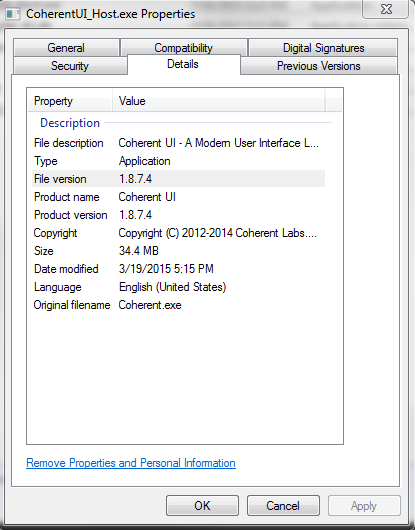
I do not believe its the game engine as much as I feel its related to the CoherentUI.

If you disable the UI the game runs normally, even on max settings. Its really as simple as that. As you open more UI windows the FPS drops even more. Open inventory, get a FPS drop of 5-7, open the Guild Panel, FPS drops by 5 more, Open the WvW Panel, more FPS drops. Also, There is something going on with the UI that is driving the GPU usage up by at least 30%

As Felipe mentioned, we only use CoherentUI to display the gem store, currency exchange, and trading post. All other UI is using an in-house UI solution. The vast majority so far appear to have performance issues unrelated to that dialog.

Also, Coherent dropped support for the 1.x builds at the end of 2014. You are using 1.8.×.x in GW2, which is not fully supported anymore. If you are tacking on UI changes that ‘breaks’ the API Coherent isn’t going to help you guys with it unless you are running a 2.x Build from them.

That’s not really true. We have a very good relationship with Coherent, and have received great support when needed (including this year).

3 days since the last update from Anet on this matter. It’s end of business on Monday. I really expected a update by now.

If I can spend 3 days rebuilding a 2.5TB corrupted MSSQL database, I’m sure you can take the 5-10mins, it would take, to update the community on the current status/finds around this issue.

Common, there is no excuse to leave us all in the dark on this. Be professional.

Desktop: 4790k@4.6ghz-1.25v, AMD 295×2, 32GB 1866CL10 RAM, 850Evo 500GB SSD
Laptop: M6600 – 2720QM, AMD HD6970M, 32GB 1600CL9 RAM, Arc100 480GB SSD

FPS DROP after Patch

in Bugs: Game, Forum, Website

Posted by: ikereid.4637

ikereid.4637

I’m fortunate enough to have many systems at home (2 high end desktops and 2 decent laptops, and a windows Tablet) Currently only my laptops and the tablet are REALLY affected (almost unplayable at times, completely unplayable on my Tablet), were my desktops still get 60fps~. So while I really need this fixed so I can play ‘on the go’ again, its not affecting me as much as many of you guys right now.

If they refuse to fix this, though, I will not be buying the expansion or dumping any more cash into the gem store for the BLK skins and such. Ill just pop in/out for Teq/Karka and EOTM like I have been doing since the patch was released, and wait until a better(HA! yea right lol) MMO is released to dump my money into.

But really, with China and EU geographic and the Expansion on the horizon, I do not see Anet ignoring this issue. It has been proven many times in this thread that it is a legit issue and even one of their lead developers has responded here as well.

So they ARE looking into it. It WILL just take time for them to address the issue, but first they have to isolate it down to what the root cause is and go from there.

Desktop: 4790k@4.6ghz-1.25v, AMD 295×2, 32GB 1866CL10 RAM, 850Evo 500GB SSD
Laptop: M6600 – 2720QM, AMD HD6970M, 32GB 1600CL9 RAM, Arc100 480GB SSD
BUG: EOTM Champs outside of Towers/Keeps

in Bugs: Game, Forum, Website

Posted by: ikereid.4637

ikereid.4637

Today in ETOM, we had 5-6 Champs ‘float’ (Quite Literally) through the gate and engage our Zerg while we were hammering down the wall/gates. After the champ was killed, the capture ring was available as normal.

Seems to be random, as each time it happened it was at a different camp/tower/keep. Unknown whats causing it too.

edit
Why did this show up as a ‘Question’ ? that was not intended…

Desktop: 4790k@4.6ghz-1.25v, AMD 295×2, 32GB 1866CL10 RAM, 850Evo 500GB SSD
Laptop: M6600 – 2720QM, AMD HD6970M, 32GB 1600CL9 RAM, Arc100 480GB SSD

BUG: Cannot turn off Story UI elements

in Bugs: Game, Forum, Website

Posted by: ikereid.4637

ikereid.4637

Closing any option for the game guide does not work. The story mode is always visible.

Desktop: 4790k@4.6ghz-1.25v, AMD 295×2, 32GB 1866CL10 RAM, 850Evo 500GB SSD
Laptop: M6600 – 2720QM, AMD HD6970M, 32GB 1600CL9 RAM, Arc100 480GB SSD

Guild Chat STILL Broken!

in Bugs: Game, Forum, Website

Posted by: ikereid.4637

ikereid.4637

Make your self appear offline, then online to ‘work’ around the issue.

Thats what I have to do currently to get into Guild chat.

Desktop: 4790k@4.6ghz-1.25v, AMD 295×2, 32GB 1866CL10 RAM, 850Evo 500GB SSD
Laptop: M6600 – 2720QM, AMD HD6970M, 32GB 1600CL9 RAM, Arc100 480GB SSD

FPS DROP after Patch

in Bugs: Game, Forum, Website

Posted by: ikereid.4637

ikereid.4637

There is no “make fixed” button for these problems and they can’t just put more people on the problem, because not every dev in the office knows the UI code..

So, chill out and take the time to a) play other games, they need your love too, b) upgrade your PC or c) watch woodenpotatoes videos and do some theorycrafting,

And if you are a programmer on here, giving their team trouble..shame on you. May a thousand customers call you on Friday at 4:59pm asking for out of scope changes.

Also, only reply to this thread with worthy information. Posting useless info like you just did doesn’t help the issue at all, just clutters this thread even more.

I really wish the players would only post if they have something to add to this thread. Complaining is not adding, nor is asking ‘are they working on it’.

I really want the Devs to be able to point back to this thread for information to assist them on fixing this issue. Having many useless posts really prohibits that from happening.

Desktop: 4790k@4.6ghz-1.25v, AMD 295×2, 32GB 1866CL10 RAM, 850Evo 500GB SSD
Laptop: M6600 – 2720QM, AMD HD6970M, 32GB 1600CL9 RAM, Arc100 480GB SSD

FPS DROP after Patch

in Bugs: Game, Forum, Website

Posted by: ikereid.4637

ikereid.4637

I dont understand anything anymore, are they working on the issue ? or not ?! wtf

They are working on the issue. But it will be a while before we are given a fix. Something changed with the UI (My guess is the high resolution Experience bar) and its causing great issues.

All we can do is give them as much information as possible about the issue as we see it and hope its enough for them to root cause the issue (replicate it) and fix it on their end to be able to deliver a fix.

I estimate 2-3 weeks before its really fixed. Which would be normal for most performance issues, game related or not (in general IT talk).

Desktop: 4790k@4.6ghz-1.25v, AMD 295×2, 32GB 1866CL10 RAM, 850Evo 500GB SSD
Laptop: M6600 – 2720QM, AMD HD6970M, 32GB 1600CL9 RAM, Arc100 480GB SSD

Help please with new laptop

in Account & Technical Support

Posted by: ikereid.4637

ikereid.4637

Hallo I am thinking of buying this laptop
http://www.e-shop.gr/dell-inspiron-3542-5771-156-intel-core-i7-4510u-8gb-1tb-nvidia-gf-gt840m-linux-p-PER.903501

Will I be able to play gw2 ??

Also this video card is GeForce gt 840m.
What’s the difference betweent this card and the geforce 840 ? ( without the gt )

Please help. Thanks

I would not buy that laptop for the reasons below

1. i7-4510u, its a low power low clock dual core CPU. There is no real benefit from i7-U/M above an i5-U/M.

2. GT840M, this is a medium range card. It will do well for older games and such, but it will not last for new releases through 2015/2016. I would opt for a 760m, 770m, 780M, 860m, or 880m, instead of the 840m

3. Resolution is 1366×768. This is a resolution that needs to LEAVE the market. Get 1600×900 or 1920×1080 ONLY. If you plan to do any ‘work’ on your laptop that 1366×768 resolution will make you hate your choice.

an Ideal laptop today would be have;

i7-4000MQ, HQ, or XM
Nvidia 760M, 770M, 860M, or 870M (780M and 880M are high range Cards that are found in 1500USD+ Laptops mostly)
1080p Resolution
8GB of ram
SSD

and have a price tag of 900-1100USD. If you search around for deals/rebates you should be able to get a laptop setup like that between 749-889USD~. And I would pay it too.

Desktop: 4790k@4.6ghz-1.25v, AMD 295×2, 32GB 1866CL10 RAM, 850Evo 500GB SSD
Laptop: M6600 – 2720QM, AMD HD6970M, 32GB 1600CL9 RAM, Arc100 480GB SSD

FPS DROP after Patch

in Bugs: Game, Forum, Website

Posted by: ikereid.4637

ikereid.4637

I do not believe its the game engine as much as I feel its related to the CoherentUI.

If you disable the UI the game runs normally, even on max settings. Its really as simple as that. As you open more UI windows the FPS drops even more. Open inventory, get a FPS drop of 5-7, open the Guild Panel, FPS drops by 5 more, Open the WvW Panel, more FPS drops. Also, There is something going on with the UI that is driving the GPU usage up by at least 30%

As Felipe mentioned, we only use CoherentUI to display the gem store, currency exchange, and trading post. All other UI is using an in-house UI solution. The vast majority so far appear to have performance issues unrelated to that dialog.

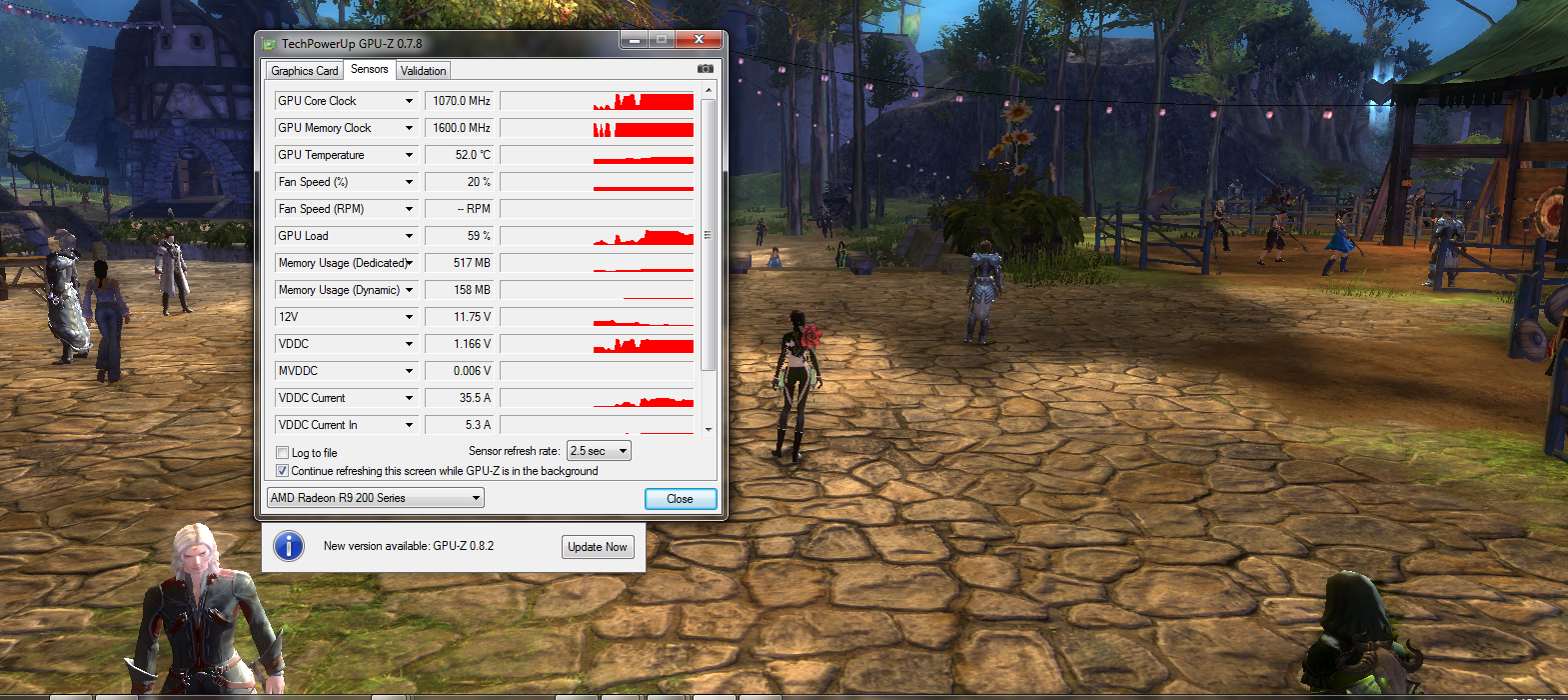
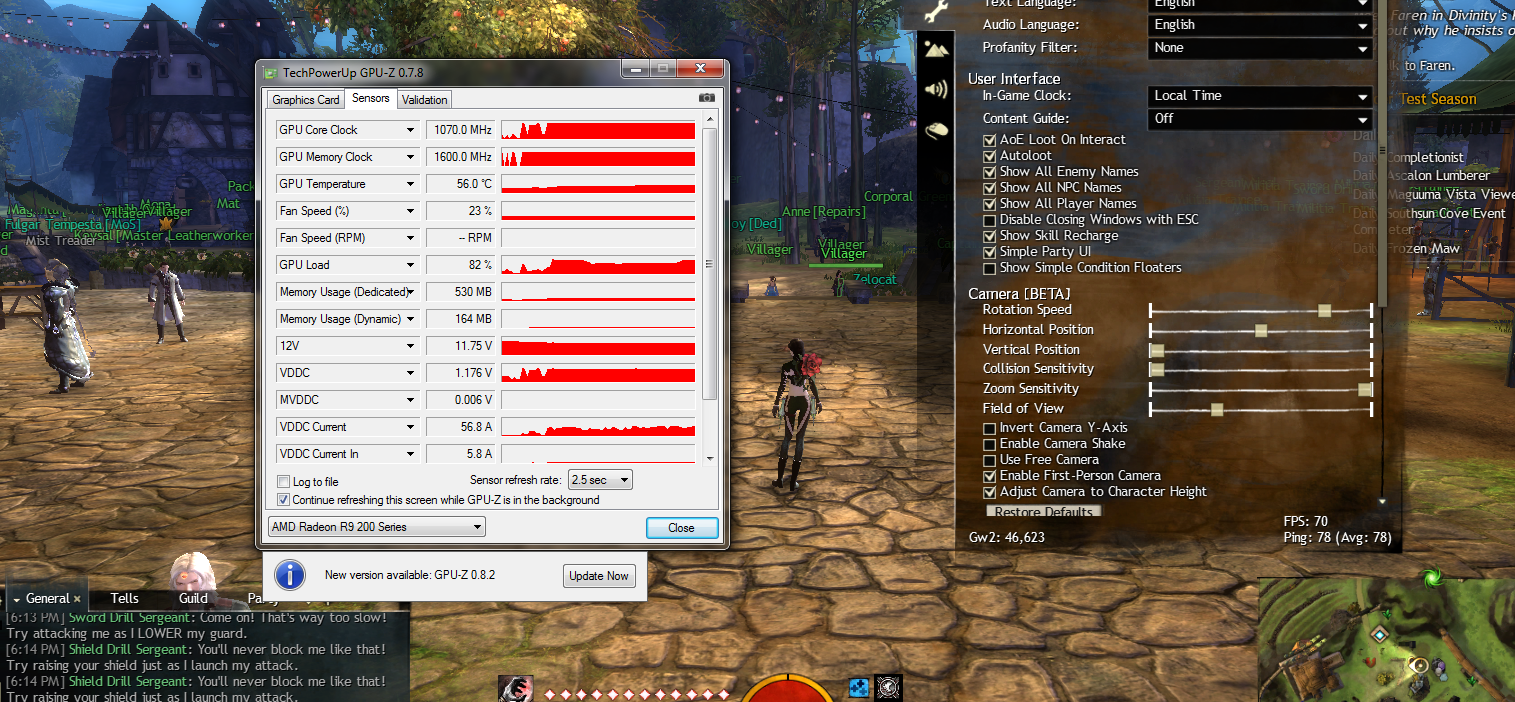
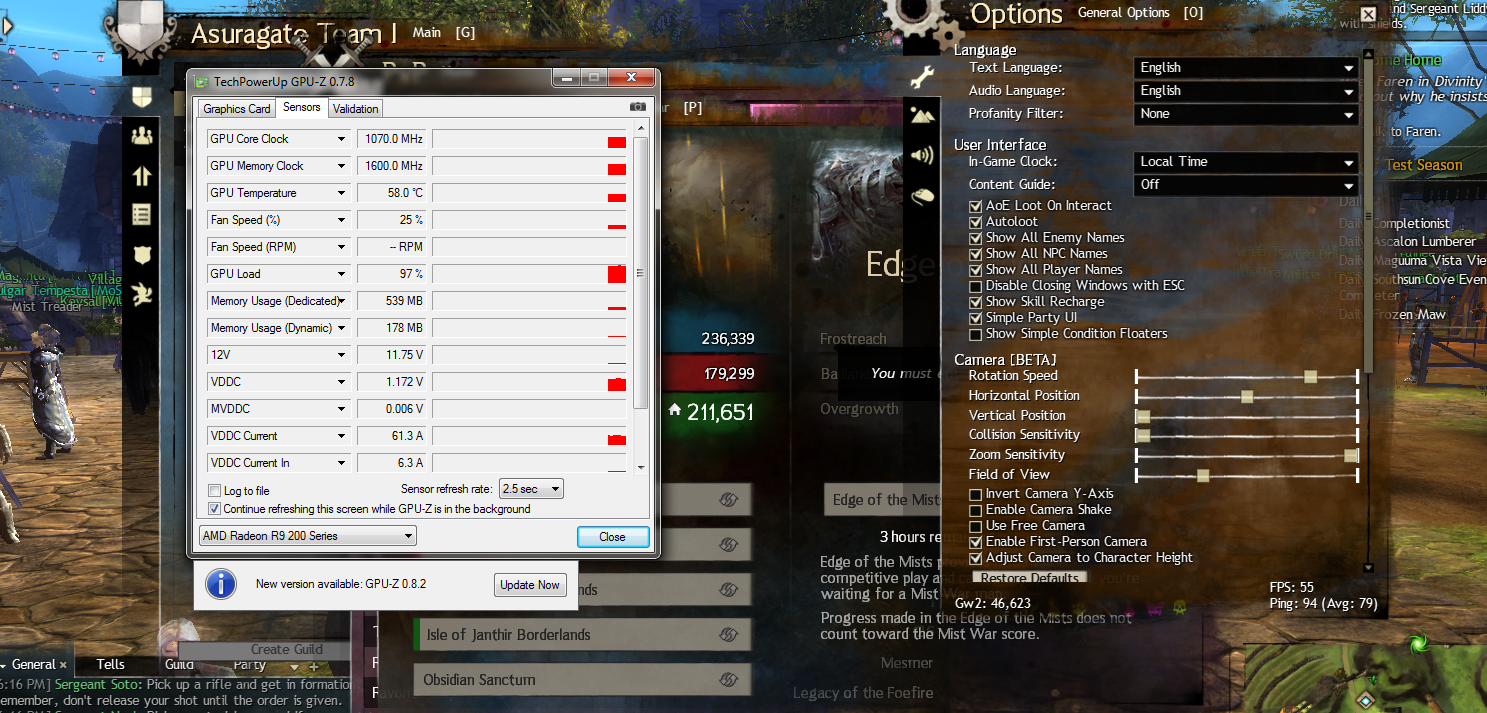
You very well may only use Coherent UI for the Web based stuff. We only have your words to take on it. But the issue remains that the UI takes 20% – 30% GPU power to display (See my Attachment here). And on EVERY ONE of my machines I am seeing a FPS loss take a hit for each UI window that is open, cumulatively.

Screenshots show what I am talking about.

3rd Screenshot is with Guild management, PVP window, WvW window, and Inventory Window, and Options. Compare the 3rd screenshot to the 2nd screenshot and youll see what I am talking about here, GPU Utilization% as well.

Screenshots are from my i7-4790K@5ghz and Dual 290’s (SLI disabled for screenshots)
I am seeing this exact same behavior on my other systems, and only my R9 290 and HD5870M systems are running Omega AMD drivers, the rest are on 14.4version 2 still;

Other systems;
i5-4670K@4ghz and single R9 280x
i7-920XM and HD5870M
i7-2630QM and HD6770M
i3-2120 and R7 260x

Attachments:

Desktop: 4790k@4.6ghz-1.25v, AMD 295×2, 32GB 1866CL10 RAM, 850Evo 500GB SSD
Laptop: M6600 – 2720QM, AMD HD6970M, 32GB 1600CL9 RAM, Arc100 480GB SSD

FPS DROP after Patch

in Bugs: Game, Forum, Website

Posted by: ikereid.4637

ikereid.4637

Also, Coherent dropped support for the 1.x builds at the end of 2014. You are using 1.8.×.x in GW2, which is not fully supported anymore. If you are tacking on UI changes that ‘breaks’ the API Coherent isn’t going to help you guys with it unless you are running a 2.x Build from them.

That’s not really true. We have a very good relationship with Coherent, and have received great support when needed (including this year).

You may have a ‘great’ relationship with them, but like any API developer it will only last so long. And they did pull 1.x from support, source below. (Just something you guys should put on the sticky Note of ‘Things to worry about’)

Source – https://coherent-labs.com/coherent-ui-1-x/

Until June 2014 we released 42 new updates of the SDK with dozens of new features and improvements. All planned Coherent UI 1.X features are now fully implemented.

Coherent UI 1.X has reached a point where it is impossible to add new features without breaking the existing API. That is why we have created a new product – Coherent UI 2.0 that adds new features and comes with a new pricing model.

Coherent UI 1.X will be fully supported until the end of 2014 and all clients will continue to receive the same support, help, and fixes from the Coherent Labs team, however it won’t be offered for purchase anymore. Users can continue to safely use Coherent UI 1.X as long as they like and count on the support they are accustomed to.

Our brand new product – Coherent UI 2.0 adds new features, a new pricing model, and is the current main product developed by us.

Desktop: 4790k@4.6ghz-1.25v, AMD 295×2, 32GB 1866CL10 RAM, 850Evo 500GB SSD
Laptop: M6600 – 2720QM, AMD HD6970M, 32GB 1600CL9 RAM, Arc100 480GB SSD

Fps down by 35 since update

in Account & Technical Support

Posted by: ikereid.4637

ikereid.4637

Has ANet stated anywhere that they are working on this? I can’t find it anywhere. How much does it take to make a simple statement that they acknowledge it and are working on it?

They immediately Tweeted the golem problem. Looks to me like they are throwing the middle finger at the people that can no longer play the game because of the FPS issues they caused.

Yes, this thread is now getting responses from their lead engine developer.

https://forum-en.gw2archive.eu/forum/support/bugs/FPS-DROP-after-Patch/page/8#post4901789

Desktop: 4790k@4.6ghz-1.25v, AMD 295×2, 32GB 1866CL10 RAM, 850Evo 500GB SSD
Laptop: M6600 – 2720QM, AMD HD6970M, 32GB 1600CL9 RAM, Arc100 480GB SSD

FPS DROP after Patch

in Bugs: Game, Forum, Website

Posted by: ikereid.4637

ikereid.4637

We have indeed noticed performance issues on the latest release.

We performed optimizations on our post processing effect pipeline, which were released on Wednesday. Our guys also put a lot of hard work optimizing the new camera collision code. These changes were released yesterday.

Although these changes have improved performance we still haven’t solved the issue you guys are experiencing.
We have top men working it right now and we will get to the bottom of this!

Thanks you guys for your patience.

Thanks for the reply, But I really hope you guys are reading through the thread. Lots of good info in here.

I do not believe its the game engine as much as I feel its related to the CoherentUI.

If you disable the UI the game runs normally, even on max settings. Its really as simple as that. As you open more UI windows the FPS drops even more. Open inventory, get a FPS drop of 5-7, open the Guild Panel, FPS drops by 5 more, Open the WvW Panel, more FPS drops. Also, There is something going on with the UI that is driving the GPU usage up by at least 30%

Also, Coherent dropped support for the 1.x builds at the end of 2014. You are using 1.8.×.x in GW2, which is not fully supported anymore. If you are tacking on UI changes that ‘breaks’ the API Coherent isn’t going to help you guys with it unless you are running a 2.x Build from them. There were some UI elements changed in the last major patch, and now we all see a FPS drop with the UI enabled.

Desktop: 4790k@4.6ghz-1.25v, AMD 295×2, 32GB 1866CL10 RAM, 850Evo 500GB SSD
Laptop: M6600 – 2720QM, AMD HD6970M, 32GB 1600CL9 RAM, Arc100 480GB SSD

FPS DROP after Patch

in Bugs: Game, Forum, Website

Posted by: ikereid.4637

ikereid.4637

I am just going to leave this here

Source – https://coherent-labs.com/coherent-ui-1-x/

Coherent UI 1.X

Coherent UI 1.X is a gui software launched in the spring of 2013 and quickly changed the way game UI is made, opening a whole new world of interconnected technologies for game developers.

Until June 2014 we released 42 new updates of the SDK with dozens of new features and improvements. All planned Coherent UI 1.X features are now fully implemented.

Coherent UI 1.X has reached a point where it is impossible to add new features without breaking the existing API. That is why we have created a new product – Coherent UI 2.0 that adds new features and comes with a new pricing model.

Coherent UI 1.X will be fully supported until the end of 2014 and all clients will continue to receive the same support, help, and fixes from the Coherent Labs team, however it won’t be offered for purchase anymore. Users can continue to safely use Coherent UI 1.X as long as they like and count on the support they are accustomed to.

Our brand new product – Coherent UI 2.0 adds new features, a new pricing model, and is the current main product developed by us.

Attachments:

Desktop: 4790k@4.6ghz-1.25v, AMD 295×2, 32GB 1866CL10 RAM, 850Evo 500GB SSD
Laptop: M6600 – 2720QM, AMD HD6970M, 32GB 1600CL9 RAM, Arc100 480GB SSD

(edited by Moderator)

FPS DROP after Patch

in Bugs: Game, Forum, Website

Posted by: ikereid.4637

ikereid.4637

They will get this fixed, they have to now as the cat is completely out of the bag.

You guys need to stop saying stuff that has nothing to do with the FPS issue in this thread. Any new info is getting buried with your complaints.

Such as the fact I provided a screenshot that shows a 30% GPU jump when the UI is enabled. That is something that Anet needs to be aware of in case they miss in it their own testing.

The UI is not flash based, if it were you would be required to have flash installed on your PC. And I do not (Flash is a HUGE security risk, btw).

I am willing to bet the UI is using more and more of that CoherentUI system they deployed a while back. And if you look at the UI when the game is in ultra low settings, the UI is still using really high quality textures with full on AA applied. I really feel that is the issue here.

Desktop: 4790k@4.6ghz-1.25v, AMD 295×2, 32GB 1866CL10 RAM, 850Evo 500GB SSD
Laptop: M6600 – 2720QM, AMD HD6970M, 32GB 1600CL9 RAM, Arc100 480GB SSD

Macbook pro eGPU

in Account & Technical Support

Posted by: ikereid.4637

ikereid.4637

I would see if your MB has a BGA or socketed CPU. If its socketed you would be able to upgrade to an i7-HQ fairly inexpensive. But you need to match the CPU to your socket, as Apple doesnt use a standard Pin array for Intel CPUs. So you cant just pull a Tray/OEM, from say dell, and have it work

Ive seen them on amazon and ebay for sub 300~ which Its cheaper then buying an upgraded MacBook.

Desktop: 4790k@4.6ghz-1.25v, AMD 295×2, 32GB 1866CL10 RAM, 850Evo 500GB SSD
Laptop: M6600 – 2720QM, AMD HD6970M, 32GB 1600CL9 RAM, Arc100 480GB SSD

FPS DROP after Patch

in Bugs: Game, Forum, Website

Posted by: ikereid.4637

ikereid.4637

Has anyone confirmed that with UI on, it’s the CPU that gets bottlenecked, not the GPU?

This was an interesting statement so I tested that just now.

UI disabled;
CPU max Thread load 51%
GPU Max Load 66%

UI Enabled
CPU max Thread Load 56%
GPU Max Load 91%

So the UI being enabled is definitely affecting the GPU more then the CPU.

Attachments:

Desktop: 4790k@4.6ghz-1.25v, AMD 295×2, 32GB 1866CL10 RAM, 850Evo 500GB SSD
Laptop: M6600 – 2720QM, AMD HD6970M, 32GB 1600CL9 RAM, Arc100 480GB SSD

FPS DROP after Patch

in Bugs: Game, Forum, Website

Posted by: ikereid.4637

ikereid.4637

Just posting a me to. Got a brand new Surface Pro 3 (not a gaming beast I know but needed something small to travel)

Game ran at full res at about 30fps on low settings Prepatch with a brand new install.

Patch happens, drops to 20ish fps, second patch 12fps. Disable UI back up to 28fps. Been tweaking resolutions, etc can’t get it to do anything reasonable after these patches but everything was fine Pre-patch on a fresh install. Not sure why I’d need to install a copy of the game again within 2 days.

Surface Pro 3 Core i5 4300U, Intel HD 4400 graphics.

I’ve been traveling so I haven’t checked my other two systems for this yet. One is AMD one is NVIDIA.

That is one of my biggest complaints too. I also have a Yoga 2 Tablet running Windows on a BayTrail-T Z3745. At 1280×800 on low settings I was getting 28-30 FPS pre patch. Now I cant get more then 12FPS unless I disable the UI. And there are no GPU settings available on the Intel HD graphics like there are for the AMD/Nvidia GPUs, so you cant ‘trick’ performance out of it.

and i loved running GW2 on that tablet. ultra portable! so who wouldnt!

Desktop: 4790k@4.6ghz-1.25v, AMD 295×2, 32GB 1866CL10 RAM, 850Evo 500GB SSD
Laptop: M6600 – 2720QM, AMD HD6970M, 32GB 1600CL9 RAM, Arc100 480GB SSD

Crappy computer with even crappier FPS

in Account & Technical Support

Posted by: ikereid.4637

ikereid.4637

While I already stated my CPU is 1.4 GHz. Here’s the stats.

its your notebook, or rather your netbook. Here is what you actually have

E-1200 APU @1.4ghz
HD7310M (integrated on the APU) with 25MB of vRAM (pulled from system ram)

Basically you are running a system that should be compared to a tablet. And since its on AMD’s Compute (CPU) its going to be weaker then current Intel Baytrail Atom CPUs for performance.

I have one of the better Baytrail (Z3745) and I can get 30FPS on Low at 1024×768 for GW2. I expect you to get much much less than that.

I’m afraid all you can do is deal with it as is, or replace that netbook for something better.

I laugh at how you called it a netbook. xD it’s a crappy tower computer I bought for about 100 bucks because my last laptop was dying.

I do realize that it was my processor that was struggling, I was asking for a way to sap any more processing power to increase my FPS, as I have stated at the beginning.

While I do thank you for pointing out that it’s comparable to a tablet (which I find hilarious that I would buy such a crappy computer.) I’ll just have to replace it at a later date when I get a form of income.

Thank you all for your help!

Dragonkkealk

This is why I call it a netbook

The AMD Radeon HD 7310 (or perhaps also called ATI Mobility Radeon HD 7310) is an integrated graphics card in the 2nd generation Zacate netbook processor. It is based on the same graphics core as the Radeon HD 6310, the clock speed is identical as well. Furthermore, it features the UVD3 video processor.

http://www.notebookcheck.net/AMD-Radeon-HD-7310.70634.0.html

That is the GPU that is found in your tower. its found in low power APU’s from AMD. The same APUs that are used in netbooks.

there is no fixing this, unless you are lucky and running a Socketed CPU (FM2 or FM2+ Hopefully) then you could upgrade the APU.

Desktop: 4790k@4.6ghz-1.25v, AMD 295×2, 32GB 1866CL10 RAM, 850Evo 500GB SSD
Laptop: M6600 – 2720QM, AMD HD6970M, 32GB 1600CL9 RAM, Arc100 480GB SSD

FPS DROP after Patch

in Bugs: Game, Forum, Website

Posted by: ikereid.4637

ikereid.4637

Putting this back here cause I would like someone else to test this as well

If your open to testing, I think I found a logical workaround that we can use.

in your GPU’s Control Panel over ride AA settings and disable the sampling, and set Texture settings to performance. By doing that I got most of my FPS rate back. And my UI/Mouse Lag is gone. You do lose quality in the games graphics, but that is the trade off for this kind of work around. If you dont like it just set it back to defaults, which youll do when Anet fixes the issue anyway.

I am starting to think that the game is calling for a higher AA value then before due to the newer UI textures (as even with the changes i propose if you disable the UI you still get 30-50 MORE FPS then when the UI is enabled), as ‘application defaults’ in the CCC for me makes the game run at 18-25 FPS and the mouse movement is crazy laggy.

just something to try to make the game playable on machines that are getting 20-25FPS right now (I am getting 46 after the CCC Change, 35 FPS in Lions Arch/City areas now. up from 18FPS-25FPS)

i want to try this but im struggling to find the settings, im on windows 7, any help would be appreciated XD

This is a screenshot from the AMD CCC control panel. it will be different from Nvidia but the setting should be there.

Changing the AA setting to None gives me some of the FPS drop back on the machines I have that are REALLY affected by this (mainly my Laptops) and makes the game playable again (in towns I was getting 18FPS now I am getting 35FPS, for Example).

This setting didnt do as much for my desktops, cause the GPUs are pretty fast. So I think its safe to say that this will only really affect weaker/older GPUS.

Which kind of enforces a theory I have that Anet is forcing a higher AA value then before the patch in the game (probably at the UI) and that’s where the FPS hit is coming from. So cards that can’t handle higher AA settings will suffer the most.

But even after this change, you will still gain 20-30FPS from disabling the UI. So it does not fix that issue. Just gives you a higher ‘lower’ FPS value.

Attachments:

Desktop: 4790k@4.6ghz-1.25v, AMD 295×2, 32GB 1866CL10 RAM, 850Evo 500GB SSD
Laptop: M6600 – 2720QM, AMD HD6970M, 32GB 1600CL9 RAM, Arc100 480GB SSD

FPS DROP after Patch

in Bugs: Game, Forum, Website

Posted by: ikereid.4637

ikereid.4637

Just tested the FPS drop on my i7-4790K@5ghz and Dual 290’s

With the UI, 175 FPS looking at the sky
with out the UI 241 FPS looking at the sky

That is a HUGE drop….

So I’ve just sent these screenshots to the Dev, and hopefully they will acknowledge the issue now and not just blame my computer or other people’s or there internet etc, how much proof do they want, I’d say 100’s of people reporting the same thing is enough..

so i just got the reply.."I would suggest having your friend contact us directly. The reason for this is because the issue you are referring to can be caused by different things and without being able to gather the needed information to troubleshoot this, we will be unable to give any specific reason why this is happening.

Once we have received a ticket from your friend we can begin troubleshooting his/her issue."

i can guarntee 100% that if you was to do this, they would blame your internet connection. and not there kitten patch.

lol yea its the PC!!1!!one!!11!!

kittening Anet. This is happening on 5 of my systems, not just one. I just did a screenshot on my most powerful to show the MASSIVE FPS drop due to the UI.

They NEED to get their heads out of their @sses right now. 4 days and no response. Unprofessional and unacceptable. Times like this I wish the game had a subscription so you can throw it back in their faces.

Desktop: 4790k@4.6ghz-1.25v, AMD 295×2, 32GB 1866CL10 RAM, 850Evo 500GB SSD
Laptop: M6600 – 2720QM, AMD HD6970M, 32GB 1600CL9 RAM, Arc100 480GB SSD

FPS DROP after Patch

in Bugs: Game, Forum, Website

Posted by: ikereid.4637

ikereid.4637

Putting this back here cause I would like someone else to test this as well

If your open to testing, I think I found a logical workaround that we can use.

in your GPU’s Control Panel over ride AA settings and disable the sampling, and set Texture settings to performance. By doing that I got most of my FPS rate back. And my UI/Mouse Lag is gone. You do lose quality in the games graphics, but that is the trade off for this kind of work around. If you dont like it just set it back to defaults, which youll do when Anet fixes the issue anyway.

I am starting to think that the game is calling for a higher AA value then before due to the newer UI textures (as even with the changes i propose if you disable the UI you still get 30-50 MORE FPS then when the UI is enabled), as ‘application defaults’ in the CCC for me makes the game run at 18-25 FPS and the mouse movement is crazy laggy.

just something to try to make the game playable on machines that are getting 20-25FPS right now (I am getting 46 after the CCC Change, 35 FPS in Lions Arch/City areas now. up from 18FPS-25FPS)

Desktop: 4790k@4.6ghz-1.25v, AMD 295×2, 32GB 1866CL10 RAM, 850Evo 500GB SSD
Laptop: M6600 – 2720QM, AMD HD6970M, 32GB 1600CL9 RAM, Arc100 480GB SSD

Crappy computer with even crappier FPS

in Account & Technical Support

Posted by: ikereid.4637

ikereid.4637

While I already stated my CPU is 1.4 GHz. Here’s the stats.

its your notebook, or rather your netbook. Here is what you actually have

E-1200 APU @1.4ghz
HD7310M (integrated on the APU) with 25MB of vRAM (pulled from system ram)

Basically you are running a system that should be compared to a tablet. And since its on AMD’s Compute (CPU) its going to be weaker then current Intel Baytrail Atom CPUs for performance.

I have one of the better Baytrail (Z3745) and I can get 30FPS on Low at 1024×768 for GW2. I expect you to get much much less than that.

I’m afraid all you can do is deal with it as is, or replace that netbook for something better.

Desktop: 4790k@4.6ghz-1.25v, AMD 295×2, 32GB 1866CL10 RAM, 850Evo 500GB SSD
Laptop: M6600 – 2720QM, AMD HD6970M, 32GB 1600CL9 RAM, Arc100 480GB SSD

FPS DROP after Patch

in Bugs: Game, Forum, Website

Posted by: ikereid.4637

ikereid.4637

I wouldn’t recommend starting a conversation in map chat about this issue either. I was just having a casual discussion about it after someone brought up bugs from the patch, and, long story short, I was told by a complete stranger that I’m poor and should kill myself for not upgrading my system. Nice to see the trolls now buying into the same logic that it’s individually to blame when there’s this many people, some with old and new computers, all experiencing the same problem. But of course, everything is our faults. The frustration is really starting to boil over. Please Anet just say something about this. I think everyone is just looking for a response at this point….

If your open to testing, I think I found a logical workaround that we can use.

in your GPU’s Control Panel over ride AA settings and disable the sampling, and set Texture settings to performance. By doing that I got most of my FPS rate back. And my UI/Mouse Lag is gone. You do lose quality in the games graphics, but that is the trade off for this kind of work around. If you dont like it just set it back to defaults, which youll do when Anet fixes the issue anyway.

I am starting to think that the game is calling for a higher AA value then before due to the newer UI textures (as even with the changes i propose if you disable the UI you still get 30-50 MORE FPS then when the UI is enabled), as ‘application defaults’ in the CCC for me makes the game run at 18-25 FPS and the mouse movement is crazy laggy.

just something to try to make the game playable on machines that are getting 20-25FPS right now (I am getting 46 after the CCC Change, 35 FPS in Lions Arch/City areas now. up from 18FPS-25FPS)

Desktop: 4790k@4.6ghz-1.25v, AMD 295×2, 32GB 1866CL10 RAM, 850Evo 500GB SSD
Laptop: M6600 – 2720QM, AMD HD6970M, 32GB 1600CL9 RAM, Arc100 480GB SSD

i7 4790k and GTX 980 getting me average fps ?

in Account & Technical Support

Posted by: ikereid.4637

ikereid.4637

karkas – I was able to find a workaround to the FPS issue introduced since the patch. Now I am only losing about 5FPS. But I had to drop the quality in the AMD CCC Performance settings.

You can try and reduce a few options in your GPU’s Control Panel and see if that helps at all. I kinda think Anet pushed higher quality textures in the UI that gets crazy performance drops since the patch. For the hell of it you can try these settings and see if it helps with your performance settings at all.

AA – Over ride/ Disabled
Texture Quality – Balanced, or One tick away from Performance.

And then set everything on high/ultra in game, but drop reflections to None or Sky/Terrain and Post Processing to None/off.

On my desktop, I was able to gain Most of my FPS back from the patch, but lost alot of the edge detect sharpness. FXAA could be used to ‘fix’ that, but it really just blurs the edge instead of super sampling it.

Just something to try, if it helps/fixes it for ya then the issue is in the game and will need to be fixed by Anet. As the defaults for those settings are usually ‘Application Defaults’.

Desktop: 4790k@4.6ghz-1.25v, AMD 295×2, 32GB 1866CL10 RAM, 850Evo 500GB SSD
Laptop: M6600 – 2720QM, AMD HD6970M, 32GB 1600CL9 RAM, Arc100 480GB SSD

i7 4790k and GTX 980 getting me average fps ?

in Account & Technical Support

Posted by: ikereid.4637

ikereid.4637

In the end this game is limited by the max no of cores used and max core speed.. not by your GPU

An I5 on 5 ghz will outperform your I7 at 4.0 anyday mostly because your processors main feature being hyperthreading isn’t used as you want maximum performance from the cores you’re using which obviously doesn’t include sharing 2 threads on 1 core. The fact most i5’s are faster per core makes them better at gaming then i&‘s as most games stilll use mono or dual thread program structures. If they’d split up Gw2 in 4 or more threads the game whould recieve a HUGE buff..

And the 980 is overkill I have 2 780’s so a bit more power, but it’s capable of rendering 3840*2160 at 60 FPS if needed at max settings ignorig all reflections and vsync, but including supersample… Just so you know.

yea, your wrong.

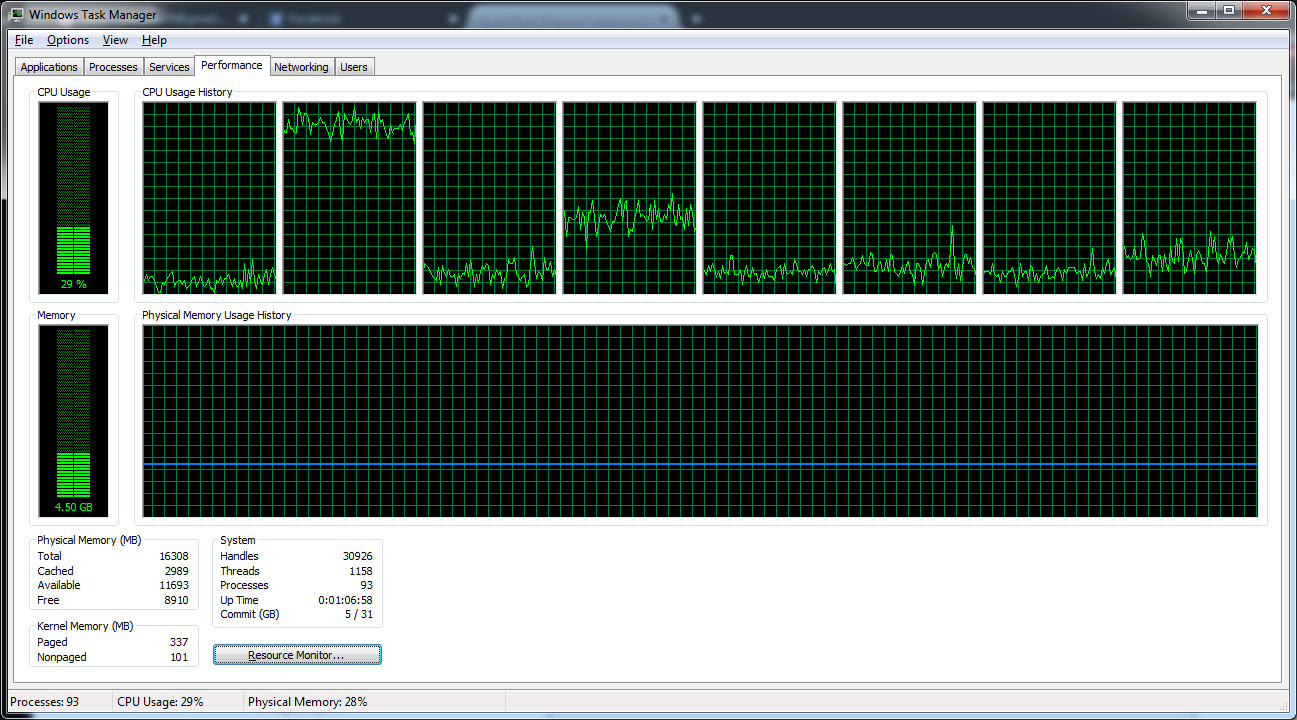
First off, the main thread in GW2 will use 80-95% of ONE core. that leaves you with 3 other cores that are at 50% or lower. And i7 will produce about 20-25 MORE FPS due to HT over the i5 because of this.

And that IS the benchmark I have between my 4790K and 4670K both clocked at 4ghz. when I swapped CPUs.

edit

Attached Image is from my Laptop with GW2 running. i7-920XM and HD5870M

Attachments:

Desktop: 4790k@4.6ghz-1.25v, AMD 295×2, 32GB 1866CL10 RAM, 850Evo 500GB SSD
Laptop: M6600 – 2720QM, AMD HD6970M, 32GB 1600CL9 RAM, Arc100 480GB SSD

FPS DROP after Patch

in Bugs: Game, Forum, Website

Posted by: ikereid.4637

ikereid.4637

Just tested the FPS drop on my i7-4790K@5ghz and Dual 290’s

With the UI, 175 FPS looking at the sky
with out the UI 241 FPS looking at the sky

That is a HUGE drop….

How do you get the options box to show up with the UI disabled?

you dont.

hot key the UI hide function, open the options to show your FPS and keep the dialog open then disable the UI and count to 10. As soon as your UI is enabled you will see what the FPS was on the last frame buffer of your GPU before you switched on the UI. with in 3 seconds the FPS will drop to what it is right now with the UI. This is how I am seeing high/low FPS. You can also compare to any util that can read the FPS of your GPU like MSI afterburners Display server…ect.

Desktop: 4790k@4.6ghz-1.25v, AMD 295×2, 32GB 1866CL10 RAM, 850Evo 500GB SSD
Laptop: M6600 – 2720QM, AMD HD6970M, 32GB 1600CL9 RAM, Arc100 480GB SSD

FPS DROP after Patch

in Bugs: Game, Forum, Website

Posted by: ikereid.4637

ikereid.4637

Just tested the FPS drop on my i7-4790K@5ghz and Dual 290’s

With the UI, 175 FPS looking at the sky
with out the UI 241 FPS looking at the sky

That is a HUGE drop….

kitten , massive drop, mind if i use that screenshot as an example if this dev gets back to me? i wish i could reach 60fps on a good day let alone 175-240 ahaha

I dont mind, anything for them to get this fixed. I might get 100+ on my desktop, but my laptop manage between 40-60FPS on a good day. Right now they barely scrape at 20-25FPS which makes the game jumpy and unplayable IMHO. This needs fixed :-)

Desktop: 4790k@4.6ghz-1.25v, AMD 295×2, 32GB 1866CL10 RAM, 850Evo 500GB SSD
Laptop: M6600 – 2720QM, AMD HD6970M, 32GB 1600CL9 RAM, Arc100 480GB SSD

FPS DROP after Patch

in Bugs: Game, Forum, Website

Posted by: ikereid.4637

ikereid.4637

Just tested the FPS drop on my i7-4790K@5ghz and Dual 290’s

With the UI, 175 FPS looking at the sky
with out the UI 241 FPS looking at the sky

That is a HUGE drop….

Attachments:

Desktop: 4790k@4.6ghz-1.25v, AMD 295×2, 32GB 1866CL10 RAM, 850Evo 500GB SSD
Laptop: M6600 – 2720QM, AMD HD6970M, 32GB 1600CL9 RAM, Arc100 480GB SSD

FPS DROP after Patch

in Bugs: Game, Forum, Website

Posted by: ikereid.4637

ikereid.4637

anet never fixes performance issues, here’s an interview with one of them on the matter https://www.youtube.com/watch?v=ezVy-zLUq6g

Well they are going to fix this one, or they are going to end up losing players. If I cannot play this game on my mobile machines then I have to walk away. I travel A LOT, and its nice to have something to do on my Tablet (Baytrail-T Z3745) or my Laptop (i7-920XM+HD5870M) and not have to worry about taking my desktop(s) around with me.

If they cannot spend the time to fix the UI issues, then that’s that.

But its obviously a UI issue, easily correctable. If they don’t fix it then that just hows how much ANet/NCSoft really cares about its customer base.

Desktop: 4790k@4.6ghz-1.25v, AMD 295×2, 32GB 1866CL10 RAM, 850Evo 500GB SSD
Laptop: M6600 – 2720QM, AMD HD6970M, 32GB 1600CL9 RAM, Arc100 480GB SSD

Crappy computer with even crappier FPS

in Account & Technical Support

Posted by: ikereid.4637

ikereid.4637

Hey guys! So I have a bad computer. (My friend gifted me this game.)

I tried to set all my graphics down to minimum, but I still get a whopping 5-10 FPS.

Is there any way to sap more from my computer to get it to a decent 25 FPS?

Computer Specs:

RAM 4 GB
CPU/Processor 1.40 GHz
System 64-bit Windows 7. Service Pack 1

(I do realize the problem is my processor. However I am unable to upgrade it since it’ll require me to upgrade my motherboard as well. And I don’t know much about computer’s hardware.)

Thanks ahead of time!

Dragonkkealk

Download a program called Speccy and screenshot the main window and attach it to the forum. It will tell us what is in your system.

https://www.piriform.com/speccy/download

Desktop: 4790k@4.6ghz-1.25v, AMD 295×2, 32GB 1866CL10 RAM, 850Evo 500GB SSD
Laptop: M6600 – 2720QM, AMD HD6970M, 32GB 1600CL9 RAM, Arc100 480GB SSD

FPS DROP after Patch

in Bugs: Game, Forum, Website

Posted by: ikereid.4637

ikereid.4637

I am 90% sure its the UI element changes. Namely the Experience Bar. The textures that they are using there are much higher quality then other textures in the UI.

I also notice that some windows in the UI now have a ‘ghost’ effect to the right of them (like a transparency that is incomplete, you can see ‘blur’ in the area, so maybe that’s some of the UI FPS issue too?)

I am getting irritated that this issue has not been addressed by the Anet employees, but the HoM issue has been. I would think ‘playability’ would be right up there with something like the HoM bug. They need to respond to one of the FPS threads saying they are aware of this and either have a fix on the way or are working on root causing it. Losing 20-30FPS is making the game unplayable on several machines, and its completely unacceptable.

Desktop: 4790k@4.6ghz-1.25v, AMD 295×2, 32GB 1866CL10 RAM, 850Evo 500GB SSD
Laptop: M6600 – 2720QM, AMD HD6970M, 32GB 1600CL9 RAM, Arc100 480GB SSD

i7 4790k and GTX 980 getting me average fps ?

in Account & Technical Support

Posted by: ikereid.4637

ikereid.4637

Right now is not a good time to be testing FPS for GW2. There is a bug with the UI that is costing FPS. I am seeing serious FPS drops when the UI is enabled on every single system I own.

Currently the game is unplayable on my laptop (dropped from 50-60FPS down to 18-20FPS), when the UI is enabled.

Wait for them to fix this issue, then go back to troubleshooting your issue.

Desktop: 4790k@4.6ghz-1.25v, AMD 295×2, 32GB 1866CL10 RAM, 850Evo 500GB SSD
Laptop: M6600 – 2720QM, AMD HD6970M, 32GB 1600CL9 RAM, Arc100 480GB SSD

Instant "God Walking Amongst Mere Mortals"

in Bugs: Game, Forum, Website

Posted by: ikereid.4637

ikereid.4637

Hey all,

Believe me, the devs are aware of this issue and it has been and is being taken care of.

How about the FPS issues surrounding the UI?

Desktop: 4790k@4.6ghz-1.25v, AMD 295×2, 32GB 1866CL10 RAM, 850Evo 500GB SSD
Laptop: M6600 – 2720QM, AMD HD6970M, 32GB 1600CL9 RAM, Arc100 480GB SSD

Bug: UI costs 20 FPS

in Bugs: Game, Forum, Website

Posted by: ikereid.4637

ikereid.4637

Bumping from page 5, Devs NEED to address this. Posted for an update on GW2’s Facebook page only for the post to be deleted. W.T.F?!

Desktop: 4790k@4.6ghz-1.25v, AMD 295×2, 32GB 1866CL10 RAM, 850Evo 500GB SSD
Laptop: M6600 – 2720QM, AMD HD6970M, 32GB 1600CL9 RAM, Arc100 480GB SSD

fps drop after patch

in Account & Technical Support

Posted by: ikereid.4637

ikereid.4637

few things. have you tried this

turn all settings to lowest / turned off
close the game and reload
set all settings to how you used to have them.

normally when they do game engine changes it causes some issues and by setting everything to its lowest you “clear” the game and it runs smoothly after.

also have u tried running a game repair.

I would like to mention that doing AC path one today and fighting the second boss my FPS droped to 10 fps and stutterd like crazy. and I couldn’t close the game and had to force close it.

they did indeed cause a nasty issue with the game.

also if u notice the XP bar at the bottom of the screen was redesigned which might be a factor in this.

also try getting updated GPU drivers. uninstall the old one then install the new one (this insures no driver corruption / conflicts, yes it does happen even today to argue is foolish)

Its the UI, nothing we can do about it but wait it out. See my post in the Bug sub forum.

Desktop: 4790k@4.6ghz-1.25v, AMD 295×2, 32GB 1866CL10 RAM, 850Evo 500GB SSD
Laptop: M6600 – 2720QM, AMD HD6970M, 32GB 1600CL9 RAM, Arc100 480GB SSD

fps drop after patch

in Account & Technical Support

Posted by: ikereid.4637

ikereid.4637

having the same problem. drop in 20 fps and is close to unplayable

Please post about it in the thread I linked. it needs to get attention in the Bug forum so it gets fixed. Anet does not really monitor this sub forum all that often.

Desktop: 4790k@4.6ghz-1.25v, AMD 295×2, 32GB 1866CL10 RAM, 850Evo 500GB SSD
Laptop: M6600 – 2720QM, AMD HD6970M, 32GB 1600CL9 RAM, Arc100 480GB SSD

Randomly got Hall of Monuments Achievments

in Bugs: Game, Forum, Website

Posted by: ikereid.4637

ikereid.4637

Just tested, seems to be patched now.

Desktop: 4790k@4.6ghz-1.25v, AMD 295×2, 32GB 1866CL10 RAM, 850Evo 500GB SSD
Laptop: M6600 – 2720QM, AMD HD6970M, 32GB 1600CL9 RAM, Arc100 480GB SSD

fps drop after patch

in Account & Technical Support

Posted by: ikereid.4637

ikereid.4637

The UI after the patch is costing a 20FPS~ on average drop in performance. I am seeing this on 4 seperate systems I play GW2 on so I created a Bug on it.

https://forum-en.gw2archive.eu/forum/support/bugs/Bug-UI-costs-20-FPS/first#post4887143

Please reply with your own findings so that the Devs can address this ASAP.

Desktop: 4790k@4.6ghz-1.25v, AMD 295×2, 32GB 1866CL10 RAM, 850Evo 500GB SSD
Laptop: M6600 – 2720QM, AMD HD6970M, 32GB 1600CL9 RAM, Arc100 480GB SSD

Bug: UI costs 20 FPS

in Bugs: Game, Forum, Website

Posted by: ikereid.4637

ikereid.4637

On my 2 laptops and 2 desktops after the patch I am seeing FPS drops from 100+ down to 75-80. Disabling the UI gets the FPS back up to 100+.

Something that was changed in the UI has cost a severe performance drop, and it needs to be addressed ASAP.

my laptop, where i run vSync, is getting 32FPS where before I was getting a solid 60FPS before the patch. And, I am sure this is wide spread.

Edit

Attached 2 screenshots from my Laptops ingame settings to show the FPS drop. The SS1 is what the FPS is right after the UI is enabled again, and SS2 is what happens after 2-3 seconds after the UI has ‘settled’. Thats a pretty nasty FPS drop right there.

Attachments:

Desktop: 4790k@4.6ghz-1.25v, AMD 295×2, 32GB 1866CL10 RAM, 850Evo 500GB SSD
Laptop: M6600 – 2720QM, AMD HD6970M, 32GB 1600CL9 RAM, Arc100 480GB SSD

(edited by ikereid.4637)

i7 4790k and GTX 980 getting me average fps ?

in Account & Technical Support

Posted by: ikereid.4637

ikereid.4637

Sure ! Also look at his video http://www.youtube.com/watch?v=3XSvcnLcmwI, im pretty much running this, with 15-20 fps lower..

well you are not mirroring his ingame settings. also he is using a R9 285, thats closer to a 290 or a 970 then a 980.

Disable FXAA, drop high res character textures, shadows down to medium, then logout/back in and check your FPS again, I would expect it to be closer to the youtube video then.

Also, im sure this has been asked, your GPU is in the PCIE slot closest to the CPU correct?

Desktop: 4790k@4.6ghz-1.25v, AMD 295×2, 32GB 1866CL10 RAM, 850Evo 500GB SSD
Laptop: M6600 – 2720QM, AMD HD6970M, 32GB 1600CL9 RAM, Arc100 480GB SSD

i7 4790k and GTX 980 getting me average fps ?

in Account & Technical Support

Posted by: ikereid.4637

ikereid.4637

So with the BIOS update and the settings you (Ansau) suggested I went from 35 fps to 50 in LA.
But for large scale events I still get less then you do.. (30 before everyone attacks, and 20 when attacking) with a lower resolution than you. Still don’t understand why I’m not getting higher with my config..

Also.. Noob question, what’s the ’’OP’’ ?

What about hyperthreading like suggested dodgycookies?
Any driver suggestions?
Also here’s the updated version on the hwinfo.

Why not throw up a screenshot of your in game settings as well? I can say for sure that one setting that should NEVER be on All/high is reflections. that should be set to Sky/Terrain at the very highest setting due to the ‘under ground’ effects that exist.

Desktop: 4790k@4.6ghz-1.25v, AMD 295×2, 32GB 1866CL10 RAM, 850Evo 500GB SSD
Laptop: M6600 – 2720QM, AMD HD6970M, 32GB 1600CL9 RAM, Arc100 480GB SSD

i7 4790k and GTX 980 getting me average fps ?

in Account & Technical Support

Posted by: ikereid.4637

ikereid.4637

Hello, so I’ve got my new setup ready for Gw2 HoT but my fps hasn’t gone up that much…

New setup: i7 4790k, GTX 980, running/installed on SSD and 1.5T Hard Drive, 20GB of RAM.

I’m a bit disappointed, it’s jumping between 35-65fps in an average map, getting only 15-20 fps at Teq, 30-35 in Lion’s Arch…
I’ve heard many people say that they get more fps with a smaller setup..

Is this normal fps for my setup? If not what’s wrong?

What resolution are you playing at? What ingame settings are you using? if you download GPU-Z and look at the Bus status, what is listed there? In GPU-Z on the sensors tab what is your Temp and GPU Core/Memory clock?

also, what did you upgrade from to the GTX980? Did you wipe out drivers before installing the new Nvidia drivers?

Desktop: 4790k@4.6ghz-1.25v, AMD 295×2, 32GB 1866CL10 RAM, 850Evo 500GB SSD
Laptop: M6600 – 2720QM, AMD HD6970M, 32GB 1600CL9 RAM, Arc100 480GB SSD

Please Help :)

in Account & Technical Support

Posted by: ikereid.4637

ikereid.4637

Hello,

A few years back i created and levelled an Elementalist called ‘Mama Juju’. I have now come to realise that i do not enjoy this. Infact, it has got to the point where i hardly want to play Guild Wars 2 anymore. Now, before you say… no, I don’t have time to level a new character all the way to endgame again. I was hoping that there is something that can be done to help me here. I have tried out several different classes and have found that guardian is my favourite class.

Will there be anything in the future that will allow me to change? or is there something else that can be done?

Thanks

This is what you do.

Build your Ele based on Toughness/Vitality and try and have at least 1800 power. and use that character to farm the leveling scrolls that are now part of the daily. They show up on WvW Keep Captures, and FoTM 1-10 and 11-20 Dailies. Every Month you can get 13 or 15 (cant remember exactly) by just simply logging in and getting the daily chest. Then you have PvP Tracks, win or loss you will get leveling scrolls pretty easily there too.

if you did all of this, with in one month you would have over 80 scrolls easily, Boom Instant 80 Guard(or other character).

Or, you could create a new Guard and just run it through EoTM until 80 using the celebration boosters for the 100% exp bonus. Would take no more then a week going it casually.

But, do NOT delete your ele. You may find a use for it later on (like canon balling Jormag with staff fire aura #1 auto attack :-D)

Desktop: 4790k@4.6ghz-1.25v, AMD 295×2, 32GB 1866CL10 RAM, 850Evo 500GB SSD
Laptop: M6600 – 2720QM, AMD HD6970M, 32GB 1600CL9 RAM, Arc100 480GB SSD

Does GW2 only use 1 core of a quad core cpu?

in Account & Technical Support

Posted by: ikereid.4637

ikereid.4637

why are they using dx9? Isn’t that one really old? I remember playing vindictus which uses dx11 and there was an option to use multiple cores, would be cool if they used that for this game but I guess it’s too late at this point.

and at the guy who asked if there’s a problem, I don’t really know yet since my computer is at college and I’ve been home for the past week so I only got to play this game on a laptop. I’m just worried about getting bad FPS because once I heard this game is cpu intensive AND about this core stuff I got worried

They adopted DX9 during the initial dev of the game due to the date. They maintain DX9 due to compatibility with older systems. if they rolled to DX11 or DX12 a lot of users would have to get a new OS, possibly a new GPU, or an entirely new PC.

can’t they just make another client that uses dx11 then? idk if that makes any sense lol I don’t know anything about this stuff but what I’m saying is there is one GW2 client (the one we have now) for dx9 people then they make another one for the dx11/12 people to download and use

They could, sure, but that would cost millions of Dollars and thousands of development hours. Its not something they are openly working on, and I don’t expect them to go that route anytime soon either.

Desktop: 4790k@4.6ghz-1.25v, AMD 295×2, 32GB 1866CL10 RAM, 850Evo 500GB SSD
Laptop: M6600 – 2720QM, AMD HD6970M, 32GB 1600CL9 RAM, Arc100 480GB SSD

Does GW2 only use 1 core of a quad core cpu?

in Account & Technical Support

Posted by: ikereid.4637

ikereid.4637

why are they using dx9? Isn’t that one really old? I remember playing vindictus which uses dx11 and there was an option to use multiple cores, would be cool if they used that for this game but I guess it’s too late at this point.

and at the guy who asked if there’s a problem, I don’t really know yet since my computer is at college and I’ve been home for the past week so I only got to play this game on a laptop. I’m just worried about getting bad FPS because once I heard this game is cpu intensive AND about this core stuff I got worried

They adopted DX9 during the initial dev of the game due to the date. They maintain DX9 due to compatibility with older systems. if they rolled to DX11 or DX12 a lot of users would have to get a new OS, possibly a new GPU, or an entirely new PC.

Desktop: 4790k@4.6ghz-1.25v, AMD 295×2, 32GB 1866CL10 RAM, 850Evo 500GB SSD
Laptop: M6600 – 2720QM, AMD HD6970M, 32GB 1600CL9 RAM, Arc100 480GB SSD

Does GW2 only use 1 core of a quad core cpu?

in Account & Technical Support

Posted by: ikereid.4637

ikereid.4637

My CPU has 4 cores (it is AMD) and I heard intel is preferred for this game because this game does not utilize multiple cores (which is amd’s strong point) by default. Is there any way I can make guild wars 2 use the other cores of my processor? Feels like much potential is wasted

its not that simple.

GW2 uses DX9 which uses 1 thread for the rendering of the graphics. That is where the single core talk comes in. While that is going on GW2.exe will spawn 50+ tiny worker threads that will spawn on up to 6 cores. Beyond 6 cores you need to do some tweaking of your OS for this game.

Since the DX9 API is single threaded, that is why Intel performs better then AMD for this game. That and its an MMO, so the CPU gets trashed pretty hard when you are around a lot of other players.

AMD’s Phenom II’s are faster at single threaded operations then their FX and current APU line, but still 40%-50% slower then current Intel CPUs. AMD’s current APU/FX line is about 50%-65% slower then Intel for single threaded operations since the 3rd Gen CPUs were released.

Intel is on their 5th gen line and soon to be releasing their 6th gen line, while AMD has not released a new ‘performance’ CPU since 2012.

That is why Intel is better then AMD at this point, AMD is still using technology in their CPUs from 2011-2012 while Intel has made changes on every other CPU release in regards to performance.

And for reference here is my current fav benchmark – http://techreport.com/review/26735/overclocking-intel-pentium-g3258-anniversary-edition-processor/3

Pay attention to the one thread chart in the link.

Desktop: 4790k@4.6ghz-1.25v, AMD 295×2, 32GB 1866CL10 RAM, 850Evo 500GB SSD
Laptop: M6600 – 2720QM, AMD HD6970M, 32GB 1600CL9 RAM, Arc100 480GB SSD