Elite Specializations & Hero Point Feedback [Merged]
in Guild Wars 2: Heart of Thorns
Posted by: ikereid.4637
Laptop: M6600 – 2720QM, AMD HD6970M, 32GB 1600CL9 RAM, Arc100 480GB SSD
in Guild Wars 2: Heart of Thorns
Posted by: ikereid.4637
Its 400 points to unlock the entire spec for that class.
its 60 points to gain the spec for that class.
If you have 60 points today, on day one you should be able to gain the scrapper spec, the 3 minor traits, access to the weapons and skill changes (F1-F5). the rest of the points (340) are to unlock the rest of the traits, all the skills, and the skins for the elite spec. Which falls in line with progression through HoT, IMHO.
its not as bad as everyone is saying it is, the sky is not falling. Just make sure your character has 60 points for release.
Also make sure that charactermodel-limit is NOT set to maximum. Medium often
already helps tp prevent OOM crashes. I have also quality on medium and can’t
remember that i ever had an OOM crash.
This is 100% the only correct advice to deal with OOM crashes. the Game client will peak at 3.25~GB of ram with character limit set to max settings in a really populated zone. and you will ultimately crash at some point. its a well known issue and setting this to medium or lower is the ONLY FIX.
in Guild Wars 2: Heart of Thorns
Posted by: ikereid.4637
as long as I can unlock my chronomancer, gain the ability to use a shield, get the +25% perm run speed, I have nothing to complain about. As we progress into HoT, we will get the required unlocks to complete the classes.
its not THAT huge of a problem. Stocking 60pts for the initial Spec unlock is not that hard, then just start working for the rest.
And for those that do not want to bother with PvE, you can just WvW till your eyes bleed to gain all the unlocks.
If you want camping to come back lets also bring back…
Global Free for all looting – everyone has access to loot, whoever hits F first gets it!
EXP loss on Death – death tax.
Underwater breathing spells only, you dont have the spell ready you choke to death
Mana regeneration via looking at a full screen Magic Book…while you get crit to death by that wondering skeleton!
Corpse Runs with a Corpse decay timer. If you don’t retrieve your corpse in 8 hours you lose all your stuffs!
NPC Mob trains that will hit anything they touch. Perfect for hazing your noob friends!
Character inventory weight limitations. So that when players beg for Gold we can down convert it to 1,000,000 copper and they are forced to delete that 10g in order to move to the bank! Another fun hazing!
NPC Regard table – Faction control. As you kill * number of Y mob you gain hatred with their race, making you Kill on Sight in areas of the game that they inhabit! Nothing like killing snakemen all over the place, to have to sneak into their home town hated to talk to a captured NPC for a key Class quest!
and soo many more….
No thanks!
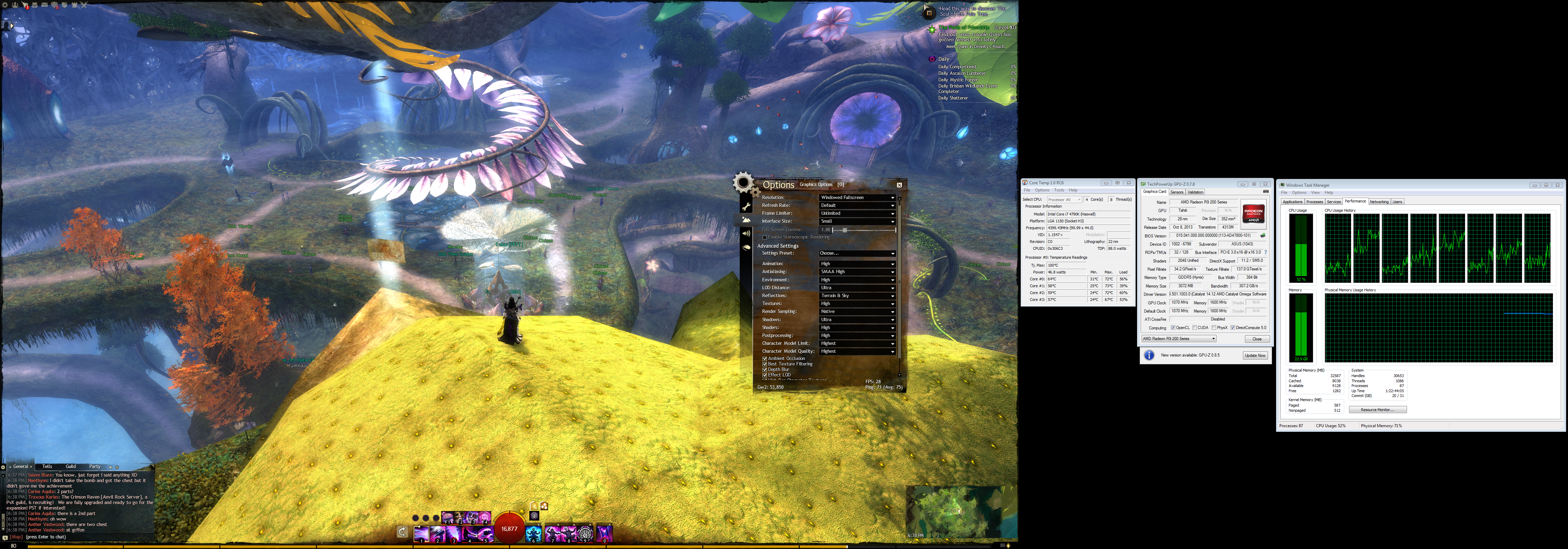
with GW2 in a window we would need to see what is hitting your CPU and Disks. For an overview, the performance tab on Task manager will show us the CPU over all utilization per core.
In that same tab is resource monitor. That breaks out utilization based on CPU, Disk, Memory, and Network. And you can sort it down by process ID and read/write I/O against those 4 hardware sources.
For example, on the Disk tab if you see your highest active time sitting at 99% that is why you are not getting a decent FPS. That means something is running in the background and fully utilizing the HDD/SDD in your system. You can expand disk activity and validate what is running by clicking the read and then the write columns to organize by highest rate. Then see what Process and PID is listed at the top. If its not GW2 then you know something else is running against the disk. If GW2 is at the top then you probably have a HDD or NTFS Filesystem issue.
The same can be done for CPU and Memory.
pull down Coretemp or HWInfo and verify the CPU temps as well.
Your GPU is running at 50% utilization, so that would place fault on your CPU. Either you are running crap in the background that is using CPU I/O or you are over heating.
in short not well. the AMD Althon 860K is not a great processor by any means. its what you would call a middle ground budget CPU to get you by.
For the cost, you can do far better looking at older intel systems. Like a SandyBridge based i5.
I tell people who are on a budget, just buy a used older system. the performance between processing generations is really sad for the price Intel expects everyone to pay. Since IvyBridge the performance jumps have not met the price gap. So if you bought a used Sandybridge system, I would say about 250~, you will be better off.
Chances are you were in sPVP and got trolled for some QQ time. It happened to a buddy of mine who too had a name for about 2.5 years before he was forced to change it.
Anet does not monitor names that passes the creation filters. Its up the players to report them, and then Anet will follow up. and thats exactly what happened.
Your name IS in violation of the naming policy. So in reality, it was just a matter of time.
HD5770 would be a good choice. Anything faster is going to be a bottleneck by the Q6600. A HD5770 paired with a dual core G3258@4.2Ghz can get 90-100fps on medium-high settings. So with your Q6600 I would expect about 45-60FPS tops.
Since you cannot buy a new drive, I would DBAN (can take 24hours) the HDD with 3 passes, boot to your Windows CD and enter recovery Mode and open Command prompt.
Enter diskpart, select the disk, create a primary partition, and do a format fs=ntfs and wait for it to complete. Then quit dispart and enter chkdsk /r for a full surface scan against the newly created NTFS partition. This entire process should take about 8 hours on a 1TB 5400RPM laptop drive.
Then reboot back into the setup of the CD and delete the partition and then let the OS re-create the install as it needs.
Once you get the system setup again, install CrystalDiskInfo and run that program every 3-5 days for a few weeks to make sure your bad sector count is not growing. If you notice that its growing boot back into the CD and do the chkdsk /r again to remap the file system against bad sectors.
The reason the I/O shows up for GW2 for you is due to the gw2.dat file being 21.5GB~ and covering a large set of the surface of that failing hdd. Since GW2 is a real-time application it is not tolerant to disk wait time commands (TLER) and will almost immediately time out when a pending sector hits.
Have you validated your CPU temps with a burnin program like AIDA or Prime95? It kinda sounds like your CPU is throttling.
If your PC just powers off while GW2 is running (IE loses power completely) that is 99% of the time thermal protection. Meaning your CPU is over heating. 1% of the other time is a failing PSU, site fault protection trips when too many amps are drawn on the 12v rail.
I would rate the chance of a failing PSU much higher.
Was totally astounded a while ago when somebody in our guild had a defect
CPU cooler and could still play GW2 .. the game was very slow because CPU
ran at minimum speed .. but the PC was not crashing or shutting down.Personally in the last 10-12 years i had that problem 3 times because my PSU
was aged.
its loaded though. OEM Machines are going to probably see a higher % of PSU failures due to their age and the lack of electrical built into them. IE, a 300watt PSU in a system that now pulls 450w with that new GPU.
And while thermal throttling will hit before fault protection (power off) if the heat jumps too high on the CPU throttling can be completely missed before the shut down. This happens quite a bit on older Phenom II and Athlon II CPUs. As they tend to run hotter then most and have a much lower TJMax limit.
So it all depends, but GENERALLY yes 99% thermal and 1% hardware failure is about right most of the time.
I am sorry, but there is no way Ascended is going to be required for raids unless Anet ads in a mechanic similar to Agony.
10% stats above Exotic is just not game breaking enough for the masses, so requiring BiS Ascended is not going to make/break raiding in this game.
in Guild Wars 2: Heart of Thorns
Posted by: ikereid.4637
So lemme get this straight. I intend to unlock elite specs on an engi, warrior, and necro, and quite possibly on my poor neglected Ranger. All for WvW, since that is pretty much all I do. BUT in their infinite wisdom I am going to be forced to go open world to garner hero points above and beyond the ones I have banked and waiting for me?
I took a week off of WvW already to get 60-80 banked hero points/character based on the 65 number they popped out earlier. Now we’re looking at 170? I ground through world completion on 2 characters already, and that was a horrendous experience for me. It’s not like there are an abundance of hero points available in WvW, and tracking down the open world ones take a ton of time that could be better spent in WvW.
Pretty much.
Only sPVP gets the full unlocks with out doing anything.
I really hate the current unlock system. The first system was better, skill point based and you got skill points every time you leveled past 80. That is how the system should be. Forcing players to go out and map on every character to get the spec (mind you, mapping outside of HoT content too…) is stupid. It takes away from other areas of the game and forces you to commit time to mindless boring tasks to collect points. And its not even time gated…..So, IMHO, there is no real reason for it to be this way.
I am sorry, but software shutting down your PC is not the fault of the software. This is going to be a hardware issue.
Its going to be faulty hardware, such as a failing/aged PSU or Thermal related, such as dried up TIM or a weakening CPU Fan/water Pump.
If your PC just powers off while GW2 is running (IE loses power completely) that is 99% of the time thermal protection. Meaning your CPU is over heating. 1% of the other time is a failing PSU, site fault protection trips when too many amps are drawn on the 12v rail.
You need to grab Speccy as suggested and post a screenshot of the summary window.
So yesterday I was hanging with my neighbour and decided to show her GW2. Boy was i wrong. The moment i logged in i was greeted by supernova explosion of skill flashes (logged out in World Boss place). She was so impressed she had a seisure cause she had epilepsy – a condition i was not aware before that. So after getting her to hospital i had a few thoughts:
1. Why is there NO EPILEPSY WARNING? The game is so flashy it HAS to have it in big bold letters at the start screen.
2. I checked options panel and did not find a suitable tool to tone down the brightness of skills only. Can we have that option?Your friend is responsible for understanding what triggers her epilepsy and not Anet. I don’t wont too see big bold letters on the start screen either.
Actually this is not true. Anet is just as responsible as the OP’s friend for this. Anet has a responsibility to warn its players that some of the content is ‘known’ to trigger epilepsy.
And we do not need it on every login. Just during the EULA acceptance and/or during the first time login after a fresh install or a major/major update.
But there needs to be this warning.
Sector reallocation is a sign that your drive has physical damage on the spinning platters. Reallocation is normal through the life of every HDD. As dropping, bumping, and moving laptops around will reset the HDD controller and if there is a I/O operation happening when that happens it will usually yield as a damaged sector.
If CrystalDiskInfo says you have a sector reallocation count, whats the data on that row? Does it say anything about uncorrectable errors, or Pending sectors?
As said by another poster, Look in your windows event viewer under system and look for ‘disk’ source errors. If there are any there that means the Disk I/O is also affecting the OS (I suspect it is) and you need to find out if the drive is actually dying or just has a series of damaged surface errors taking out a number of sectors.
What I would do, after investigating the above, is DBAN the HDD with 1-3 passes. And then do a full surface scan with chkdsk to validate the surface of the drive. Since DBAN will wipe the drive out completely your sector reallocation count can get reset. Running a file system check may force the errors to reappear, and then the drive has to correct for them. This process can take a long time, like 10+ hours to a couple of days. And, If after all that the surface damage on the drive is still there, or incrementing above what it is now, (again pull SMART data) replace the HDD.
Depending on how big your HDD is (I am going to guess 250GB to 320GB) you might want to look into buying an SSD. You can get a 480GB SSD for 179 or a 250G SSD for 80~ at your local Microcenter or Frys. I would suggest buying a Samsung 850Evo or an OCZ Arc100.
If you are building with GW2 mainly in mind. Get the fastest CPU you can buy. For your budget that would be the 6600K or 4690K. Then Plan to overclock it to 4.4ghz+. The stock intel cooler can take those CPUs at about 4.2ghz before you need to move to a better cooling solution. You just need to make sure the Intake fan on that case is blowing across the cooler.
Even an older GPU, like a HD7790/R7-260x/R7-360x(the same card…), can get really good FPS for this game. On ultra you wont get 60FPS with those kinda cards but you can still get really good appearance for the money against those cards.
With a G3258 clocked at 4.2ghz and a HD5770, rolling medium to high game settings, I was getting 80-90FPS at 1080p with open areas. Zergs and such still yielded sub 20FPS.
Just to give you perspective
60FPS on Ultra requires quite a build. Your best bet is to look at the price of the 6600K or 4690K as a baseline, and for the GPU a R9 280x or GTX760 or better(Look at benchmarks). But your budget might be limiting due to the CPU+Motherboard being nearly 50% of it.
The only setting that is going to pose issues is that character limit setting. Even on a top end rig, leaving that to highest setting causes issues with some world bosses (OOM crashes). so even if you do run on Ultra settings, I suggest setting that to High or Medium.
Typically when a PC boots directly into the Bios thats usually due to a CMOS error. Could be a faulty CMOS chip but most likely a dying CMOS battery.
I would boot into your BIOS, set bios defaults, save and exit and reboot (from a cold start). Get back into your bios and adjust your settings as necessary (such as set Sata operation to AHCI or RAID depending on what you had) and see if that helps.
Chances are, your CMOS battery is going bad and the voltage is weakening on it making the CMOS user area data between reboots degraded. So your BIOS pops up asking for input to continue to boot. MOST of the time replacing the battery with a RS232 type battery will fix the issue. You can find them at walgreens or any store that sales watch style batteries, and they are usually 3.99each.
Standing facing the bank, I counted about 32 players and 7 ranger pets, and 12 minis over there btw before taking screenshots.
4790k@4.6ghz, R9 280x 1150core/6550mem.
On Max settings, then another with sampling dropped to native, Char limit to medium, and reflections to ground/sky.
AMD CPUs are just not capable of this.
Hello, this is my first time posting here on the forums. Ever since I got the game, I have been having horrible performance in-game. For example, in Lion’s Arch I get ~23 FPS, and in highly populated areas such as world bosses I only get max 18 FPS. I heard this game was very CPU intensive and did not work well with multi-core processors, and I also know that AMD CPUs aren’t the strongest out there, but I imagined I would be able to run the game much smoother than I am now despite all of this. Shortly after I started playing I upgraded from a GTX 760 to a 970 (I overclocked the hell out of it too), but did not notice any big performance improvement.
Basically I’m just wondering if this is normal in terms of game performance with the hardware I currently have set up. I will eventually be upgrading to Intel, but as I still have a long time to go before that happens I am curious if my game experience will have to suffer until I can finally upgrade.
Thanks for the help!
*Edit: I forgot to mention, I also have 8 gigs of RAM and have an M5A97 R2.0 mobo.
Thanks again!
This is perfectly normal for your CPU. The FX series CPU has a weak single core performance, and that is what drives the performance of GW2.
The New Lions Arch, the new HoT Zones, and Zerg like content is going to yeild the the FPS you are reporting. The CPU is just not fast enough to keep up with the Feild of View in these zones for the draw compute requests.
You can hang out until AMD releases the Zen coded CPUs at the end of 2016, or upgrade to any of the 4th gen or 6th gen Intel CPUs out on the market now. And, your performance is going to nearly double at least.
Most of the Low FPS is from your i5, but also that GT630M is holding you back.
the Only thing you can really do is upgrade that i5 to an i7-3610MQ(a Quad core). But it might not be worth it since you do have a GT630M.
the GT630M uses DDR3 and is way slower then a GPU of the same class that uses GDDR5. You might actually be better off switching the graphics back to the Intel HD3000 and set your resolution down to 1366×768 and use low settings and see what the performance is vs the GT630M.
http://www.notebookcheck.net/NVIDIA-GeForce-GT-630M.63761.0.html
as for your one upgrade to an i7-3610QM, you can get a used CPU from Ebay for 129~ Shipped. Install requires tearing your entire laptop apart to swap the CPU and replacing the Thermal paste. Its not hard to do, and there are plenty of Youtube videos on the process.
Fermi – You just lost ANY respect I had for you.
Your points just prove you didn’t really read anything that I posted.
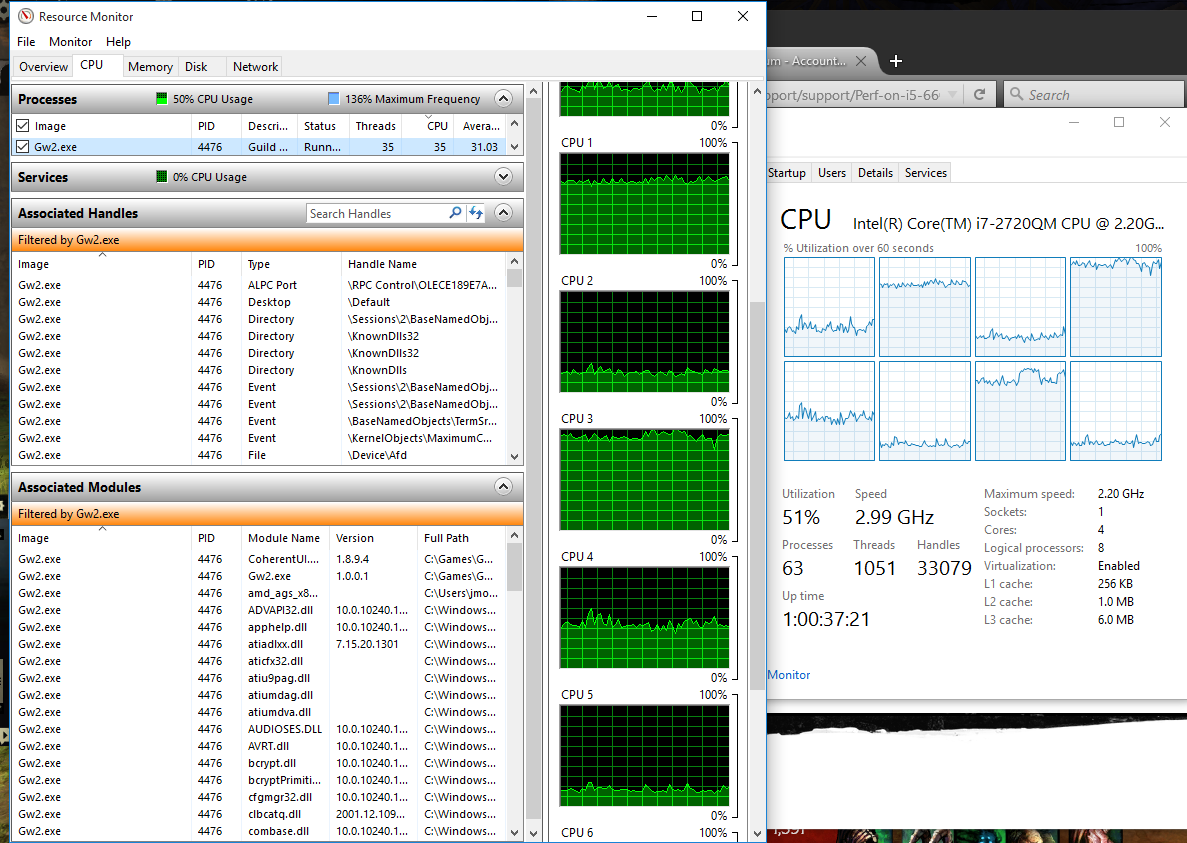
For one my CPU on my laptop was not my topic point, and while running the game it clocks to 2.9ghz not 2.2ghz(again, you didn’t really look at the screenshots. You only saw what you wanted to see). I posted that screenshot cause its the system I was on while posting and I wanted to show the OP that the game spawns many threads even though the bottleneck is a single management thread.
My 295×2 is being RMA’d as the 2nd GPU on the board Died and wont CF anymore. I am currently running my main desktop off my old 280×. I gave my 4670K build to my brother a couple weeks ago as my wife moved to a laptop.,so dont have that one anymore either. Why am I even explaining any of this to you anyway….
BUT Here are a couple screenshots since you had to call me out saying ‘if you had the build in your sig’.
My build is for 40% gaming 60% work. The ram and storage is cause of the VMware work I do being VCDX certified. But I doubt you would know ANYTHING about that with the douchary comments you have made.
@sirsquishy
Does hyper threading make a difference for GW2 at all? I am contemplating an i5 because my i7 nehalem far outlived its usefulness before games used many threads. With DX12 on the horizon for some games that might change so games use more threads. However, for GW2 use, isn’t the IPC the same between say the 6600k and 6700k because they run on the same architecture?
In my experience yes, because GW2 will spawn 50+ worker threads. While the core of the game rides on a single management thread for the entire engine, the rest of the game is split into tons of other threads.
A fresh load of GW2 sitting in my ‘banking area’ it has 35 threads spawned, and its using the resources of 5.25 Cores.
The rest of the ramble about ITX vs ATX didn’t make any sense to me either; that’s a matter of form factor and what size PC you want.
ITX has a limit of 2 DIMMs. Using DDR3 you have a system max of 16GB of ram. using DDR4 you have a system max of 32GB of ram. Thats what that was about.
For ATX, Skylake has faster DMI links to the CPU from the Chipset. It handles multiplexing better then Haswell’s DMI. So when running Quad SLI/CF a Z170 system makes more sense here.
sorry if i was too vague.
An i7 is going to be faster then an i5 due to clock speed differences alone. When I still had my 4670K, I had it clocked the same as my 4790K and the 4790K was still 20-25FPS higher then the 4670K using the same RAM/GPU. So yes, HT does yeild more FPS.
the IPC is going to be the same for the same generation of CPU. a i5-4440 is going to have the same IPC as a i7-4790k. But the faster clocked CPU is going to win in performance over all.
You are getting way more then 5% performance between an i5 and i7. You gain HT, you gain more L3 Cache and you have a higher base clock and higher Turbo.
on your receipt you got your game code for HoT. Log into your account page on guildwars2.com and click redeem code. Copy/paste the code from your Receipt on that field and click apply. Done.
for THIS game there are only 2 Choices for CPU, 6700K or 4790K because they are the FASTEST single threaded CPUs on the market. The 6700K is ONLY 5% faster then the 4790k at the same clocks. And the 4790K overclocks higher then the 6700K on average. So If you are going to OC, depending on your Binning Luck there maybe no IPC performance difference between the two.
The question you need to ask yourself is DDR3 or DDR4 and ITX or not. Memory wise there is NO performance difference between DDR3 and DDR4 with these chips due to them both using dual channel controllers.
IMHO, the main difference is going to be memory capacity. ITX has 2 slots, so DDR3 yeilds a max of 16GB while DDR4 yeilds a max of 32GB.
Both CPUs have the same limitation of 4x lanes going to DMI for the chipset. The 4790K is version2 bandwidth, while 6700K is version3 bandwidth. But if you use NVMe on either you will saturate the DMI links anyway. Both have 16x lanes from the CPU, the z97 and z170 both have motherboard options with PCIE multiplexers to give more PCIE lanes at the chipset (below the DMI) so you can run 4way SLI/CF. I would not push dual GPUs in that setup however, as you will again saturate the 4x DMI bandwidth to the CPU.
Currently If i was going to build a system I would probably take the 4790K on a Z97 for microATX, and a 6700K okitten70 on ITX or Full ATX due to some of the board designs and the version3 link speed of the DMI.
There are really no other options, IMHO.
(NOTE the i7-5775c is a good choice IF you are going to overclock it. With the L4 Cache it does outperform BOTH the 4790K and 6700K at the same Clock speeds. But your locked into a Z97 and DDR3 with this choice, and the 5775c is very hard to find.)
http://www.anandtech.com/show/9483/intel-skylake-review-6700k-6600k-ddr4-ddr3-ipc-6th-generation/16
The Z170 board I would choose, due to the 40 PCIE Lanes at the Chipset for 4way SLI and 3way CF support. http://www.evga.com/Products/Product.aspx?pn=151-SS-E179-KR
(edited by ikereid.4637)
I accidentally discovered that the issue only happened in Lion’s Arch. On other maps the GPU usage is the same as before. Don’t know if this is something related to my laptop, a bug, or was working as intended. Also, I was running on Windowed Fullscreen, but I discovered I get better settings using normal Fullscreen. Still not using PCIe 16x though, but okay for now.This is not the perfect state, but now I can play without overheating. Thanks for the help.
Couple of things.
1. your GPU is only ever going to be 8x in the laptop due to how its wired in. Most laptops do not use 16x PCIE Lanes, and the ones that do are usually very high end and/or use dual GPU setups.
2. this happening in Lions Arch makes perfect sense. There is a lot more detail in the new Lions Arch then in other ‘Classic’ zones. So it hits your CPU harder. If your CPU has to work harder your GPU is going to ‘wait’ which will make the over all system slow down.
The best you can do is find the zone that affects you most and adjust your ingame settings for the performance you desire and let it roll for the rest of the game.
I for one, avoid Lions Arch like the plague cause of how hard it hits my systems.
The best we have is the LOD limit checkbox under settings. that will reduce the effects on screen by a small %.
we do need an effects slider for SOO MANY REASONS. The OP’s issue is the MAIN reason.
If your friend has been diagnosed with Epilepsy make sure shes taking her Dilantin
Pronunciation (http://www.drugs.com/dilantin.html). My dad had epilepsy and he would only go into seizures when his levels were very low. Those meds DO work.
yes it will run. the biggest problem is the i5-5200u part of the laptop. The U means ultra low voltage and lower CPU clocks/performance. The HD5500 is not a bad Intel GPU, its giving AMD’s APU iGPUs a run for its money. At 1366×768 GW2 should run about 45FPS in the open world on medium/high settings (Character limit on low or lowest) and 18-24FPS in zergs on medium/low settings.
the Only way they can make ascended required for raids is if they use something like AR that can only be outfitted on Ascended gear. The stat differences between Exotic and Ascended is not game breaking enough to be required for raids, unless there is some mechanic behind it.
you cannot design a game that will grant the same experience to 12-90 yr olds in all professions in all desired focuses of life.
Anet always says that GW2 is revolutionary:P Well, actually Blizzard essentially managed to make all content available to everyone (or at least one version of it containing the entire story) after they implemented LFR. This is done even though their player base is more hardcore.
Yup and how many expansions did WoW have before they implemented LFR?
They did do it in the end. Anet can learn from others’ experience and do it much sooner. When we learned, say, physics in high school, we only spent several years on it, instead of spending hundreds of years which were needed for physicists to create the theory that is taught in textbooks.
If GW2 is going to have LFR, then GW2 needs a ‘gearscore’ approach. But list the build/gear of the joining members to the LFR, else you might get raids with full bezerker and no support traits which would yeild with 100% failure for those unskilled players.
IMHO, LFR is a BAD idea until there is a subsystem that helps train players on HOW to properly raid and gear that is not outside of the GW2 game.
Coming from 72+ Man Raids in Everquest (1999~) that were HARD and required guild attendance of 93% or the community would kick you; going to WoW for raids with 40 players, then down to 10man/25man/heroic, then being able to Pug my way through WoTK 10 and 25mans(dropped WoW at Cata)….the ONE thing I hope for is that these raids in GW2 start off as HARD, as they will only be made easier as the community cry’s and whines over being unable to complete them.
I would like to see 3 branches of raids, IMHO. 10man for everyone, 25man for the ‘elite’ few, and maybe a heroic(more then 25 players!) branch when the 25man runners get bored. Similar to how WoW does it, but less Puggy. The bosses in raids should not be a faceroll and it shouldn’t be faceroll through countless mobs to get to a hard boss either.
the entire place needs to feel more like a raid and less like a smash and bash to see boss (like how nearly all the exp paths are right now)
The part that applies Healing power per active illusion on Healing Prism does not affect Restorative Mantras. It affects your healing on the healing slot, but all traited Mantra’s do not gain any benefit from this trait. This is +300 healing power lost cause of this bug. Please fix.
Hey sirsquishy,
I don’t have that particular tracerout info anymore but here is the info I sent Arenanet support.
.
So;
Mindspring > RR(RoadRunner) > Telia > NCSoft(Anet)
You should contact your ISP and find out if they can test Telia through their RR link partner contract to get the issue fixed. Otherwise, Anet is going to have to contact Telia and have them do the head to head on their end, Since telia is NCSofts Uplink to RR’s Pathing.
So whenever I play guild wars my computer randomly crashes black screen then the audio screw up then I have to restart my computer.
my bluescreen error is 0×8000000000000002
I’m using a EVGA GeForce GTX 970 Super Clocked ACX 2.0 4GB GDDR5 Graphics Card
i7-2600k cpu @ 3.40 ghz
That is a windows Kernel error, usually tied back to Thermal protection faults.
Verify that your GPU and CPU are running with in normal Temps. You can use HWInfo to find this out using the sensors applet. Make sure you verify Idle Temps as well as loaded Temps (GW2, Prime95, AIDA, or something similar)
More textures to load and more animations to run with more people in the area.
it sounds like your GPU is stuck in the s7 sleep state. You can confirm this with GPU-Z while the game is running in a window.
Look at the Bus speed, and on the sensor tab the Core Clock.
the HD7700 series all suffer from this, time to time, my HD7790 did as well. the Fix is to download MSI Afterburner and set the power to +10 or higher in it.
This is a driver issue, and since you are under windows 10 I hope you are running 15.20.1062.1004 or higher, as that has fixed it for the systems I have a HD7790 and/or R7 260x in.
The problem seems to be on the route to 206.127.159.XXX.
Now I’m on 206.127.146.62 and it seems fine with avg 40ms ping. Did a tracert and the difference is the ffm-bb1-link-etc…
Your traceroutes are clean, but are you on a campus or something? There are too many 10.xxx.xxx.xxx addresses before you actually hit the internet. So the Latency could be a Firewall in your network that is slowing Packets going to NCSofts servers.
It does appear to be on their end as I’ve had performance issues since yesterday. Ran the diag and these are the bad connections
11 128ms 16/ 50 = 32% 8/ 50 = 16% ffm-b1-link.telia.net [62.115.137.121]
0/ 50 = 0% |
12 112ms 35/ 50 = 70% 27/ 50 = 54% ncsoft-ic-306349-ffm-b11.c.telia.net [62.115.43.74]
0/ 50 = 0% |
13 —- 50/ 50 =100% 42/ 50 = 84% 206-127-157-86.ncsoft.com [206.127.157.86]
0/ 50 = 0% |
14 109ms 8/ 50 = 16% 0/ 50 = 0% 206-127-158-1.ncsoft.com [206.127.158.1]
No, the issue is with Telia and not Anet/NCSoft. Can you post your FULL traceroute?
I did a tracert to one of the EotM IPs (64.25.33.81), and then ping tested each of the hops.
Tracing route to 64.25.33-81.ncsoft.com [64.25.33.81] over a maximum of 30 hops: 1 <1 ms <1 ms <1 ms 2 19 ms 19 ms 19 ms 3 20 ms 19 ms 19 ms 4 20 ms 19 ms 21 ms 5 19 ms 19 ms 19 ms 6 229 ms 230 ms 229 ms las-b3-link.telia.net [80.239.161.97] 7 * * 230 ms las-b21-link.telia.net [213.155.137.58] 8 261 ms 262 ms 262 ms dls-b21-link.telia.net [62.115.139.4] 9 264 ms 265 ms 265 ms ncsoft-ic-307708-dls-b21.c.telia.net.10.115.62.i n-addr.arpa [62.115.10.106] 10 265 ms 264 ms 264 ms 64.25.32-9.ncsoft.com [64.25.32.9] 11 266 ms 267 ms 265 ms 64.25.32-26.ncsoft.com [64.25.32.26] 12 276 ms 275 ms 276 ms 64.25.32-82.ncsoft.com [64.25.32.82] 13 * 262 ms 261 ms 64.25.33-81.ncsoft.com [64.25.33.81] Trace complete.I found out the packet loss starts at the point las-b3-link.telia.net [80.239.161.97]. Here are the ping test results of 80.239.161.97 (telia.net):
Ping statistics for 80.239.161.97: Packets: Sent = 100, Received = 86, Lost = 14 (14% loss), Approximate round trip times in milli-seconds: Minimum = 229ms, Maximum = 236ms, Average = 230msMy question is, I am in S.E. Asia and connected to the US servers, yet why am I being routed to Europe first, then to the US?
That is a question for your ISP.
Can you update your Traces with the IPs BEFORE Hop 6. It would tell me if telia is a link partner or just a transport to Anet. And yes, it does matter.
Just had this problem start happening to me this week as well. I can log in, get to Select Character, and actually get into the game for roughly 2 minutes with everything running smoothly and cleanly… and then the screen goes ‘wrong’, the music cuts and loops, and everything freezes solid. Nothing is listed in the error logs, my computer doesn’t register there was an error at all, but it’s made GW2 unplayable for the time being. Comp isn’t overheating, everything else works after a reboot. Only GW2 is affected.
I can play any other game at full power, speed, and graphics, but starting today, GW2 decided it doesn’t want me playing. I kinda hope it’s just some weird code error that will be swiftly patched, as I also got HoT and have been waiting for it to start.
What do you mean ‘the screen goes wrong’. This could be the key to your issue here. This could be a sign that your GPU is dying.
I had a system we were working on for my brother where we took his boxed GTX570 and tried to make it work with this newer 4670K. The GPU’s 3D engine was toast, as when ever you loaded any 3D application the Video would cut out, audio would loop with the last 1-3 seconds of whatever sounds was played and after 45 seconds the system would just reboot.
Ended up using an older Nvidia 8800GTS until we can get him something better.
But the GTX570 was the issue, and it sounds VERY similar to what you are describing.
Complete necro, but I’m having this issue now as well. Brand new computer build. No memory, PSU , or GPU issue. Gonna go out on a limb and say it’s not the mobo. If this is a software issue. Anyone have any solutions. I just came back to GW2 after a very long hiatus and now I unfortunately can’t play the game.
PC rebooting is ALWAYS a hardware issue. 90% of the time its thermal 5% of the time its power, and 5% of the time its GPU/RAM/Other.
Load up hwinfo for your system, and load its sensors applet. enable logging to desktop. Load up GW2 and wait for the system to reboot/shut down.
Then Load up the Log and see what your Temps are for all the components in the system. I am willing to bet its your CPU temp skyrocking causing the system to halt the CPU and shutdown the PC. Also you can post the log.
Sounds like your GPU wont wake up properly for GW2. Load GW2, change it from Full screen to Windowed and then download/load GPU-Z and post a screenshot of the main GPU-Z screen and another of the sensors Tab.
if they reset the masteries does that mean they are satisfied with the current released beta PvE zone content? Cause if we still need to test it, we need those masteries.
If so, then the rest of the beta testing should probably be other stuff that doesnt need the masteries.
This is what I am talking about, look at the GPU usage. The spike in the middle is when I teleport to the location and after that, that’s the boss fight. And when it all ends, as people leave it starts climbing up to normal usage, as you can see in the second picture.
Your GPU utilization% is going to drop when your CPU gets heavy loaded for GW2. That is due to the fact there is 1 thread that controls EVERYTHING for this game and when that one thread is under heavy load (when there is more vector math going on, basically) the GPU must wait for the CPU to catch up.
This happens in WvW, World Bosses, Open areas with LOTS of players, and when lots of players are around you in combat.
It happens with the fastest CPU and it happens with the slowest CPU. Its perfectly normal for this to be happening, and its not going to change unless Anet redesigns the game engine from the ground up (not happening).
OP, you obviously have no idea how Certs work.
When a cert is legit it will get populated into your root store automatically, unless you have your system default browser locked down and ask YOU for permission on EVERY SINGLE cert for ANY website that uses SSL.
Legit, activated, and current SSL certs are automatically accepted via the Root store due to how certs work. They are held by the Cert provider (Veri sign being the biggest) and the authorization of the SSL Cert against the Certs Domain (NCsoft.com here) gets passed to them before the cert is considered activated/permitted to enter your root store.
That is the different between a publish authorized cert and a private self signed cert.
I love it when people come here and post a complaint about something they have no idea on and throw in ‘25 years of XYZ “Engineering” Experience’. Just makes you look like a jack kitten who really knows nothing.
What GPU and CPU are you using? That is going to have the biggest impact.
While the newer GPUs coming out are geared more for 4k rather then 8k, its mainly based on texture resolution and not your display resolution. AFAIK GW2 uses 2k for texture resolutions. So the only remaining issue for pushing the game to 4k would be buffer memory on the GPU. 1G,2G, and 3G vRAM is not enough for 4k resolutions in MOST 3D situations. 4G with very fast Ram (HBM, and GDDR5) barely cuts is, 6GB seems to be the sweet spot per GPU right now. For 8K I would say 8GB would probably be required to get any kind of performance.
In Win10, MS does updates of your hardware’s drivers unless you tell Win10 not to do that. Are you letting windows take care of this?
what was the old Video card? If it was AMD did you remove the old drivers before installing the GTX980Ti? If the old GPU was an Older Nvidia did you update the drivers to the latest?
Not affiliated with ArenaNet or NCSOFT. No support is provided.
All assets, page layout, visual style belong to ArenaNet and are used solely to replicate the original design and preserve the original look and feel.
Contact /u/e-scrape-artist on reddit if you encounter a bug.