Showing Posts Upvoted By shadow.6174:

Cancelling a Res is a Fine Art

in Bugs: Game, Forum, Website

Posted by: zamalek.2154

zamalek.2154

It is far too unreliable cancelling a res. I just had a case where I attempted to move, attempted to dodge, attempted to switch weapons, attempted to attack, attempted to use conflicting abilities (which worked, but I remained there ressing once they went off) and the only result is that I took the full damage of the AOE ring and was downed. Absolutely nothing worked. Not for me and not for the 3 people with me.

I don’t know the repro steps because cancelling ressing can be real easy at times (simply moving works).

Practically there is NEVER a circumstance where ignoring player input for the sake of a res is actually a good idea – it will nearly always lead to 2 dead players. If the player cancels the res out of error they can simply press F to continue.

Auroraglade
Epistemic.8013: Guys this is bullkitten a sentient plant creature is hitting these
wooden doors with fireballs and it’s working
.

[Mesmer] Phantasmal Warden Bugged

in Bugs: Game, Forum, Website

Posted by: Preyar.6783

Preyar.6783

This is the only thing I don’t like about the current patch
Anet even said like 5-6 weeks ago that they we’re looking into it, but nothing has happened. It would be stupid postpone the fix to the balance patch…..it’s a pretty annoying and serious bug.

Wondrous Achiever \o/

Targeting Still Broken Please Fix It!

in Bugs: Game, Forum, Website

Posted by: Max Gladius.6930

Max Gladius.6930

Priority seems the following for interaction targeting… even if you have a target selected that you want to interact with, the game does not care….

Banner Pickup
Resurrection
Interaction with world item.

Prime example is Cliff Side Fractal…
Warrior puts banners where we stand, hammer runner goes down where we are… you can target the hammer (if your are lucky) but you, and everyone else who follows target will not pickup the hammer until all the banners are moved, and the guy is resurrected….

Targeting Still Broken Please Fix It!

in Bugs: Game, Forum, Website

Posted by: Greyhound.2058

Greyhound.2058

Trying to target Shadow Behemoth, pressing Tab cycles through… other players. Green after green after green… can’t target SB at all, or any of the portals etc, except by going a loooong way away – and then it drops the target again as soon as I get close enough to start fireballin’.. Even from way back it seems to prefer sparkflies.

Also can’t target Claw of Jormag, Jungle Wurm or Golem (anything bigger than Wolfmaster in fact). Tab just cycles through irrelevant stuff inc other players. Sometimes I’m going through whole events and getting no credit at all due to not having targetted a single thing. (It was particularly bad in my first and only attempt at Scarlett’s Marionette thing – disastrous, couldn’t target anything at all and just died ALL the deaths) I’ve tried just fireballing madly in the hope it would autotarget something, but either nothing/other players gets targetted – even in the middle of mobs – or I incinerate bunnies or pick fights with moas.

Never used to have this problem, it seemed to start around 6 months ago, or so..seems to be getting worse though, if that’s even possible.

Targeting Still Broken Please Fix It!

in Bugs: Game, Forum, Website

Posted by: Carize.8532

Carize.8532

Please can we get some Dev reply here? This issue killed me earlier. Mining ore, mob aggros, my camera is toward the cliff wall I’m mining and my Tab key will not target anything until I walk 10 paces away from the cliff. Why? Because my camera decided to behave as if it was inside my character’s head, looking outward and the game decided that meant I can’t “see” any target. I have dropped to 60% health by then, and walking out aggros 2 more Risen to whittle away my remaining health.

Target Nearest…shouldn’t that hit the risen thrall standing practically inside my character, chewing on my ankle?

Bianca Helios, Ele :: Ganna Shouztu, Ranger :: Selad Mahen, Necro :: Rowan Nightseer, Warr
Melodic Whisper, Thief :: Mephelotic Phantasm, Mes :: Xoboda, Guard :: Plikkik, Engi
Jade Quarry since launch then I started wandering the borderlands of Yak’s Bend

Targeting Needs Fixing-Let's Keep This Going

in Bugs: Game, Forum, Website

Posted by: Mad Queen Malafide.7512

Mad Queen Malafide.7512

We’ve had threads about the bad targeting at the top of the bugs forum since launch, and not a single dev has bothered to post in any of them. I’m 100% sure they are aware of the issue and do not need more examples from us. But it is a good idea I think, to keep reminding them that this is an issue that won’t just go away by itself.

Without proper targeting, a fundamental part of the core combat system is broken. Translated: This means that poor targeting is responsible for more player deaths than anything else in the game.

“Madness is just another way to view reality”
(https://www.youtube.com/watch?v=D-On3Ya0_4Y)

Targeting Still Broken Please Fix It!

in Bugs: Game, Forum, Website

Posted by: Mad Queen Malafide.7512

Mad Queen Malafide.7512

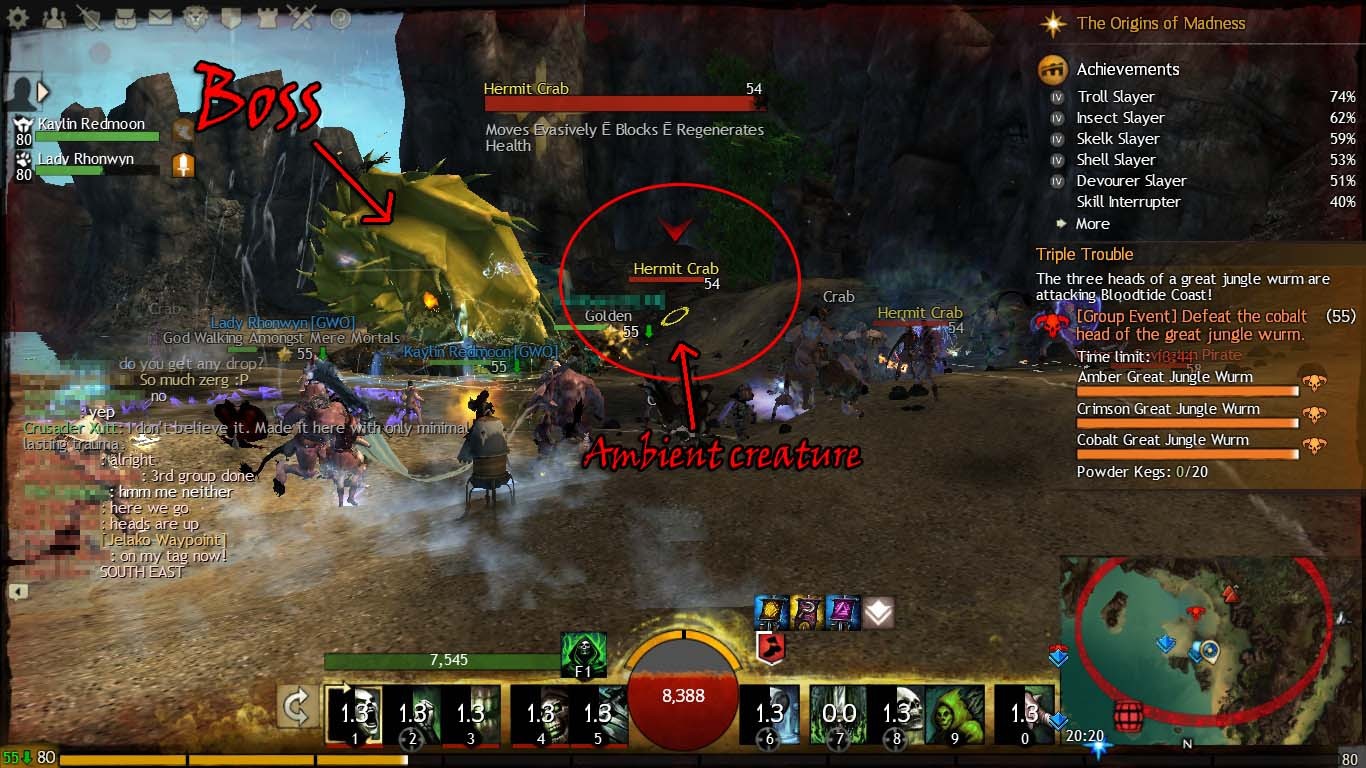
Hermit Crab!

Frickin’ Hermit Crab!

Priorities!

Attachments:

“Madness is just another way to view reality”
(https://www.youtube.com/watch?v=D-On3Ya0_4Y)

Game Update Notes - January 21, 2014

in Game Release Notes

Posted by: Mark Katzbach

Mark Katzbach

Content Marketing Manager

Bug Fixes:

  • Fixed a bug that caused inventory bags to start in the collapsed state.
  • Fixed a bug in which the pirate in Crusader Xutt’s escort event would perpetually remain in the game, causing the escort to stall on all future attempts.
  • Fixed an issue that could cause the powder keg counter for the cobalt great jungle wurm encounter to decrement incorrectly.
  • Fixed a bug that was preventing players from being invited to PvP rosters.
  • Fixed a server crash.

Battle of Fort Trinity with multiple people

in Bugs: Game, Forum, Website

Posted by: aumy.7516

aumy.7516

Allow me to start by saying that we reproduced the problem ourselves and figured out how to solve it. But it’s still a bug.

My wife and I created characters to level up together. As such, we created them as the same race with the same motivational background stuff so that we could do our personal stories together. This worked fine until the always problematic “Battle of Fort Trinity” level 70 story.

She activated the story and I entered with her. Trehearne does some jibber-jabber with a couple of soldiers. Then you are supposed to walk up to him and initiate a cutscene (Report to Trehearne at Fort Trinity). We could hear the noise indicating that the section was finished (speak to Trehearne) and it grayed it out in our progression at the top-right of our screen. However, the cutscene never showed up and it didn’t tell us the next part of our story (Check on the Logging Camp). We waited a few minutes and nothing happened.

We then exited and re-entered. Once again, she activated the personal story and I entered with her. The same problem occurred. We tried a third time; this time I activated the personal story and she followed me in. The same problem occurred.

At this point, we decided that we would both try it solo. I entered into my own instance and she entered into her own instance. It worked fine for both of us.

Now, I seriously doubt that one personal story bugging out for multiple people is high up on your priority list and I get that, but we both want to express displeasure over it. We enjoy playing together and that very much includes doing our personal stories together. This bug was annoying, both for the time wasted (waiting on it to progress) and because we were forced to do it apart from each other.

Also, if I actually have the attention of someone from Anet, my wife wants to express displeasure at how she didn’t feel epic at this part of the story. In all the other parts, she’s felt like she was actually the one in charge doing things and making a difference in the story. But in this one, there were sections where the soldiers would have everything killed before she could even arrive or monsters just kept infinitely spawning while she was trying to resurrect the soldiers. Her suggestion? Make all the monsters drop loot. For some reason, she associates getting loot with making a difference. It’s not something I ever noticed before, but yeah, it does make sense.

What's up with the API?

in Bugs: Game, Forum, Website

Posted by: Illconceived Was Na.9781

Illconceived Was Na.9781

It’s fixed now, since the recent server reboot.

To be fair to the OP, it wasn’t just the timers that were out of sync — the API wasn’t returning event information for a number of servers. (I could only find data from three worlds.)

Still, it’s good to remind everyone that, after an update, the websites that use the API (such as GW2 Stuff and GW2 State) will be out of sync for each covered chain on each server, until the first event in the relevant chain begins on the server.

John Smith: “you should kill monsters, because killing monsters is awesome.”

Option to delete/hide Personal story prompt.

in Suggestions

Posted by: Kal Spiro.9745

Kal Spiro.9745

I don’t want to disable it, but I would like the ability to change the number of things up there that can be maximized. Currently it’s 2, with the addition of daily/monthly, PvP and then a couple of simultaneous events occuring, it’s very hard to get what I want maximized to stay maximized.

Tarnished Coast Kal Spiro – Ranger (80), LB/S-D, Eagle/Wolf, Signet, M/S/WS #SABorRiot
|Daredevil|Ranger|Guardian|Scrapper|Necromancer|Berserker|Dragonhunter|Mesmer|Elementalist
|Deadeye|Warrior|Herald|Daredevil|Reaper|Spellbreaker

Option to delete/hide Personal story prompt.

in Suggestions

Posted by: DreamOfACure.4382

DreamOfACure.4382

This is something that we’ve discussed internally, the main issue is how to account for people who accidentally hide their story, then don’t know how to get it back?

Don’t make them hide completely then.

Just make them all fold into a larger tab like “Active Events”, that stays folded up until the player manually clicks it again.

“Bleeding, Poison, Confusion, Torment, they all look delightful on you.”

Lv80s: Guard, Thief, Necro. Renewed my Altaholic’s card on the HoT Hype-Train. Choo choo~

Option to delete/hide Personal story prompt.

in Suggestions

Posted by: Teofa Tsavo.9863

Teofa Tsavo.9863

well to be “that guy”, but why does every option have to be braindead friendly? Seriously its almost like mmo’s these if they were in charge of creating a light switch would have to think of a simplar version of on/off.

They don’t want CS staff tied up with “Help, I accidently deleted” requests I think.

Ley lines. The perfect solution to deadlines and writers block. Now in an easy open Can.

Option to delete/hide Personal story prompt.

in Suggestions

Posted by: Rising Dusk.2408

Rising Dusk.2408

Have an option in the hero panel to disable it. Have it enabled by default. Thus, the only people who would ever have to enable it again already know where it is because to be in that position they had to disable it to begin with.

[VZ] Valor Zeal – Stormbluff Isle – Looking for steady, casual-friendly NA raiders!

its okay UI... just take up all my screen

in Suggestions

Posted by: Linguistically Inept.6583

Linguistically Inept.6583

Do like me, buy yourself a nice 28 or 30 inch monitor and you wont even notice them.

great suggestion(!) except im unemployed (for several reasons i dont intend on listing) and not on benefits (jobseekers/dla/whatever else i may be elligible for) so dont have the money to spend

Desolation: 80 ranger [Nightwither], 80 necro [Dusk Grimsoul]
80 warr [Blaze Steelsoul], 80 ele [Blaze Nightstrike], 80 mesmer [Grim Shatterwhirl]
80 guard [Dusk Grimlight], 80 engi [Flintgear]

its okay UI... just take up all my screen

in Suggestions

Posted by: Linguistically Inept.6583

Linguistically Inept.6583

Well, I can see plenty of issues with that screenshot.

  • The resolution is 1280×1024, which is not widescreen. That makes the placement of the event descriptions, map and your chat window take up some much needed screen space.
  • Your chat window is in a weird location. Even if it’s because it makes it easier to read, you really cannot argue that there’s nothing for you to see in that lower left corner.
  • Your map size seems pretty big.
  • You have 8 mails.
  • my resolution isnt a problem, the problem is anet failed to build around varying monitor resolutions (last i was aware 1280*1024 is what most web designers try to cater to… well… make sure their site works well with)
  • chat window is there so i see it better when people talk (i have a habit of not checking chat if its at the bottom), but i normally use # to turn the background invisible so its not as obtrusive as in that screenshot (i was reading guild chat and forgot to press # again)
  • well observed…
  • your point?

- to clarify, i dont care about the map taking up my screen (its useful) i dont care about chat taking up my screen (its useful) i care about the horrible atrocity shown on the right side of the screen (and the way it keeps hiding stuff i actually want to see to show other stuff i dont care about thats progressing, cant hide the living story pop up and dailies/monthlies track automatically)

Check the sig below, join in with the rest of us haters & one day, this crap may get fixed.

+1’d the UI design is horrible (the new achievement screens as well… double rows…. eugh)

Yeah, I agree with the OP, UI should definitely be adjusted for different monitors. Yesterday I was playing on my brother PC, and I was stunned that the UI took so much place, even if it was 1920×1200 screen.

Imo it should look close to the attached one on most of the displays, not much ppl have large res screens anyway, and it rly affects gameplay.
I’d suggest sth like UI scale option like in LoL

if the display showed as small as that (in proportion to the rest) on my screen the text would probably be unreadable (kind of like the TP…)… but a UI scaler would be nice… being able to customise your UI to extensive degrees would be even better

Desolation: 80 ranger [Nightwither], 80 necro [Dusk Grimsoul]
80 warr [Blaze Steelsoul], 80 ele [Blaze Nightstrike], 80 mesmer [Grim Shatterwhirl]
80 guard [Dusk Grimlight], 80 engi [Flintgear]

(edited by Linguistically Inept.6583)

its okay UI... just take up all my screen

in Suggestions

Posted by: uknortherner.2670

uknortherner.2670

Whether the resolution is widescreen or not is irrelevant. I play on the same resolution and the screen can get cluttered pretty quickly. Switching to the small UI scale causes text corruption and unless you have a couple of hundred quid to throw my way, I’m not going to throw out a perfectly good, working monitor just to be able to play a game I’ve already paid good money for.

I stole a special snowflake’s future by exercising my democratic right to vote.

its okay UI... just take up all my screen

in Suggestions

Posted by: digiowl.9620

digiowl.9620

The main problem is that ANet insist on putting backgrounds on these things.

This makes them much more visually intrusive than they need to be.

Radiant gloves + Mesmer Phantasm painful bug

in Bugs: Game, Forum, Website

Posted by: AKGeo.6048

AKGeo.6048

It’s an outline of the “fog” polygons that have a combination of transparent and visible pixels which create the fog or particle. The only way I can think of to fix it is to remove that particle effect when stealthed or cloned.

Yes, it’s very ugly.

Radiant gloves + Mesmer Phantasm painful bug

in Bugs: Game, Forum, Website

Posted by: Surbrus.6942

Surbrus.6942

This has always been the case with skills that turn you translucent, and armour with particle effects. I first experienced this when using the Molten Gauntlets with a Necromancer’s Spectral Walk skill.

The easy and cleanest way to fix this would to be just disable particle effects when the character is turned translucent, there’s already enough particle effects with those skills that they’d just obscure the armour particle effects anyways.

mesmer bugs

in Bugs: Game, Forum, Website

Posted by: selan.8354

selan.8354

i warden:
since the i warden patch, the phantasms 95% of the time just stands there and does nothing, it never hits anything anymore in a zerg at all.

ileap:
doesnet work on certain bridges, uphill or down hill or on stairs ever.

obstructed bug:
i can literally stand below unbuilt oil and will never be able to hit it as i get obstructed. i stand below the cannon try to spawn a berserker and get obstructed and phantasm goes into full cd. the los on phantasms and mes skills is way too strict and often bugged.

blink:
sometimes u blink and u hit the location for less than a second before u end up back at the location u started from, blink does not wok on most of the strais, hills and 90% of the bridges in the game.

decoy, sometimes doesent work at all and doesent give u stealth or a clone despite having no revealed debuff.

confusing images, has issues to hit if target is beside u but still slightly infront.

magic bullet: even if u are facing the target u cant use it while strifing left or right even if u are facing the target.

some of these bugs have been in the game for ever and never been fixed.

Lv 80 glamour Mesmer Triforce Mesmerpower PU mes,Lv 80 power necro
[AVTR]
Isle of Kickaspenwood

Targeting Still Broken Please Fix It!

in Bugs: Game, Forum, Website

Posted by: Paul.4081

Paul.4081

Topic was removed due to the amount of hate and trollism that the thread had inside of it. Keep it clean.

Helpful. Thanks for sharing your targeting experiences.

Hate and frustration are not the same thing.

Thank you.

in Account & Technical Support

Posted by: Brother Grimm.5176

Brother Grimm.5176

More posts like this are needed. Kuddos! (to OP and Support Team).

We go out in the world and take our chances
Fate is just the weight of circumstances
That’s the way that lady luck dances

Thank you.

in Account & Technical Support

Posted by: SandraSolace.7682

SandraSolace.7682

I love these kinds of posts!

Friday, I’m glad your issues were resolved and thanks for posting it here!
Because you are right, there are a lot of complaints here (some justified but most are not).

It’s nice to see support for the support team!

Thank you.

in Account & Technical Support

Posted by: Friday.9078

Friday.9078

People tend to complain loudly when something is not to their satisfaction, so this section is filled with threads about problems and complaints, which probably gives a skewed view how the Support teams are doing. I would like to post this as a counterpoint:

Thank you so much for your help. I recently submitted a ticket for a technical problem and I got my response within 24 hours, the team members that helped me (Brian and Ashley) were polite, quick to respond to my updates and were super helpful. They helped me to find the source of my problem and even provided me with the tools I needed to solve my problem.

So just a shout out to the Support guys… Thank you for your effort, friendliness in the face of raging gamers and going beyond the call of duty.

/salute

Leia Friday
[OURS] [quaK] [Dawn]
Gandara

Targeting Still Broken Please Fix It!

in Bugs: Game, Forum, Website

Posted by: Zaxares.5419

Zaxares.5419

+1 to these experiences. Automatic targeting is really wonky. It should target the nearest enemy instead of a new target that’s further away. I’ve lost count of the number of times I’ve pulled in new enemies because it auto-targeted an enemy that was out of aggro range instead of the closest next enemy I was already fighting.

Targeting Still Broken Please Fix It!

in Bugs: Game, Forum, Website

Posted by: FenrirSlakt.3692

FenrirSlakt.3692

I usually not complain about things and find a workaround, but this whole targetting issue is ridiculous. Just how hard would it be to make it so that target priority goes something like:
1. Closest Enemy Player.
2. Closest Legendary hostile.
3. Closest Champion hostile.
4. Closest hostile.
5. Neutrals.
And also making it so that these rules apply only to enemies within a radius of, say 2000 Units.
If possible, when downed, also make it so that it prioritises the closest enemy with the lowest remaining health.

Also, there’s also this bloodboiling issue. Why not make HP bars non-interactive? I can’t count the times I’ve tried to place a Temporal Curtain behind some hostiles only to have my character cast it at her feet (I use Instant ground-targetting).

Really, ANET, I like your game quite a lot, but these issues have been around forever and they always cause a great deal of frustration.

(edited by FenrirSlakt.3692)

Targeting Still Broken Please Fix It!

in Bugs: Game, Forum, Website

Posted by: Mad Queen Malafide.7512

Mad Queen Malafide.7512

I had the most awful problems trying to select the Jade Maw yesterday. It has become a standard tactic now for someone to call the Maw as a target. Not because he is the boss. But because when you do need to target him, it is such a huge hassle. I’m pretty sure this is the reason that everyone targets the Jade Maw. You can directly click on him, but unless you click directly on one of his cross-hairs, he will refuse to be selected. So we always keep the Maw as our primary target, so that when we do need to throw those crystals in a hurry, we can just press T.

But that is not a good thing. It is a way that circumvents the core issue of bad targeting. And it seems to have become a common strategy now. That is how bad the targeting is.

“Madness is just another way to view reality”
(https://www.youtube.com/watch?v=D-On3Ya0_4Y)

Targeting Still Broken Please Fix It!

in Bugs: Game, Forum, Website

Posted by: Adacian.9752

Adacian.9752

Despite having the correct game options set to give me control over my targeting and locking my target in, My favorite targeting bug is when my target that has not vanished or done anything to cause targeting to drop, for whatever reason is no longer targeted and my ranger is shooting off at nothing.