SoundblasterZ AsusX99Pro 512GBM2SSD 1TBSSD
3TBHDD 16gbRAM Corsair900D Win10Pro Corsair rmi1000w ethernet 100 down, 6 up
Could you post your specs anyway please? I suspect you may have to delete your GW.dat file and maybe repair but someone else with more knowledge than me would confirm that.
I personally am always wary of installing new drivers. I’m working fine with the 331.82’s so will stick with them until something breaks
A civil tongue would also help. The folks on these forums are knowledgable and will help and politeness costs nothing and you’ll get a better response.
Is this related to this thread: https://forum-en.gw2archive.eu/forum/support/tech/FPS-Issue-with-the-9-9-patch-merged
I didn’t have any issues before or after the patch – or, at least, nothing worth mentioning.
How can I switch the content guide to off so that my story, daily, monthly etc. are all invisible? The settings in the UI (off, default, disable personal story etc.) doesn’t seem to do the trick.
Thanks.
Yes, it’s been done to death.
But now I know why it’s frustrating. Two years plus (yes, I know), I decided to get off my rear end and explore the whole map. At first, I enjoyed it. Lovely vista’s, exotic waypoints etc.
Then.
And I knew it would come to this at some point.
WvW stuff.
Pure frustration. I won’t be bothering with world map completion any time soon and yes, it’s my loss. I’m in the camp that thinks this should avoid any PvP, WvW etc. despite what others may think. My opinion and apologies, pure venting..
G’night.
Didn’t want to derail the main FPS thread but this is sort of related as linked to the infamous patch.
When waypointing into a map, the scene renders much slower than pre-patch. Pre-patch, it wasn’t noticeable at all, now I have to wait about five seconds before all the scenery is drawn. It’s not much, I know but it is an observation since the patch.
It’s very noticeable when coming from WvW to LA and also at Meddlers.
I’ve created my first 50 slot guild bank upgrade. Now it won’t let me deposit items. Am I missing something? It says I need to be a guild member for three days before using – however, this is a guild of one, i.e. me, that was set up a few months back, just for fun.
Wakarimasen.
Thanks for that. I’ve now figured out what it is – it’s my pet stealing the kill. Guess I’ll do the harpoon thing on another character!
After all the time I’ve spent in this game, I should know this. I’m trying to complete weapon mastery but one of them says about killing with a speargun. Can’t seem to find one – plenty of “harpoon guns” and “spears” though. Could anyone make me go “d’oh”?
Cheers.
Is it really? Wow, didn’t realise that was throttled! Thanks.
I seem to be getting the above error quite a lot on the BLT. Is this a bug or “just one of those things”? It does seem to appear more when I’m trying to sell low value items of which there are already tens of thousands for sale.
ISP: Virgin internet
Region: London UK
Server: TC
First time I’ve had this issue. Who’s choking the ’net this time?
Me too. Virgin internet, UK.
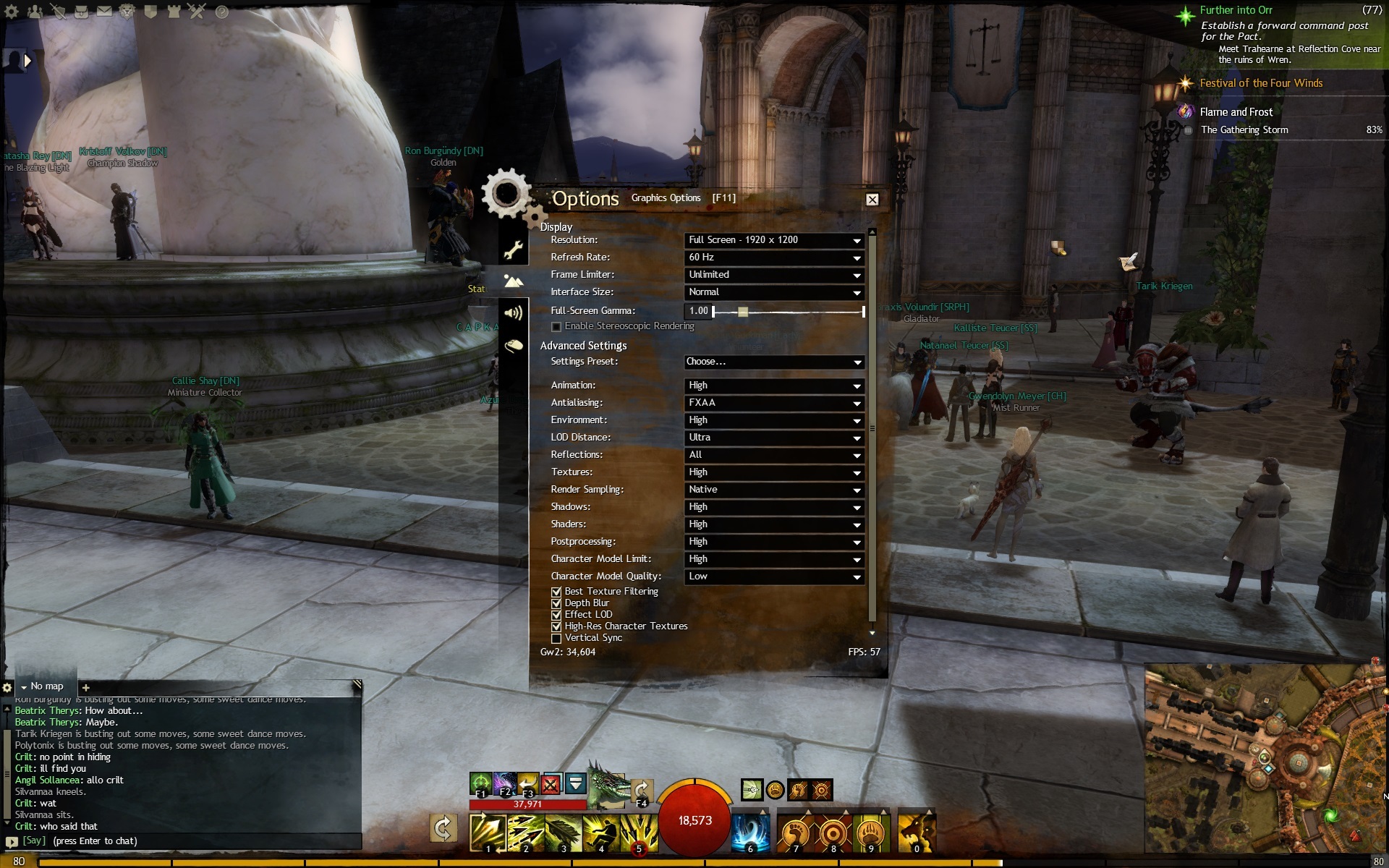
Here’s what I get in Div. Reach. Have a look at the settings and see if they help.
(edited by Flatley.1620)
You’ll need to tell us more about your specs. What CPU does is have? Is it O/C’d? What GPU do you have? What are the temperatures of both? Are you on a lappy or desktop? What lane is your GPU running in? You could output the details of your dxdiag as well. Another good applet is Speccy which provides lots of details about your machine.
I can vouch for a GTX760. My ATi 5970 recently died and I replaced it. The difference in FPS is quite staggering (I had a max of 209 once – yeah, two hundred and nine). The thing I find odd about that is, if the game is so CPU bound, why would I see that much of a difference?
On a side note, when I first started playing, my old 5970 coped admirably with 50 FPS. From about July last year, that FPS went down to about 30. In open areas with very little in the way of complicated graphics.
This is really odd. I’ve been playing with no issues again tonight but it appears my fellow countrymen are affected. What ISP’s do you use? I’m with Virgin.
call me crazy, but I don’t think Flatley was being serious (in either post)
;) Correct. I made an attempt at being wry and I certainly wouldn’t diss Sola given how much help he gives in his posts. I still think I can get over 500FPS in LA using an Amiga A500 though.
OK, this is really odd. My tracert is still timing out after 64.25.32.82 but, in game, I have no lag. Skill lag is gone.
What gives? Where’s a confused smiley when you need one?
@SolarNova
I’ve respected your posts so far but, well really… Cost: £14668.71 After VAT £16802.45 that alone should make it perform better than any PC ever built ever, ever, ever.
Seriously. Would it not? No? Oh… why not? Is it the 2 x EK-PSC Revolvable angled adaptor 45° G1/4 Black that’s holding it back do you think?
Actually, when all is done and dusted, I think you’re perhaps right; I should scrap it.
There. Done.
I’ve now ordered a Commodore Amiga A500. Nuff said.
I just ordered a new PC as the maximum FPS I got was 207FPS. Will this get better frame rates do you think?
The Bear
20mm Corsair Air Series AF120 Quiet Edition, High Airflow & Low Noise, 1100rpm, 39.88CFM, 21dB, 3-Pin, Twin Pack
7 × 120mm Corsair Air Series SP120 Quiet Edition, High Pressure, 1450rpm, 37.85CFM, 23dB, 3-Pin, Single Pack
140mm Corsair Air Series AF140 Quiet Edition, High Airflow & Low Noise, 1150rpm, 67.8CFM, 24dB, 3-Pin, Single Pack
2 × 2m XSPC FLX Clear Hose 1/2" ID, 3/4" OD – 19/12.7mm
2 × 30cm AKASA AK-CBFA01-30 4 Pin to 4 Pin PWM fan extension cable -
6 × 30cm Phobya Extension Cable 3Pin Molex – in black
3 × 31.5″ Asus PQ321QE 4K UHD LED IGZO Monitor DP/RS232 10Bit 3840×2160 350cd/m2 800:1 8ms Speakers
32GB (4×8GB) Corsair DDR3 Dominator Platinum, PC3-19200 (2400), Non-ECC Unbuffered, CAS 10-12-12-31, DHX, XMP, 1.65V
3XS Bear Build
3XS Bear Mods Hardware
3XS Bear Mods Painting
3XS Extreme Overclock – 4.6GHZ
3XS Only RM1000W Modular Gold Silent PSU
40cm Akasa FLEXA 24 pin ATX PSU Extension Cable
2 × 40cm Akasa FLEXA 8pin ATX PSU Extension Cable, 8 pin female to male connectors
3 × 40cm Akasa FLEXA 8pin VGA Power Extension Cable, 8pin female to 8pin (splits 6+2) male power
4 × 4TB WD Red WD40EFRX RED SATA 6Gb/sec, 64MB Cache, IntelliPower rpm 8ms NCQ OEM 24×7 Use
4 × 500GB Samsung 840 EVO Basic SSD 7mm SATA 6GB/s 3-core MEX Controller Read 540MB/s, Write 520MB/s 98K IOPS
2 × 5EK-DDC 3.2 PWM X-TOP CSQ – Acetal Water Cooling Pump
3 × 6GB EVGA GTX Titan Superclocked, 28nm, PCIe 3.0 (x16), 6008MHz GDDR5, GPU 876MHz, Boost 928MHz, Cores 2688
5 × 90cm Scan RB-483 SATA 3 Internal Cable
Acronis True Image 2013 PC Backup & Recovery Software *Digital Download licence key
7 x Akasa AK-FY320 3pin Female to 2 × 3pin Male (Fan) Splitter Cable
Akasa AK-LD02-05WH Vegas LED strip light, 60cm, White
3 x Akasa FLEXA V6 VGA Power Extension Cable 6pin Female to 6pin Male Power for VGA Card
Akasa PWM fan splitter Supports 2 PWM fans from a single motherboard PWM header
Akasa SSD & HDD adapter fits 3.5" HDD or 2.5" Notebook drive into 5.25" PC bay
2 x Alphacool 17051 Angled Adaptor 45° – revolvable – G1/4 outer thread to G1/4 inner thread – Deep Black
2 x Aqua-Computer 53067 Temperature sensor internal/external thread G1/4
Asus Rampage IV Extreme Black Edition Motherboard Ivy Bridge-E Optomised
Corsair Obsidian 900D Black Super Tower Case with Side Window – Designed by builders, for builders
Corsair Vengeance K95 Mechanical Gaming Keyboard Cherry MX Red Programmable USB
Creative Sound Blaster ZxR PCI-Express Sound Card 5.1Ch + Headphone Jack
Cyberlink Power DVD 11 Ultra – 3D & HD Ready, Plays Blu-ray (OEM) CD in PAPER SLEEVE *Oem Version
8 x EK-HD Adapter 12/16mm – Black Nickel, Solid-tube Fitting
2 x EK-HD Tube 12/16mm 2-Slot (2 pcs)
2 x EK-PSC Revolvable angled adaptor 45° G1/4 Black
EK-Supremacy Clean CSQ- Acetal+Nickel Universal Water Block
Intel Core i74960X Extreme, 2011, Ivy Bridge, Six Core, 3.6GHz, 4GHz Turbo, 5 GT/s DMI, 36x Ratio, 15MB Cache, Retail
Microsoft Windows 7 Pro SP1 64-bit English 1PC OEM DVD
2 x Monsoon 19/13mm (ID 1/2" OD 3/4") Compression Fitting Straight – Matte Black – 6 Pack
Monsoon 19/13mm (OD 3/4") Rotary 45° – Matte Black
2 x Monsoon 19/13mm (OD 3/4") Rotary 90° – Matte Black
2 x NZXT CB-42SATA Black Braid Sleeved Molex to 2 SATA Cable 200mm
2 x Phobya Balancer 450 black nickel
2 x Phobya Noise Destructor V.1 for pump decoupling
4 x Power Splitter Cable Molex to 2 x Molex Way (88RB-511)
Razer Mamba 2012 Elite Ergonomic Wireless Gaming Mouse 6400dpi
Razer Megalodon 7.1Ch Gaming Headset – Maelstorm Audio Engine! – The Best
3XS System – 3 Year Warranty (Mainland UK) – 1st Year Onsite, 2nd & 3rd Year Return to Base (Parts & Labour)
Silverstone Panasonic UJ265 Slim Blu-ray Writer Slim SLOT Black for Laptops & Custom Desktops
SilverStone SST-FP58B, Bay Device 5.25" 1x slot loading slim optical drive and 4x 2.5” HDD/SSD, Black
5 x Silverstone SST-LS01W, LED Light Strip, White
Silverstone SST-SDP10B, Bay Converter 5.25" to 3.5" + 2x 2.5" HDD
System
Upgrade 2nd & 3rd Year Warranty to Onsite (System Price £3001 – £5000)
Cost: £14668.71 After VAT £16802.45
Here’s where I built it:
http://3xs.scan.co.uk/configurator/custom-built-boutiaue-dream-gaming-pc-uk-thebear
(edited by Flatley.1620)
Right, I’m getting network lag now. Fine last night. Seems to be a couple of things happening. Paris (France) is slowing things down, so is Dallas (US). And, as Marley points out, there are timeouts right after IP 64.25.32.82. Here’s my tracert:
6 20 ms 26 ms 14 ms manc-bb-1d-et-410-0.network.virginmedia.net [62.253.175.246]
7 * * * Request timed out.
8 202 ms * 200 ms vlan90.csw4.Paris1.Level3.net [4.69.168.254]
9 202 ms 204 ms * ae-92-92.ebr2.Paris1.Level3.net [4.69.161.105]
10 * * 202 ms ae-43-43.ebr2.Washington1.Level3.net [4.69.137.58]
11 221 ms 205 ms 199 ms ae-92-92.csw4.Washington1.Level3.net [4.69.134.158]
12 198 ms 217 ms 206 ms ae-91-91.ebr1.Washington1.Level3.net [4.69.134.141]
13 * * * Request timed out.
14 201 ms * * ae-7-7.ebr3.Dallas1.Level3.net [4.69.134.21]
15 201 ms * 204 ms ae-93-93.csw4.Dallas1.Level3.net [4.69.151.169]
16 * * * Request timed out.
17 * 223 ms * 4.59.197.34
18 214 ms 204 ms * 64.25.32.9
19 * * 200 ms 64.25.32.26
20 203 ms 215 ms 212 ms 64.25.32.82
21 * * * Request timed out.
22 * * * Request timed out.
23 * * * Request timed out.
24 * * * Request timed out.
25 * * * Request timed out.
26 * * * Request timed out.
27 * * * Request timed out.
28 * *
Edit: I’m from the UK. Also, these forums are much slower tonight – coincidental?
Why not try them all and see what takes your fancy? You have five slots 
Is it possible to change this?
One thing you might want to try before moving your boards about is to run GPU-z (that’s a Gee, not a C). If it states “1” in the bus interface, try clicking on ? button. This will run a little applet that may change the status to 16. If it does, great. If not, then yes, select a different PCI-E slot.
Edit- I was talking rubbish. Please ignore.
(edited by Flatley.1620)
And yet, a new GPU solved my FPS issues. And that’s odd to me; if the game is so CPU bound, why would a new GPU solve it?
Because your old GPU, a Radeon HD 5970, was a dual chip meaning it had crossfire always enabled. Some games perform like absolute crap with it enabled, and Guild Wars 2 is one of them.
Now I’m really curious!
I tried playing in windowed mode which, I thought, effectively turned crossfire off – it was still crap. Mind you, I’m not tech savvy enough to understand all in’s and out’s so my assumption is probably way off reality.
To the OP: it does seem, at least from the threads I’ve read here, that AMD has problems with GW2. Even though your CPU is clocked 500mhz higher than mine, I hit a max of over 200FPS in PvE (although it’s more typically around 160). In LA, that will drop to around 45 with medium culling settings.
I’m not going to suggest changing your CPU however; I just hope Anet provide some optimisation for AMD users.
And yet, a new GPU solved my FPS issues. And that’s odd to me; if the game is so CPU bound, why would a new GPU solve it? Admittedly, my old board was around three years old. And hey, I’m not complaining!
in Account & Technical Support
Posted by: Flatley.1620
No, I haven’t tried the repair option as it seems to be OK now – maybe just a glitch. Also, v-sync is disabled. No worries – just “one of those things” by the look! 
in Account & Technical Support
Posted by: Flatley.1620
Port to Hoelbrak. FPS = 140-ish. Go to Dreadgehaunt from there, FPS = 9 (nine). Log out of the game, log back in, FPS back to 130-140.
What’s that all about?
Right. Some further findings.
I cranked everything to max – ultra shadows, highest animation, reflections all, etc. etc. Went into LA and managed 25 FPS.
Out in the open PvE world, I got a rather nice 209 FPS. Yeah, two hundred and nine.
Holy cuddly-kittens (just got two btw from a rescue centre – very cuddly and cute beyond belief but I digress ).
Which leads me to believe that an Intel/nVidea cpu/gpu tag team is the way to go.
What do you think?
It does appear to that, every time there’s a big patch, FPS suffers. I’m not sure what extra “stuff” goes into each one, but it does seem to be detrimental to performance.
I was suffering from exactly the same issue until I updated my GPU (https://forum-en.gw2archive.eu/forum/support/tech/My-FPS-is-now-great-again/first#post3393435) although that is a rather drastic approach to a cure – although I had no choice, really.
+1
Put it this way, the rig I have now (in today’s money) is about 3K UK money (3 years old now and still going strong – apart from a GPU replacement).
You do pay a premium for having your rig built for you where you just pick the parts from a PC building firm. That’s why mine cost what it did; and, for me, well…. I just don’t have the nous to buy the parts and do some DIY. Each to their own!
@ SolaNova : OK, I’ll give that a try and see what happens! 
@ NeedCoffee: Took a look at SweetFX – seems like quite a complicated tool. Or is it easy to use?
Everything on at least high, reflections on terrain and sky, character culling settings are both low.
Sorry! It’s dead Jim, dead Jim, dead Jim.
However… it took a blown GPU to do it.
I had a Radeon 5970 which gave up the ghost last week. Wasn’t related to GW2 at all – it just went bye-bye while surfing the web ( O.O ) causing my monitor to go into instant power save mode. The PC itself still had power and sounded like it was churning away at something – I just couldn’t see it.
So.
I got myself one of these: 2GB EVGA GTX 760 Superclocked ACX
Oh my gosh.
The only time I dipped below 50FPS was in the busiest part of LA – and then it only went down to 45. Note that I haven’t (yet) done any big zergs or WvW as I’m more into PvE. I also managed to up shadows to high with reflections staying at terrain and sky and running in full screen mode rather than windowed (which I had been doing).
Now I’m not saying everyone ought to go out and buy a better graphics card, far from it. What I am saying is this is what worked for me. I do hope that, in some way, this observation helps those suffering from FPS woes.
Good luck and seasons greetings. Better change my signature now.
Whether this helps you or not, I can’t say but for the past couple of days, I’ve had a much smoother experience.
The only thing I’ve done differently is switched to windowed mode. Now, I have done this before and noticed a performance drop; however, using this in conjunction with the -forwardrenderer switch seems to have made a marked difference.
I’ll keep running around and seeing how this affects things in various areas and then post back.
Specs in sig.
Mine is 17.7 – shouldn’t everyone’s dat file be the same size?
‘Due to potential changes, system requirements may change over time, and you may be required to upgrade your current system (or obtain a new system) to continue to play the game.’
That’s a good point. However, it would have been nicer if Anet were to make us aware of upcoming increasing hardware demands before a patch comes that may decrease performance.
It’s no secret there’s an FPS issue with the game. When I first got the game and, up until July this year, everything ran as smooth as silk.
Then: wham. My FPS fell through the floor. I jumped through all the hoops Anet asked me to but to no avail. In fact, they actually stated there was no reason why I should’ve seen the frame rate drop I had. In the end, it came down to reinstalling Windows and/or a new GPU. I have done neither which was my decision.
Now, I have the game started using the -forwardrenderer switch which I’ve been espousing for a while now. It’s not perfect. But it helps me although there’s no guaranty it will work for you. Worth checking out though.
Hi,
What is the optimal settings in the Nvidia Control Panel and in game settings. Excuse my English, google translator.I5 3570K
MSI GTX 760 Hawk
8 GB RAMIt is cool playing, i toooo: http://www.youtube.com/watch?v=jVceL9je81g&feature=youtu.be
Not sure about what’ll be optimal as everyone may have a different setting. However, one thing you could try – and it really helped me – is the -forwardrenderer switch. Now, there’s no guaranty and your mileage may vary but it’d be worth a shot.
It has it’s drawbacks, mind; water will look strange and your shadows may disappear unless you set them on lowest. Which is kind of odd when you think about it. If you set your shadows high when the renderer turns them off anyway, why does the framerate drop again? Weird.
Anyway, good luck.
With so many posts regarding FPS issues, I would have thought some kind of official response would have been posted by now
… has a male voice when hurt.
in Account & Technical Support
Posted by: Flatley.1620
Sorry to say this, but it’s a case of “welcome to the club”. The best result I’ve found is to use the -forwardrenderer switch but that’s not perfect and your mileage may vary. If you have a look around the forums, there’s a ton of posts around FPS drops.
Mine started back in July and I’ve tried everything thus far that’s been suggested.
This is an optimisation issue that needs to be addressed by Anet.
You could also try the -forwardrenderer switch in your .exe line. Your mileage may vary and you’ll lose shadows and get some graphics glitches. However, you may find it helps your FPS.
(edited by Flatley.1620)
Well, I’m running the game with the -forwardrenderer switch and it has helped. Unfortunately, the downside is you don’t get any shadows and some graphic effects look a little odd. I posted a video on how this game performed twelve months ago; the difference is rather striking.
Just as a matter of interest, this: https://www.youtube.com/watch?v=Ax-_06Acj8Y
… is a video made last year. As you can see, the frame rates are way superior to what they are now. At least for me. I used to experience exactly this smoothness of FPS. I don’tknow the specs off the rig used but…
What say you?
Warning – profanity. Lots. Do not watch if easily offended.
Try the -forwardrenderer switch… it may help.
Not affiliated with ArenaNet or NCSOFT. No support is provided.
All assets, page layout, visual style belong to ArenaNet and are used solely to replicate the original design and preserve the original look and feel.
Contact /u/e-scrape-artist on reddit if you encounter a bug.