We have made no changes to this stuff in the 10/7 build. The only changes that went in related to the Mystic Forge are in the patch notes.
Remember to keep it friendly and refrain from being rude or insulting your opponents in here folks.
Invisible enemies and allies in W vs W
in Account & Technical Support
Posted by: Ashley Segovia.8276
Hey guys this is a known issue that our teams are currently looking into. We don’t have an ETA for a fix but this is being worked on as a priority.
In the meantime we would like to thank you all for your patience and understanding.
Thank you very much GaileGray
120916-005788 Resolved
Thank you GaileGray, I appreciate the quick update.
EDIT: 120928-003604 Issue resolved now, thank you.
Sure appreciate these updates. Thanks a bunch!
Communications Manager
Guild & Fansite Relations; In-Game Events
ArenaNet
It was added in the 10/1 update I believe.
The marker is probably trying to display the shortest route from your current location, which would be through the asura gate at Vigil Keep. (It doesn’t know whether or not you can actually use the gate.)
Stuck loading screen after respawn in pvp free tournament
in Account & Technical Support
Posted by: Ashley Segovia.8276
Hey guys thanks for all Game Advisor reports that were provided. This does appear to be a known issue that our teams are currently looking into. Please refer to this thread for any updates. Sorry for any inconvenience this may have caused you all but we appreciate your patience.
https://forum-en.gw2archive.eu/forum/pvp/pvp/endless-loading-screen-in-spvp-MERGED/first#post385454
we’ve been making individual nerfs/buffs to specific things, but we haven’t done a global dungeon stat nerf/buff if that is what you are wondering. It’s mostly specific moments that we are looking into and adjusting.
People are just getting better at them. The more you complete the better you get at learning the mechanics. It doesn’t hurt that you also find new gear!
I just tried it right now and it worked correctly. Note that the wind must blow at least once for the safety checkpoint to be enabled—you can’t just leap into the chasm to bypass the puzzle. Also, note that I’ve done this step dozens of times with no speed boosts/leaps/skills at all. You do need to stop about halfway across (behind the wall), there isn’t time (7 seconds between gusts) to run the entire way in one go.
No they are not working as intended. They are a big point of contention to me, and are high o the list of things to fix. We’re working on a solution to them as we speak, so hopefully soon that and other general gadget problems will be fixed.
I hope to see more about that secret room you have
Why, whatever SECRET room are you talking about? There are no SECRET rooms. SECRET.
:3
It’s dependent on your time zone. It’s not 5pm for everyone, just west coasters. We chose to have the day reset for everyone at the same time, instead of at, say, midnight for each independent time zone.
I was told it was 0:00 GMT.
Ori nodes not showing up as minable - Friend showed me spawns I see a ruined base like I mined it but I haven't, can mine 2 out of 5
Posted by: Jason King.2647
Hi everyone,
My apologies for the belated response! There’s been a lot of confusion surrounding these changes, so while dev posts have been made in other threads, I’ll try to answer questions here as well.
We made some changes to the respawn timers on the resource nodes so that they only respawn once per day. This happens based on our server time at 00:00 UTC, which is 5:00pm PDT and 4:00pm PST, not based on when you last harvested them, which may be why some of you think you are seeing varying respawn rates.
In that sense, the patch notes may seem confusing as they state:
- Ancient wood, Orichalcum Ore, and Mithril Ore nodes respawn rate is now tied directly to characters
What this means is that mining the same node is characater based, not account based, so you could mine the same resource node with multiple characters on the same account.
These changes were made for the same reasons that we made changes to butter; and as Jon Peters has previously mentioned, we’ve gotten to a point where we’re aware that this update was too harsh and we will try to increase the supply of these resources again soon.
If you’re seeing different behavior from what I’ve outlined here, then please let us know so that we can investigate further. Thank you!
— Live Response Embed —
(edited by Jason King.2647)
What map are you in? The story start point is just outside Fort Triniry in the Straits of Devastation.
Thanks for the headsup on this. I’ll be sure to let our items folks know about the rune being soul bound. That seems odd to me!
hmmm!
Gonna look into this one.
Hey everyone,
To help us fix this issue, we’d appreciate it if you could provide some additional information:
1. Are there any specific steps you can take to reproduce the issue? While we’re aware of the general circumstances that surround this issue, if you can take specific steps that cause this to occur, we’d love to know how!
2. Your DxDiag file. You can attach this by posting via the “More Posting and Formatting Options…” button.
Thanks for the help! 
— Live Response Embed —
To the people claiming the Searing effigy encounter is made so much easier, please read the first page post I made about exactly what those changes were. I reduced the crystal toughness a bit, added a red ring/strike/effect to one of his attacks, and didn’t change of his numbers. He’s not any easier than he was before – people are just getting better at the encounter. I can always toughen him up though! lol
it’s different depending on the time zone your in. On the west coast (pacific) it’s 5pm.
I was trying something new when I built that event, and it just doesn’t seem to be as fun as I was hoping it would have been.
I’d have rebuilt it already, but I’m still working on my side project: A device that injects 3-4 more hours into a standard earth day.
my contribution:
Kudu from the CoE story mode dungeon.
Oops, spoiler alert! lol
When the day ticks over to the next day, and your daily achievements reset.
This encounter is on a list of mine to rebuild. Initial changes to it were meant to slow down the speed runs being done on it while increasing the difficulty a bit since the rest of that path is a bit of a cake-walk.
No, there weren’t any changes to their numbers to my knowledge. Gave two playthroughs last night with my ranger (detha/Hodgins) and didn’t notice any difference.
Hi,
If you don’t have the time to report bots ingame, you can also take a screenshot and then send it to our customer support with all necessary details.
Thanks for your help!
Hi,
You should continue to report bots because it helps us a lot to fight against them.
We know that it is disturbing for players to see such behavior ingame, but be sure that we are actively working on it as explained in this thread.
Thanks for your help!
Hi,
Thank you for your feedback, but this thread as a great tendency to go off topic. These forums are here to speak about Guild Wars 2, compare it to another game can be tolerated only if it is to support your point of view but not more.
Thank you for your understanding.
Thanks for the feedback, but it’s time for this pure “what if” thread to be closed.
Guild Wars runs very poorly on the new macbook pro retina
in Account & Technical Support
Posted by: Robert Walter
Dark Anima,
Have you tried performing the reset again? As Xellahmai and green plum noted, you’ll probably need to repeat this process each time you notice this behavior until the underlying issue is addressed by Apple.
Also, we’ll need more information than just your CPU. Check out this sticky for instructions on how to provide the most important system specs under Lion (10.7.X) and Mountain Lion (10.8.X):
https://forum-en.gw2archive.eu/forum/support/mac/Technical-Problems-Post-Your-System-Specs
The best thing players can do to fight this is continue to report every incident of suspected botting behavior they witness using the in-game ticketing system. The team is continuing to work on various solutions (as seen here: https://forum-en.gw2archive.eu/forum/game/gw2/On-Botting-and-What-We-re-Doing-About-It). Thanks for the continued reports and everyone’s patience. It’s greatly appreciated!
If you get knocked off during the jumping puzzle, you’ll be downed and teleported to the start. You can either bandage up and try again, or allow yourself to die and “Retry from checkpoint” which will set you past the jumping puzzle.
Thanks for the reports! We’re aware of this issue and working towards a fix.
— Live Response Embed —
If you’re posting in this forum about a technical issue you’re experiencing—be it a crash, slow performance, graphics glitch, etc.—the most important data you can add are the details about your systems components. Without this information, ArenaNet and your fellow players are greatly limited in the help they can provide.
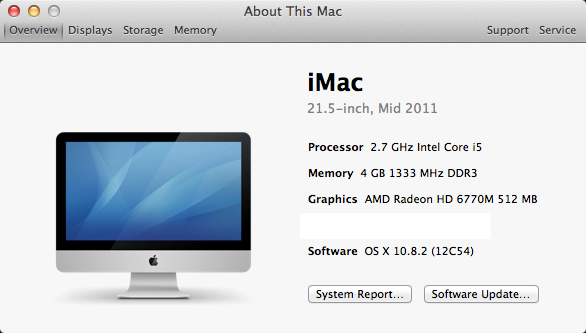
The easiest way to capture and post this information is by getting it from the About This Mac panel under Lion (10.7.X) and Mountain Lion (10.8.X):
- Click on the Apple Menu in the top-left corner of the Mac desktop.
- Select About This Mac.
- Click on More Info…
In this panel, you will find the information that will allow ArenaNet and your fellow players to help you with your problem:
- Mac model (name, size, and year)
- Processor (CPU)
- Memory (RAM)
- Graphics (GPU)
- Software (OS)
Note: Your serial number is not needed.
You may chose to either copy and paste these fields into your post, or you can follow these steps to take a screenshot which you can attach to the your post:
- Press Command+Shift+4 to get the screenshot crosshairs.
- Use your mouse to draw a box around the About This Mac window.
- Right-click the screenshot file saved to your desktop, and chose Open With > Preview.
- Use the Rectangular Selection tool to draw a box around the Serial Number field.
- Press Delete to remove your Mac’s serial number from the image.
- Press Command+S to save the edited screenshot.
- Below your forum post, click More posting & formatting options…
- Click Choose File and navigate to the screenshot file on your desktop to attach the image to your post.
(Example image below.)
Attachments:
(edited by Robert Walter.8130)
Thanks for your patience, everyone! We are still working on this bug, and we believe we’re getting close to a potential solution.
— Live Response Embed —
Orichalcum ore is not affected by DR – the change in spawning was made with the October 1st patch: https://forum-en.gw2archive.eu/forum/info/news/Update-Notes-October-1st-2012
“MISSING UPDATE:
General
Ancient wood, Orichalcum Ore, and Mithril Ore nodes respawn rate is now tied directly to characters and set to respawn one day after your character gathered from it."
As an update, we’re still working on this as a priority item, and we believe we’re getting close to a potential solution. Thank you for your patience, everyone!
— Live Response Embed —
Thanks for the feedback. Time to close this thread down.
The development team has access to an inordinate amount of data from the game and the behavior of those playing within it. Rest assured the vocal minority are not the only considered faction in decisions.
Thanks for the feedback. As this thread has run its course, it’s time to close it.
Config File Edits for Improved Performance
in Account & Technical Support
Posted by: BradHallisey.1078
Hi folks,
I see you have discovered the Cider config file. It is good to hear some of you are seeing improvements with the MTD3D setting. Please be aware that tweaking settings in this file can have side affects other than performance, namely stability. The MTD3D is intentionally disabled currently because of driver conflicts on the Radeon cards. We do intend on turning this back on once the stability issues have been resolved.
I am not telling you to stop making tweaks to the config file and you probably wouldn’t listen to me anyway. Please be smart and make a backup of the file and if you experience unusual crashes, revert your changes.
Both ArenaNet and Transgaming are continuing efforts to improve performance on the Mac client. We appreciate the feedback many of you have provided via this forum.
Happy Gaming,
—Brad
Hi,
Due to the unconstructive and inflammatory tone of this thread, we will now close it.
Thanks for your understanding.
Hi RLD.
The forums are not the best place to report them but rather the in-game tools. Thanks for reporting as it is much appreciated!
Thank you all for your reports regarding this issue. Our teams are currently working on this issue as a priority. We will update you on that matter as soon as possible.
In the meantime, we’d like to thank you all for your patience and understanding.
Now that the answer has been given, I will close this thread.
Hi Nepocrates.
This issue is known to the team; they have put it on the top of their priorities. For reading about more people experiencing the same problem and/or for contributing to the discussion, please, check this thread. Thanks.
Hello everyone.
Please, try to stay on topic and leave out personal accusations or appreciations, as they do not help to keep a good atmosphere on the forums.
Thank you very much for your cooperation.
Hi everyone.
Thank you very much for your feedback. We are proceeding to close this thread as discussions about Orr are quite numerous in this subforum. Do not hesitate to check them. Thanks for your understanding.